
Window sevice +OWIN+webapi
webapi正常都托管在iis上,这里引入owin,将其托管在window服务上。
第一步:创建一个服务,这里就不多描述。
第二步:引入OWIN
2.1引入bll
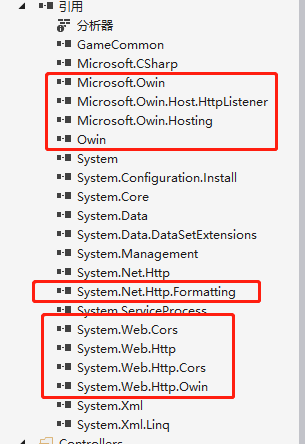
2.2加入api路由配置
    public class Startup

    {

        public void Configuration(IAppBuilder appBuilder)

        {

            HttpConfiguration config = new HttpConfiguration();

            config.MapHttpAttributeRoutes();

            config.Routes.MapHttpRoute(

                name: "DefaultApi",

                routeTemplate: "api/{controller}/{id}",

                defaults: new { id = RouteParameter.Optional }

            );

            //添加允许跨域

            var CorsConfig = new EnableCorsAttribute(origins: "*", headers: "*", methods: "*")

            {

                PreflightMaxAge = ,

                SupportsCredentials = true

            };

            config.EnableCors(CorsConfig);

            appBuilder.UseWebApi(config);

        }

    }
2.3监听ip和端口
        protected override void OnStart(string[] args)

        {

            _server = WebApp.Start<Startup>(url: "http://192.168.200.84:2000/");

            Console.WriteLine("Service start success...");

        }
第三步:加入webapi接口
namespace WebSocketService.Controllers

{

    public class HomeController : HomeControllerBase

    {

    }

}
基类:
namespace GameCommon.Controllers

{

    public class HomeControllerBase : ApiController

    {

        [HttpGet]

        public object Get()

        {

            return new { Age=,Name="Holle world"};

        }

        [HttpPost]

        public object Post()

        {

            return new { Age = , Name = "Holle world" };

        }

    }

}
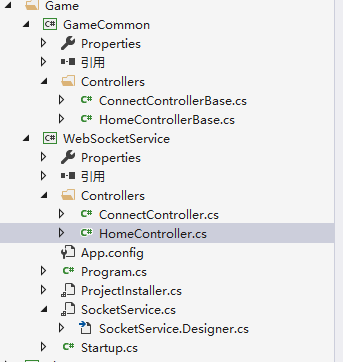
我这里将接口单独提取了一个DLL文件来处理。
项目结构:
另外这里再贴上webSocket的代码:
using GameCommon.Controllers;

using System;

using System.Collections.Generic;

using System.Linq;

using System.Text;

using System.Threading.Tasks;

namespace WebSocketService.Controllers

{

    public class ConnectController:ConnectControllerBase

    {

    }

}
基类:
using Microsoft.Owin;

using System;

using System.Collections.Generic;

using System.Linq;

using System.Net;

using System.Net.Http;

using System.Net.WebSockets;

using System.Text;

using System.Threading;

using System.Threading.Tasks;

using System.Web.Http;

namespace GameCommon.Controllers

{

    using WebSocketAccept = System.Action<System.Collections.Generic.IDictionary<string, object>,System.Func<

        System.Collections.Generic.IDictionary<string, object>, System.Threading.Tasks.Task>>;

    public class ConnectControllerBase : ApiController

    {

        [HttpGet]

        public HttpResponseMessage Connect()

        {

            try

            {

                if (Request.Method != HttpMethod.Get)

                {

                    return new HttpResponseMessage(HttpStatusCode.NotFound);

                }

                IOwinContext owinContext = Request.GetOwinContext();

                WebSocketAccept acceptToken = owinContext.Get<WebSocketAccept>("websocket.Accept");

                if (acceptToken != null)

                {

                    acceptToken(null, ProcessSocketConnection);

                }

                else

                {

                    return new HttpResponseMessage(HttpStatusCode.BadRequest);

                }

                return new HttpResponseMessage(HttpStatusCode.SwitchingProtocols);

            }

            catch (Exception ex)

            {

                Console.WriteLine(ex.Message);

                return null;

            }

        }

        public async Task ProcessSocketConnection(IDictionary<string, object> wsEnv)

        {

            WebSocket wSocket = ((HttpListenerWebSocketContext)wsEnv["System.Net.WebSockets.WebSocketContext"]).WebSocket;

            while (true)

            {

                ArraySegment<byte> buffer = new ArraySegment<byte>(new byte[]);

                WebSocketReceiveResult receivedResult;

                receivedResult = await wSocket.ReceiveAsync(buffer, CancellationToken.None);

                if (receivedResult.MessageType == WebSocketMessageType.Close)

                {

                    await wSocket.CloseAsync(WebSocketCloseStatus.Empty, string.Empty, CancellationToken.None);

                    break;

                }

                if (wSocket.State == WebSocketState.Open)

                {

                    string receivedJson = Encoding.UTF8.GetString(buffer.Array, , receivedResult.Count);

                }

            }

        }

    }

}
Window sevice +OWIN+webapi的更多相关文章
- ASP.NET Linux部署(2) - MS Owin + WebApi + Mono + Jexus
ASP.NET Linux部署(2) - MS Owin + WebApi + Mono + Jexus 本文承接我的上一篇博文: ASP.NET 5 Linux部署,那篇文章主要是针对最新的ASP. ...
- (转)基于OWIN WebAPI 使用OAuth授权服务【客户端模式(Client Credentials Grant)】
适应范围 采用Client Credentials方式,即应用公钥.密钥方式获取Access Token,适用于任何类型应用,但通过它所获取的Access Token只能用于访问与用户无关的Open ...
- 基于OWIN WebAPI 使用OAuth授权服务【客户端验证授权(Resource Owner Password Credentials Grant)】
适用范围 前面介绍了Client Credentials Grant ,只适合客户端的模式来使用,不涉及用户相关.而Resource Owner Password Credentials Grant模 ...
- 基于OWIN WebAPI 使用OAuth授权服务【客户端模式(Client Credentials Grant)】
适应范围 采用Client Credentials方式,即应用公钥.密钥方式获取Access Token,适用于任何类型应用,但通过它所获取的Access Token只能用于访问与用户无关的Open ...
- 【干货】基于Owin WebApi 使用OAuth2进行客户端授权服务
前言:采用Client Credentials方式,即密钥key/password,场景一般是分为客户端限制必须有权限才能使用的模块,这和微信公众号开放平台很类似. 让用户通过客户端去获取自己的tok ...
- Owin WebAPI上传文件
Owin是微软出了几年的东东了,一直没时间学习.大概了解了下,是一个脱离IIS环境,快速搭建WebAPI服务的东西. 刚好想尝试下尽量脱离IIS创建简单快捷配置的项目,就是用了Nginx+Owin的模 ...
- 转:winform_webApiSelfHost及 OWIN WebAPI Service
winform_webApiSelfHost 窗本构造函数中添加以下代码: var baseAddress = ConfigurationManager.AppSettings["baseA ...
- Owin + WebApi + OAuth2 搭建授权模式(授权码模式 Part I)
绪 最近想要整理自己代码封装成库,也十分想把自己的设计思路贴出来让大家指正,奈何时间真的不随人意. 想要使用 OWIN 做中间件服务,该服务中包含 管线.授权 两部分.于是决定使用 webapi .O ...
- 基于OWIN WebAPI 使用OAUTH2授权服务【授权码模式(Authorization Code)】
之前已经简单实现了OAUTH2的授权码模式(Authorization Code),但是基于JAVA的,今天花了点时间调试了OWIN的实现,基本就把基于OWIN的OAUHT2的四种模式实现完了.官方推 ...
随机推荐
- 前端(二十二)—— vue组件:局部组件、全局组件、父组件数据传到子组件、子组件数据传到父组件、父子组件实现todoList
Vue组件 一.组件介绍 每一个组件都是一个vue实例 每个组件均具有自身的模板template,根组件的模板就是挂载点,根组件也可以显式书写模板,会替换掉挂载点 每个组件模板只能拥有一个根标签 子组 ...
- springMvc请求路径解析
一开始我的代码是: //index.jsp<%@ page contentType="text/html;charset=UTF-8" language="java ...
- Ubuntu12.04开机自动挂载windows分区
最近使用Ubuntu12.04时不知到怎么搞的原本能自动识别的Windows的C .D .E盘突然间无法识别了,于是上网搜了一下Ubuntu12.04下自动挂载Windows NTFS分区的方法. 还 ...
- locust性能测试框架随笔
现在有很多的性能测试工具,比如说我们熟悉的loadrunner.jmeter.ab.webbench等等,这些工具如果对一个没用过的朋友来说,学习起来比较不容易,但是如果你能看懂python代码,会写 ...
- 关于EntityFramework 更新数据记录时字段全部更新问题和不从数据库中获取直接更新记录
一.一直对这个比较疑惑感觉只修改一条数据记录的一个字段结果更新Savechages后跟踪生成sql竟然是全部被修改,感觉微软怎么这么傻,总觉得会有其它方式可以只更新部分字段,但一直没有找到相关设置,最 ...
- tzfile - 时区信息
SYNOPSIS #include <tzfile.h> DESCRIPTION 时区信息文件被 tzset(3) 使用, 其开头为特征字符"TZif", 以此标示该文 ...
- docker Dockerfile学习---nginx负载均衡tomcat服务
1.此过程在nginx的基础上,也就是上篇博客写的内容. 2.创建项目目录并上传包,解压 $ mkdir centos_tomcat $ cd centos_tomcat $ tar zxvf jdk ...
- windows 开启管理员权限
在使用cmd为windows系统的电脑添加一条路由的时候,发现提示我权限不足,经过我的查找,需要在 我的电脑 右键 管理 本地用户管理 打开用户一栏 找到管理员账户 右键打开属 ...
- jq-demo-购物车
首页 <!DOCTYPE html> <html> <head> <meta charset="UTF-8"> <title& ...
- js实现正则判断手机号
//判断是否为手机号的正则表达式 function phoneFun(phones){ var myreg = /^[1][3,4,5,7,8,9][0-9]{9}$/; if (!myreg.tes ...