
Scrapy框架的使用
- Scrapy框架的安装
- pip install pywin32
- 下载 Twisted 包 pip install Twisted包的路径
- pip insatll scrapy
- Scrapy的基本使用
- 切换到开始项目的目录
- scrapy startproject my_first_spider 命令创建一个新项目
- scrapy genspider my_first_spider www.xxx.com
- 目录结构如下
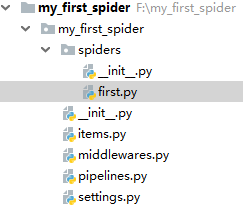
# -*- coding: utf-8 -*-

import scrapy

from my_first_spider.items import MyFirstSpiderItem

class FirstSpider(scrapy.Spider):

    # 当前spider的名称

    name = 'first'

    # 允许的域名

    # allowed_domains = ['www.xxx.com']

    # 开始的第一个url

    start_urls = ['https://www.zhipin.com/c101010100/?query=python开发&page=1&ka=page-1']

    url = 'https://www.zhipin.com/c101010100/?query=python开发&page=%d&ka=page-1'

    page = 1

    # 用于解析的解析函数, 适用 xpath, 必传参数response

    def parse(self, response):

        div_list = response.xpath('//div[@class="job-list"]/ul/li')

        for div in div_list:

            job = div.xpath('./div/div[1]/h3/a/div[1]/text()').extract_first()

            salary = div.xpath('./div/div[1]/h3/a/span/text()').extract_first()

            company = div.xpath('./div/div[2]/div/h3/a/text()').extract_first()

            item = MyFirstSpiderItem()

            item['job'] = job

            item['salary'] = salary

            item['company'] = company

            yield item  # 将item对象返回给数据持久化管道(pipelines)

        # 分页爬取

        if self.page <= 7:

            print(f'第{self.page}页爬取完毕,开始爬取第{self.page+1}页')

            self.page += 1

            yield scrapy.Request(url=self.url%self.page, callback=self.parse)
first.py
# -*- coding: utf-8 -*-

# Define here the models for your scraped items

#

# See documentation in:

# https://doc.scrapy.org/en/latest/topics/items.html

import scrapy

# 与管道交互,实例化item对象进行交互,将爬取到的数据封装在对象中,以对象的方式进行文件间数据传递

class MyFirstSpiderItem(scrapy.Item):

    # define the fields for your item here like:

    # name = scrapy.Field()

    job = scrapy.Field()

    salary = scrapy.Field()

    company = scrapy.Field()
item.py
# -*- coding: utf-8 -*-

# Define your item pipelines here

#

# Don't forget to add your pipeline to the ITEM_PIPELINES setting

# See: https://doc.scrapy.org/en/latest/topics/item-pipeline.html

import redis

# 写入boss.txt文件

class MyFirstSpiderPipeline(object):

    fp = None

    def open_spider(self, spider):

        print('开始爬虫')

        self.fp = open('./boss.txt', 'w', encoding='utf8')

    def close_spider(self, spider):

        self.fp.close()

        print('爬虫结束')

    def process_item(self, item, spider):

        self.fp.write(item['job']+':'+item['salary']+':'+item['company']+'\n')

        return item

# MySQL 写入管道

class MySqlPipeline(object):

    conn = None

    cursor = None

    # 爬虫开始后如若使用管道, 首先执行open_spider方法(打开mysql数据库连接)

    def open_spider(self, spider):

        import pymysql.cursors

        self.conn = pymysql.connect(host='127.0.0.1', port=3306, user='root', password='root',

                                     db='scrapy', charset='utf8')

        # print('-----', self.conn)

        print('打开MySQL连接, 开始写入')

    # 第二步 执行process_item 函数, 在其中进行写入操作, 如若有在此管道之后还有管道 此方法要将item对象返回

    def process_item(self, item, spider):

        self.cursor = self.conn.cursor()

        try:

            self.cursor.execute(

                'INSERT INTO boss (job_name, salary, company) VALUES ("%s", "%s", "%s")' % (item['job'], item['salary'], item['company']))

            self.conn.commit()

        except Exception as e:

            self.conn.rollback()

            print('出现错误, 事件回滚')

            print(e)

    # 第三部爬虫结束后执行close_spider方法(关闭MySQL连接)

    def close_spider(self, spider):

        self.conn.close()

        self.cursor.close()

        print('MySQl 写入完毕')

# Redis 写入管道

class RedisPipeline(object):

    conn = None

    def open_spider(self, spider):

        self.conn = redis.Redis(host='127.0.0.1', port=6379)

    #  第二步 执行process_item 函数, 在其中进行写入操作, 如若有在此管道之后还有管道 此方法要将item对象返回

    def process_item(self, item, spider):

        import json

        dic = {

            'job_name': item['job'],

            'salary': item['salary'],

            'company': item['company']

        }

        try:

            self.conn.lpush('boss', json.dumps(dic))

            print('redis 写入成功')

        except Exception as e:

            print('redis 写入失败', e)

        return item
pipeline.py
# Configure item pipelines

# See https://doc.scrapy.org/en/latest/topics/item-pipeline.html

ITEM_PIPELINES = {

   'my_first_spider.pipelines.MyFirstSpiderPipeline': 300,

   'my_first_spider.pipelines.RedisPipeline': 301,

   'my_first_spider.pipelines.MySqlPipeline': 302,

}

BOT_NAME = 'my_first_spider'

SPIDER_MODULES = ['my_first_spider.spiders']

NEWSPIDER_MODULE = 'my_first_spider.spiders'

# Crawl responsibly by identifying yourself (and your website) on the user-agent

USER_AGENT = 'Mozilla/5.0 (Windows NT 10.0; Win64; x64) AppleWebKit/537.36 (KHTML, like Gecko) Chrome/71.0.3578.98 Safari/537.36'

# Obey robots.txt rules

ROBOTSTXT_OBEY = False
setting.py
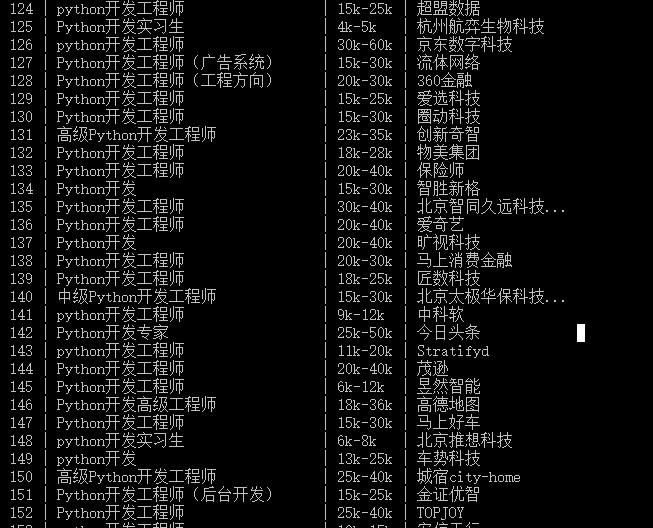
- 在命令行中输入 scrapy crawl first --nolog --nolog不显示日志
- 爬取成功

Scrapy框架的使用的更多相关文章
- Python爬虫Scrapy框架入门(2)
本文是跟着大神博客,尝试从网站上爬一堆东西,一堆你懂得的东西 附上原创链接: http://www.cnblogs.com/qiyeboy/p/5428240.html 基本思路是,查看网页元素,填写 ...
- Python爬虫Scrapy框架入门(1)
也许是很少接触python的原因,我觉得是Scrapy框架和以往Java框架很不一样:它真的是个框架. 从表层来看,与Java框架引入jar包.配置xml或.property文件不同,Scrapy的模 ...
- Scrapy框架使用—quotesbot 项目(学习记录一)
一.Scrapy框架的安装及相关理论知识的学习可以参考:http://www.yiibai.com/scrapy/scrapy_environment.html 二.重点记录我学习使用scrapy框架 ...
- Python爬虫从入门到放弃(十一)之 Scrapy框架整体的一个了解
这里是通过爬取伯乐在线的全部文章为例子,让自己先对scrapy进行一个整理的理解 该例子中的详细代码会放到我的github地址:https://github.com/pythonsite/spider ...
- Python爬虫从入门到放弃(十二)之 Scrapy框架的架构和原理
这一篇文章主要是为了对scrapy框架的工作流程以及各个组件功能的介绍 Scrapy目前已经可以很好的在python3上运行Scrapy使用了Twisted作为框架,Twisted有些特殊的地方是它是 ...
- python爬虫scrapy框架——人工识别登录知乎倒立文字验证码和数字英文验证码(2)
操作环境:python3 在上一文中python爬虫scrapy框架--人工识别知乎登录知乎倒立文字验证码和数字英文验证码(1)我们已经介绍了用Requests库来登录知乎,本文如果看不懂可以先看之前 ...
- 一个scrapy框架的爬虫(爬取京东图书)
我们的这个爬虫设计来爬取京东图书(jd.com). scrapy框架相信大家比较了解了.里面有很多复杂的机制,超出本文的范围. 1.爬虫spider tips: 1.xpath的语法比较坑,但是你可以 ...
- 安装scrapy框架的常见问题及其解决方法
下面小编讲一下自己在windows10安装及配置Scrapy中遇到的一些坑及其解决的方法,现在总结如下,希望对大家有所帮助. 常见问题一:pip版本需要升级 如果你的pip版本比较老,可能在安装的过程 ...
- 关于使用scrapy框架编写爬虫以及Ajax动态加载问题、反爬问题解决方案
Python爬虫总结 总的来说,Python爬虫所做的事情分为两个部分,1:将网页的内容全部抓取下来,2:对抓取到的内容和进行解析,得到我们需要的信息. 目前公认比较好用的爬虫框架为Scrapy,而且 ...
- 利用scrapy框架进行爬虫
今天一个网友问爬虫知识,自己把许多小细节都忘了,很惭愧,所以这里写一下大概的步骤,主要是自己巩固一下知识,顺便复习一下.(scrapy框架有一个好处,就是可以爬取https的内容) [爬取的是杨子晚报 ...
随机推荐
- UItextInput-Protocol
UItextInput是一个protocol,一般来说,文字处理的控件都要遵守这个协议.如UITextField,UITextView.下面介绍一些文字处理的基本概念. marked text 对于多 ...
- UITableView编辑模式
UITableView有两种模式,普通模式和编辑模式.在编辑模式下可以对cell进行排序.删除.插入等等. 如何进入编辑模式 调用tableView的setEditing(editing: Bool, ...
- tableView下沉
出现问题的界面如下,并附有大致介绍: 而我想做的界面应该是自定义的headerView和tableView是一起滑动的,而不是headerView在tableView滑动的时候始终在顶部位置,而且ta ...
- 条目二十一《总是让比较函数在等值情况下返回false》
条目二十一<总是让比较函数在等值情况下返回false> 这条目对序列容器是不适合的,因为序列容器就是通过等值判断来比较的. 对于关联容器来说,比较是等价比较,所以要注意等值的时候,比较子的 ...
- 2016级算法第二次上机-D.Bamboo的饼干
Bamboo的饼干 分析 从两个数组中各取一个数,使两者相加等于给定值.要注意去重和排序 难度不大,方法很多,基本只要不大于O(n^2 ) 的都可以过.本意想考察二分搜索 还可以借助stl中的map, ...
- 洛谷 P4234 最小差值生成树(LCT)
题面 luogu 题解 LCT 动态树Link-cut tree(LCT)总结 考虑先按边权排序,从小到大加边 如果构成一颗树了,就更新答案 当加入一条边,会形成环. 贪心地想,我们要最大边权-最小边 ...
- Python中的range和xrange区别
range 函数说明:range([start,] stop[, step]),根据start与stop指定的范围以及step设定的步长,生成一个序列. range示例: >>> r ...
- [转] kerberos介绍
[From] https://www.cnblogs.com/ulysses-you/p/8107862.html 重要术语 1. KDC 全称:key distributed center 作用:整 ...
- hdu1495 bfs搜索、模拟
大家一定觉的运动以后喝可乐是一件很惬意的事情,但是seeyou却不这么认为.因为每次当seeyou买了可乐以后,阿牛就要求和seeyou一起分享这一瓶可乐,而且一定要喝的和seeyou一样多.但see ...
- 人机交互print
python两种输出类型: 1· 表达式语句,python理解的 # repr() 2· print() 结果是给用户看的 # str() >>> "Hell ...