
[Raspberry Pi] 入门使用
今天开始介绍Raspberry Pi(简称RPi,下同)入门的一些基础知识。
第1部分: 安装RPi
1.1 从 http://www.raspberrypi.org/downloads 下载RPi 最新镜像,这里以Raspbian为例。
1.2 从 http://pan.baidu.com/share/link?shareid=95002292&uk=2419385090 安装Win32DiskImager工具,将镜像写入SD卡。
1.3 解压Step1.1下载的Raspbian镜像,打开Step1.2下载的Win32DiskImager,根据下图所示将镜像写到SD卡里。
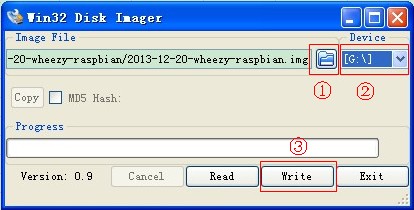
① 选择镜像路径
② 选择SD卡
③ 确认写入
1.4 将SD卡插入RPi,通过HDMI连接显示器,接入电源,RPi就开始工作了!
1.5 一大串英文开始在屏幕滚动,然觉又回到了很多年以前,当屏幕不再滚动的时候,会出现提示输入用户名(默认pi)和密码(默认pi)。
1.6 键入startx即可进入图形化界面。
现在,开始你的探索之旅吧!
如果你使用了HDMI转VGA的接口,将SD卡根目录里的config.txt的内容替换成以下代码中并保存,否则HDMI将无输出。
 1 hdmi_edid_file=1

 2

 3 # uncomment if you get no picture on HDMI for a default "safe" mode

 4 hdmi_safe=0

 5

 6 # uncomment this if your display has a black border of unused pixels visible

 7 # and your display can output without overscan

 8 disable_overscan=1

 9

10 # uncomment the following to adjust overscan. Use positive numbers if console

11 # goes off screen, and negative if there is too much border

12 #overscan_left=-30

13 #overscan_right=-30

14 #overscan_top=-30

15 #overscan_bottom=-30

16

17 # uncomment to force a console size. By default it will be display's size minus

18 # overscan.

19 #framebuffer_width=1280

20 #framebuffer_height=720

21

22 # uncomment if hdmi display is not detected and composite is being output

23 hdmi_force_hotplug=1

24

25 # uncomment to force a specific HDMI mode (this will force VGA)

26 hdmi_group=2

27 hdmi_mode=47

28

29 # uncomment to force a HDMI mode rather than DVI. This can make audio work in

30 # DMT (computer monitor) modes

31 hdmi_drive=2

32

33 # uncomment to increase signal to HDMI, if you have interference, blanking, or

34 # no display

35 config_hdmi_boost=4

36

37 # uncomment for composite PAL

38 #sdtv_mode=2

39

40 #uncomment to overclock the arm. 700 MHz is the default.

41 arm_freq=800

42

43 # for more options see http://elinux.org/RPi_config.txt

44 core_freq=250

45 sdram_freq=400

46 over_voltage=0
以上配置是给1400 × 900的显示器用,具体配置方法及参数的含义参考下面链接:
① 解决Raspberry Pi只能在默认640×480模式下显示的问题
http://www.roboby.com/raspberry-pi-640x480.html
② RPiconfig
/××××××××××××××××××××××××××× THE END ×××××××××××××××××××××××××××/
[Raspberry Pi] 入门使用的更多相关文章
- [树莓派(raspberry pi)] 01、在linux环境下给树莓派安装系统及入门各种资料
1.预准备 进入帮助页面https://www.raspberrypi.org/help/,可以直接看到GET START WITH PASPBERRY PI,点击进入: 接下来会引导你检查配件是否齐 ...
- Raspberry Pi 摄像头模块入门
目录 一.摄像头模块安装 二.使用命令控制摄像头 三.使用Python程序控制摄像头 四.基于vlc的Raspberry Pi摄像头实时监控 参考资料 Raspberry Pi提供了摄像头模块的接口, ...
- [树莓派(raspberry pi)] 02、PI3安装openCV开发环境做图像识别(详细版)
前言 上一篇我们讲了在linux环境下给树莓派安装系统及入门各种资料 ,今天我们更进一步,尝试在PI3上安装openCV开发环境. 博主在做的过程中主要参考一个国外小哥的文章(见最后链接1),不过其教 ...
- 玩树莓派(raspberry pi) 2/3 raspbian的遇到的一些问题
raspberry pi买回来玩了一段时间,现在就记录一下入门遇到的一些问题吧. 首先是烧写镜像,和安装电脑系统是一样的道理. 先要有一个制作一个U启动盘.先将SD卡格式化,再用Win32DiskIm ...
- 树莓派(raspberry pi)系统开发
[树莓派(raspberry pi)] 01.在linux环境下给树莓派安装系统及入门各种资料 [树莓派(raspberry pi)] 02.PI3安装openCV开发环境做图像识别(详细版) 出处: ...
- Raspberry Pi Finder
这是 meelo 原创的 玩转树莓派 系列文章 作为一名新手,你可能苦恼与如何寻找树莓派的IP地址.要想寻找IP地址,在不同的连接状况下,的方法是不一样的,这在其它教程里有作详细介绍(使用路由器连接树 ...
- 让Mono 4在Raspberry Pi上飞
最近公司有项目想要在树莓派上做,代替原来的工控机(我们是把工控主机当作小的主机用,一台小的工控主机最少也要600左右,而树莓派只要200多).于是,公司买了一个Raspberry Pi B+和一个Ra ...
- Kali v2.1.2 for Raspberry Pi 3B
最新的下载地址是: https://www.offensive-security.com/kali-linux-arm-images/ 按照官网的说法是找不到树莓派版本的SHA1SUM和SHA1SUM ...
- A new comer playing with Raspberry Pi 3B
there are some things to do for raspberry pi 3b for the first time: 1, connect pi with monitor/KB/mo ...
随机推荐
- 小迪安全 Web安全 基础入门 - 第一天 - 操作系统&名词&文件下载&反弹SHELL&防火墙绕过
一.专业名词 1.POC:(Proof of Concept),即概念验证.漏洞报告中的POC是一段说明或一个攻击的样例使读者能够确认这个漏洞是真实存在的. 2.EXP:exploit,即漏洞利用.对 ...
- CF108A Palindromic Times 题解
Content 现在是 \(h\) 时 \(m\) 分,请求出在此之后(不包含此时)的第一个回文时间. 数据范围:\(0\leqslant h\leqslant 23,0\leqslant m\leq ...
- VC Mirror Driver显示虚拟驱动经典开发
一个简单的显示驱动实例windows wdk 7600的 mirror(镜像) 显示驱动部分基本流程:Windows 2000 DDK包含了一个例子镜像驱动程序,在 上面3个目录中包括了组件源文件.目 ...
- JAVA使用多线程进行数据处理
import org.apache.commons.collections.CollectionUtils; import org.slf4j.Logger; import org.slf4j.Log ...
- UDP&串口调试助手用法(2)
通道的是创建.删除.编辑.链接.断开 通道创建 通道删除 先选择要删除的通道,再点击删除通道即可 通道参数编辑 双击创建的通道 即可编辑通道 通道链接 通道创建成功,提示 点击链接即可链接通道 通道断 ...
- 【LeetCode】1095. 山脉数组中查找目标值 Find in Mountain Array
作者: 负雪明烛 id: fuxuemingzhu 个人博客:http://fuxuemingzhu.cn/ 目录 题目描述 题目大意 解题方法 二分查找 日期 题目地址:https://leetco ...
- 【LeetCode】1110. Delete Nodes And Return Forest 解题报告 (C++)
作者: 负雪明烛 id: fuxuemingzhu 个人博客:http://fuxuemingzhu.cn/ 目录 题目描述 题目大意 解题方法 递归 日期 题目地址:https://leetcode ...
- 【LeetCode】1047. Remove All Adjacent Duplicates In String 解题报告(Python)
作者: 负雪明烛 id: fuxuemingzhu 个人博客: http://fuxuemingzhu.cn/ 目录 题目描述 题目大意 解题方法 栈 日期 题目地址:https://leetcode ...
- 【九度OJ】题目1080:进制转换 解题报告
[九度OJ]题目1080:进制转换 解题报告 标签(空格分隔): 九度OJ 原题地址:http://ac.jobdu.com/problem.php?pid=1080 题目描述: 将M进制的数X转换为 ...
- 【九度OJ】题目1179:阶乘 解题报告
[九度OJ]题目1179:阶乘 解题报告 标签(空格分隔): 九度OJ http://ac.jobdu.com/problem.php?pid=1179 题目描述: 输入n, 求y1=1!+3!+-m ...