
ELK学习实验017:filebeat收集java日志
收集JAVA格式日志
1 查看Java格式日志
elasticsearch属于Java日志,可以收集elasticsearch作为Java日志范本
[root@node3 ~]# tail -f /usr/local/elasticsearch/logs/my-elktest-cluster.log
[2020-01-19T01:57:18,496][INFO ][o.e.t.TransportService   ] [node-3] publish_address {192.168.132.133:9300}, bound_addresses {[::]:9300}

[2020-01-19T01:57:18,506][INFO ][o.e.b.BootstrapChecks    ] [node-3] bound or publishing to a non-loopback address, enforcing bootstrap checks

[2020-01-19T01:57:18,531][INFO ][o.e.c.c.Coordinator      ] [node-3] cluster UUID [4xt-ZTijTz2oTnlz1gMFjg]

[2020-01-19T01:57:19,195][INFO ][o.e.c.s.ClusterApplierService] [node-3] master node changed {previous [], current [{node-2}{9qVjdVSvSAGlZ7lpB9O78g}{m9_mEscHTMKQ0VwFt9YHog}{192.168.132.132}{192.168.132.132:9300}{dilm}{ml.machine_memory=1907953664, ml.max_open_jobs=20, xpack.installed=true}]}, added {{node-1}{KupGTMgUTTmp3poPa9iYdQ}{9vTQ4MQfRgqkB_gv4Jyp_A}{192.168.132.131}{192.168.132.131:9300}{dilm}{ml.machine_memory=1907953664, ml.max_open_jobs=20, xpack.installed=true},{node-2}{9qVjdVSvSAGlZ7lpB9O78g}{m9_mEscHTMKQ0VwFt9YHog}{192.168.132.132}{192.168.132.132:9300}{dilm}{ml.machine_memory=1907953664, ml.max_open_jobs=20, xpack.installed=true},}, term: 705, version: 875, reason: ApplyCommitRequest{term=705, version=875, sourceNode={node-2}{9qVjdVSvSAGlZ7lpB9O78g}{m9_mEscHTMKQ0VwFt9YHog}{192.168.132.132}{192.168.132.132:9300}{dilm}{ml.machine_memory=1907953664, ml.max_open_jobs=20, xpack.installed=true}}
2 直接使用filebeat收集
直接配置,使用filebeat收集
filebeat.inputs:

#####################################################

## Nginx log

#####################################################

- type: log

  enabled: true

  paths:

    - /usr/local/nginx/logs/access.log

  json.key_under_root: true

  json.overwrite_keys: true

  tags: ["access"]

- type: log

  enabled: true

  paths:

    - /usr/local/nginx/logs/error.log

  tags: ["error"]

#####################################################

## tomcat  log

#####################################################

- type: log

  enabled: true

  paths:

    - /var/log/tomcat/localhost_access_log.*.txt

  json.key_under_root: true

  json.overwrite_keys: true

  tags: ["tomcat"]

#####################################################

## tomcat  log

#####################################################

- type: log

  enabled: true

  paths:

    - /usr/local/elasticsearch/logs/my-elktest-cluster.log

  tags: ["es-java"]

#####################################################

## Output

#####################################################

setup.kibana:

  host: "192.168.132.131:5601"

output.elasticsearch:

  hosts: ["192.168.132.131:9200","192.168.132.132:9200","192.168.132.133:9200"]

  #index: "nginx-%{[agent.version]}-%{+yyyy.MM.dd}"

  indices:

    - index: "access-%{[agent.version]}-%{+yyyy.MM.dd}"

      when.contains:

        tags: "access"

    - index: "error-%{[agent.version]}-%{+yyyy.MM.dd}"

      when.contains:

        tags: "error"

    - index: "tomcat-access-%{[agent.version]}-%{+yyyy.MM.dd}"

      when.contains:

        tags: "tomcat"

    - index: "javaes-access-%{[agent.version]}-%{+yyyy.MM.dd}"

      when.contains:

        tags: "es-java"

setup.template.name: "nginx"

setup.template.pattern: "nginx-*"

setup.template.overwrite: true

setup.template.enabled: true

setup.ilm.enabled: false
[root@node3 ~]# systemctl restart filebeat

3 错误日志显示不清晰
但是错误信息分开显示
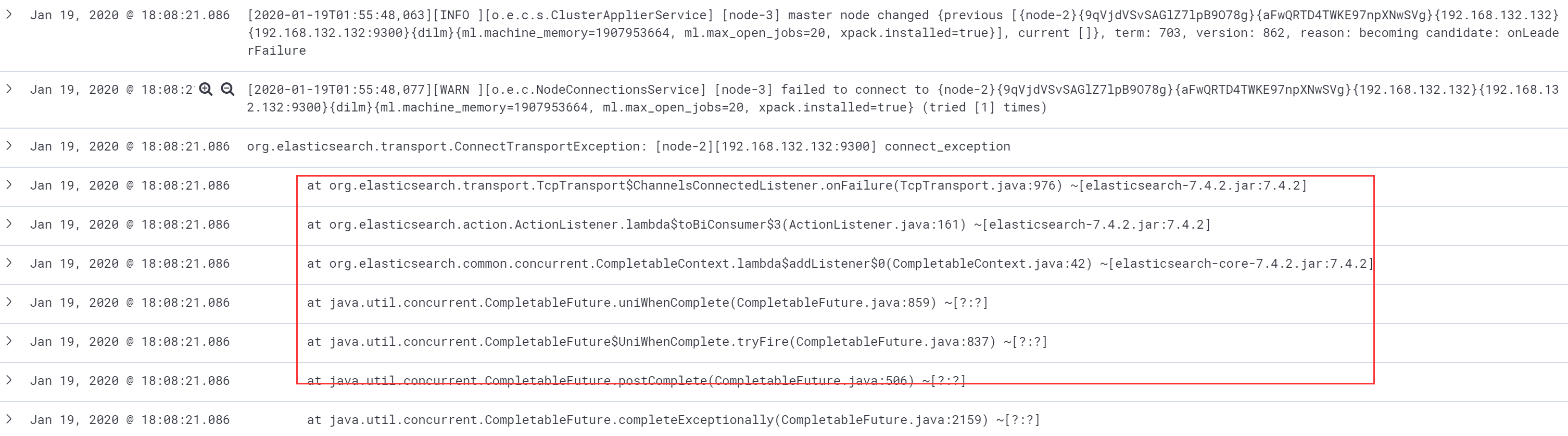
[2020-01-19T01:55:48,077][WARN ][o.e.c.NodeConnectionsService] [node-3] failed to connect to {node-2}{9qVjdVSvSAGlZ7lpB9O78g}{aFwQRTD4TWKE97npXNwSVg}{192.168.132.132}{192.168.132.132:9300}{dilm}{ml.machine_memory=1907953664, ml.max_open_jobs=20, xpack.installed=true} (tried [1] times)

org.elasticsearch.transport.ConnectTransportException: [node-2][192.168.132.132:9300] connect_exception

        at org.elasticsearch.transport.TcpTransport$ChannelsConnectedListener.onFailure(TcpTransport.java:976) ~[elasticsearch-7.4.2.jar:7.4.2]

        at org.elasticsearch.action.ActionListener.lambda$toBiConsumer$3(ActionListener.java:161) ~[elasticsearch-7.4.2.jar:7.4.2]

        at org.elasticsearch.common.concurrent.CompletableContext.lambda$addListener$0(CompletableContext.java:42) ~[elasticsearch-core-7.4.2.jar:7.4.2]

        at java.util.concurrent.CompletableFuture.uniWhenComplete(CompletableFuture.java:859) ~[?:?]

        at java.util.concurrent.CompletableFuture$UniWhenComplete.tryFire(CompletableFuture.java:837) ~[?:?]

        at java.util.concurrent.CompletableFuture.postComplete(CompletableFuture.java:506) ~[?:?]

        at java.util.concurrent.CompletableFuture.completeExceptionally(CompletableFuture.java:2159) ~[?:?]

        at org.elasticsearch.common.concurrent.CompletableContext.completeExceptionally(CompletableContext.java:57) ~[elasticsearch-core-7.4.2.jar:7.4.2]

        at org.elasticsearch.transport.netty4.Netty4TcpChannel.lambda$addListener$0(Netty4TcpChannel.java:68) ~[?:?]

        at io.netty.util.concurrent.DefaultPromise.notifyListener0(DefaultPromise.java:500) ~[?:?]

        at io.netty.util.concurrent.DefaultPromise.notifyListeners0(DefaultPromise.java:493) ~[?:?]

        at io.netty.util.concurrent.DefaultPromise.notifyListenersNow(DefaultPromise.java:472) ~[?:?]

        at io.netty.util.concurrent.DefaultPromise.notifyListeners(DefaultPromise.java:413) ~[?:?]

        at io.netty.util.concurrent.DefaultPromise.setValue0(DefaultPromise.java:538) ~[?:?]

        at io.netty.util.concurrent.DefaultPromise.setFailure0(DefaultPromise.java:531) ~[?:?]

        at io.netty.util.concurrent.DefaultPromise.tryFailure(DefaultPromise.java:111) ~[?:?]

        at io.netty.channel.nio.AbstractNioChannel$AbstractNioUnsafe.fulfillConnectPromise(AbstractNioChannel.java:323) ~[?:?]

        at io.netty.channel.nio.AbstractNioChannel$AbstractNioUnsafe.finishConnect(AbstractNioChannel.java:339) ~[?:?]

        at io.netty.channel.nio.NioEventLoop.processSelectedKey(NioEventLoop.java:685) ~[?:?]

        at io.netty.channel.nio.NioEventLoop.processSelectedKeysPlain(NioEventLoop.java:597) ~[?:?]

        at io.netty.channel.nio.NioEventLoop.processSelectedKeys(NioEventLoop.java:551) ~[?:?]

        at io.netty.channel.nio.NioEventLoop.run(NioEventLoop.java:511) ~[?:?]

Caused by: java.net.ConnectException: Connection refused

        at sun.nio.ch.Net.pollConnect(Native Method) ~[?:?]

        at sun.nio.ch.Net.pollConnectNow(Net.java:579) ~[?:?]

        at sun.nio.ch.SocketChannelImpl.finishConnect(SocketChannelImpl.java:820) ~[?:?]

        at io.netty.channel.socket.nio.NioSocketChannel.doFinishConnect(NioSocketChannel.java:327) ~[?:?]

        at io.netty.channel.nio.AbstractNioChannel$AbstractNioUnsafe.finishConnect(AbstractNioChannel.java:336) ~[?:?]

        ... 7 more

[2020-01-19T01:55:49,727][INFO ][o.e.n.Node               ] [node-3] stopping ...
这是一段错误日志,需要单独收集
4 配置filebat的多行匹配
以时间作为标识,再读取一个时间标记之后,先缓存,当读到下一个时间标记,再整个发送日志,相当于多行匹配
官方文档:https://www.elastic.co/guide/en/beats/filebeat/current/multiline-examples.html
multiline.pattern: '^\['

multiline.negate: true

multiline.match: after
配置filebeat
filebeat.inputs:

#####################################################

## Nginx log

#####################################################

- type: log

  enabled: true

  paths:

    - /usr/local/nginx/logs/access.log

  json.key_under_root: true

  json.overwrite_keys: true

  tags: ["access"]

- type: log

  enabled: true

  paths:

    - /usr/local/nginx/logs/error.log

  tags: ["error"]

#####################################################

## tomcat  log

#####################################################

- type: log

  enabled: true

  paths:

    - /var/log/tomcat/localhost_access_log.*.txt

  json.key_under_root: true

  json.overwrite_keys: true

  tags: ["tomcat"]

#####################################################

## tomcat  log

#####################################################

- type: log

  enabled: true

  paths:

    - /usr/local/elasticsearch/logs/my-elktest-cluster.log

  tags: ["es-java"]

  multiline.pattern: '^\['

  multiline.negate: true

  multiline.match: "after"

#####################################################

## Output

#####################################################

setup.kibana:

  host: "192.168.132.131:5601"

output.elasticsearch:

  hosts: ["192.168.132.131:9200","192.168.132.132:9200","192.168.132.133:9200"]

  #index: "nginx-%{[agent.version]}-%{+yyyy.MM.dd}"

  indices:

    - index: "access-%{[agent.version]}-%{+yyyy.MM.dd}"

      when.contains:

        tags: "access"

    - index: "error-%{[agent.version]}-%{+yyyy.MM.dd}"

      when.contains:

        tags: "error"

    - index: "tomcat-access-%{[agent.version]}-%{+yyyy.MM.dd}"

      when.contains:

        tags: "tomcat"

    - index: "javaes-access-%{[agent.version]}-%{+yyyy.MM.dd}"

      when.contains:

        tags: "es-java"

setup.template.name: "nginx"

setup.template.pattern: "nginx-*"

setup.template.overwrite: true

setup.template.enabled: true

setup.ilm.enabled: false
[root@node3 ~]# systemctl restart filebeat
5 生成错误日志
然后修改配置文件,重启产生错误日志

到kibana查看,错误日志一起显示
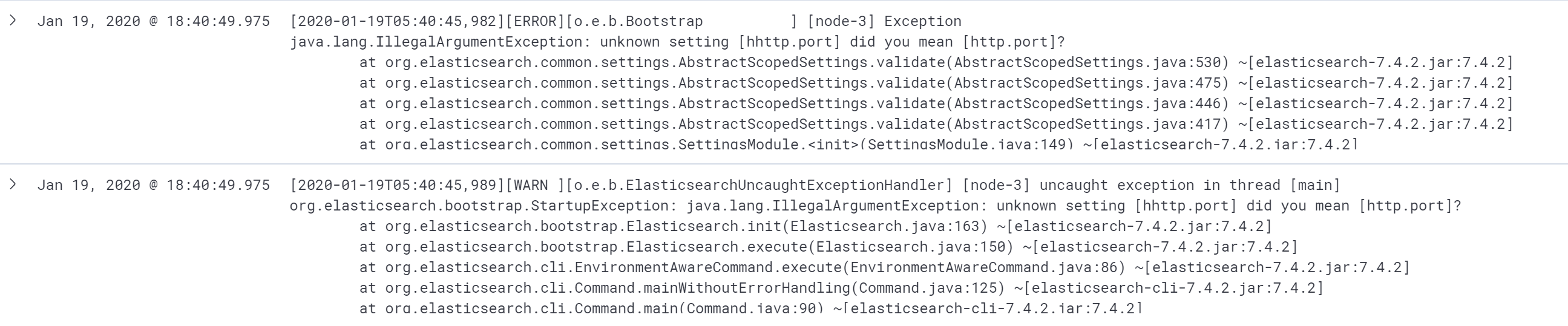
收集Java日志,配置完成
ELK学习实验017:filebeat收集java日志的更多相关文章
- ELK学习实验006:Nginx的日志分析系统之filebeat配置
一 Filebeat工作原理 Filebeat由两个主要组件组成: prospector和 harvester 1.1 harvester 负责读取单个文件的内容 如果文件在读取时被制除或重命名, F ...
- ELK学习实验007:Nginx的日志分析系统之Metribeat配置
一 Metricbeat 简介 1.1 系统级监控,更简洁将 Metricbeat 部署到您的所有 Linux.Windows 和 Mac 主机,并将它连接到 Elasticsearch 就大功告成了 ...
- ELK学习实验018:filebeat收集docker日志
Filebeat收集Docker日志 1 安装docker [root@node4 ~]# yum install -y yum-utils device-mapper-persistent-data ...
- ELK学习实验016:filebeat收集tomcat日志
filebeat收集tomcat日志 1 安装tomcat [root@node4 ~]# yum -y install tomcat tomcat-webapps tomcat-admin-weba ...
- ELK学习实验014:Nginx日志JSON格式收集
1 Kibana的显示配置 https://demo.elastic.co/app/kibana#/dashboard/welcome_dashboard 环境先处理干净 安装nginx和httpd- ...
- 第六章·Logstash深入-收集java日志
1.通过Logstash收集java日志并输出到ES中 因为我们现在需要用Logstash收集tomcat日志,所以我们暂时将tomcat安装到Logstash所在机器,也就是db03:10.0.0. ...
- Kubernetes部署ELK并使用Filebeat收集容器日志
本文的试验环境为CentOS 7.3,Kubernetes集群为1.11.2,安装步骤参见kubeadm安装kubernetes V1.11.1 集群 1. 环境准备 Elasticsearch运行时 ...
- ELK之使用filebeat收集java运行日志
安装filebeat修改配置文件/etc/filebeat/filebeat.yml filebeat.prospectors: - type: log enabled: true #日志路径 pat ...
- ELK之filebeat收集多类型日志
1.IP规划 10.0.0.33:filebeat+tomcat,filebeat收集系统日志.tomcat日志发送到logstash 10.0.0.32:logstash,将日志写入reids(in ...
随机推荐
- Python基础(九):字典的使用
创建字典的5种方式 用{}创建字典 >>> a = {'name':'韩梅梅','age':18,'job':'teacher'} >>> print(a) {'n ...
- 二、python学习-函数
类型判断 1.type()直接获取类型 2.isinstance 用法一:isinstance(值,类型) 返回真或假 用法二:isinstance(值,(类型1,类型2 ...)) 有一个类型满足 ...
- 简述Java多线程(一)
JAVA多线程 程序:是指令和数据的有序集合,其本身没有任何运行的含义,是一个静态的概念. 进程:是执行程序的一次执行过程,是一个动态的概念,是系统资源分配的单位. 线程是CPU调度和执行的单位. 创 ...
- Spring Boot超简单的测试类demo
1 概述 Spring Boot结合Junit的简单测试类demo,流程是先引入依赖,接着编写测试类测试运行即可. 2 依赖 <dependency> <groupId>org ...
- JS笔记(二)
1.完整的JavaScript由核心(ECMAScipt).文档对象模型(DOM).浏览器对象模型(BOM)组成. 2.<script>标签的用法:引用位置.src.async.defer ...
- .NET 5学习笔记(12)——WinUI 3 Project Reunion 0.5
2021年3月的时候,Win UI 3终于来到了第一个稳定的支持版本,可用于创建发布到Micosoft Store的应用.据某软的说法,这个叫WinUI 3 Project Reunion 0.5的版 ...
- LA3644简单并查集判环
题意: 有n个化合物,每个化合物是两种元素组成,现在要装车,但是一旦车上的化合物中的某几个化合物组成这样一组关系,有n个化合物正好用了n中元素,那么就会爆炸,输入的顺序是装车的顺序,对于每 ...
- 前端不得不了解的TCP协议
背景 早期的网络是基于OSI(开放式系统互联网,一般叫OSI参考模型)模型,该模型是由ISO国际标准组织制定的,包含了七层(应用层.表示层.会话层.传输层.网络层.数据链路层.物理层),即复杂又不实用 ...
- 【mybatis】mybaits generator 逆向工程的使用
mybatis逆向工程官方网站:http://www.mybatis.org/generator/quickstart.html 准备xml文件.如下generator.xml全部内容 <?xm ...
- The content of element type "web-app" must match "(icon?,display- name?,description?,distributable?,context-param*,filter*,filter-mapping*,listener*,servlet*,servlet- mapping*,session-config?
web.xml头部配置: <?xml version="1.0" encoding="UTF-8"?> <!DOCTYPE web-app P ...