
将Mybatis引入Spring Boot项目连接数据库操作
将Mybatis引入Spring Boot项目连接数据库操作
一,首先,在pom.xml引入Mybatis插件
加入Maven依赖代码即可快速引入Mybatis 2.0.0:
<!--Mybatis-->

<dependency>

    <groupId>org.mybatis.spring.boot</groupId>

    <artifactId>mybatis-spring-boot-starter</artifactId>

    <version>2.0.0</version>

</dependency>

<!--MySQL-->

<dependency>

    <groupId>mysql</groupId>

    <artifactId>mysql-connector-java</artifactId>

</dependency>
上面代码将mybatis 2.0.0和mysql连接插件引入项目,保存,等待插件加载完。
二,在配置文件中加入连接配置信息
打开application.properties编辑,加入连接配置信息:
#mybatis链接数据库相关配置

spring.datasource.url=jdbc:mysql://192.168.10.223:3306/db_demo?serverTimezone=UTC&useUnicode=true&characterEncoding=utf-8&useSSL=true

spring.datasource.username=root

spring.datasource.password=Kings0ft_01

spring.datasource.driver-class-name=com.mysql.cj.jdbc.Driver
以上信息用于连接mysql数据库。
三,在项目启动程序中加入mapper注解
打开项目的Xxhdemo1Application,加入注解。
package xxh.springbootmvc.xxhdemo1;

import org.mybatis.spring.annotation.MapperScan;

import org.springframework.boot.SpringApplication;

import org.springframework.boot.autoconfigure.SpringBootApplication;

@SpringBootApplication

/*Spring Boot 会自动加载 spring.datasource.* 相关配置,数据源就会自动注入到 sqlSessionFactory 中,

sqlSessionFactory 会自动注入到 Mapper 中*/

@MapperScan("xxh.springbootmvc.xxhdemo1.MybatisDemo.mapper")

public class Xxhdemo1Application {

    public static void main(String[] args) {

        SpringApplication.run(Xxhdemo1Application.class, args);

    }

}
注意,加入@MapperScan注解后,Spring Boot 会自动加载 spring.datasource.* 相关配置,数据源就会自动注入到 sqlSessionFactory 中,sqlSessionFactory 会自动注入到 Mapper 中。
四,按上面Mapper 路径创建自己建Package,然后在里面创建自己的Mapper 和Model。
创建Model示例 D:\javaWorkspace\IdeaProjects\xxhdemo1\src\main\java\xxh\springbootmvc\xxhdemo1\MybatisDemo\mapper\UserEntity.java:
package xxh.springbootmvc.xxhdemo1.MybatisDemo.mapper;

import java.util.Date;

public class UserEntity {

    public int getId() {

        return id;

    }

    public void setId(int id) {

        this.id = id;

    }

    public String getName() {

        return Name;

    }

    public void setName(String name) {

        Name = name;

    }

    public String getDesc() {

        return Desc;

    }

    public void setDesc(String desc) {

        Desc = desc;

    }

    public Date getCreateTime() {

        return CreateTime;

    }

    public void setCreateTime(Date createTime) {

        CreateTime = createTime;

    }

    public UserEntity(int id, String name, String desc, Date createTime) {

        this.id = id;

        Name = name;

        Desc = desc;

        CreateTime = createTime;

    }

    @Override

    public String toString() {

        return "UserEntity{" +

                "id=" + id +

                ", Name='" + Name + '\'' +

                ", Desc='" + Desc + '\'' +

                ", CreateTime=" + CreateTime +

                '}';

    }

    private int id;

    private String Name;

    private String Desc;

    private Date CreateTime;

}
创建Mapper示例 D:\javaWorkspace\IdeaProjects\xxhdemo1\src\main\java\xxh\springbootmvc\xxhdemo1\MybatisDemo\mapper\UserMapper.java
package xxh.springbootmvc.xxhdemo1.MybatisDemo.mapper;

import org.apache.ibatis.annotations.*;

import java.util.List;

/*注意Mapper的类型是“接口”*/

public interface UserMapper {

    /*查询操作示例*/

    @Select("SELECT * FROM t_user;")

    @Results({

            @Result(property = "id",  column = "Id"),

            @Result(property = "Name", column = "Name"),

            @Result(property = "Desc", column = "Desc"),

            @Result(property = "CreateTime", column = "CreateTime")

    })

    List<UserEntity> getAll();

    /*查询操作示例*/

    @Select("SELECT * FROM t_user WHERE Id = #{id};")

    @Results({

            @Result(property = "id",  column = "Id"),

            @Result(property = "Name", column = "Name"),

            @Result(property = "Desc", column = "Desc"),

            @Result(property = "CreateTime", column = "CreateTime")

    })

    UserEntity getEntity(int id);

    /*插入操作示例*/

    @Insert("INSERT INTO t_user(`Name`,`Desc`,CreateTime) VALUES(#{Name}, #{Desc}, #{CreateTime});")

    @Options(useGeneratedKeys=true, keyProperty="id", keyColumn="Id") /*将自增ID绑定到实体,keyProperty是实体字段,keyColumn是数据库字段*/

    int insert(UserEntity user);

    /*修改操作示例*/

    @Update("UPDATE t_user SET `Name`=#{Name},`Desc`=#{Desc} WHERE Id =#{id};")

    int update(UserEntity user);

    /*删除操作示例*/

    @Delete("DELETE FROM t_user WHERE Id =#{id};")

    int delete(int id);

}
五,创建Controller,写接口或页面调用操作数据库方法
测试demo只需要放回数据即可,不写页面了。所以引入@RestController,@RequestMapping注解。然后必须在控制器域代码里声明Mapper类型,访问类型一般是私有的:
/*在控制器域代码声明Mapper类型*/

private UserMapper UserMapper;
然后再控制器里面写各种调用Mapper操作数据库方法,调用正删查改完整示例:
package xxh.springbootmvc.xxhdemo1.MybatisDemo;

import org.springframework.beans.factory.annotation.Autowired;

import org.springframework.boot.autoconfigure.EnableAutoConfiguration;

import org.springframework.web.bind.annotation.RequestMapping;

import org.springframework.web.bind.annotation.RestController;

import xxh.springbootmvc.xxhdemo1.MybatisDemo.mapper.UserEntity;

import xxh.springbootmvc.xxhdemo1.MybatisDemo.mapper.UserMapper;

import java.util.List;

import java.util.Date;

@RestController

@EnableAutoConfiguration

@RequestMapping("/v1/mybatisdemo")

public class mysqlTestController {

    /*在控制器域代码声明Mapper类型*/

    @Autowired

    private UserMapper UserMapper;

    @RequestMapping("add")

    public int testInsert() throws Exception {

        int id, num = 0;

        UserEntity u = new UserEntity(0, "刘备", "大哥", new Date());

        num = UserMapper.insert(u);

        id = u.getId();

        System.out.println("新增数据完成 id=" + id + ",num=" + num);

        return num;

    }

    @RequestMapping("get")

    public UserEntity testQueryOne(int id) throws Exception {

        UserEntity UserEntity = UserMapper.getEntity(id);

        System.out.println(UserEntity.toString());

        return UserEntity;

    }

    @RequestMapping("getlist")

    public List<UserEntity> testQuery() throws Exception {

        List<UserEntity> UserEntitys = UserMapper.getAll();

        System.out.println(UserEntitys.toString());

        return UserEntitys;

    }

    @RequestMapping("edit")

    public int testUpdate(int id, String name, String desc) throws Exception {

        int num = 0;

        UserEntity UserEntity = UserMapper.getEntity(id);

        if (null != UserEntity && UserEntity.getId() > 0) {

            System.out.println(UserEntity.toString());

            UserEntity.setName(name);

            UserEntity.setDesc(desc);

            num = UserMapper.update(UserEntity);

        }

        return num;

    }

    @RequestMapping("del")

    public int testDelete(int id) throws Exception {

        int num = 0;

        if (id > 0) {

            num = UserMapper.delete(id);

        }

        return num;

    }

}
到这里就可以运行项目代码,测试接口了。
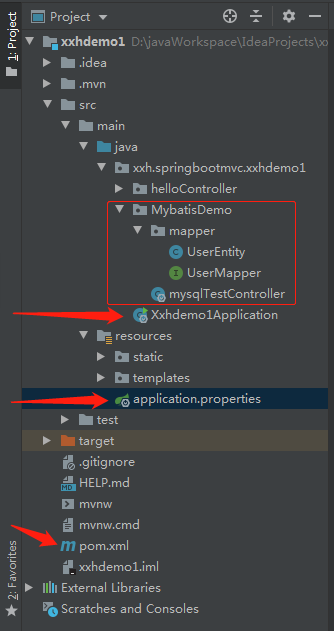
代码结构如图:
六,创建MySQL数据库及表结构
创建MySQL数据库:
CREATE DATABASE IF NOT EXISTS db_demo DEFAULT CHARSET utf8mb4;
创建数据库表结构:
SET FOREIGN_KEY_CHECKS=0;

-- ----------------------------

-- Table structure for t_user

-- ----------------------------

DROP TABLE IF EXISTS `t_user`;

CREATE TABLE `t_user` (

  `Id` int(11) NOT NULL AUTO_INCREMENT,

  `Name` varchar(255) DEFAULT NULL,

  `Desc` varchar(255) DEFAULT NULL,

  `CreateTime` datetime(3) NOT NULL,

  PRIMARY KEY (`Id`)

) ENGINE=InnoDB AUTO_INCREMENT=14 DEFAULT CHARSET=utf8mb4;
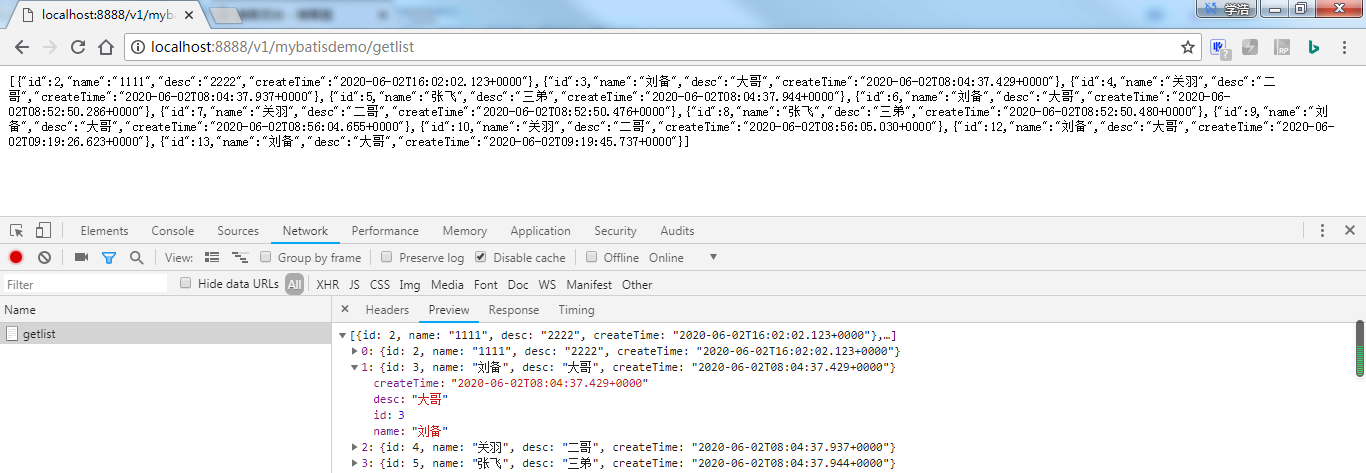
其中,查询数据列表的运行效果,如图:
【完】
上一篇:idea创建一个入门Spring Boot项目(controller层)使用Maven代码管理
下一篇:将Ldap组织结构及用户信息同步到MySQL,用Spring Boot项目操作
将Mybatis引入Spring Boot项目连接数据库操作的更多相关文章
- spring boot 项目连接数据库查询数据过程
spring boot 项目搭建 pom.xml <?xml version="1.0" encoding="UTF-8"?> <projec ...
- 使用IDEA创建Spring boot项目,继承mybaits。并进行简单的数据库查询操作
本文讲的是使用IEDA创建Spring boot项目,对于环境安装需要自行准备,如JDK1.8.Maven 3.3.IDEA编译器.Mysql5.7等需事前准备好. 1.创建Spring boot项目 ...
- Spring Boot 项目学习 (二) MySql + MyBatis 注解 + 分页控件 配置
0 引言 本文主要在Spring Boot 基础项目的基础上,添加 Mysql .MyBatis(注解方式)与 分页控件 的配置,用于协助完成数据库操作. 1 创建数据表 这个过程就暂时省略了. 2 ...
- Spring Boot项目中MyBatis连接DB2和MySQL数据库返回结果中一些字符消失——debug笔记
写这篇记录的原因是因为我之前在Spring Boot项目中通过MyBatis连接DB2返回的结果中存在一些字段, 这些字段的元素中缺少了一些符号,所以我现在通过在自己的电脑上通过MyBatis连接DB ...
- Spring Boot项目指定启动后执行的操作
Spring Boot项目指定启动后执行的操作: (1)实现CommandLineRunner 接口 (2)重写run方法 (3)声明执行顺序@Order(1),数值越小,优先级越高 (4)如果需要注 ...
- spring boot中连接数据库报错500(mybatis)
spring boot中连接数据库报错500(mybatis) pom.xml中的依赖 <!-- 集成mybatis--> <dependency> <groupId&g ...
- spring boot项目启动报DataSource错误
初建一个简单的spring boot 项目,启动后会报错. Exception encountered during context initialization - cancelling refre ...
- step6----->往工程中添加spring boot项目------->修改pom.xml使得我的project是基于spring boot的,而非直接基于spring framework
文章内容概述: spring项目组其实有多个projects,如spring IO platform用于管理external dependencies的版本,通过定义BOM(bill of mater ...
- 用Gradle构建Spring Boot项目
相比起Maven的XML配置方式,Gradle提供了一套简明的DSL用于构建Java项目,使我们就像编写程序一样编写项目构建脚本.本文将从无到有创建一个用Gradle构建的Spring Boot项目, ...
- 使用Docker部署Spring boot项目
Docker是一个使用广泛的Linux容器管理工具包,它允许用户创建镜像,并将其容器实例化.通过本指南,我们可以学习到如何使用Docker部署Spring Boot项目. 先决条件 开发之前,你必须具 ...
随机推荐
- 用python 将数字每三组分割
def cut_num(n, sep=','): # 第一个参数是要传递的数字,第二个是分隔符 s = str(abs(n))[::-1] groups = [] i = 0 while i < ...
- 想学习建个网站?WAMP Server助你在Windows上快速搭建PHP集成环境
我想只要爬过几天网的同学都会知道PHP吧,异次元的新版本就是基于PHP的WordPress程序制造出来的,还有国内绝大部分论坛都是PHP的哦.据我所知很多同学都想要试着学习一下PHP,无奈要在Wind ...
- golang之copier
今天我们要介绍的copier库就能处理不同类型之间的赋值.除此之外,copier还能: 调用同名方法为字段赋值: 以源对象字段为参数调用目标对象的方法,从而为目标对象赋值(当然也可以做其它的任何事情) ...
- 1分钟学会如何提升PCIe通信速率,基于RK3568J + FPGA国产平台!
测试数据汇总 表 1 PCIe总线介绍 PCIe,即PCI-Express(peripheral component interconnect express)是一种高速串行计算机扩展总线标准.主要用 ...
- Echrtas 实时渲染
1.实时曲线图 业务场景:每个时间节点产生一个数据,且时间节点间隔不固定 坐标轴配置:X轴类型设定为time,Y轴类型设定为value 数据格式:每个节点的数据都是一个数组,第一个数组为时间,第二个元 ...
- Net5学习笔记
IOC 容器IServiceCollection 什么是Ioc 把对象的统一创建交给第三方容器来创建 如何使用内置IOC ServerCollection 1.在Starup中的ConfigurSer ...
- ArkTs布局入门05——栅格布局(GridRow/GridCol)
1.概述 栅格布局是一种通用的辅助定位工具,对移动设备的界面设计有较好的借鉴作用.主要优势包括: 提供可循的规律:栅格布局可以为布局提供规律性的结构,解决多尺寸多设备的动态布局问题.通过将页面划分为等 ...
- 为了改一行代码,我花了10多天时间,让性能提升了40多倍---Pascal架构GPU在vllm下的模型推理优化
ChatGPT生成的文章摘要 这篇博客记录了作者在家中使用Pascal显卡运行大型模型时遇到的挑战和解决方案.随着本地大型模型性能的提升,作者选择使用vllm库进行推理.然而,作者遇到了多个技术难题, ...
- 裸辞一年狂肝了一个AI搜索!我要硬刚Google和Perplexity!
Hika AI 是一款 AI 加持的「知识搜索工具」,它主要的目的是帮助你在搜索问题时通过Hika的「不同视角的思路」,为你快速延伸问题相关的知识领域,或者深挖问题中某个关键点,获得更加全面的结果. ...
- MeteoInfo-Java解析与绘图教程(十)_JAVA绘制雷达PPI图
天气雷达的基本要素有很多,特别是双偏振雷达更多,但业务场景经常使用的一般为基本反射率,基本速度这两种要素 接下来我们以基本反射率为例,其他的要素也是一样的,一通百通 首先我们做基本反射率的图需要确定做 ...