
Fedora 25/24/23 nVidia Drivers Install Guide
https://www.if-not-true-then-false.com/2015/fedora-nvidia-guide/
Most Popular Featured Linux Programming Servers SQL Advertise
Fedora 25/24/23 nVidia Drivers Install Guide
person JR date_range 2 years ago Published 2015-08-30 10:51:14 update 2 weeks ago Updated 2017-06-15 08:40:05 insert_comment 1250
 This is guide, howto install nVidia proprietary drivers on Fedora 25/24/23/22/21 and disable Nouveau driver. This guide works with GeForce 6/7/8/9/200/300/400/500/600/700/800/900/10 series cards.
- GeForce 400/500/600/700/800/900/10 series cards works with 375.xx and 381.xx nVidia drivers
- GeForce 8/9/200/300 series cards works with 340.xx nVidia drivers
- GeForce 6/7 series cards works with 304.xx nVidia drivers
This is totally different guide than my earlier guides, like Fedora 20 nVidia driver install. This guide uses nVidia drivers directly from nVidia site and dkms to help on kernel updates. Have to say that I have had and heard strange problems with different repos (like RPMFusion) nVidia drivers. So that’s why I decided go back to old school (and bit ugly) method and install nVidia drivers “manually”. I have tested this guide with 304.xx (patched), 340.xx (patched), 375.xx and 381.xx drivers/cards.
With DKMS, you could just update your kernel and your nVidia drivers are compiled automatically. If you want upgrade nVidia drivers, then you have to download new package from nVidia site or use nvidia-installer --update option (this works only with latest drivers). If you try –update method with 304.xx or 340.xx versions, then you get latest drivers.
Table of Contents
1. Before nVidia drivers installation (Fedora 25/24/23/22/21)
2. Install nVidia proprietary drivers on Fedora 25/24/23/22/21 and disable the nouveau driver
3. Some Screenshots Using Different nVidia Cards and Drivers
4. Restore/Change/Update Plymouth After nVidia Drivers Installation (BIOS/UEFI Users)
5. Fedora 25/24/23/22/21 Uninstall nVidia drivers and Enable Nouveau
6. Fedora 25/24/23/22/21 nVidia FAQ
Let me know, if you have some problems?
Or if you succeed, you could post output of following commands:
nvidia-installer -v |grep version

uname -a

lspci |grep -i VGA
Backup first important files before you start installation. And this is of course at your own risk, because graphic cards, components and monitors are different and some combinations might cause totally unexpected results.
1. Before nVidia drivers installation
1.1 Check is your nVidia card supported
lspci |grep -E "VGA|3D"

## Example outputs ##

01:00.0 VGA compatible controller: NVIDIA Corporation GF119 [GeForce GT 610] (rev a1)
List of Supported NVIDIA GPU Products, if your card found before 340.xx section, then use 375.xx drivers and if between 340.xx and 304.xx sections, then use 340.xx drivers and if after 304.xx section, then use 304.xx drivers.
If you see multiple VGA controllers, then check next step and sometimes you might see example Intel VGA controller which have nothing to do with Optimus, normally you can go to BIOS and simply disable it.
1.2 NVIDIA Optimus Technology
If your lspci |grep -E “VGA|3D” output looks like following:
00:02.0 VGA compatible controller: Intel Corporation 2n Generation Core Processor Family Integrated Graphics Controller (rev 09)

01:00.0 VGA compatible controller: nVidia Corporation GF106 [GeForce GT 555M SDDR3] (rev a1)
Or
00:02.0 VGA compatible controller: Intel Corporation 4th Gen Core Processor Integrated Graphics Controller (rev 06)

01:00.0 3D controller: NVIDIA Corporation GK107M [GeForce GT 750M] (rev a1)
Or you know that your computer have NVIDIA Optimus Technology, and it is impossible to turn Intel Graphics / NVIDIA Optimus off in the BIOS then this guide might not work for you and it’s not tested. You should check Bumblebee Project.
2. Install nVidia proprietary drivers on Fedora 25/24/23/22/21 and disable the nouveau driver
2.1 Download nVidia Installer Package
Go to http://www.nvidia.com/Download/Find.aspx?lang=en-us and find latest version of installer package. When you use browser this is normally downloaded /home/<username>/Downloads/NVIDIA-Linux-xxxx.run location.
Tested versions:
| Fedora 25 | Fedora 24 | Fedora 23 | Fedora 22/21 |
|---|---|---|---|
| 381.22 (May 9, 2017) | 381.22 (May 9, 2017) | 381.22 (May 9, 2017) | 381.22 (May 9, 2017) |
| 375.66 (May 4, 2017) | 375.66 (May 4, 2017) | 375.66 (May 4, 2017) | 375.66 (May 4, 2017) |
| 340.102 (February 14, 2017) | 340.102 (February 14, 2017) | 340.102 (February 14, 2017) | 340.102 (February 14, 2017) |
| 304.135 (February 14, 2017) | 304.135 (February 14, 2017) | 304.135 (February 14, 2017) | 304.135 (February 14, 2017) |
Note 340.102 users: 340.102 on Fedora 25 Kernel 4.11/4.10/4.9 needs a patched version (Download NVIDIA-Linux-x86_64-340.102 + Kernel 4.11/4.10/4.9 patch)
Note 304.135 users: 304.135 on Fedora 25/24/23 – installs and boot, but doesn’t work with Gnome 3.22/3.20/3.18. Other DEs/WMs should work normally. Kernel 4.11/4.10/4.9/4.8/4.7/4.6/4.5/4.4/4.3 needs a patched version (Download NVIDIA-Linux-x86_64-304.135 + Kernel 4.11/4.10/4.9/4.8/4.7/4.6/4.5/4.4/4.3 patch)
2.2 Make nVidia installer executable
chmod +x /path/to/NVIDIA-Linux-*.run
2.3 Change root user
su -

## OR ##

sudo -i
2.4 Make sure that you system is up-to-date and you are running latest kernel
If you have exclude=xorg-x11* row in your /etc/dnf/dnf.conf, then you can remove it now and update xorg too.
## Fedora 25/24/23/22 ##

dnf update

## Fedora 21 ##

yum update
After update reboot your system and boot using latest kernel:
reboot
2.5 Install needed dependencies
## Fedora 25/24/23/22 ##

dnf install kernel-devel kernel-headers gcc dkms acpid

## Fedora 21 ##

yum install kernel-devel kernel-headers gcc dkms acpid
2.6 Disable nouveau
2.6.1 Create or edit /etc/modprobe.d/blacklist.conf
Append ‘blacklist nouveau’
echo "blacklist nouveau" >> /etc/modprobe.d/blacklist.conf
2.6.2 Edit /etc/sysconfig/grub
Append ‘rd.driver.blacklist=nouveau’ to end of ‘GRUB_CMDLINE_LINUX=”…”‘
## Example row ##

GRUB_CMDLINE_LINUX="rd.lvm.lv=fedora/swap rd.lvm.lv=fedora/root rhgb quiet rd.driver.blacklist=nouveau"
2.6.3 Update grub2 conf
## BIOS ##

grub2-mkconfig -o /boot/grub2/grub.cfg

## UEFI ##

grub2-mkconfig -o /boot/efi/EFI/fedora/grub.cfg
2.6.4 Remove xorg-x11-drv-nouveua
## Fedora 25/24/23/22 ##

dnf remove xorg-x11-drv-nouveau

## Fedora 21 ##

yum remove xorg-x11-drv-nouveau
If you have following row on /etc/dnf/dnf.conf file, then you can remove it:
exclude=xorg-x11*
2.6.5 Generate initramfs
## Backup old initramfs nouveau image ##

mv /boot/initramfs-$(uname -r).img /boot/initramfs-$(uname -r)-nouveau.img

## Create new initramfs image ##

dracut /boot/initramfs-$(uname -r).img $(uname -r)
2.7 Reboot to runlevel 3
Note: You don’t have Desktop/GUI on runlevel 3. Make sure that you have some access to end of guide. (Print it, use lynx/links/w3m, save it to text file).
systemctl set-default multi-user.target

reboot
2.8 Install nVidia proprietary drivers for GeForce 6/7 & GeForce 8/9/200/300 & GeForce 400/500/600/700/800/900/10 series cards
2.8.1 Log in as root user
Or alternatively change root user (you shouldn’t have nouveua and xorg loaded)
su -

## OR ##

sudo -i
2.8.2 Run NVIDIA Binary
Following command executes driver install routine. Use full file name command if you have multiple binaries on same directory.
./NVIDIA-Linux-*.run

## OR full path / full file name ##

./NVIDIA-Linux-x86_64-375.66.run

/path/to/NVIDIA-Linux-x86_64-381.22.run

/path/to/NVIDIA-Linux-x86_64-340.102-patched.run

/home/<username>/Downdloads/NVIDIA-Linux-x86_64-304.135-patched.run
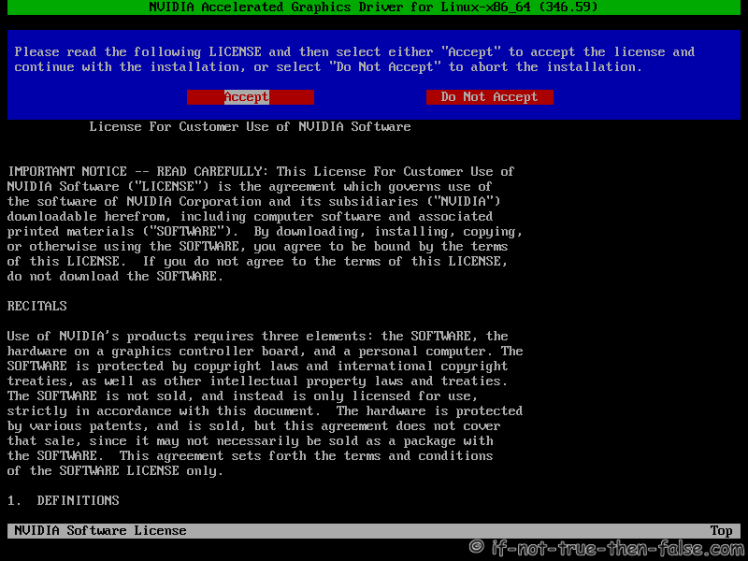
2.8.3 nVidia Installer Accept License
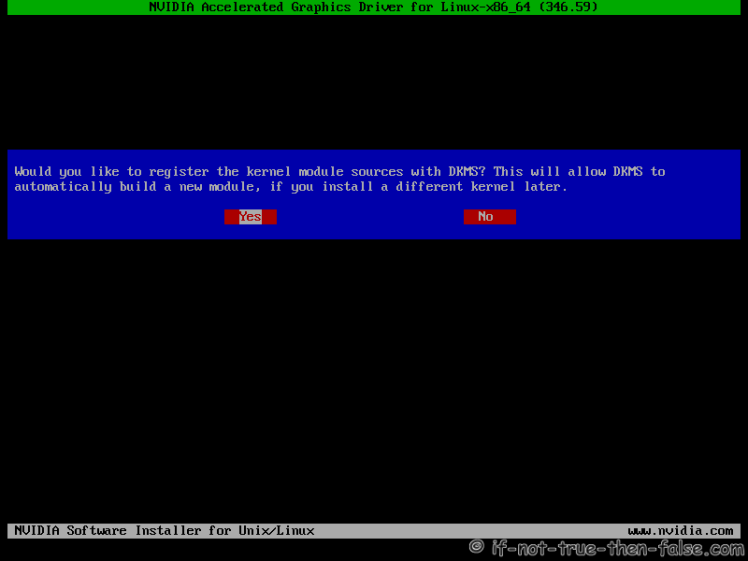
2.8.4 nVidia Installer Register the Kernel Source Modules with DKMS
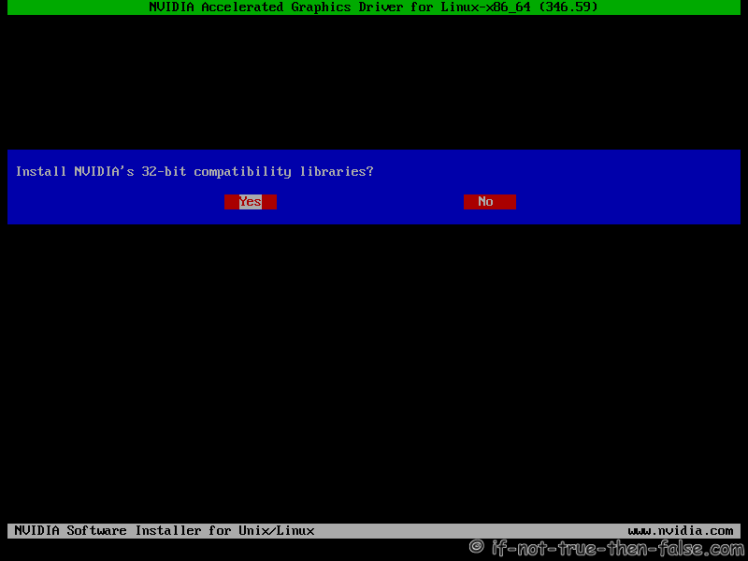
2.8.5 nVidia Installer 32-bit Compatibility Libraries
2.8.6 nVidia Installer Installing Drivers
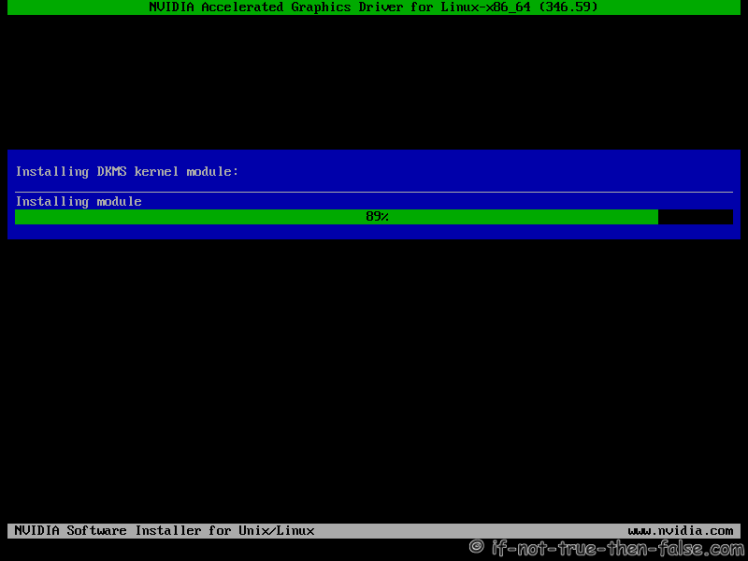
Note: Just ignore following errors:
Cannot create symlink /usr/lib/libGL.so.1 (File exists)

Cannot create symlink /usr/libGL.so (File exists)

Cannot create symlink /usr/libGLX-nvidia.so.0 (File exists)
This is bug and maybe fixed on next release. For more information check this.
2.8.7 nVidia Installer Xorg Backup
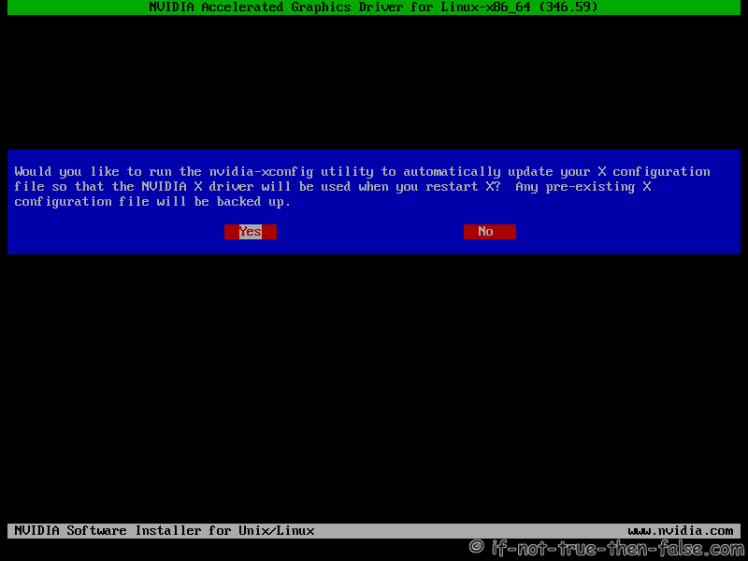
2.8.8 nVidia Drivers Installation Complete
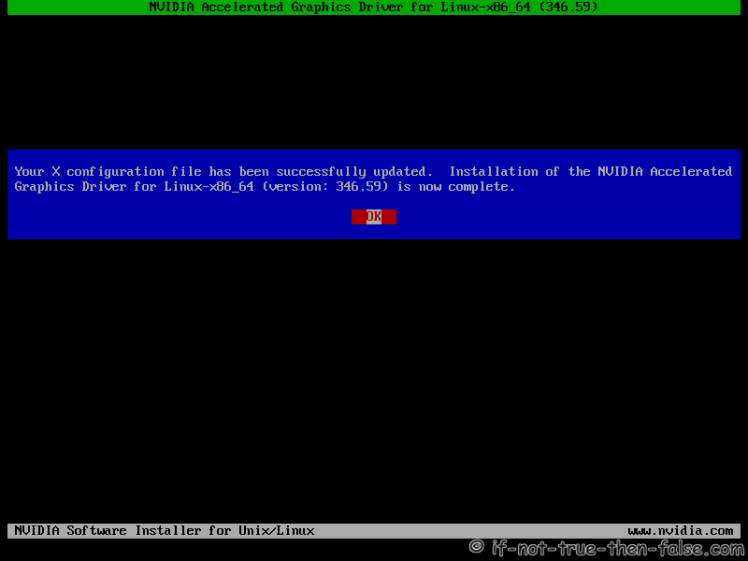
2.9 All Is Done and Then Reboot Back to Runlevel 5
systemctl set-default graphical.target

reboot
2.10 VDPAU/VAAPI support
To enable video acceleration support for your player (Note: you need Geforce 8 or later).
## Fedora 25/24/23/22 ##

dnf install vdpauinfo libva-vdpau-driver libva-utils

## Fedora 21 ##

yum install vdpauinfo libva-vdpau-driver libva-utils
3. Some Screenshots Using Different Cards and Drivers
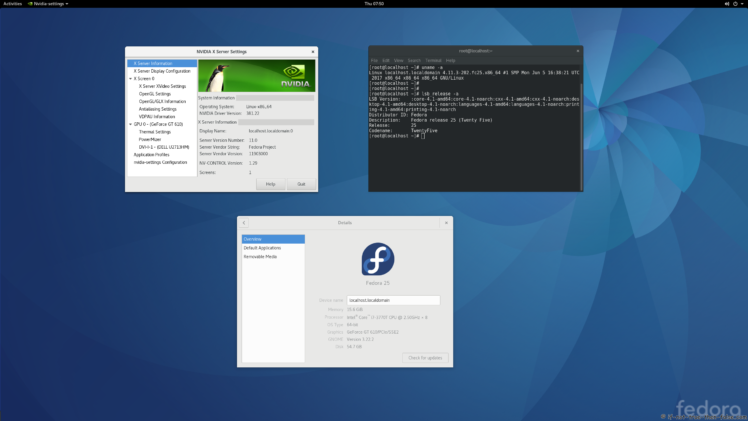
3.1 nVidia 381.22 drivers on Fedora 25 Gnome 3.22.2 with Kernel 4.11
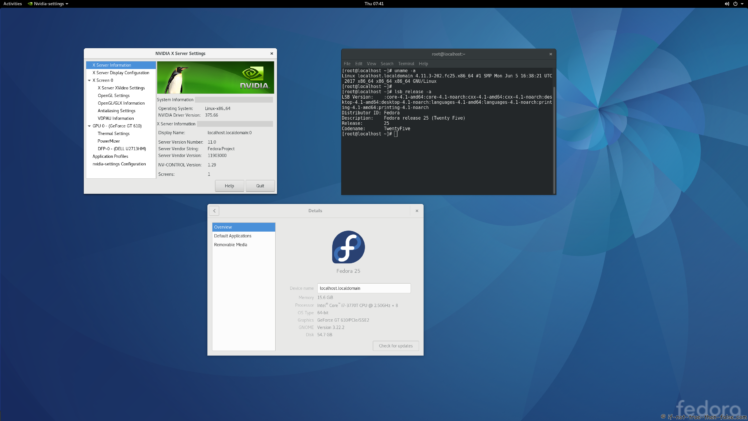
3.2 nVidia 375.66 drivers on Fedora 25 Gnome 3.22.2 Kernel 4.11
3.3 nVidia 340.102 drivers on Fedora 25 Gnome 3.22.2 with Kernel 4.9.11
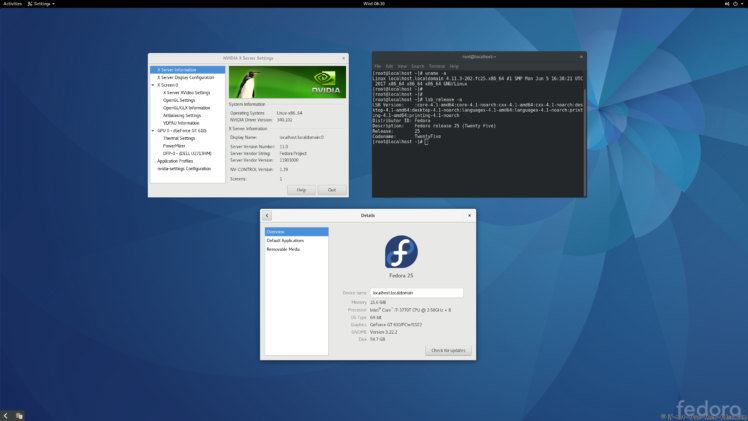
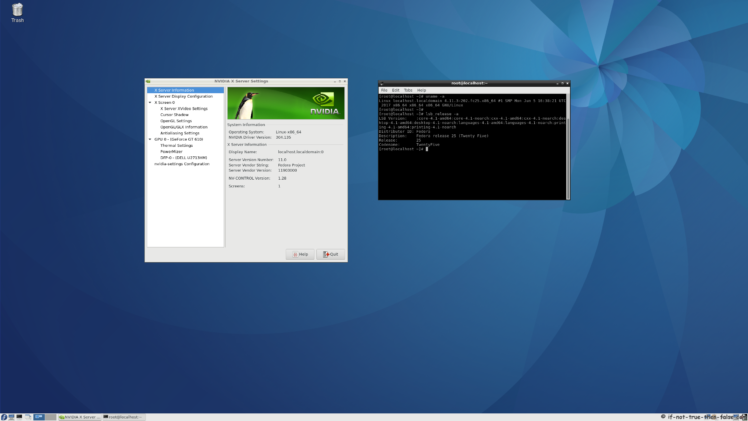
3.4 nVidia 304.135 drivers on Fedora 25 LXDE with Kernel 4.9.11
Let me know, if you have problems?
Or if you succeed, you could post output of following commands:
nvidia-installer -v |grep version

uname -a

lspci |grep -i VGA
Table of Contents
Table of Contents
1. Before nVidia drivers installation (Fedora 25/24/23/22/21)
2. Install nVidia proprietary drivers on Fedora 25/24/23/22/21 and disable the nouveau driver
3. Some Screenshots Using Different nVidia Cards and Drivers
4. Restore/Change/Update Plymouth After nVidia Drivers Installation (BIOS/UEFI Users)
5. Fedora 25/24/23/22/21 Uninstall nVidia drivers and Enable Nouveau
Related Posts
- navigate_next Fedora 20 nVidia Drivers Install / Uninstall / Restore Plymouth
- navigate_next Fedora 19 nVidia Drivers Install / Uninstall Guide
- navigate_next Fedora 18 nVidia Drivers Install / Uninstall Guide
- navigate_next Fedora 17 nVidia Drivers Install Guide (disable nouveau driver)
- navigate_next Fedora 16 nVidia Drivers Install Guide (disable nouveau driver)
1250 Comments
arrow_back Read comments (1250)
Leave a Comment
Your email address will not be published. Required fields are marked *
help
You may use these HTML tags and attributes: <a href="" title=""> <abbr title=""> <acronym title=""> <b> <blockquote cite=""> <cite> <code> <del datetime=""> <em> <i> <q cite=""> <s> <strike> <strong>
Most Popular Posts
- navigate_nextFedora 25/24/23 nVidia Drivers Install Guide
- navigate_nextInstall Skype 4.3 on Fedora 25/24, CentOS/RHEL/SL 7.3/6.9
- navigate_nextVirtualBox 5.1 on Fedora 25/24, CentOS/RHEL 7.3/6.9/5.11
- navigate_nextFedora 16 nVidia Drivers Install Guide (disable nouveau driver)
- navigate_nextAdobe Flash Player 26 on Fedora 25/24, CentOS/RHEL 7.3/6.9/5.11
Last Updated Posts
- navigate_nextInstall Oracle Java 8u131 on Fedora 25/24, CentOS/RHEL 7.3/6.9/5.11
- navigate_nextInstall Apache/PHP 7.1.6 on Fedora 25/24, CentOS/RHEL 7.3/6.9
- navigate_nextAdobe Flash Player 26 on Fedora 25/24, CentOS/RHEL 7.3/6.9/5.11
- navigate_nextFedora 25/24/23 nVidia Drivers Install Guide
- navigate_nextVirtualBox 5.1 on Fedora 25/24, CentOS/RHEL 7.3/6.9/5.11
Recent Posts
- navigate_nextUpgrade Fedora 25 from Fedora 24 Using DNF (F24 to F25)
- navigate_nextUpgrade Fedora 24 from Fedora 23 Using DNF (F23 to F24)
- navigate_nextFedora 23 Install Guide
- navigate_nextUpgrade Fedora 22 to Fedora 23 Using DNF (F22 to F23)
- navigate_nextFedora 22 Upgrade From 21 using FedUp
Recent Comments
- navigate_nextFernando on Fedora 25/24/23 nVidia Drivers Install Guide
- navigate_nextYaque on VirtualBox 5.1 on Fedora 25/24, CentOS/RHEL 7.3/6.9/5.11
- navigate_nextTony Stark on Fedora 25/24/23 nVidia Drivers Install Guide
- navigate_nextGert on Fedora 25/24/23 nVidia Drivers Install Guide
- navigate_nextJohn on VirtualBox Guest Additions on Fedora 25/24, CentOS/RHEL 7.3/6.8/5.11
Copyright 2017 If Not True Then False
Fedora 25/24/23 nVidia Drivers Install Guide的更多相关文章
- Install MySQL 5.7 on Fedora 25/24, CentOS/RHEL 7.3/6.8/5.11
MySQL is a relational database management system (RDBMS) that runs as a server providing multi-user ...
- How to install the NVIDIA drivers on Fedora 32
https://linuxconfig.org/how-to-install-the-nvidia-drivers-on-fedora-32 The NVIDIA Driver is a progra ...
- How to install the NVIDIA drivers on Ubuntu 18.04 Bionic Beaver Linux
Objective The objective is to install the NVIDIA drivers on Ubuntu 18.04 Bionic Beaver Linux. This a ...
- Fedora 25 Alpha版本今天发布啦
时隔Fedora 24发布后的3个月,Fedora项目团队非常开心的宣布任何感兴趣的用户都能下载和测试即将到来的Fedora 25操作系统的Alpha预发布版本,在Fedora 25 Alpha里程碑 ...
- Fix Elementary Boot Screen (plymouth) After Installing Nvidia Drivers
Q:I just installed propietary nvidia drivers, after that the glowing “e” plymouth theme was gone, on ...
- Win10 Theano Install Guide
basic install guide 1. download miniconda 2. conda install libpython mingw 3. conda install theano n ...
- Installation of NVIDIA Drivers in RHEL/CentOS and Fedora
1.首先安装所需的软件: # yum groupinstall "Development Tools" # yum install kernel-devel kernel-head ...
- freefcw/hustoj Install Guide
First of all, this version hustoj is a skin and improved for https://code.google.com/p/hustoj/. So t ...
- [原]Chef_Server and Chef_WorkStation and Chef_Client Install Guide[by haibo]
一.Prerequisite OS : CentOS-7.0-1406-x86_64-DVD.iso Time Server : NTP Server SERVER NAME IP PLAN ...
随机推荐
- [USACO07NOV]牛继电器Cow Relays (最短路,DP)
题目链接 Solution 非正解 似乎比较蛇啊,先个一个部分分做法,最短路+\(DP\). 在求最短路的堆或者队列中存储元素 \(dis_{i,j}\) 代表 \(i\) 这个节点,走了 \(j\) ...
- java面试题之java中用到的线程调度算法是什么
抢占式.一个线程用完CPU之后,操作系统会根据线程优先级.线程饥饿情况等数据算出一个总的优先级并分配下一个时间片给某个线程执行. 操作系统中可能会出现某条线程常常获取到VPU控制权的情况,为了让某些优 ...
- mysql的简单介绍
一 数据类型 分为数值类型,日期时间类型,字符串类型 菜鸟教程网址:http://www.runoob.com/mysql/mysql-data-types.html
- 定时任务管理之python篇celery使用
一.为什么要用celery celery是一个简单.灵活.可靠的,处理大量消息的分布式系统,并且提供维护这样一个系统的必须工具.他是一个专注于实时处理的任务队列,同时也支持任务调度. celery是异 ...
- 47深入理解C指针之---指针与硬件
一.size_t:用于安全表示长度,所有平台和系统都会解析成自己对应的长度 1.定义:size_t类型表示C中任何对象所能表示的最大长度,是个无符号整数:常常定义在stdio.h或stdlib.h中 ...
- linux shmget shmctl
shmgetint shmget(key_t key, size_t size, int flag);key: 标识符的规则size:共享存储段的字节数flag:读写的权限返回值:成功返回共享存储的i ...
- hdu 2841(容斥原理+状态压缩)
Visible Trees Time Limit: 2000/1000 MS (Java/Others) Memory Limit: 32768/32768 K (Java/Others)Tot ...
- 第1章 Spring Cloud 构建微服务架构(一)服务注册与发现
一.Spring Cloud 简介 Spring Cloud是一个基于Spring Boot实现的云应用开发工具,它为基于JVM的云应用开发中的配置管理.服务发现.断路器.智能路由.微代理.控制总 ...
- JAVA中获取不重复的随机数
我们知道 Random random = new Random() 中可能会获取到重复的随机数 那么假设要获取1到33之间的六个不重复随机数应该怎么做呢? 首先定义一个数字数组存储1到33 int[ ...
- Java创建和解析Json数据方法(五)——Google Gson包的使用
(五)Google Gson包的使用 1.简介 Gson包中,使用最多的是Gson类的toJson()和fromJson()方法: ①toJson():将java对象转化为json数据 ...