
x01.xiangqi: 走动棋子
采用 pygame 写的象棋程序,目前只完成绘制棋盘与走动棋子,还没考虑规则等问题。
1. 代码:
""" x01.xiangqi (c) 2019 by x01"""

import os, sys, pygame

from pygame.locals import *

BaseDir = os.path.dirname(os.path.abspath(__file__))

ImagePath = BaseDir + '/res/'

BoardWidth = 520

BoardHeight = 576

BoardEdge = 8

PieceSize = 56

# piece type

King = 0

Advisor = 1

Bishop = 2

Knight = 3

Rook = 4

Cannon = 5

Pawn = 6

Selected = 7

# piece types

types = [

    20, 19, 18, 17, 16, 17, 18, 19, 20,

    0,  0,  0,  0,  0,  0,  0,  0,  0,

    0, 21,  0,  0,  0,  0,  0, 21,  0,

    22,  0, 22,  0, 22,  0, 22,  0, 22,

    0,  0,  0,  0,  0,  0,  0,  0,  0,

    0,  0,  0,  0,  0,  0,  0,  0,  0,

    14,  0, 14,  0, 14,  0, 14,  0, 14,

    0, 13,  0,  0,  0,  0,  0, 13,  0,

    0,  0,  0,  0,  0,  0,  0,  0,  0,

    12, 11, 10,  9,  8,  9, 10, 11, 12

]

class Piece(object):

    def __init__(self, player, ptype, name, pos):

        self.player = player

        self.ptype = ptype

        self.name = name

        self.pos = pos

pieces = [

    # black

    Piece(0, King, "bk.bmp", (4,0)),

    Piece(0, Advisor, "ba.bmp", (3,0)),Piece(0, Advisor, "ba.bmp", (5,0)),

    Piece(0, Bishop, "bb.bmp", (2,0)), Piece(0, Bishop, "bb.bmp", (6,0)),

    Piece(0, Knight, "bn.bmp", (1,0)), Piece(0, Knight, "bn.bmp", (7,0)),

    Piece(0, Rook, "br.bmp", (0,0)), Piece(0, Rook, "br.bmp", (8,0)),

    Piece(0, Cannon, "bc.bmp", (1,2)), Piece(0, Cannon, "bc.bmp", (7,2)),

    Piece(0, Pawn, "bp.bmp", (0,3)), Piece(0, Pawn, "bp.bmp", (2,3)),

    Piece(0, Pawn, "bp.bmp", (4,3)),Piece(0, Pawn, "bp.bmp", (6,3)),Piece(0, Pawn, "bp.bmp", (8,3)),

    # red

    Piece(1, King, "rk.bmp", (4,9)),

    Piece(1, Advisor, "ra.bmp", (3,9)),Piece(1, Advisor, "ra.bmp", (5,9)),

    Piece(1, Bishop, "rb.bmp", (2,9)), Piece(1, Bishop, "rb.bmp", (6,9)),

    Piece(1, Knight, "rn.bmp", (1,9)), Piece(1, Knight, "rn.bmp", (7,9)),

    Piece(1, Rook, "rr.bmp", (0,9)), Piece(1, Rook, "rr.bmp", (8,9)),

    Piece(1, Cannon, "rc.bmp", (1,7)), Piece(1, Cannon, "rc.bmp", (7,7)),

    Piece(1, Pawn, "rp.bmp", (0,6)), Piece(1, Pawn, "rp.bmp", (2,6)),

    Piece(1, Pawn, "rp.bmp", (4,6)),Piece(1, Pawn, "rp.bmp", (6,6)),Piece(1, Pawn, "rp.bmp", (8,6)),

    # selected

    Piece(2, Selected, 'selected.bmp', (0,0))

]

# type index

def index(pos):

    col,row = pos[0], pos[1]

    return row * 9 + col

def draw(surface, name, xy, ispiece=True):

    img = pygame.image.load(ImagePath + name).convert()

    if ispiece:

        img.set_colorkey((0,255,0))

    surface.blit(img, xy)

def draw_pieces(surface):

    for p in pieces[:-1]:

        x = p.pos[0] * PieceSize + BoardEdge

        y = p.pos[1] * PieceSize + BoardEdge

        draw(surface, p.name, (x,y))

def run():

    pygame.init()

    screen = pygame.display.set_mode((BoardWidth, BoardHeight),0,32)

    pygame.display.set_caption('x01.xiangqi')

    draw(screen, 'board.bmp', (0,0), False)

    draw_pieces(screen)

    prevPiece = None

    player = 1

    clock = pygame.time.Clock()

    while True:

        for event in pygame.event.get():

            if event.type == QUIT:

                sys.exit()

            if event.type == KEYDOWN:

                if event.key == K_ESCAPE:

                    sys.exit()

            if event.type == MOUSEBUTTONDOWN:

                x,y = pygame.mouse.get_pos()

                x,y = ((x // PieceSize) * PieceSize + BoardEdge, (y//PieceSize)*PieceSize + BoardEdge)

                pos = (x//PieceSize, y//PieceSize)

                draw(screen,'board.bmp',(0,0),False)

                draw_pieces(screen)

                pieces[-1].pos = pos

                draw(screen, pieces[-1].name, (x,y))

                for p in pieces[:-1]:

                    if p.pos == pos:

                        prevPiece = p

                        break

                if types[index(pos)] == 0 and prevPiece != None:

                    if player != prevPiece.player:

                        continue

                    player = 1 - player

                    if prevPiece.player == 0:

                        types[index(pos)] = prevPiece.ptype + 16

                    elif prevPiece.player == 1:

                        types[index(pos)] = prevPiece.ptype + 8

                    types[index(prevPiece.pos)] = 0

                    for p in pieces[:-1]:

                        if p.pos == prevPiece.pos:

                            p.pos = pos

                            break

                    prevPiece = None

                    draw(screen,'board.bmp',(0,0),False)

                    draw_pieces(screen)

                    draw(screen, pieces[-1].name, (x,y))

        clock.tick(40)

        pygame.display.update()

if __name__ == '__main__':

    run()
main.py
2. 效果图:
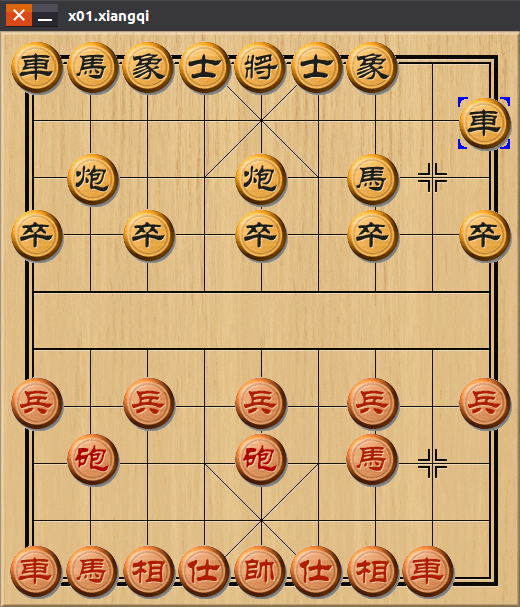
3. 下载链接:(x01.lab => py => xiangqi)
附: md 批量转换到 pdf 文件
a) 需安装 pandoc, 拷贝 template.tex 到 /usr/share/pandoc/data/templates/ 目录中。
b) 需安装中文字体。
c) 需安装 xelatex.
d) 代码 md2pdfs.py 及模板 template.tex 如下:
from pathlib import Path

import os

def md2pdfs(currdir='.'):

    dir = os.path.abspath(currdir)

    files = os.listdir(dir)

    for f in files:

        path = os.path.join(dir, f)

        if os.path.isdir(path):

            md2pdfs(path)

            dir = os.path.dirname(path)

            continue

        name = os.path.splitext(f)[0]

        ext = os.path.splitext(f)[1]

        if ext == '.md':

            mdfile = f

            pdffile = name + '.pdf'

            os.chdir(dir)

            print(os.getcwd() + '/' + f)

            cmd = "pandoc '{0}' -o '{1}' --latex-engine=xelatex -V mainfont='PingFang SC' --template=template.tex".format(mdfile, pdffile)

            os.system(cmd)

if __name__ == '__main__':

    md2pdfs()
md2pdfs.py
\documentclass[12pt]{article}

\usepackage{xeCJK}

\setCJKmainfont{SimSun}

$if(fontfamily)$

\usepackage{$fontfamily$}

$else$

\usepackage{lmodern}

$endif$

$if(linestretch)$

\usepackage{setspace}

\setstretch{$linestretch$}

$endif$

% 图片设置

\usepackage{graphicx}

% 可以指定根目录下的image文件夹为图片文件夹

\graphicspath{{image/}}

% 页面设置

\usepackage[a4paper]{geometry}

\geometry{

    left=2.54cm,

    right=2.54cm,

    top=3.18cm,

    bottom=3.18cm,

    footskip=1.48cm,

    headsep=.5cm,

    headheight=1.5cm

}

\usepackage{amssymb,amsmath}

\usepackage{ifxetex,ifluatex}

\usepackage{fixltx2e} % provides \textsubscript

\ifnum 0\ifxetex 1\fi\ifluatex 1\fi=0 % if pdftex

  \usepackage[T1]{fontenc}

  \usepackage[utf8]{inputenc}

$if(euro)$

  \usepackage{eurosym}

$endif$

\else % if luatex or xelatex

  \ifxetex

    \usepackage{xltxtra,xunicode}

  \else

    \usepackage{fontspec}

  \fi

  \defaultfontfeatures{Mapping=tex-text,Scale=MatchLowercase}

  \newcommand{\euro}{€}

% $if(mainfont)$

%     \setmainfont{$mainfont$}

% $endif$

% $if(sansfont)$

%     \setsansfont{$sansfont$}

% $endif$

% $if(monofont)$

%     \setmonofont[Mapping=tex-ansi]{$monofont$}

% $endif$

% $if(CJKmainfont)$

%     \usepackage{xeCJK}

%     \setCJKmainfont[$CJKoptions$]{$CJKmainfont$}

% $endif$

% 字体的设置,可以自行修改

% \usepackage{xeCJK}

% 【推荐】第一种设置

% XeLaTeX在编译时会自动选择思源宋体的bold部分

% 不设置monofont,因为有些字符在其他指定字符的出现变形,不如默认字体美观

% \setCJKmainfont{思源宋体 CN}

% \setCJKsansfont{思源黑体 CN}

% \setmainfont{思源宋体 CN}

% \setsansfont{思源黑体 CN}

% 【列示】第二种设置

% \setCJKmainfont{思源宋体}[BoldFont = 思源黑体 Regular]

%\setCJKmonofont{思源黑体 Light}

% \setCJKsansfont{思源黑体 Regular}

% \setmainfont{IBM Plex Serif}

% \setmonofont{IBM Plex Mono}

% \setsansfont{IBM Plex Sans}

\fi

% use upquote if available, for straight quotes in verbatim environments

\IfFileExists{upquote.sty}{\usepackage{upquote}}{}

% use microtype if available

\IfFileExists{microtype.sty}{%

\usepackage{microtype}

\UseMicrotypeSet[protrusion]{basicmath} % disable protrusion for tt fonts

}{}

\ifxetex

  \usepackage[setpagesize=false, % page size defined by xetex

              unicode=false, % unicode breaks when used with xetex

              xetex]{hyperref}

\else

  \usepackage[unicode=true]{hyperref}

\fi

\usepackage[usenames,dvipsnames]{color}

\hypersetup{breaklinks=true,

            bookmarks=true,

            pdfauthor={$author-meta$},

            pdftitle={$title-meta$},

            colorlinks=true,

            citecolor=$if(citecolor)$$citecolor$$else$blue$endif$,

            urlcolor=$if(urlcolor)$$urlcolor$$else$blue$endif$,

            linkcolor=$if(linkcolor)$$linkcolor$$else$magenta$endif$,

            pdfborder={0 0 0}}

\urlstyle{same}  % don't use monospace font for urls

$if(lang)$

\ifxetex

  \usepackage{polyglossia}

  \setmainlanguage{$mainlang$}

  \setotherlanguages{$for(otherlang)$$otherlang$$sep$,$endfor$}

\else

  \usepackage[shorthands=off,$lang$]{babel}

\fi

$endif$

$if(natbib)$

\usepackage{natbib}

\bibliographystyle{$if(biblio-style)$$biblio-style$$else$plainnat$endif$}

$endif$

$if(biblatex)$

\usepackage{biblatex}

$for(bibliography)$

\addbibresource{$bibliography$}

$endfor$

$endif$

$if(listings)$

\usepackage{listings}

$endif$

$if(lhs)$

\lstnewenvironment{code}{\lstset{language=Haskell,basicstyle=\small\ttfamily}}{}

$endif$

$if(highlighting-macros)$

$highlighting-macros$

$endif$

$if(verbatim-in-note)$

\usepackage{fancyvrb}

\VerbatimFootnotes

$endif$

$if(tables)$

\usepackage{longtable,booktabs}

$endif$

$if(graphics)$

\usepackage{graphicx,grffile}

\makeatletter

\def\maxwidth{\ifdim\Gin@nat@width>\linewidth\linewidth\else\Gin@nat@width\fi}

\def\maxheight{\ifdim\Gin@nat@height>\textheight\textheight\else\Gin@nat@height\fi}

\makeatother

% Scale images if necessary, so that they will not overflow the page

% margins by default, and it is still possible to overwrite the defaults

% using explicit options in \includegraphics[width, height, ...]{}

\setkeys{Gin}{width=\maxwidth,height=\maxheight,keepaspectratio}

$endif$

$if(links-as-notes)$

% Make links footnotes instead of hotlinks:

\renewcommand{\href}[2]{#2\footnote{\url{#1}}}

$endif$

$if(strikeout)$

\usepackage[normalem]{ulem}

% avoid problems with \sout in headers with hyperref:

\pdfstringdefDisableCommands{\renewcommand{\sout}{}}

$endif$

\setlength{\emergencystretch}{3em}  % prevent overfull lines

\providecommand{\tightlist}{%

  \setlength{\itemsep}{0pt}\setlength{\parskip}{0pt}}

$if(numbersections)$

\setcounter{secnumdepth}{5}

$else$

\setcounter{secnumdepth}{0}

$endif$

$if(verbatim-in-note)$

\VerbatimFootnotes % allows verbatim text in footnotes

$endif$

$if(title)$

\title{\bfseries \huge $title$$if(subtitle)$\\\vspace{0.5cm}{\Large  $subtitle$}$endif$}

$endif$

$if(author)$

\author{\LARGE $for(author)$$author$$sep$ \and $endfor$}

$endif$

\date{{\large \today}}

$for(header-includes)$

$header-includes$

$endfor$

% Redefines (sub)paragraphs to behave more like sections

\ifx\paragraph\undefined\else

\let\oldparagraph\paragraph

\renewcommand{\paragraph}[1]{\oldparagraph{#1}\mbox{}}

\fi

\ifx\subparagraph\undefined\else

\let\oldsubparagraph\subparagraph

\renewcommand{\subparagraph}[1]{\oldsubparagraph{#1}\mbox{}}

\fi

\begin{document}

$if(title)$

\maketitle

$endif$

$if(abstract)$

\begin{abstract}

$abstract$

\end{abstract}

$endif$

$for(include-before)$

$include-before$

$endfor$

$if(toc)$

{

\setcounter{tocdepth}{$toc-depth$}

\tableofcontents

}

$endif$

$if(lot)$

\listoftables

$endif$

$if(lof)$

\listoffigures

$endif$

$body$

$if(natbib)$

$if(bibliography)$

$if(biblio-title)$

$if(book-class)$

\renewcommand\bibname{$biblio-title$}

$else$

\renewcommand\refname{$biblio-title$}

$endif$

$endif$

\bibliography{$for(bibliography)$$bibliography$$sep$,$endfor$}

$endif$

$endif$

$if(biblatex)$

\printbibliography$if(biblio-title)$[title=$biblio-title$]$endif$

$endif$

$for(include-after)$

$include-after$

$endfor$

\end{document}
template.tex
e) 合并 pdf 代码 merge_pdf.py 如下:
# merge_pdf.py

# usage:

#   复制到目标目录,由终端进入,运行 "python3 merge_pdf.py" 命令即可。

import os

from PyPDF2 import PdfFileReader, PdfFileWriter

filenames = []

outfile = '../temp.pdf'

def getfiles(curr_dir='.', ext='.pdf'):

    global filenames

    dir = os.path.abspath(curr_dir)

    files = os.listdir(dir)

    for f in files:

        path = os.path.join(dir,f)

        if os.path.isdir(path):

            getfiles(path, ext)

            continue

        extname = os.path.splitext(f)[1]

        if ext == extname:

            filenames.append(os.path.join(dir,f))

def merge():

    getfiles()

    filenames.sort()

    writer = PdfFileWriter()

    pages = 0

    for f in filenames:

        print(f)

        reader = PdfFileReader(open(f, 'rb'))

        count = reader.getNumPages()

        pages += count

        for i in range(count):

            writer.addPage(reader.getPage(i))

        writer.addBookmark(os.path.basename(f)[:-3],pages - count)

    stream = open(outfile, 'wb')

    writer.write(stream)

    stream.close()

    print("OK!")

def test(dir='.'):

    dirs = os.listdir(dir)

    for f in dirs:

        if os.path.isdir(f):

            test(f)

            continue

        print(f)

if __name__ == '__main__':

    filenames.clear()

    merge()
merge_pdf.py
又:github 上的 python-100 项目转换后的下载链接: py100days.pdf
x01.xiangqi: 走动棋子的更多相关文章
- x01.Weiqi.12: 定式布局
定式 下一步当将定式保存到数据库中,如布局中的代码所示,但其初始的代码更有利于理解.以小飞挂为例: // 0 // + 0 0 // + // // + List<Pos> P_LuSta ...
- x01.Weiqi.7: 调整重绘
GitHub 谁方便谁拍,谁重要拍谁.在这个砖头满天飞的时代,一个好的生态显得尤为重要. 红颜小头发,要的很简单. 也许成绝唱,只因鱼断肠. 姚贝福娃的离去,除感叹人生无常外,活着做点有意义的事情, ...
- HDU 4121 Xiangqi 我老了?
Xiangqi Time Limit: 2000/1000 MS (Java/Others) Memory Limit: 32768/32768 K (Java/Others)Total Sub ...
- HDU 4121 Xiangqi 模拟题
Xiangqi Time Limit: 20 Sec Memory Limit: 256 MB 题目连接 http://acm.hdu.edu.cn/showproblem.php?pid=4121 ...
- JavaScript中国象棋程序(2) - 校验棋子走法
"JavaScript中国象棋程序" 这一系列教程将带你从头使用JavaScript编写一个中国象棋程序.这是教程的第2节. 这一系列共有9个部分: 0.JavaScript中国象 ...
- Uva - 1589 - Xiangqi
Xiangqi is one of the most popular two-player board games in China. The game represents a battle bet ...
- Xiangqi(简单模拟)
4746: Xiangqi 时间限制(普通/Java):1000MS/3000MS 内存限制:65536KByte 总提交: 15 测试通过:2 描述 Xiangqi i ...
- x01.Tetris: 俄罗斯方块
最强大脑有个小孩玩俄罗斯方块游戏神乎其技,那么,就写一个吧,玩玩而已. 由于逻辑简单,又作了一些简化,所以代码并不多. using System; using System.Collections.G ...
- x01.MagicCube: 简单操作
看最强大脑,发现魔方还是比较好玩的,便买了一个,对照七步还原法,居然也能成功还原. 为什么不写一个魔方程序呢?在网上找了找,略作修改,进行简单操作,还是不错的,其操作代码如下: protected o ...
随机推荐
- asp.net 在IIS上配置出现的一些问题
1.可能会遇到一下图的错无.请求的内容似乎是脚本.因而将无法由静态文件处理程序来处理---大概的原因是应用程序池选择错误了.如第二幅图如此解决即可 解决方案如下两个图所示. 我遇到了以上的问题之后能也 ...
- android中AudioRecord使用
一 什么是音频的采样率和采样大小 自然界中的声音非常复杂,波形极其复杂,通常我们采用的是脉冲代码调制编码.即PCM编码.PCM通过抽样.量化.编码三个步骤将连续变化的模拟信号转换为数字编码. 抽样:在 ...
- cmd对其他盘符进行操作
一般我们打开cmd命令时,会出现如下界面: 现在,我想要对g盘进行操作,则输入 --> g:,然后回车,如图: 可以查看一下g盘下的所有子目录,输入 --> dir,回车,结果如下: 我想 ...
- vue实现选中列表功能
<template> <div> <ul v-for="prop in items"> <dt>{{prop.name}}</ ...
- ABAP:从例子学习ABAP
1.插入内表行: *插入内表行: DATA: BEGIN OF man, name(20) TYPE c, high TYPE p DECIMALS 2, weight TYPE p DECIMALS ...
- iOS-加载数据的实现-MJRefresh
使用CocoaPods加载三方库: pod 'MJRefresh' MJRefresh类结构图: 具体实现方法和效果图: The drop-down refresh 01-Default self.t ...
- 高德地图 获取sha1
开发版本sha1 控制台输入 cd .android 回车 再输入 keytool -list -v -keystore debug.keystore 回车 输入密钥库口令: andorid ...
- oracle最高账号sys的密码认证模式
CONNECT USERNAME/PASSWORD@SERVERNAME AS SYSDBAconnect 是指连接到username是指用户名password是指密码servername是指服务名a ...
- Python学习笔记-day1(if流程控制)
在python中,流程控制语句为强制缩进(4空格) if username=='lmc' and password=='123456': print('Welcome User {name} logi ...
- echo -e的用法
root@bt:~# echo -e "HEAD /HTTP/1.0\n\n"HEAD /HTTP/1.0 root@bt:~# echo -e "HEAD /HTTP/ ...