
CoreAnimation--CALayer的动画
CoreAnimation--CALayer的动画
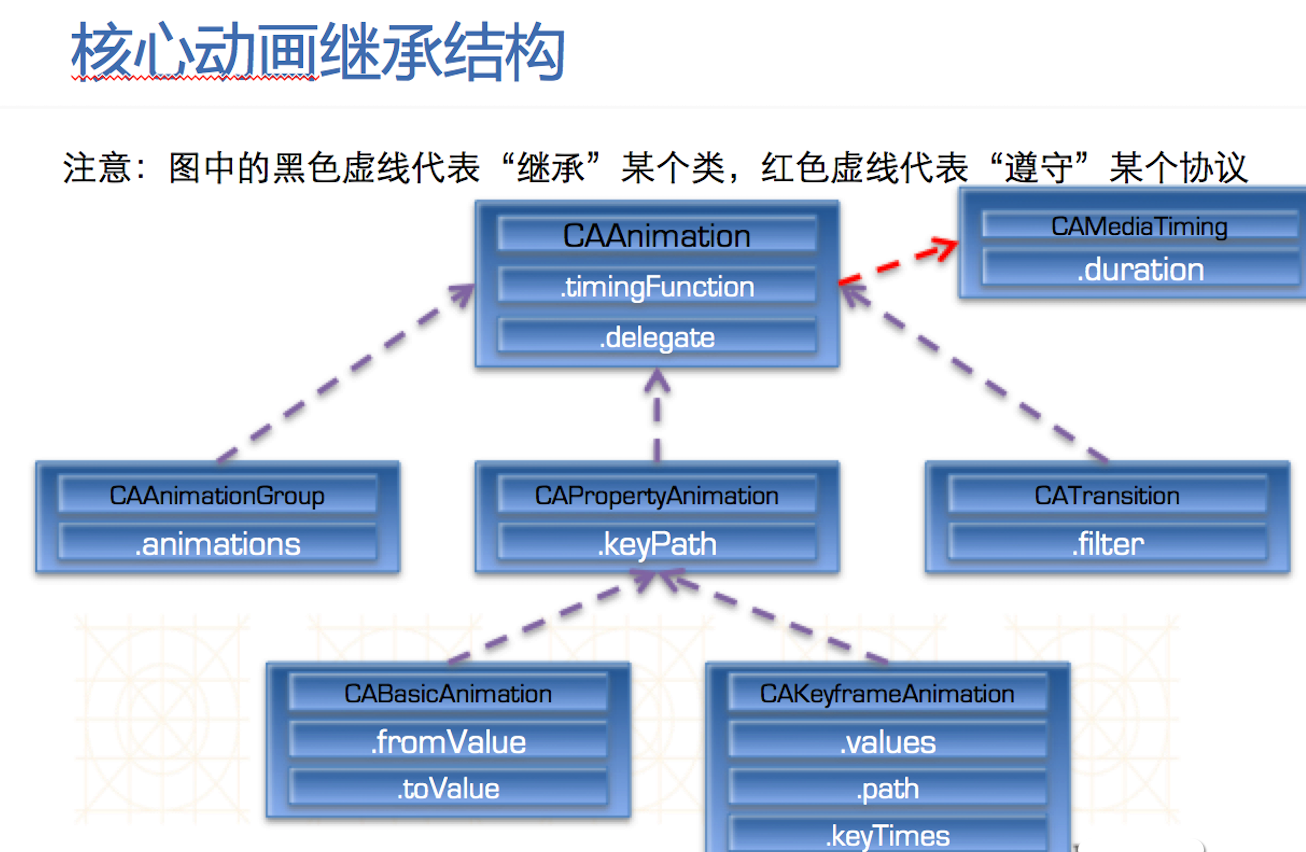
核心动画中所有类都遵守CAMediaTiming
CAAnaimation和CAPropertyAnimation都是抽象类,本身不具备动画效果,必须用它的子类才有动画效果。
CAAnimationGroup是个动画组,可以同时进行缩放,旋转。
CABasicAnimation基本动画,做一些简单效果。
CAKeyframeAnimation帧动画,做一些连续的流畅的动画。
CATransition是转场动画,界面之间跳转都可以用转场动画。
ios layer 动画-(transform.scale篇)
CABasicAnimation *theAnimation;
theAnimation=[CABasicAnimation animationWithKeyPath:@"transform.scale.x"];
theAnimation.duration=8;
theAnimation.removedOnCompletion = YES;
theAnimation.fromValue = [NSNumber numberWithFloat:1];
theAnimation.toValue = [NSNumber numberWithFloat:0.5];
[yourView.layer addAnimation:theAnimation forKey:@"animateTransform"];
y轴缩放:
CABasicAnimation *theAnimation;
theAnimation=[CABasicAnimation animationWithKeyPath:@"transform.scale.y"];
theAnimation.duration=8;
theAnimation.removedOnCompletion = YES;
theAnimation.fromValue = [NSNumber numberWithFloat:1];
theAnimation.toValue = [NSNumber numberWithFloat:0.5];
[yourView.layer addAnimation:theAnimation forKey:@"animateTransform"];
x轴,y轴同时按比例缩放:
CABasicAnimation *theAnimation;
theAnimation=[CABasicAnimation animationWithKeyPath:@"transform.scale"];
theAnimation.duration=8;
theAnimation.removedOnCompletion = YES;
theAnimation.fromValue = [NSNumber numberWithFloat:1];
theAnimation.toValue = [NSNumber numberWithFloat:0.5];
[yourView.layer addAnimation:theAnimation forKey:@"animateTransform"];
以上缩放是以view的中心点为中心缩放的,如果需要自定义缩放点,可以设置卯点:
//中心点
[yourView.layer setAnchorPoint:CGPointMake(0.5, 0.5)];
//左上角
[yourView.layer setAnchorPoint:CGPointMake(0, 0)];
//右下角
[yourView.layer setAnchorPoint:CGPointMake(1, 1)];
ios layer 动画-(transform.rotation篇)
CABasicAnimation *theAnimation;
theAnimation=[CABasicAnimation animationWithKeyPath:@"transform.rotation.x"];
theAnimation.duration=8;
theAnimation.removedOnCompletion = YES;
theAnimation.fromValue = [NSNumber numberWithFloat:0];
theAnimation.toValue = [NSNumber numberWithFloat:3.1415926];
[yourView.layer addAnimation:theAnimation forKey:@"animateTransform"];
y轴旋转:
CABasicAnimation *theAnimation;
theAnimation=[CABasicAnimation animationWithKeyPath:@"transform.rotation.y"];
theAnimation.duration=8;
theAnimation.removedOnCompletion = YES;
theAnimation.fromValue = [NSNumber numberWithFloat:0];
theAnimation.toValue = [NSNumber numberWithFloat:3.1415926];
[yourView.layer addAnimation:theAnimation forKey:@"animateTransform"];
z轴旋转:
CABasicAnimation *theAnimation;
theAnimation=[CABasicAnimation animationWithKeyPath:@"transform.rotation.z"];
theAnimation.duration=8;
theAnimation.removedOnCompletion = YES;
theAnimation.fromValue = [NSNumber numberWithFloat:0];
theAnimation.toValue = [NSNumber numberWithFloat:3.1415926];
[yourView.layer addAnimation:theAnimation forKey:@"animateTransform"];
以上缩放是以view的中心点为中心缩放的,如果需要自定义缩放点,可以设置卯点:
//中心点
[yourView.layer setAnchorPoint:CGPointMake(0.5, 0.5)];
//左上角
[yourView.layer setAnchorPoint:CGPointMake(0, 0)];
//右下角
[yourView.layer setAnchorPoint:CGPointMake(1, 1)];
可设参数:
theAnimation.repeatCount = 0;
theAnimation.autoreverses = NO;
旋转的另一种实现:(以下代码绕z轴旋转180度)
[self.topViewController.view.layer setAnchorPoint:CGPointMake(0.5, 0.5)];
[self.topViewController.view.layer setTransform:CATransform3DMakeRotation(0, 0, 0, 1)];
[UIView animateWithDuration:8 delay:0.0f options:UIViewAnimationOptionAllowUserInteraction | UIViewAnimationCurveEaseIn animations:^{
[self.topViewController.view.layer setTransform:CATransform3DMakeRotation(3.1415926, 0, 0, 1)];
} completion:^(BOOL finished) {
}];
CATransition 过渡动画
CATransition *animation = [CATransition animation];
animation.duration = 0.3;
animation.type = @"cube"; //转场动画type见后文
animation.subtype = kCATransitionFromLeft;
[[self.tableView layer] addAnimation:animation forKey:@"myAnimation"];
animation.fillMode = kCAFillModeBackwards;
animation.startProgress = 0.01;
animation.endProgress = 0.99;
使用过渡动画,实现在同一个view上,左推,右推等各种动画,节省一个view;
参数说明:
setType:可以返回四种类型:
kCATransitionFade淡出
kCATransitionMoveIn覆盖原图
kCATransitionPush推出
kCATransitionReveal底部显出来
setSubtype:也可以有四种类型:
kCATransitionFromRight;
kCATransitionFromLeft(默认值)
kCATransitionFromTop;
kCATransitionFromBottom
[animation setType:@"type类型"]; 可用的type类型主要有:
pageCurl 向上翻一页
pageUnCurl 向下翻一页
rippleEffect 滴水效果
suckEffect 收缩效果,如一块布被抽走
cube 立方体效果
oglFlip 上下翻转效果
/** 转场动画type一览表 **/
fade 交叉淡化过渡
push 新视图把旧视图推出去
moveIn 新视图移到旧视图上面
reveal 将旧视图移开,显示下面的新视图
cube 立方体翻滚效果
oglFlip 上下左右翻转效果
suckEffect 收缩效果,如一块布被抽走
rippleEffect 水滴效果
pageCurl 向上翻页效果
pageUnCurl 向下翻页效果
cameraIrisHollowOpen 相机镜头打开效果
cameraIrisHollowClose 相机镜头关闭效果
转自:http://blog.163.com/it__man/blog/static/137199904201301722556447/
CoreAnimation--CALayer的动画的更多相关文章
- CoreAnimation (CALayer 动画)
CoreAnimation基本介绍: CoreAnimation动画位于iOS框架的Media层 CoreAnimation动画实现需要添加QuartzCore.Framework CoreAnima ...
- iOS 用CALayer实现动画
与动画有关的几个类的继承关系 涉及到动画的类主要有6个,看一下它们的基本用途: 1. CAAnimation 动画基类 2. CAAnimationGroup 组合多个动画 3. CAPropert ...
- CALayer帧动画
CALayer帧动画 _sunLayer = [[CALayer alloc]init]; _sunLayer.contents = (id)[UIImage imageNamed:@"su ...
- Quartz2D复习(四) --- 图层CALayer和动画CAAnimation
1.CALayer 1).在ios中,能看得见摸得着的东西基本上都是UIView, 比如按钮.文本标签.文本输入框.图标等,这些都是UIView 2).UIView之所以能显示在屏幕上,完全是因为它内 ...
- CoreAnimation —— CALayer
概述 如上篇博文讲述,UIView中封装了很多系统方法,可以满足我们的大部分需求.但是,其也有很多限制.那些方法产生的动画基本单元为UIView,是非常重量级的对象,而且也不支持三维布局,大部分是对视 ...
- [iOS Animation]-CALayer 定时器动画
定时器的动画 我可以指导你,但是你必须按照我说的做. -- 骇客帝国 在第10章“缓冲”中,我们研究了CAMediaTimingFunction,它是一个通过控制动画缓冲来模拟物理效果例如加速或者减速 ...
- [iOS Animation]-CALayer 显示动画
显式动画 如果想让事情变得顺利,只有靠自己 -- 夏尔·纪尧姆 上一章介绍了隐式动画的概念.隐式动画是在iOS平台创建动态用户界面的一种直接方式,也是UIKit动画机制的基础,不过它并不能涵盖所有的动 ...
- CoreAnimation中layer动画闪烁的原因及解决
大熊猫猪·侯佩原创或翻译作品.欢迎转载,转载请注明出处. 如果觉得写的不好请多提意见,如果觉得不错请多多支持点赞.谢谢! hopy ;) 网上有一段Core Animation层动画的例子,是将vie ...
- iOS:CALayer核心动画层
CALayer:核心动画层 简介: Core Animation 是跨平台的,支持iOS环境和Mac OS X环境 学习核心动画之前,需要先理解CALayer,因为核心动画操作的对象不是UIView, ...
- iOS:CALayer核心动画层上绘图
在CALayer上绘图: •要在CALayer上绘图,有两种方法: 1.创建一个CALayer的子类,然后覆盖drawInContext:方法,可以使用Quartz2D API在其中进行绘图 2.设置 ...
随机推荐
- OpenResty 通过二级域名做跳转
if ( $host ~* (\b(?!www\b)\w+)\.\w+\.\w+ ) { #获取nba.test.com域名中的nba set $subdomain $1; } location / ...
- 洛谷 P1014 Cantor表 Label:续命模拟QAQ
题目描述 现代数学的著名证明之一是Georg Cantor证明了有理数是可枚举的.他是用下面这一张表来证明这一命题的: 1/1 1/2 1/3 1/4 1/5 … 2/1 2/2 2/3 2/4 … ...
- 3分钟wamp中php安装 pear 然而并没有用 并没能借此安装phpunit 不得不借用了其他的方式安装phpunit
15:42 2015/11/233分钟wamp中php安装 pear环境介绍:windows10,wamp2.5(推荐博客的博主是win7,所以系统应该不是问题)注意:在过程中要输入一次 yes,不要 ...
- 【BZOJ】3621: 我想那还真是令人高兴啊
http://www.lydsy.com/JudgeOnline/problem.php?id=3621 题意:给两个三角形,问A能否通过旋转伸缩到B. #include <bits/stdc+ ...
- 【BZOJ】2242: [SDOI2011]计算器
http://www.lydsy.com/JudgeOnline/problem.php?id=2242 题意:(前两个问略...)第三个问是,求$a^x \equiv b \pmod{p}$最小的$ ...
- bug:clang: error: no input files
1.clang: error: no input files这个问题一般是因为你删除或者移动了某一个文件,但是在你的编译资源里面( project > target > Build Pha ...
- Hibernate条件查询
设计上可以灵活的根据 Criteria 的特点来方便地进行查询条件的组装.现在对 Hibernate的Criteria 的用法进行总结:Hibernate 设计了 CriteriaSpecificat ...
- 利用jdk自带的运行监控工具JConsole观察分析Java程序的运行
利用jdk自带的运行监控工具JConsole观察分析Java程序的运行 原文链接 一.JConsole是什么 从Java 5开始 引入了 JConsole.JConsole 是一个内置 Java 性能 ...
- [CareerCup] 18.7 Longest Word 最长的单词
5.7 Given a list of words, write a program to find the longest word made of other words in the list. ...
- JAVA6开发WebService (一)
转载自http://wuhongyu.iteye.com/blog/807470 WebService是SOA的一种较好的实现方式,它将应用程序的不同功能单元通过中立的契约(独立于硬件平台.操作系统和 ...