
3.9 run_main.py源码(兼容python2和3)
3.9 run_main.py源码(兼容python2和3)
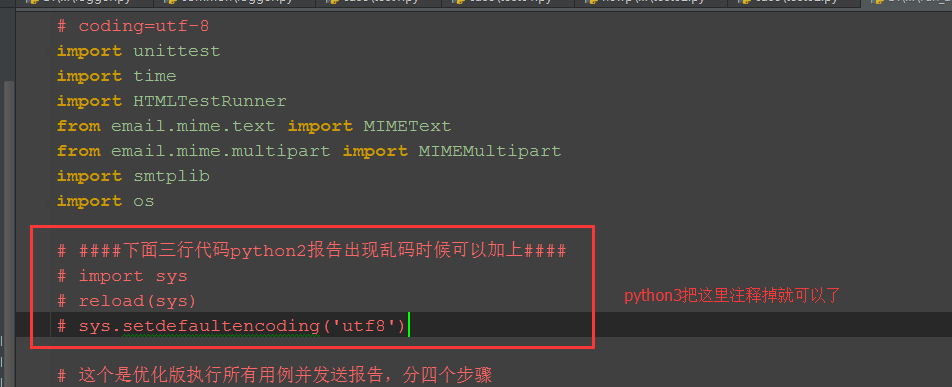
以下代码在python2和python3上都跑通过,python3只需注释掉上面红色框框区域代码就行(最后一步发送邮箱代码,我注释掉了)。

# coding=utf-8

import unittest

import time

import HTMLTestRunner

from email.mime.text import MIMEText

from email.mime.multipart import MIMEMultipart

import smtplib

import os

####下面三行代码python2报告出现乱码时候可以加上####

import sys

reload(sys)

sys.setdefaultencoding('utf8')

# 这个是优化版执行所有用例并发送报告,分四个步骤

# 第一步加载用例

# 第二步执行用例

# 第三步获取最新测试报告

# 第四步发送邮箱 (这一步不想执行的话,可以注释掉最后面那个函数就行)

def add_case(case_path, rule):

    '''加载所有的测试用例'''

    testunit = unittest.TestSuite()

    # 定义discover方法的参数

    discover = unittest.defaultTestLoader.discover(case_path,

                                                  pattern=rule,

                                                  top_level_dir=None)

    # discover方法筛选出来的用例,循环添加到测试套件中

    # for test_suite in discover:

    #     for test_case in test_suite:

    #         testunit.addTests(test_case)

    #         print testunit

    testunit.addTests(discover)  # 直接加载discover

    print(testunit)

    return testunit

def run_case(all_case, report_path):

    '''执行所有的用例, 并把结果写入测试报告'''

    now = time.strftime("%Y_%m_%d %H_%M_%S")

    report_abspath = os.path.join(report_path, now+"result.html")

    # report_abspath = "D:\\web_project\\report\\"+now+"result.html"

    fp = open(report_abspath, "wb")

    runner = HTMLTestRunner.HTMLTestRunner(stream=fp,

                                           title=u'自动化测试报告,测试结果如下:',

                                           description=u'用例执行情况:')

    # 调用add_case函数返回值

    runner.run(all_case)

    fp.close()

def get_report_file(report_path):

    '''获取最新的测试报告'''

    lists = os.listdir(report_path)

    lists.sort(key=lambda fn: os.path.getmtime(os.path.join(report_path, fn)))

    print (u'最新测试生成的报告: '+lists[-1])

    # 找到最新生成的报告文件

    report_file = os.path.join(report_path, lists[-1])

    return report_file

def send_mail(sender, psw, receiver, smtpserver, report_file):

    '''发送最新的测试报告内容'''

    # 读取测试报告的内容

    with open(report_file, "rb") as f:

        mail_body = f.read()

    # 定义邮件内容

    msg = MIMEMultipart()

    body = MIMEText(mail_body, _subtype='html', _charset='utf-8')

    msg['Subject'] = u"自动化测试报告"

    msg["from"] = sender

    msg["to"] = psw

    # 加上时间戳

    # msg["date"] = time.strftime('%a, %d %b %Y %H_%M_%S %z')

    msg.attach(body)

    # 添加附件

    att = MIMEText(open(report_file, "rb").read(), "base64", "utf-8")

    att["Content-Type"] = "application/octet-stream"

    att["Content-Disposition"] = 'attachment; filename= "report.html"'

    msg.attach(att)

    # 登录邮箱

    smtp = smtplib.SMTP()

    # 连接邮箱服务器

    smtp.connect(smtpserver)

    # 用户名密码

    smtp.login(sender, psw)

    smtp.sendmail(sender, receiver, msg.as_string())

    smtp.quit()

    print('test report email has send out !')

if __name__ == "__main__":

    # 测试用例的路径、匹配规则

    case_path = "D:\\test\\newp\\case"

    rule = "test*.py"

    all_case = add_case(case_path, rule)   # 1加载用例

    # 生成测试报告的路径

    report_path = "D:\\test\\newp\\report"

    run_case(all_case, report_path)        # 2执行用例

    # 获取最新的测试报告文件

    report_file = get_report_file(report_path)  # 3获取最新的测试报告

    #邮箱配置

    sender = "yoyo@xxx.com"

    psw = "xxx"

    # 收件人多个时,中间用逗号隔开,如'a@xx.com,b@xx.com'

    receiver = "yoyo@xxx.com"

    smtp_server = 'smtp.xxx.com'

    # send_mail(sender, psw, receiver, smtp_server, report_file)  # 4最后一步发送报告,需要发邮件就取消注释。
3.9 run_main.py源码(兼容python2和3)的更多相关文章
- daily news新闻阅读客户端应用源码(兼容iPhone和iPad)
daily news新闻阅读客户端应用源码(兼容iPhone和iPad),也是一款兼容性较好的应用,可以支iphone和ipad的阅读阅读器源码,设计风格和排列效果很不错,现在做新闻资讯客户端的朋友可 ...
- Django框架base.py源码
url.py文件 from django.conf.urls import url from django.contrib import admin from app_student import v ...
- Python逆向(四)—— Python内置模块dis.py源码详解
一.前言 上一节我们对Python编译及反汇编做了讲解,大家知道dis模块可以将编译好的pyc文件中提取出来的PyCodeObject反汇编为可以阅读字节码形式.本节我们对dis模块中的源码进行详细的 ...
- r-cnn学习(四):train_faster_rcnn_alt_opt.py源码学习
论文看的云里雾里,希望通过阅读其代码来进一步了解. 参考:http://blog.csdn.net/sloanqin/article/details/51525692 首先是./tools/train ...
- 深度学习入门-4.1 AND.py 源码分析
源代码 ------------------------------------------------------------------------------------------------ ...
- 获得PyInstaller打包exe的py源码
参考链接:https://laucyun.com/33359ed9f725529ac9b606d054c8459d.html way1:pyi-archive_viewer 提取pyc,uncomp ...
- python string.py 源码分析 三:maketrans
l = map(chr, xrange(256)) #将ascii转为字符串 _idmap = str('').join(l) del l # Construct a translation stri ...
- python string.py 源码分析 二:capwords
def capwords(s, sep=None): """capwords(s [,sep]) -> string Split the argument into ...
- python string.py 源码分析 一
# Some strings for ctype-style character classification c风格字符串 whitespace = ' \t\n\r\v\f' #空白字符 \t 制 ...
随机推荐
- Gulp 之图片压缩合并
同事需要处理很多的图片,由于UI那边提供图片比较大,为了性能好一点,程序包小一点,因此希望我帮忙做成小程序来完成此工作. 其实之前做过一个grunt写的图片压缩合并工具,当时是为了处理270多个国家/ ...
- spyder中让生成的图像单独在窗口中显示
IPython 支持两种形式的绘图 终端输出图像新窗口输出图像方式 1 能够非常方便的保存输出记录(如将`IPython 终端输出转换成 Html 文件) 方式 2 则可以交互式的放大.拖动图片,并且 ...
- Qt 适合做界面
确实感觉的Qt的界面开发相比MFC方便了许多,不用为设计和实现窗口烦恼.不需要太细研究界面的实现,从Qt自带的例子中就能轻松学习和应用.在界面开发上Qt的实用比MFC前进了许多.做C++开发不管怎样如 ...
- JS-圣杯模式
var inherit = (function(){ var F = function(){}; return function(Target,Origin){ F.prototype = Origi ...
- Android ORC文字识别之识别身份证号等(附源码)
项目地址https://github.com/979451341/OrcTest 我们说说实现这个项目已实现的功能,能够截图手机界面的某一块,将这个某一块图片的Bitmap传给tess-two的代码来 ...
- 执行git命令时出现fatal: 'origin' does not appear to be a git repository错误
在执行git pull origin master时出现: fatal: 'origin' does not appear to be a git repository fatal: Could no ...
- js 原型原型链
个人的理解,有什么不正确的请指教,共同学习 //声明一个构造函数Personfunction Person(name,age){ this.name = name; this.age = age;} ...
- Ubuntu 18.04安装VNC远程登录
reference: https://blog.csdn.net/bluewhalerobot/article/details/73649353 https://community.bwbot.org ...
- int 跟 Integer 的关系
Integer是对象 Int是类型 比如 boolean 和Boolean就也不一样,long和Long等等 作为参数传递时要注意 要进行转换如下 int到Integer: int a=3; Inte ...
- 非关系数据库一Memcached
第三十四课 非关系数据库一Memcached 目录 一.nosql介绍 二.memrcached介绍 三.安装memcached 四.查看memcachedq状态 五.memcached命令行 六.m ...