
构建ASP.NET MVC4+EF5+EasyUI+Unity2.x注入的后台管理系统(30)-本地化(多语言)
原文:构建ASP.NET MVC4+EF5+EasyUI+Unity2.x注入的后台管理系统(30)-本地化(多语言)
我们的系统有时要扩展到其他国家,或者地区,需要更多的语言环境,微软提供了一些解决方案,原始我们是用js来控制的,现在不需要了。
我们只要创建简单的资源文件,通过MVC的路由设置就可以轻松的进行语言中的切换。
本节受益于:Asp.net MVC3 高级编程第121页。大家可以自行百度这本书,这应该是国内第一本中文版的MVC3.0教程
现在从项目入手吧(本节也适合其他MVC程序),新建一个语言项目来放资源文件。

一、新建App.Lang,同时新建BaseRes.resx和BaseRes.en.resx或者其他国语言
分别是中文,英文。并引用System.Web类库i
二、处理通讯,配置App.Admin web.config,让这个类生效
在App.Admin中的Core文件夹添加CultureAwareHttpModule文件并继承IHttpModule
using System;

using System.Collections.Generic;

using System.Globalization;

using System.Linq;

using System.Text;

using System.Threading;

using System.Threading.Tasks;

using System.Web;

using System.Web.Routing;

namespace App.Admin

{

    public class CultureAwareHttpModule : IHttpModule

    {

        private CultureInfo currentCulture;

        private CultureInfo currentUICulture;

        public void Dispose() { }

        public void Init(HttpApplication context)

        {

            context.BeginRequest += SetCurrentCulture;

            context.EndRequest += RecoverCulture;

        }

        private void SetCurrentCulture(object sender, EventArgs args)

        {

            currentCulture = Thread.CurrentThread.CurrentCulture;

            currentUICulture = Thread.CurrentThread.CurrentUICulture;

            HttpContextBase contextWrapper = new HttpContextWrapper(HttpContext.Current);

            RouteData routeData = RouteTable.Routes.GetRouteData(contextWrapper);

            if (routeData == null)

            {

                return;

            }

            object culture;

            if (routeData.Values.TryGetValue("lang", out culture))

            {

                try

                {

                    Thread.CurrentThread.CurrentCulture = new CultureInfo(culture.ToString());

                    Thread.CurrentThread.CurrentUICulture = new CultureInfo(culture.ToString());

                }

                catch

                { }

            }

        }

        private void RecoverCulture(object sender, EventArgs args)

        {

            Thread.CurrentThread.CurrentCulture = currentCulture;

            Thread.CurrentThread.CurrentUICulture = currentUICulture;

        }

    }

}
CultureAwareHttpModule
这里必须做个声明:下面2段第一段支持MVC3,第二段支持MVC4
-----------------------MVC3.0
<system.web>
<httpModules>
<add name="CultureAwareHttpModule" type=" App.Admin.CultureAwareHttpModule,App.Admin"/>
</httpModules>
</system.web>
-----------------------MVC4.0 (VS2012 版本配置以下, VS2010的MVC4版本配置同MVC3.0)
<system.webServer>
<modules>
<add name="CultureAwareHttpModule" type="App.Admin.CultureAwareHttpModule,App.Admin"/>
</modules>
</system.webServer>
红色部分在system.web节点内,type包含的是命名空间
三、注册路由
打开RouteConfig.cs,注册为
   public static void RegisterRoutes(RouteCollection routes)

        {

            routes.IgnoreRoute("{resource}.axd/{*pathInfo}");

            routes.MapRoute(

                "Globalization", // 路由名称

                "{lang}/{controller}/{action}/{id}", // 带有参数的 URL

                new { lang = "zh", controller = "Home", action = "Index", id = UrlParameter.Optional }, // 参数默认值

                new { lang = "^[a-zA-Z]{2}(-[a-zA-Z]{2})?$" }    //参数约束

            );

            routes.MapRoute(

                "Default", // 路由名称

                "{controller}/{action}/{id}", // 带有参数的 URL

                new { controller = "Home", action = "Index", id = UrlParameter.Optional } // 参数默认值

            );

        }
路由执行有先后大家都懂的。可以看出最后我们的访问会是这样的
http://localhost:1201/(http://localhost:1201/zh),http://localhost:1201/等
四、将要本地化的项目引用App.Lang
回到Resx文件,打开Resx设置代码为的访问修饰符为public,并添加如下属性,可以看出是键值对应

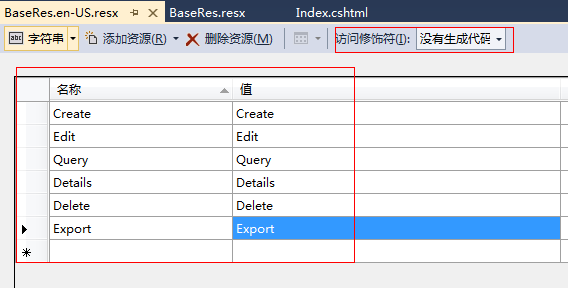
这里我们以SysSample的index视图为例,回到index上修改如下代码
先引入@using App.Lang;然后修改以下代码
<div class="mvctool">

    <input id="txtQuery" type="text" class="searchText" />

    @Html.ToolButton("btnQuery", "icon-search",BaseRes.Query, perm, "Query", true)

    @Html.ToolButton("btnCreate", "icon-add", BaseRes.Create, perm, "Create", true)

    @Html.ToolButton("btnEdit", "icon-edit", BaseRes.Edit, perm, "Edit", true)

    @Html.ToolButton("btnDetails", "icon-details", BaseRes.Details, perm, "Details", true)

    @Html.ToolButton("btnDelete", "icon-remove", BaseRes.Delete, perm, "Delete", true)

    @Html.ToolButton("btnExport", "icon-export", BaseRes.Export, perm, "Export", true)

</div>
其中的BaseRes.Query就是国际化属性了
预览一下例子(请注意我的URL地址变化)


现在你可以本地化您的项目了。最后一个声明,如果你要获取当然选中的是什么语言你必须在页面引用
CultureInfo info = Thread.CurrentThread.CurrentCulture;
通过info.Name可以获取到URL上选择的zh或en
例:
src='/@info.Name/SysSample/Create'
结果
src='/en/SysSample/Create'
构建ASP.NET MVC4+EF5+EasyUI+Unity2.x注入的后台管理系统(30)-本地化(多语言)的更多相关文章
- 构建ASP.NET MVC4+EF5+EasyUI+Unity2.x注入的后台管理系统(1)-前言与目录(持续更新中...)
转自:http://www.cnblogs.com/ymnets/p/3424309.html 曾几何时我想写一个系列的文章,但是由于工作很忙,一直没有时间更新博客.博客园园龄都1年了,却一直都是空空 ...
- 构建ASP.NET MVC4+EF5+EasyUI+Unity2.x注入的后台管理系统(48)-工作流设计-起草新申请
原文:构建ASP.NET MVC4+EF5+EasyUI+Unity2.x注入的后台管理系统(48)-工作流设计-起草新申请 系列目录 创建新表单之后,我们就可以起草申请了,申请按照严格的表单步骤和分 ...
- 构建ASP.NET MVC4+EF5+EasyUI+Unity2.x注入的后台管理系统(47)-工作流设计-补充
原文:构建ASP.NET MVC4+EF5+EasyUI+Unity2.x注入的后台管理系统(47)-工作流设计-补充 系列目录 补充一下,有人要表单的代码,这个用代码生成器生成表Flow_Form表 ...
- 构建ASP.NET MVC4+EF5+EasyUI+Unity2.x注入的后台管理系统(46)-工作流设计-设计分支
原文:构建ASP.NET MVC4+EF5+EasyUI+Unity2.x注入的后台管理系统(46)-工作流设计-设计分支 系列目录 步骤设置完毕之后,就要设置好流转了,比如财务申请大于50000元( ...
- 构建ASP.NET MVC4+EF5+EasyUI+Unity2.x注入的后台管理系统(45)-工作流设计-设计步骤
原文:构建ASP.NET MVC4+EF5+EasyUI+Unity2.x注入的后台管理系统(45)-工作流设计-设计步骤 系列目录 步骤设计很重要,特别是规则的选择. 我这里分为几个规则 1.按自行 ...
- 构建ASP.NET MVC4+EF5+EasyUI+Unity2.x注入的后台管理系统(44)-工作流设计-设计表单
原文:构建ASP.NET MVC4+EF5+EasyUI+Unity2.x注入的后台管理系统(44)-工作流设计-设计表单 系列目录 设计表单是比较复杂的一步,完成一个表单的设计其实很漫长,主要分为四 ...
- 构建ASP.NET MVC4+EF5+EasyUI+Unity2.x注入的后台管理系统(43)-工作流设计-字段分类设计
原文:构建ASP.NET MVC4+EF5+EasyUI+Unity2.x注入的后台管理系统(43)-工作流设计-字段分类设计 系列目录 建立好42节的表之后,每个字段英文表示都是有意义的说明.先建立 ...
- 构建ASP.NET MVC4+EF5+EasyUI+Unity2.x注入的后台管理系统(42)-工作流设计01
原文:构建ASP.NET MVC4+EF5+EasyUI+Unity2.x注入的后台管理系统(42)-工作流设计01 工作流在实际应用中还是比较广泛,网络中存在很多工作流的图形化插件,可以做到拉拽的工 ...
- 构建ASP.NET MVC4+EF5+EasyUI+Unity2.x注入的后台管理系统(40)-精准在线人数统计实现-【过滤器+Cache】
原文:构建ASP.NET MVC4+EF5+EasyUI+Unity2.x注入的后台管理系统(40)-精准在线人数统计实现-[过滤器+Cache] 系列目录 上次的探讨没有任何结果,我浏览了大量的文章 ...
- 构建ASP.NET MVC4+EF5+EasyUI+Unity2.x注入的后台管理系统(41)-组织架构
原文:构建ASP.NET MVC4+EF5+EasyUI+Unity2.x注入的后台管理系统(41)-组织架构 本节开始我们要实现工作流,此工作流可以和之前的所有章节脱离关系,也可以紧密合并. 我们当 ...
随机推荐
- Python 关于正负无穷float(‘inf’)的一些用法
Python中可以用如下方式表示正负无穷: float("inf"), float("-inf") 利用 inf 做简单加.乘算术运算仍会得到 inf > ...
- PAT (Basic Level) 1002. 写出这个数 (20)
读入一个自然数n,计算其各位数字之和,用汉语拼音写出和的每一位数字. 输入格式:每个测试输入包含1个测试用例,即给出自然数n的值.这里保证n小于10100. 输出格式:在一行内输出n的各位数字之和的每 ...
- oracle dataguard
startup mount restrict; drop database; alter database add standby logfile thread 1 group 8 '/oracle/ ...
- 我的前端之旅--SeaJs基础和spm编译工具运用[图文]
标签:seajs nodejs npm spm js 1. 概述 本文章来源于本人在项目的实际应用中写下的记录.因初期在安装和使用Seajs和SPM的时候,有点不知所措的经历.为此,我 ...
- bzoj 3594: [Scoi2014]方伯伯的玉米田 dp树状数组优化
3594: [Scoi2014]方伯伯的玉米田 Time Limit: 60 Sec Memory Limit: 128 MBSubmit: 314 Solved: 132[Submit][Sta ...
- uva 11136 - Hoax or what
用两个优先队列来实现,因为队列只能从一头出去: 所以维护一个数组,来标记这个队列的已经出列而另外一个队列没有出列的元素: 到时候再把他们删了就行: #include<cstdio> #in ...
- lc面试准备:Remove Duplicates from Sorted List II
1 题目 Given a sorted linked list, delete all nodes that have duplicate numbers, leaving only distinct ...
- WordPress Xhanch - My Twitter插件跨站请求伪造漏洞(CVE-2013-3253)
漏洞版本: WordPress Xhanch - My Twitter Plugin 2.7.5 漏洞描述: Bugtraq ID:61629 CVE ID:CVE-2013-3253 WordPre ...
- Linux Shell编程(15)——操作字符串
Bash已经支持了令人惊讶的字符串操作的数量.不幸地,这些工具缺乏统一的标准.一些是参数替换的子集,其它受到UNIX的expr命令的功能的影响.这导致不一致的命令语法和冗余的功能,但这些并没有引起混乱 ...
- 【转】在Ubuntu下编译Android源码并运行Emulator
原文网址:http://www.mcuos.com/thread-4553-1-1.html 建立编译环境 1.在VirtualBox上安装Ubuntu 2.安装JDK $ sudo apt-ge ...