
asp.net core 系列之webapi集成EFCore的简单操作教程
因为官网asp.net core webapi教程部分,给出的是使用内存中的数据即 UseInMemoryDatabase 的方式,
这里记录一下,使用SQL Server数据库的方式即 UseSqlServer 的方式。
环境说明:
这里使用的是win 7 下的 virtual studio 2017 ,数据库使用的Sql Server
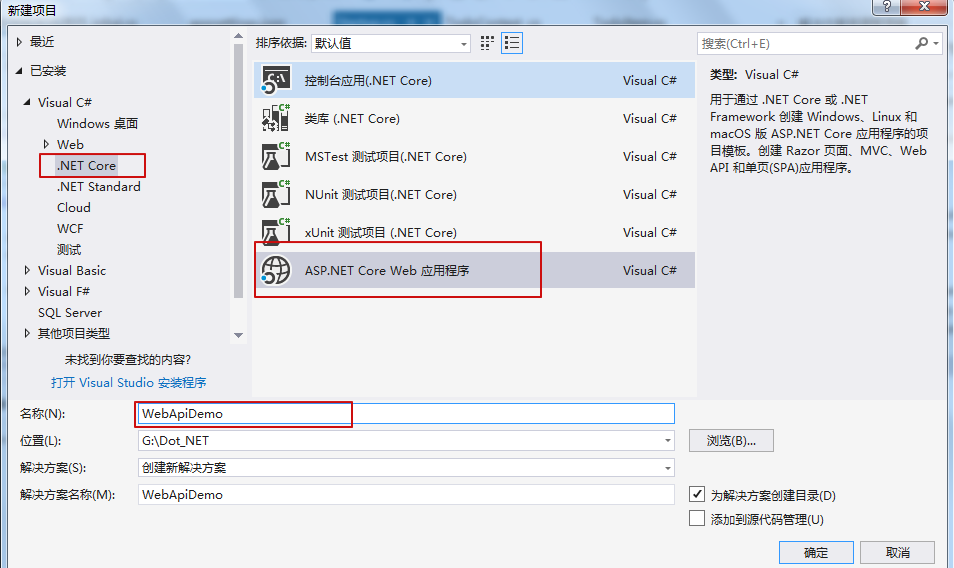
1.创建一个web项目
- 文件->新建->项目
- 选择 ASP.NET Core Web 应用 的模板,项目名 WebApiDemo
- 在新的 ASP.NET Core Web 应用的页面,选择 API 模板,并确定,不要选择支持Docker


2.增加一个实体类
- 右击项目,新增一个Models文件夹
- 在Models文件夹下增加一个类(class),TodoItem
代码如下
public class TodoItem

    {

        public long Id { get; set; }

        public string Name { get; set; }

        public bool IsComplete { get; set; }

    }
3.增加一个数据库上下文实体(database context)
- 右键Models文件夹,增加一个类,命名 TodoContext
代码如下
 public class TodoContext : DbContext

    {

        public TodoContext(DbContextOptions<TodoContext> options)

            : base(options)

        {

        }

        public DbSet<TodoItem> TodoItems { get; set; }

    }
4.注册数据库上下文实体
在 ASP.NET Core 中 ,服务(service)例如 数据库上下文(the DB context),必须被注册到 DI 容器中;
容器可以给Controller 提供 服务 (service).
StartUp.cs代码如下
 public class Startup

    {

        public Startup(IConfiguration configuration)

        {

            Configuration = configuration;

        }

        public IConfiguration Configuration { get; }

        // This method gets called by the runtime. Use this method to add services to the container.

        public void ConfigureServices(IServiceCollection services)

        {

            services.AddDbContext<TodoContext>(opt =>

            opt.UseSqlServer(Configuration.GetConnectionString("DemoContext")));  //使用SqlServer数据库

            services.AddMvc().SetCompatibilityVersion(CompatibilityVersion.Version_2_2);

        }

        // This method gets called by the runtime. Use this method to configure the HTTP request pipeline.

        public void Configure(IApplicationBuilder app, IHostingEnvironment env)

        {

            if (env.IsDevelopment())

            {

                app.UseDeveloperExceptionPage();

            }

            else

            {

                // The default HSTS value is 30 days. You may want to change this for production scenarios, see https://aka.ms/aspnetcore-hsts.

                app.UseHsts();

            }

            app.UseHttpsRedirection();

            app.UseMvc();

        }

    }
注意,这里是不同于官网教程中的地方,对比如下
ConfigureService方法中:
//官网
services.AddDbContext<TodoContext>(opt =>

                opt.UseInMemoryDatabase("TodoList"));


//本教程

services.AddDbContext<TodoContext>(opt =>

            opt.UseSqlServer(Configuration.GetConnectionString("DemoContext")));
Configuration.GetConnectionString("DemoContext") 取得是 appsettings.json 文件中的 字符串,如下
appsettings.json 内容:
{

  "Logging": {

    "LogLevel": {

      "Default": "Warning"

    }

  },

  "AllowedHosts": "*",

  "ConnectionStrings": {

    "TodoContext": "Server=(localdb)\\mssqllocaldb;Database=WebApiDemo;Trusted_Connection=True;MultipleActiveResultSets=true"

  }

}
5.增加初始化迁移,更新数据库
此步骤,主要是使用code first 方式,在数据库中,创建相应的数据库和实体对应的表
对应 appsettings.json 文件中的连接字符串 :数据库名 WebApiDemo
- 工具-> NuGet 包管理器 -> 程序包管理器控制台
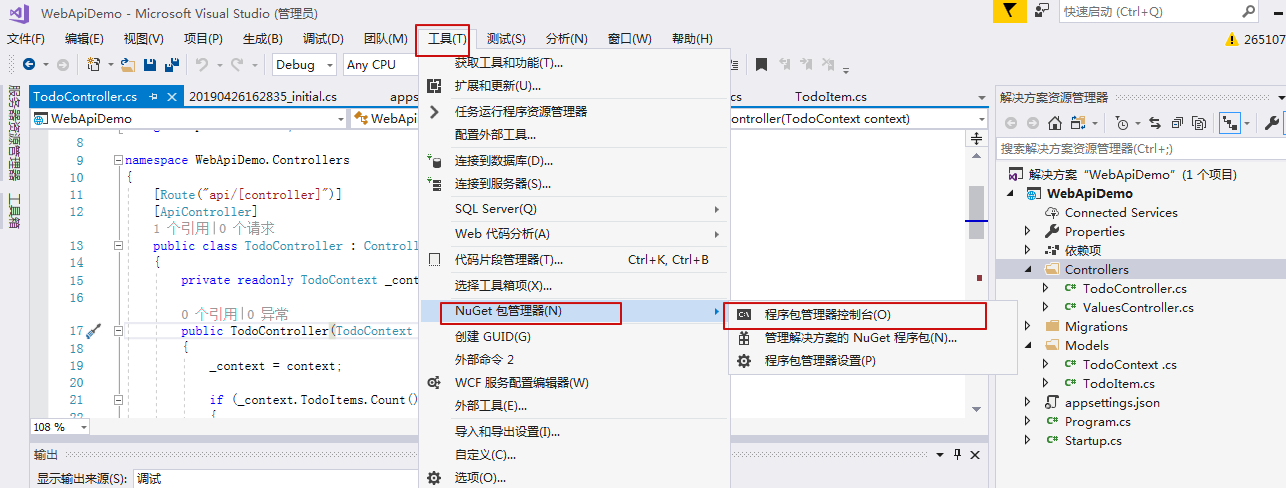
控制台如下:
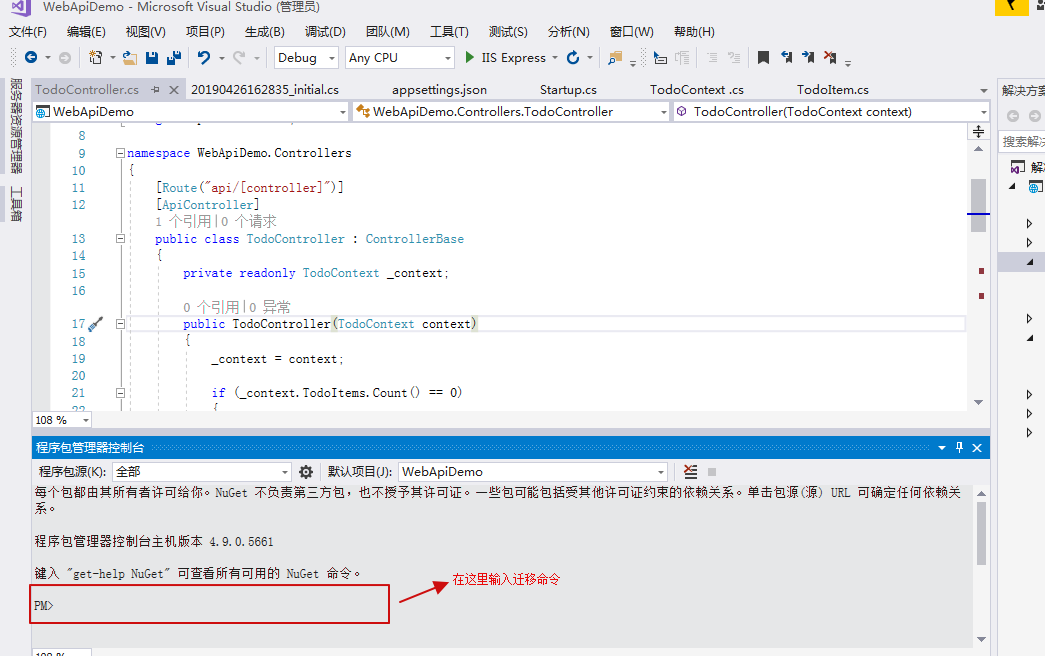
命令如下:
Add-Migration Initial

Update-Database
注意,这里要求 power shell 版本 需要是3.0及以上,如果版本不够,可以自己百度然后升级power shell,这里不再详述
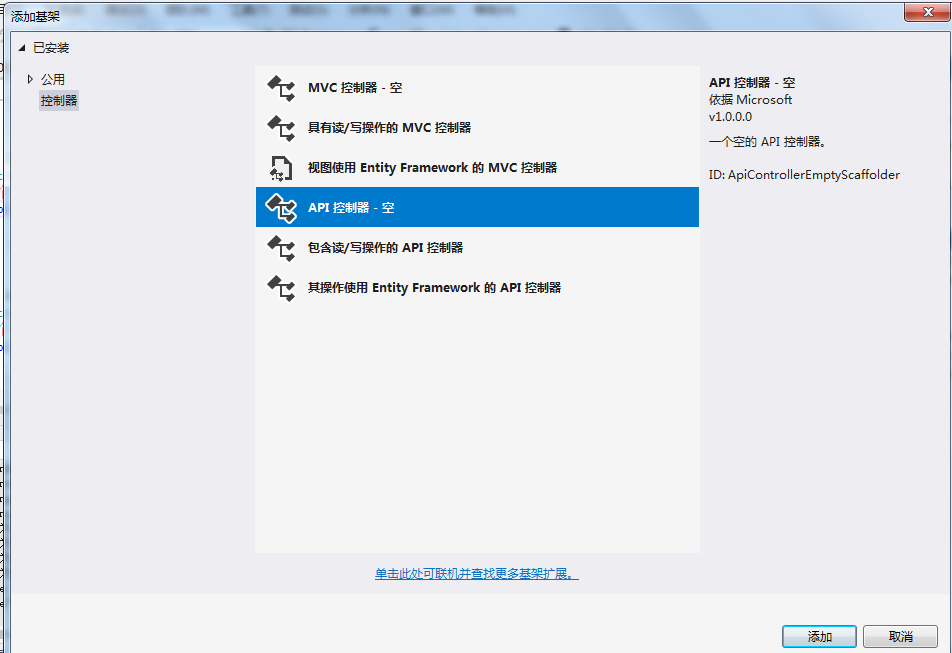
6.增加 Controller 控制器
- 右键 Controllers 文件夹
- 添加->控制器
- 选择 空 API 控制器,命名 TodoController ,添加
代码如下:
[Route("api/[controller]")]

    [ApiController]

    public class TodoController : ControllerBase

    {

        private readonly TodoContext _context;

        public TodoController(TodoContext context)

        {

            _context = context;

            if (_context.TodoItems.Count() == )

            {

                // Create a new TodoItem if collection is empty,

                // which means you can't delete all TodoItems.

                _context.TodoItems.Add(new TodoItem { Name = "Item1" });

                _context.SaveChanges();

            }

        }

        // GET: api/Todo

        [HttpGet]

        public async Task<ActionResult<IEnumerable<TodoItem>>> GetTodoItems()

        {

            return await _context.TodoItems.ToListAsync();

        }

        // GET: api/Todo/5

        [HttpGet("{id}")]

        public async Task<ActionResult<TodoItem>> GetTodoItem(long id)

        {

            var todoItem = await _context.TodoItems.FindAsync(id);

            if (todoItem == null)

            {

                return NotFound();

            }

            return todoItem;

        }

    }
这里面有两个方法,主要是为了检验是否成功创建此webapi项目
7.运行,输入浏览器地址检验
https://localhost:44385/api/todo
这里用户根据自己的地址替换即可
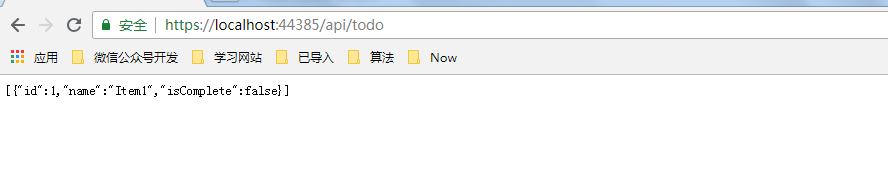
这里作简单记录,方便自己日后查看,如有错误,欢迎指正
参考网址:
https://docs.microsoft.com/en-us/aspnet/core/tutorials/first-web-api?view=aspnetcore-2.2&tabs=visual-studio
https://docs.microsoft.com/en-us/aspnet/core/tutorials/razor-pages/model?view=aspnetcore-2.2&tabs=visual-studio
asp.net core 系列之webapi集成EFCore的简单操作教程的更多相关文章
- asp.net core 系列之webapi集成Dapper的简单操作教程
Dapper也是是一种ORM框架 这里记录下,使用ASP.NET 集成 Dapper 的过程,方便自己查看 至于Dapper的特性以及操作可以参考Dapper官方文档 1.创建数据库相关 在Sql S ...
- asp.net core系列 38 WebAPI 返回类型与响应格式--必备
一.返回类型 ASP.NET Core 提供以下 Web API Action方法返回类型选项,以及说明每种返回类型的最佳适用情况: (1) 固定类型 (2) IActionResult (3) Ac ...
- asp.net core 2.0 webapi集成signalr
asp.net core 2.0 webapi集成signalr 在博客园也很多年了,一直未曾分享过什么东西,也没有写过博客,但自己也是汲取着博客园的知识成长的: 这两天想着不能这么无私,最近.N ...
- asp.net core系列 36 WebAPI 搭建详细示例
一.概述 HTTP不仅仅用于提供网页.HTTP也是构建公开服务和数据的API强大平台.HTTP简单灵活且无处不在.几乎任何你能想到的平台都有一个HTTP库,因此HTTP服务可以覆盖广泛的客户端,包括浏 ...
- asp.net core系列 37 WebAPI 使用OpenAPI (swagger)中间件
一.概述 在使用Web API时,对于开发人员来说,了解其各种方法可能是一项挑战.在ASP.NET Core上,Web api 辅助工具介绍二个中间件,包括:Swashbuckle和NSwag .NE ...
- asp.net core系列 77 webapi响应压缩
一.介绍 背景:目前在开发一个爬虫框架,使用了.net core webapi接口作为爬虫调用入口,在调用 webapi时发现爬虫耗时很短(1秒左右),但客户端获取响应时间却在3~4秒.对于这个问题考 ...
- asp.net core系列 61 Ocelot 构建服务发现简单示例
一.概述 Ocelot允许指定服务发现提供程序,如Consul或Eureka. 这二个中间件是用来实现:服务治理或秒服务发现,服务发现查找Ocelot正在转发请求的下游服务的主机和端口.目前Ocelo ...
- asp.net core系列 WebAPI 作者:懒懒的程序员一枚
asp.net core系列 36 WebAPI 搭建详细示例一.概述1.1 创建web项目1.2 添加模型类1.3 添加数据库上下文1.4 注册上下文1.5 添加控制器1.6 添加Get方法1.7 ...
- 【目录】asp.net core系列篇
随笔分类 - asp.net core系列篇 asp.net core系列 68 Filter管道过滤器 摘要: 一.概述 本篇详细了解一下asp.net core filters,filter叫&q ...
随机推荐
- 3d轮播图——类似酷狗的轮播
说到轮播图,其实只要是跟web开发相关的无论是前端后端应该都不陌生,各种各样的轮播图,从以前的单纯的平面山水画遮盖滑动或滚动,到Jquery的animate甚至是h5+css3,各种炫酷的轮播图更是层 ...
- Python_zip&rar
import zipfile fp=zipfile.ZipFile('/Users/c2apple/Desktop/彩屏/旭威XW-6600.zip','r') for f in fp.filelis ...
- 二十一、Hadoop学记笔记————kafka的初识
这些场景的共同点就是数据由上层框架产生,需要由下层框架计算,其中间层就需要有一个消息队列传输系统 Apache flume系统,用于日志收集 Apache storm系统,用于实时数据处理 Spark ...
- 0517JS综合练习、挂事件练习
<!DOCTYPE html><html> <head> <meta charset="UTF-8"> ...
- MonolithFirst
As I hear stories about teams using a microservices architecture, I've noticed a common pattern. Alm ...
- Mybatis通过注解方式实现批量插入数据库 及 常见的坑
原文地址:http://f0rb.iteye.com/blog/1207384 MyBatis中通过xml文件配置数据库批量操作的文章很多,比如这篇http://www.cnblogs.com/xcc ...
- Java描述数据结构之链表的增删改查
链表是一种常见的基础数据结构,它是一种线性表,但在内存中它并不是顺序存储的,它是以链式进行存储的,每一个节点里存放的是下一个节点的"指针".在Java中的数据分为引用数据类型和基础 ...
- javascript 原型机制
prototype,__proto__,constructor 在 JavaScript 原型继承结构里面,规范中用 [[Prototype]] 表示对象隐式的原型,在 JavaScript 中用 _ ...
- Python软件目录结构规范
设计项目目录结构和'代码编码风格'一样, 是为了达到以下两点: 可读性高 可维护性高 目录组织方式 Stackoverflow上有一些比较好的范式.
- [论文解读]CNN网络可视化——Visualizing and Understanding Convolutional Networks
概述 虽然CNN深度卷积网络在图像识别等领域取得的效果显著,但是目前为止人们对于CNN为什么能取得如此好的效果却无法解释,也无法提出有效的网络提升策略.利用本文的反卷积可视化方法,作者发现了AlexN ...