
WPF依赖属性详解
WPF依赖属性详解
WPF 依赖属性 英文译为 Dependency Properties,是WPF引入的一种新类型的属性,在WPF中有着极为广泛的应用,在WPF中对于WPF Dependency Properties 的使用贯穿样式的使用,数据绑定,动画等等,在刚刚接触Dependency Properties的时候可能觉得有些奇怪,但是,当你了解他要解决的问题的时候,你可能就不觉得奇怪了。Dependency Properties第一个要解决的问题就是控件的属性共享问题,由于大部分的WPF控件都有多达上百个属性,如果每个属性都是使用实例属性,那对于一个有着成百上千控件的应用来说后果是不堪设想的,Dependency Properties 使用静态共享的方式解决了这个问题,下面的代码说明了这个solution.
public class Button : ButtonBase

{

// The dependency property

public static readonly DependencyProperty IsDefaultProperty;

static Button()

{

// Register the property

Button.IsDefaultProperty = DependencyProperty.Register( “IsDefault” ,

typeof( bool), typeof( Button),

new FrameworkPropertyMetadata( false,

new PropertyChangedCallback(OnIsDefaultChanged)));

…

}

// A .NET property wrapper (optional)

public bool IsDefault

{

get { return ( bool)GetValue( Button.IsDefaultProperty); }

set { SetValue( Button.IsDefaultProperty, value); }

}

// A property changed callback (optional)

private static void OnIsDefaultChanged(

DependencyObject o, DependencyPropertyChangedEventArgs e) { … }

…

}
另外相对于普通的WPF属性,Dependency Properties 还有如下的优势
Property value inheritance -- 属性继承
Change notification -- 改变通知
Support for multiple providers -- 支持多个提供者
下面让我们首选来看看属性继承的效果和代码,从这两张图上读者可以看出,窗体上所有的字体都变大了,从30变成了50,但是这个改变并不是通过设置每个控件的属性得到的,我只需要设置窗体的一个属性,这个窗体的子控件就会适应这一改变,并且使用相同的设置,这就是,属性继承,区别于传统的OO继承,这种方式的继承主要是控件树上元素的继承,相对应的代码如下所示。
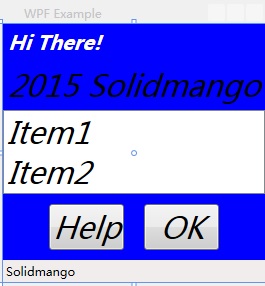
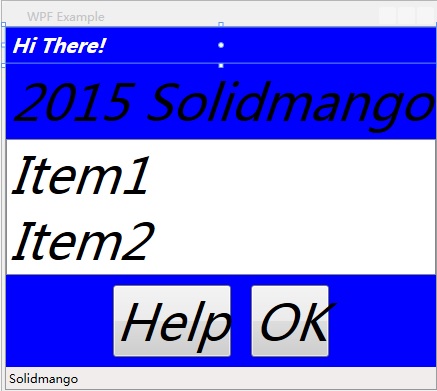
<Window xmlns="http://schemas.microsoft.com/winfx/2006/xaml/presentation"

  Title="WPF Example" SizeToContent="WidthAndHeight"

  FontSize="" FontStyle="Italic"

  Background="Blue">

    <StackPanel>

        <Label FontWeight="Bold" FontSize="" Foreground="White">

            Hi There!

        </Label>

        <Label> Solidmango</Label>

        <ListBox>

            <ListBoxItem>Item1</ListBoxItem>

            <ListBoxItem>Item2</ListBoxItem>

        </ListBox>

        <StackPanel Orientation="Horizontal" HorizontalAlignment="Center">

            <Button MinWidth="" Margin="">Help</Button>

            <Button MinWidth="" Margin="">OK</Button>

        </StackPanel>

        <StatusBar>Solidmango</StatusBar>

    </StackPanel>

</Window>
对于属性的改变通知主要说的是通常我们使用普通属性时只有通过事件响应函数,或者回调函数才能解决的问题,使用 Dependency Properties 只需要及其简单的配置就可以解决,相对于普通属性,方便性不言而喻。下面我们对比一下这两种方式的代码。
使用普通属性
<Button MouseEnter=” Button_MouseEnter” MouseLeave=” Button_MouseLeave”

MinWidth=” ” Margin=” ” >Help</Button>

<Button MouseEnter=” Button_MouseEnter” MouseLeave=” Button_MouseLeave”

MinWidth=” ” Margin=” ” >OK</Button>

// Change the foreground to blue when the mouse enters the button

void Button_MouseEnter( object sender, MouseEventArgs e)

{

Button b = sender as Button;

if (b != null) b.Foreground = Brushes.Blue;

}

// Restore the foreground to black when the mouse exits the button

void Button_MouseLeave( object sender, MouseEventArgs e)

{

Button b = sender as Button;

if (b != null) b.Foreground = Brushes.Black;

}
使用依赖属性
<Trigger Property=” IsMouseOver” Value=” True” >

<Setter Property=” Foreground” Value=” Blue” />

</Trigger>
对于多提供者的支持也是 Dependency Properties 的特色之一,具体的提供者优先级如下:
Determine Base Value
1.Local value
2. Parent template trigger
3. Parent template
4. Style triggers
5. Template triggers
6. Style setters
7. Theme style triggers
8. Theme style setters
9. Property value inheritance
10. Default value
Evaluate (if an Expression)
Apply Animations
Coerce
Validate
WPF依赖属性详解的更多相关文章
- OutputCache属性详解(三)— VaryByHeader,VaryByCustom
目录 OutputCache概念学习 OutputCache属性详解(一) OutputCache属性详解(二) OutputCache属性详解(三) OutputCache属性详解(四)— SqlD ...
- OutputCache属性详解(四)— SqlDependency
目录 OutputCache概念学习 OutputCache属性详解(一) OutputCache属性详解(二) OutputCache属性详解(三) OutputCache属性详解(四)— SqlD ...
- odoo项目结构参数属性详解
1.基础文件及目录结构 在认识odoo ORM框架前,先介绍一下odoo中模块目录结构. data:存放模块预制数据i18n:存放国际化文件models:存放模型等py代码security:存放权 ...
- hikari连接池属性详解
hikari连接池属性详解 一.主要配置 1.dataSourceClassName 这是DataSourceJDBC驱动程序提供的类的名称.请查阅您的特定JDBC驱动程序的文档以获取此类名称,或参阅 ...
- Java精通并发-自旋对于synchronized关键字的底层意义与价值分析以及互斥锁属性详解与Monitor对象特性解说【纯理论】
自旋对于synchronized关键字的底层意义与价值分析: 对于synchronized关键字的底层意义和价值分析,下面用纯理论的方式来对它进行阐述,自旋这个概念就会应运而生,还是很重要的,下面阐述 ...
- android:exported 属性详解
属性详解 标签: android 2015-06-11 17:47 27940人阅读 评论(7) 收藏 举报 分类: Android(95) 项目点滴(25) 昨天在用360扫描应用漏洞时,扫描结果, ...
- OutputCache属性详解(一)一Duration、VaryByParam
目录 OutputCache概念学习 OutputCache属性详解(一) OutputCache属性详解(二) OutputCache属性详解(三) OutputCache属性详解(四)— SqlD ...
- OutputCache属性详解(二)一 Location
目录 OutputCache概念学习 OutputCache属性详解(一) OutputCache属性详解(二) OutputCache属性详解(三) OutputCache属性详解(四)— SqlD ...
- HTML video 视频标签全属性详解
HTML 5 video 视频标签全属性详解 现在如果要在页面中使用video标签,需要考虑三种情况,支持Ogg Theora或者VP8(如果这玩意儿没出事的话)的(Opera.Mozilla.C ...
随机推荐
- Twitter全局唯一ID生成算法
测试:private static void TestIdWorker() { HashSet<long> set = new HashSet<long>(); IdWorke ...
- Blend 2015 教程 (三) 模板
前一篇讲述了一些基本样式的修改方法,并搭建了Style层的基本框架,本篇将进一步修改ListBox的样式. 1. 首先选中ListBox控件,在美工板导航栏中点击ListBox,选择 编辑其他模板-编 ...
- asp.net identity 2.2.0 中角色启用和基本使用(三)
创建控制器 第一步:在controllers文件夹上点右键>添加>控制器, 我这里选的是“MVC5 控制器-空”,名称设置为:RolesAdminController.cs 第二步:添加命 ...
- 在.net中使用aquiles访问Cassandra(四)
数据的持久化我们都已经完成了,和所有应有程序一样,最重要的是要向用户展示数据.下面我们就推出这部分代码,读取任意行任何列: public IList<TRowResult> Execute ...
- java中基本类型和包装类型实践经验
至今,小菜用java快两年了,有些事,也该有个总结. 基本类型和包装类型的概念在本文不作赘述. 如果这两种类型直接使用,倒没什么值得讨论的,无非就是自动装箱拆箱,java可以让你感觉不到他们的存在,但 ...
- Spring-Context之八:一些依赖注入的小技巧
Spring框架在依赖注入方面是非常灵活和强大的,多了解点一些注入的方式.方法,绝对能优化配置. idref idref属性可以传入一个bean的名称,虽然它是指向一个bean的引用,但是得到的是该b ...
- Javascript函数节流
最近在做网页的时候有个需求,就是浏览器窗口改变的时候需要改一些页面元素大小,于是乎很自然的想到了window的resize事件,于是乎我是这么写的 <!DOCTYPE html> < ...
- ASP.NET Core: 全新的ASP.NET !
背景 最新版本的 ASP.NET 叫做 ASP.NET Core (也被称为 ASP.NET 5) 它颠覆了过去的 ASP.NET. 什么是 ASP.NET Core? ASP.NET Core ...
- Visual Studio 2010 实用功能:使用web.config发布文件替换功能
当建立ASP.NET Web应用程序项目后,默认除了生成web.config外,还生成了web.debug.config与Web.Release.config.顾名思义,根据它们的命名我可以推测到他们 ...
- NSString NSNumber 相互转化
NSNumberFormatter *numFormatter = [[NSNumberFormatter alloc] init]; NSNumber *firstNum = [NSNumber n ...