
asp.net实现动态添加table行
asp.net动态的生成,删除table的行,主要是在后台动态创建单元行,单元表格,效果图:

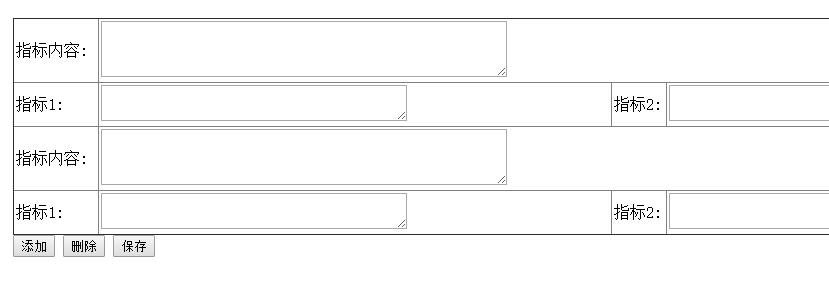
2.代码:
<%@ Page Language="C#" AutoEventWireup="true" CodeFile="releaseAffair.aspx.cs" Inherits="affair_releaseAffair" %>

<!DOCTYPE html>

<!--发布事务页面:名称AffairName,内容content,创建日期-->

<html xmlns="http://www.w3.org/1999/xhtml">

<head runat="server">

<meta http-equiv="Content-Type" content="text/html; charset=utf-8"/>

    <title></title>

</head>

<body>

    <form id="form1" runat="server">

    <div>

    <table>

        <tr>

            <td>

                发布个人事务

            </td>

        </tr>

        <tr>

            <td>

           事务名称:<asp:TextBox runat="server"  ID="text_affairName"></asp:TextBox>

            </td>

        </tr>

        <tr>

            <td>

           事务内容:<asp:TextBox runat="server" ID="text_affairContent" TextMode="MultiLine" Width="500px" Height="100px"></asp:TextBox>

            </td>

        </tr>

    </table><br />

    <asp:Table ID="tableTarget" runat="server" Width="100%" CellSpacing="0"  CaptionAlign="Bottom" CellPadding="2" >

    </asp:Table>

        <div>

         <asp:Button runat="server" ID="btnAddRow" Text="添加" OnClick="btnAddRow_Click"/>

           <asp:Button runat="server" ID="btnDelRow" Text="删除" OnClick="btnDelRow_Click" />

          <asp:Button runat="server" ID="btnSave" Text="保存" OnClick="btnSave_Click" />

        </div>

    </div>

    </form>

</body>

</html>
后台代码:
using System;

using System.Collections.Generic;

using System.Data.SqlClient;

using System.Linq;

using System.Web;

using System.Web.UI;

using System.Web.UI.WebControls;

public partial class affair_releaseAffair : System.Web.UI.Page

{

    Sqlhelper sp = null;

    SqlDataReader dr = null;

    SqlCommand comm = null;

    protected void Page_Load(object sender, EventArgs e)

    {

        if (Session["username"] != null)

        {

            if (ViewState["count"] != null)

            {

                //每次刷新都重新建立表格循环再次添加行

                for (int i = 0; i < Convert.ToInt16(ViewState["count"])/2; i++)

                {

                    AddRows(tableTarget);

                }

            }

        }

        else {

            Response.Write("<script>alert('请先登录!')</script>");

            // Server.Transfer("~/login.aspx");

            Response.Write("<script>top.window.location.href = '../login.aspx?r='+Math.random() ;</script>");

            //Response.Write("<script>window.location='../login.aspx';</script>");

           //Response.Redirect("~/login.aspx",true);

        }

    }

    //  删除按钮事件,总是默认删除表的最后一行

    protected void btnDelRow_Click(object sender, EventArgs e)

    {

        tableTarget.Rows.RemoveAt(tableTarget.Rows.Count - 1);

        tableTarget.Rows.RemoveAt(tableTarget.Rows.Count - 1);

        ViewState["count"] = Convert.ToInt16(ViewState["count"]) - 2;

    }

    protected void btnAddRow_Click(object sender, EventArgs e)

    {

        AddRows(tableTarget);

        ViewState["count"] = Convert.ToInt16(ViewState["count"]) + 2;  //记录的table行数。

    }

    /// <summary>

    ///table中有8列,四列label,三列是TextBox一列是DropDownList,这是一个添加行的函数

    ///给表table1添加两行

    /// </summary>

    /// <param name="table"></param>

    public void AddRows(Table table) {

        TableRow tr0 = new TableRow();

        TableCell tc = new TableCell();

        Label lb0 = new Label();

        lb0.Text = "指标内容:";

        lb0.Width = Unit.Parse("80px");

        tc.Controls.Add(lb0); tc.Width = Unit.Parse("80px");

        TableCell tc0 = new TableCell();

        TextBox tb0 = new TextBox();

        tb0.ID = "tbc" + table.Rows.Count;  //content指标内容

        tb0.TextMode = TextBoxMode.MultiLine; //多行

        tb0.Width = Unit.Parse("400px");

        tb0.Height = Unit.Parse("50px");

        tc0.Controls.Add(tb0);

        tc0.ColumnSpan = 7;

        tr0.Cells.Add(tc);

        tr0.Cells.Add(tc0);

        table.Rows.Add(tr0);

        TableRow tr = new TableRow();

        for (int i = 1; i <= 3; i++) {

            TableCell tc1 = new TableCell();

            Label lb1 = new Label();

            lb1.Text = "指标"+i+":";

            lb1.Width= Unit.Parse("50px");

            tc1.Controls.Add(lb1); tc1.Width = Unit.Parse("50px");

             TableCell tc2 = new TableCell();

            TextBox tb1 = new TextBox();

            tb1.ID = "tb"+i+""+ table.Rows.Count;

            tb1.TextMode = TextBoxMode.MultiLine;

            tb1.Width = Unit.Parse("300px");

            tc2.Controls.Add(tb1);

            tr.Cells.Add(tc1);

            tr.Cells.Add(tc2);

        }

        TableCell tc7 = new TableCell();

        Label lb4 = new Label(); lb4.Width = Unit.Parse("80px");

        lb4.Text = "您的选择:";

        tc7.Controls.Add(lb4); tc7.Width = Unit.Parse("80px");

        TableCell tc8 = new TableCell();

        DropDownList dpl = new DropDownList();

        dpl.ID = "dpl" + table.Rows.Count;

        for (int i = 1; i < 4; i++) dpl.Items.Add(i.ToString());

        tc8.Controls.Add(dpl);

        tr.Cells.Add(tc7);

        tr.Cells.Add(tc8);

        table.Rows.Add(tr);

        table.Attributes.Add("border", "1");

    }

    //保存选中的值,保存到数据库

    protected void btnSave_Click(object sender, EventArgs e)

    {

       int num =  saveAffair();

        if (num == 1)

        {//成功

            Response.Write("<script>alert('添加成功!')</script>");

        }

        else {

            Response.Write("<script>alert('添加失败!')</script>");

        }

    }

    //保存事务

    public int saveAffair() {

        String content,affairName,sqlStr;

        int affairId=0,userId = getUserId(),num2=0;

        SqlDataReader dr = null;

        affairName = text_affairName.Text.Trim();

        content = text_affairContent.Text.Trim();

        if (affairName.Equals("") || content.Equals(""))

        {

            Response.Write("<script>alert('请输入事务!')</script>");

        }

        else {

            num2 = 1;

      sp = Sqlhelper.getSqlhelper();

        comm = sp.getComm();

        sqlStr = "insert into affair(UserId,Content,AffairName,createDate) values("+ userId + ",'"+ content + "','"+ affairName + "',GETDATE());";

        try

        {

            comm.CommandText = sqlStr;

            int num = comm.ExecuteNonQuery();

            sqlStr = "select * from affair order by id desc;";

            comm.CommandText = sqlStr;

            dr = comm.ExecuteReader();

            if (dr.HasRows == true)

            {

                    dr.Read();

                affairId = Convert.ToInt32(dr["Id"].ToString());

            }

            dr.Close();

            if (affairId > 0)

                saveTarget(affairId, comm);//保存指标

        }

        catch (Exception ee)

        {

            num2 = 2;

            throw;

        }

        finally {

            sp.Close();

        }

        }//else

        return num2;

    }

    //保存指标

    public int saveTarget(int affairId,SqlCommand comm) {

        String content="", select1="", select2="", select3="", answer,sqlStr="";

        int num=0;

        for (int i = 0; i < tableTarget.Rows.Count; i++)

        {

            if (i % 2 == 0)

            { //content内容

                content = ((TextBox)tableTarget.Rows[i].FindControl("tbc" + i)).Text.Trim();

            }

            else

            {//选项

                select1 = ((TextBox)tableTarget.Rows[i].FindControl("tb1" + i)).Text.Trim();

                select2 = ((TextBox)tableTarget.Rows[i].FindControl("tb2" + i)).Text.Trim();

                select3 = ((TextBox)tableTarget.Rows[i].FindControl("tb3" + i)).Text.Trim();

                answer = ((DropDownList)tableTarget.Rows[i].FindControl("dpl" + i)).SelectedValue;

                if(!content.Equals(""))

                sqlStr = "insert into "+"target"+ creatRandom() + " values("+ affairId + ",'"+ content + "','"+ select1 + "','"+

                        select2 + "','"+ select3 + "','"+ answer + "');";

            }

            if (!sqlStr.Equals("")|| !select1.Equals("")|| !select2 .Equals("")|| !select3.Equals("")) {

                comm.CommandText = sqlStr;

                num = comm.ExecuteNonQuery();

            }

        }

        return num;

    }

    public int creatRandom() {

        //第二种方法可以指定一个int型参数作为随机种子:

        long tick = DateTime.Now.Ticks;

        Random ran = new Random((int)(tick & 0xffffffffL) | (int)(tick >> 32));

        // 而下面这段代码则指定返回值必须在50 - 100的范围之内:

        int iResult;

        int iUp = 20;

        int iDown = 1;

        iResult = ran.Next(iDown, iUp);

        return iResult;

    }

    public int getUserId() {

        int userId=0;

        sp = Sqlhelper.getSqlhelper();

        comm = sp.getComm();

        String username = Session["username"].ToString();

        String sqlStr = "select Id from userInfo where Name='"+ username+"'";

        comm.CommandText = sqlStr;

        try

        {

            userId = (int)comm.ExecuteScalar();

        }

        catch (Exception)

        {

            throw;

        }

        return userId;

    }

}
核心代码:
/// <summary>

    ///table中有8列,四列label,三列是TextBox一列是DropDownList,这是一个添加行的函数

    ///给表table1添加两行

    /// </summary>

    /// <param name="table"></param>

    public void AddRows(Table table) {

        TableRow tr0 = new TableRow();

        TableCell tc = new TableCell();

        Label lb0 = new Label();

        lb0.Text = "指标内容:";

        lb0.Width = Unit.Parse("80px");

        tc.Controls.Add(lb0); tc.Width = Unit.Parse("80px");

        TableCell tc0 = new TableCell();

        TextBox tb0 = new TextBox();

        tb0.ID = "tbc" + table.Rows.Count;  //content指标内容

        tb0.TextMode = TextBoxMode.MultiLine; //多行

        tb0.Width = Unit.Parse("400px");

        tb0.Height = Unit.Parse("50px");

        tc0.Controls.Add(tb0);

        tc0.ColumnSpan = 7;

        tr0.Cells.Add(tc);

        tr0.Cells.Add(tc0);

        table.Rows.Add(tr0);

        TableRow tr = new TableRow();

        for (int i = 1; i <= 3; i++) {

            TableCell tc1 = new TableCell();

            Label lb1 = new Label();

            lb1.Text = "指标"+i+":";

            lb1.Width= Unit.Parse("50px");

            tc1.Controls.Add(lb1); tc1.Width = Unit.Parse("50px");

             TableCell tc2 = new TableCell();

            TextBox tb1 = new TextBox();

            tb1.ID = "tb"+i+""+ table.Rows.Count;

            tb1.TextMode = TextBoxMode.MultiLine;

            tb1.Width = Unit.Parse("300px");

            tc2.Controls.Add(tb1);

            tr.Cells.Add(tc1);

            tr.Cells.Add(tc2);

        }

        TableCell tc7 = new TableCell();

        Label lb4 = new Label(); lb4.Width = Unit.Parse("80px");

        lb4.Text = "您的选择:";

        tc7.Controls.Add(lb4); tc7.Width = Unit.Parse("80px");

        TableCell tc8 = new TableCell();

        DropDownList dpl = new DropDownList();

        dpl.ID = "dpl" + table.Rows.Count;

        for (int i = 1; i < 4; i++) dpl.Items.Add(i.ToString());

        tc8.Controls.Add(dpl);

        tr.Cells.Add(tc7);

        tr.Cells.Add(tc8);

        table.Rows.Add(tr);

        table.Attributes.Add("border", "1");

    }
asp.net实现动态添加table行的更多相关文章
- ASP.NET网页动态添加数据行
一看到这标题<ASP.NET网页动态添加数据行>,想起来似乎有点难实现.因为网页的周期性原因,往往在PostBack之后,状态难于有所保留.但Insus.NET又想实现这样的效果,用户点击 ...
- ASP.NET网页动态添加、更新或删除数据行
ASP.NET网页动态添加.更新或删除数据行 看过此篇<ASP.NET网页动态添加数据行> http://www.cnblogs.com/insus/p/3247935.html的网友,也 ...
- MiniUI动态添加table表格
本文将介绍一下,如何用Jquery MiniUi动态添加一行table表格 1.效果展示 ↓ 2.具体代码 <script type="text/javascript"> ...
- jquery 动态添加表格行
jquery 动态添加表格行 <!DOCTYPE HTML PUBLIC "-//W3C//DTD HTML 4.01 Transitional//EN"> <h ...
- C# DataGridView控件 动态添加新行
DataGridView控件在实际应用中非常实用,特别需要表格显示数据时.可以静态绑定数据源,这样就自动为DataGridView控件添加相应的行.假如需要动态为DataGridView控件添加新行, ...
- C# DataGridView控件动态添加新行
C# DataGridView控件动态添加新行 DataGridView控件在实际应用中非常实用,特别需要表格显示数据时.可以静态绑定数据源,这样就自动为DataGridView控件添加相应的行.假如 ...
- DataGridView动态添加新行的两种方法
简单介绍如何为DataGridView控件动态添加新行的两种方 法: 方法一: int index=this.dataGridView1.Rows.Add();this.dataGridView1.R ...
- js 动态添加Table tr,选中与不选中checkbox行数NO的变化
首次加载进入页面,如图: 注:Table是在js中拼接字符串循环动态添加的(拼接字符串,详见之前随笔) 点击Line2 checkbox后,效果如图: 实现的效果就是: 点击checkbox — 显示 ...
- asp.net gridview动态添加列,并获取其数据;
1,绑定数据前先动态添加列,见方法CreateGridColumn(只在第一次加载动态添加): 2,gvlist_RowDataBound为对应列添加控件: 前台代码: <%@ Page Lan ...
随机推荐
- oracle数据库字符集US7ASCII,在java中处理中文问题
原来项目中oracle数据库一直是US7ASCII,我新项目对接的时候,查询以及插入中文,出现乱码问题. 暂时未能解决此问题,最终决定每次转码: 查询的时候: List<Record> l ...
- MVC的控制器的激活过程,我们从MvcHandler开始讲,前面的事情以后再讲
一.从MvcHandler开始(不要觉得是代码,让你看懂才是最重要的) using Microsoft.Web.Infrastructure.DynamicValidationHelper; usin ...
- 解析导航栏的url--selnium,beautifulsoup实战
前段时间做ui自动化测试的时候,导航栏菜单始终有点问题,最后只好直接获取到url,然后直接使用driver.get(url)进入页面: 包括做压测的时候,比如我要找出所有报表菜单的url,这样不可能手 ...
- C#对图片文件的压缩、裁剪操作初探
在做项目时,对图片的处理,以前都采用在上传时,限制其大小的方式,这样带来诸多不便.毕竟网站运维人员不一定会对图片做处理,经常超出大小限制,即使会使用图片处理软件的,也由于个人水平方面原因,处理效果差强 ...
- 【原创】Kakfa serializer包源代码分析
这个包很简单,只有两个scala文件: decoder和encoder,就是提供序列化/反序列化的服务.我们一个一个说. 一.Decoder.scala 首先定义了一个trait: Decoder[T ...
- 【转载】HTTP 错误 500.19 - Internal Server Error
windows 2008下IIS7 安装ASP.NET 遇到如下错误: HTTP 错误 500.19 - Internal Server Error 无法访问请求的页面,因为该页的相关配置数据无效. ...
- Visual Studio 后期生成事件复制配置文件
命令行 copy 源文件 目标路径 copy "$(SolutionDir)\ICBC.Sdyf.Applications\bin\Debug\ICBC.Sdyf.Applications. ...
- MVC _ aspx视图引擎登录及状态保持
MVC - M(Model模型层) V(View视图层) C(Control控制层) 数据访问层 界面层 业务逻辑层 WebForm 是请求访问哪一个页面,返回的是一 ...
- 利用Abot爬虫和visjs 呈现漫威宇宙
1. 引言 最近接触Abot爬虫也有几天时间了,闲来无事打算从IMDB网站上爬取一些电影数据玩玩.正好美国队长3正在热映,打算爬取漫威近几年的电影并用vis这个JS库呈现下漫威宇宙的相关电影. Abo ...
- WCF在编译出现 “错误 3 命令“时解决
如果你遇到了下面问题解决方案很简单,以管理员身份运行VS就OK了. 错误 3 命令“ mkdir %SystemDrive%\inetpub\wwwroot\servicemodelsamples m ...