
Pandas 索引和切片
Series和Datafram索引的原理一样,我们以Dataframe的索引为主来学习
- 列索引:df['列名'] (Series不存在列索引)
- 行索引:df.loc[]、df.iloc[]
选择列 / 选择行 / 切片 / 布尔判断
import numpy as np

import pandas as pd

# 导入numpy、pandas模块

# 选择行与列

df = pd.DataFrame(np.random.rand(12).reshape(3,4)*100,

                   index = ['one','two','three'],

                   columns = ['a','b','c','d'])

print(df)

data1 = df['a']           # 列的索引

data2 = df[['a','c']]     # 注意:选择多列的时候要用两个中括号 ['列1','列2','列3',····’列n'····]

print(data1,type(data1))

print(data2,type(data2))

print('-----')

# 按照列名选择列,只选择一列输出Series,选择多列输出Dataframe

data3 = df.loc['one']                  #行的索引

data4 = df.loc[['one','two']]

print(data2,type(data3))

print(data3,type(data4))

# 按照index选择行,只选择一行输出Series,选择多行输出Dataframe
输出结果:
               a          b          c          d

one     5.191896  33.756807  55.531059  48.271119

two    73.611065  25.943409  63.896590  10.736052

three  82.450101  45.914238  37.840761  64.896341

one       5.191896

two      73.611065

three    82.450101

Name: a, dtype: float64 <class 'pandas.core.series.Series'>

               a          c

one     5.191896  55.531059

two    73.611065  63.896590

three  82.450101  37.840761 <class 'pandas.core.frame.DataFrame'>

-----

               a          c

one     5.191896  55.531059

two    73.611065  63.896590

three  82.450101  37.840761 <class 'pandas.core.series.Series'>

a     5.191896

b    33.756807

c    55.531059

d    48.271119

Name: one, dtype: float64 <class 'pandas.core.frame.DataFrame'>
2. 选择/索引 列
# df[] - 选择列

# 一般用于选择列,也可以选择行,但不推荐,行索引用.loc与.iloc

df = pd.DataFrame(np.random.rand(12).reshape(3,4)*100,

                   index = ['one','two','three'],

                   columns = ['a','b','c','d'])

print(df)

print('-----')

data1 = df['a']

data2 = df[['b','c']]  # 尝试输入 data2 = df[['b','c','e']]

print(data1)

print(data2)

# df[]默认选择列,[]中写列名(所以一般数据colunms都会单独制定,不会用默认数字列名,以免和index冲突)

# 单选列为Series,print结果为Series格式

# 多选列为Dataframe,print结果为Dataframe格式

# 核心笔记:df[col]一般用于选择列,[]中写列名
输出结果:
               a          b          c          d

one    32.302368  89.444542  70.904647   3.899547

two    71.309217  63.006986  73.751675  34.063717

three  13.534943  84.102451  48.329891  33.537992

-----

one      32.302368

two      71.309217

three    13.534943

Name: a, dtype: float64

               b          c

one    89.444542  70.904647

two    63.006986  73.751675

three  84.102451  48.329891
3. 选择/索引 行
# df.loc[] - 按index选择行

df1 = pd.DataFrame(np.random.rand(16).reshape(4,4)*100,

                   index = ['one','two','three','four'],

                   columns = ['a','b','c','d'])

df2 = pd.DataFrame(np.random.rand(16).reshape(4,4)*100,

                   columns = ['a','b','c','d'])

print(df1)

print(df2)

print('-----')

data1 = df1.loc['one']

data2 = df2.loc[1]

print(data1)

print(data2)

print('单标签索引\n-----')

# 单个标签索引,返回Series

data3 = df1.loc[['two','three','five']]  #多了个标签,明明没有'five',会出现警告。

data4 = df2.loc[[3,2,1]]

print(data3)

print(data4)

print('多标签索引\n-----')

# 多个标签索引,如果标签不存在,则返回NaN

# 顺序可变

# 这里‘five’标签不存在,所以有警告

data5 = df1.loc['one':'three']    #从初始到结束,末端也包含

data6 = df2.loc[1:3]

print(data5)

print(data6)

print('切片索引')

# 可以做切片对象

# 末端包含

# 核心笔记:df.loc[label]主要针对index选择行,同时支持指定index
输出结果:
              a          b          c          d

one    41.473536  36.036192  61.836041  13.373447

two    83.709165  96.248540  31.266231  84.736594

three  48.617461  82.627569  68.185809  71.803329

four   38.772901  89.275885  84.279757  78.687116

           a          b          c          d

0   1.387796  39.795388  12.439624  20.428982

1  88.289011  47.849035  50.188306  77.745736

2  20.914579  13.127105  28.333499  73.411151

3  27.545903  89.901712  14.438023  81.676334

-----

a    41.473536

b    36.036192

c    61.836041

d    13.373447

Name: one, dtype: float64

a    88.289011

b    47.849035

c    50.188306

d    77.745736

Name: 1, dtype: float64

单标签索引

-----

               a          b          c          d

two    83.709165  96.248540  31.266231  84.736594

three  48.617461  82.627569  68.185809  71.803329

five         NaN        NaN        NaN        NaN

           a          b          c          d

3  27.545903  89.901712  14.438023  81.676334

2  20.914579  13.127105  28.333499  73.411151

1  88.289011  47.849035  50.188306  77.745736

多标签索引

-----

               a          b          c          d

one    41.473536  36.036192  61.836041  13.373447

two    83.709165  96.248540  31.266231  84.736594

three  48.617461  82.627569  68.185809  71.803329

           a          b          c          d

1  88.289011  47.849035  50.188306  77.745736

2  20.914579  13.127105  28.333499  73.411151

3  27.545903  89.901712  14.438023  81.676334

切片索引

C:\Users\iHJX_Alienware\Anaconda3\lib\site-packages\ipykernel\__main__.py:19: FutureWarning:

Passing list-likes to .loc or [] with any missing label will raise

KeyError in the future, you can use .reindex() as an alternative.

See the documentation here:

https://pandas.pydata.org/pandas-docs/stable/indexing.html#deprecate-loc-reindex-listlike
4. 行的另一种索引方式:
# df.iloc[] - 按照整数位置(从轴的0到length-1)选择行  ,按位置进行索引

# 类似list的索引,其顺序就是dataframe的整数位置,从0开始计

df = pd.DataFrame(np.random.rand(16).reshape(4,4)*100,

                   index = ['one','two','three','four'],

                   columns = ['a','b','c','d'])

print(df)

print('------')

print(df.iloc[0])     #直接写位置,0就是第一行

print(df.iloc[-1])

#print(df.iloc[4])

print('单位置索引\n-----')

# 单位置索引

# 和loc索引不同,不能索引超出数据行数的整数位置

print(df.iloc[[0,2]])

print(df.iloc[[3,2,1]])

print('多位置索引\n-----')

# 多位置索引

# 顺序可变

print(df.iloc[1:3])

print(df.iloc[:2])    #类似于列表里面的索引,不包括第三列 这一点区别于loc

print(df.iloc[::2])

print('切片索引')

# 切片索引

# 末端不包含
输出结果:
               a          b          c          d

one    40.344453  97.884228  24.426729  12.624394

two    76.042829  86.362548   2.393513  92.894224

three  57.122758  45.150241  95.613046  63.914110

four   89.905096  63.079797  85.669807   0.008500

------

a    40.344453

b    97.884228

c    24.426729

d    12.624394

Name: one, dtype: float64

a    89.905096

b    63.079797

c    85.669807

d     0.008500

Name: four, dtype: float64

单位置索引

-----

               a          b          c          d

one    40.344453  97.884228  24.426729  12.624394

three  57.122758  45.150241  95.613046  63.914110

               a          b          c          d

four   89.905096  63.079797  85.669807   0.008500

three  57.122758  45.150241  95.613046  63.914110

two    76.042829  86.362548   2.393513  92.894224

多位置索引

-----

               a          b          c          d

two    76.042829  86.362548   2.393513  92.894224

three  57.122758  45.150241  95.613046  63.914110

             a          b          c          d

one  40.344453  97.884228  24.426729  12.624394

two  76.042829  86.362548   2.393513  92.894224

               a          b          c          d

one    40.344453  97.884228  24.426729  12.624394

three  57.122758  45.150241  95.613046  63.914110

切片索引
5. 布尔型索引
# 布尔型索引    与numpy里面的布尔型索引一个意思

# 多用于索引行

import numpy as np

import pandas as pd

df = pd.DataFrame(np.random.rand(16).reshape(4,4)*100,

                   index = ['one','two','three','four'],

                   columns = ['a','b','c','d'])

print(df)

print('------')

b1 = df < 20

print(b1,type(b1))

print(df[b1])  # 也可以书写为 df[df < 20]  只保留符合条件的值,不符合条件的返回空值

print('------')

# 不做索引则会对数据每个值进行判断

# 索引结果保留 所有数据:True返回原数据,False返回值为NaN

b2 = df['a'] > 50   #只保留列a的索引里面大于50的值,按行索引。

print(b2,type(b2))

print(df[b2])  # 也可以书写为 df[df['a'] > 50]

#如果想筛选,a这一列大于50,并且我只需要b和c两列的值

print(df[df['a']>50][['b','c']],'哈哈哈哈')

print('------')

# 单列做判断

# 索引结果保留 单列判断为True的行数据,包括其他列

#这里区别于数组,看看数组的吧

ar = np.random.randn(20,2)*50

print(ar[ar>5],'数组数组数组!!!')   #数组只会保留元素中大于5的值,而不大于5的值删除。也不会返回空值

b3 = df[['a','b']] > 50

print(b3,type(b3))

print(df[b3])  # 也可以书写为 df[df[['a','b']] > 50]

print('------')

# 多列做判断

# 索引结果保留 所有数据:True返回原数据,False返回值为NaN

# 注意这里报错的话,更新一下pandas → conda update pandas

b4 = df.loc[['one','three']] < 50

print(b4,type(b4))

print(df[b4])  # 也可以书写为 df[df.loc[['one','three']] < 50]

print('------')

# 多行做判断

# 索引结果保留 所有数据:True返回原数据,False返回值为NaN
输出结果:
        a          b          c          d

one    42.182880  16.944943  97.143421  16.715137

two     3.894318   1.655007  62.291734  73.600681

three  96.052714   3.845297  43.290603  36.172796

four    8.988430  38.483679  51.538006  60.855976

------

           a      b      c      d

one    False   True  False   True

two     True   True  False  False

three  False   True  False  False

four    True  False  False  False <class 'pandas.core.frame.DataFrame'>

              a          b   c          d

one         NaN  16.944943 NaN  16.715137

two    3.894318   1.655007 NaN        NaN

three       NaN   3.845297 NaN        NaN

four   8.988430        NaN NaN        NaN

------

one      False

two      False

three     True

four     False

Name: a, dtype: bool <class 'pandas.core.series.Series'>

               a         b          c          d

three  96.052714  3.845297  43.290603  36.172796

              b          c

three  3.845297  43.290603 哈哈哈哈

------

[126.5305168   76.76672929  67.54122606  46.95383418 108.70865373

  77.67833227  17.48275006  19.85031457  25.70929928  28.68636573

  44.54084001  35.11082135  64.24927152  37.96842756  16.79771495

  16.35297097  29.9591603   36.49625972   7.3347084   24.82526937

  36.31873796  21.64895926  36.75066597] 数组数组数组!!!

           a      b

one    False  False

two    False  False

three   True  False

four   False  False <class 'pandas.core.frame.DataFrame'>

               a   b   c   d

one          NaN NaN NaN NaN

two          NaN NaN NaN NaN

three  96.052714 NaN NaN NaN

four         NaN NaN NaN NaN

------

           a     b      c     d

one     True  True  False  True

three  False  True   True  True <class 'pandas.core.frame.DataFrame'>

              a          b          c          d

one    42.18288  16.944943        NaN  16.715137

two         NaN        NaN        NaN        NaN

three       NaN   3.845297  43.290603  36.172796

four        NaN        NaN        NaN        NaN

------
5. 多重索引
# 多重索引:比如同时索引行和列

# 先选择列再选择行 —— 相当于对于一个数据,先筛选字段,再选择数据量

df = pd.DataFrame(np.random.rand(16).reshape(4,4)*100,

                   index = ['one','two','three','four'],

                   columns = ['a','b','c','d'])

print(df)

print('------')

print(df['a'].loc[['one','three']])   # 选择a列的one,three行

print(df[['b','c','d']].iloc[::2])   # 选择b,c,d列的one,three行

print(df[df['a'] < 50].iloc[:2])   # 选择满足判断索引的前两行数据
输出结果:
       a          b          c          d

one    48.981007  79.206804  43.775695   5.205462

two    43.786019  15.436499  85.919123  84.083483

three  94.546433  59.227961  97.579354  37.942078

four   11.292684   8.417224  38.782994  17.420902

------

one      48.981007

three    94.546433

Name: a, dtype: float64

               b          c          d

one    79.206804  43.775695   5.205462

three  59.227961  97.579354  37.942078

             a          b          c          d

one  48.981007  79.206804  43.775695   5.205462

two  43.786019  15.436499  85.919123  84.083483
课后练习:
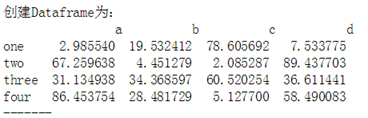
作业1:如图创建Dataframe(4*4,值为0-100的随机数),通过索引得到以下值
① 索引得到b,c列的所有值
② 索引得到第三第四行的数据
③ 按顺序索引得到two,one行的值
④ 索引得到大于50的值
import numpy as np

import pandas as pd

#练习1

df = pd.DataFrame(np.random.rand(16).reshape(4,4)*100,

                  index=['one','two','three','four'],

                  columns=['a','b','c','d'])

print(df)

print(df[['b','c']])

print(df.loc[['three','four']])

print(df.iloc[2:4])  #或者print(df.iloc[[2,3]]) // print(df.iloc[[2:]])

print(df.loc[['two','one']])

b = df[df>50]

print(b)
作业2:创建一个Series,包含10个元素,且每个值为0-100的均匀分布随机值,index为a-j,请分别筛选出:
① 标签为b,c的值为多少
② Series中第4到6个值是哪些?
③ Series中大于50的值有哪些?
#练习2

df1 = pd.Series(np.random.rand(10)*100,index=['a','b','c','d','e','f','g','h','i','j'])

print(df1)

print(df1.loc[['b','c']])

print(df1.iloc[4:7])

print(df1[df1>50])
Pandas 索引和切片的更多相关文章
- pandas中层次化索引与切片
Pandas层次化索引 1. 创建多层索引 隐式索引: 常见的方式是给dataframe构造函数的index参数传递两个或是多个数组 Series也可以创建多层索引 Series多层索引 B =Ser ...
- 金融量化分析【day110】:Pandas-DataFrame索引和切片
一.实验文档准备 1.安装 tushare pip install tushare 2.启动ipython C:\Users\Administrator>ipython Python 3.7.0 ...
- Pandas索引和选择数据
在本章中,我们将讨论如何切割和丢弃日期,并获取Pandas中大对象的子集. Python和NumPy索引运算符"[]"和属性运算符".". 可以在广泛的用例中快 ...
- pandas索引操作
Pandas的索引操作 索引对象Index 1. Series和DataFrame中的索引都是Index对象 示例代码: print(type(ser_obj.index)) print(type(d ...
- Numpy 索引及切片
1.一维数组的索引及切片 ar = np.arange(20) print(ar) print(ar[4]) print(ar[3:6]) print(ar[:4:2]) #索引到4 按2的步长 pr ...
- numpy之索引和切片
索引和切片 一维数组 一维数组很简单,基本和列表一致. 它们的区别在于数组切片是原始数组视图(这就意味着,如果做任何修改,原始都会跟着更改). 这也意味着,如果不想更改原始数组,我们需要进行显式的复制 ...
- Numpy系列(四)- 索引和切片
Python 中原生的数组就支持使用方括号([])进行索引和切片操作,Numpy 自然不会放过这个强大的特性. 单个元素索引 1-D数组的单元素索引是人们期望的.它的工作原理与其他标准Python序 ...
- Numpy学习二:数组的索引与切片
1.一维数组索引与切片#创建一维数组arr1d = np.arange(10)print(arr1d) 结果:[0 1 2 3 4 5 6 7 8 9] #数组的索引从0开始,通过索引获取第三个元素a ...
- 数据类型&字符串得索引及切片
一:数据类型 1):int 1,2,3用于计算 2):bool ture false 用于判断,也可做为if的条件 3):str 用引号引起来的都是str 存储少量数据,进行 ...
随机推荐
- Python并发编程之进程池与线程池
一.进程池与线程池 python标准模块concurrent.futures(并发未来) 1.concurrent.futures模块是用来创建并行的任务,提供了更高级别的接口,为了异步执行调用 2. ...
- 微信小程序电商实战-首页(下)
好了,上一期我们把首页搜索.导航栏和广告轮播给做完了,那么接下来会继续完成我们首页的剩余部分,先看我们要实现的效果吧! 本期实现效果图.gif 本期我们要实现首页的实时热销榜.福利专场和左下方个人 ...
- js获取文件上传进度
js获取文件上传进度: <input name="file" id="FileUpload" type="file" /> &l ...
- #include stdio.h(7)
#include <stdio.h> int main() { //***********一.循环语句*************** //什么叫做循环: //重复的做某件事情,重复的执行一 ...
- jquery_lazyload插件
延迟加载图片的 jQuery 插件 http://www.neoease.com/lazy-load-jquery-plugin-delay-load-image/
- Design Pattern ->Prototype
Layering & Contract Philosophy With additional indirection Prototype The example code is as foll ...
- LoadRunner性能测试之常见函数及参数的说明和作用
- JavaScript 面向对象编程(三):非构造函数对象的继承
JavaScript 面向对象编程(三):非构造函数对象的继承 一.什么是"非构造函数"的继承? 比如,现在有一个对象,叫做"中国人". var Chinese ...
- MSD_radix_sort
一.这次是在上一次尝试基础上进行的,预期是达到上次性能的9倍. MSD的基本手法就是不断切片.每一步都是把整体数据切割成256片,如上图所示,实际情况切片未必均匀,有的slice内可能一个元素也没有. ...
- eplise一键集成工具
因为要做平台,后台的内容就由我负责,目前想让测试人员 在本地使用eplise可以进行脚本开发,但是很多人都死在了搭建环境的道路上,那我就做了一键集成,点击就可以把所需要的配置项进行配置,总结:实际就 ...