
studentmanagement
package javatestywh; public class ScoreInformation
{
private String stunumber;
private String name;
private double mathematicsscore=4;
private double englishscore=3;
private double networkscore=4;
private double databasescore=3;
private double softwarescore=2;
public ScoreInformation()
{
super(); }
public ScoreInformation(String stunumber, String name, double mathematicsscore, double englishscore,
double networkscore, double databasescore, double softwarescore)
{
super();
this.stunumber = stunumber;
this.name = name;
this.mathematicsscore = mathematicsscore;
this.englishscore = englishscore;
this.networkscore = networkscore;
this.databasescore = databasescore;
this.softwarescore = softwarescore;
}
public String getStunumber()
{
return stunumber;
}
public void setStunumber(String stunumber)
{
this.stunumber = stunumber;
}
public String getName()
{
return name;
}
public void setName(String name)
{
this.name = name;
}
public double getMathematicsscore()
{
return mathematicsscore;
}
public void setMathematicsscore(double mathematicsscore)
{
this.mathematicsscore = mathematicsscore;
}
public double getEnglishscore()
{
return englishscore;
}
public void setEnglishscore(double englishscore)
{
this.englishscore = englishscore;
}
public double getNetworkscore()
{
return networkscore;
}
public void setNetworkscore(double networkscore)
{
this.networkscore = networkscore;
}
public double getDatabasescore()
{
return databasescore;
}
public void setDatabasescore(double databasescore)
{
this.databasescore = databasescore;
}
public double getSoftwarescore()
{
return softwarescore;
}
public void setSoftwarescore(double softwarescore)
{
this.softwarescore = softwarescore;
}
@Override
public String toString()
{
return "学号" + stunumber + ", 姓名=" + name + ", 数学=" + mathematicsscore
+ ", 英语=" + englishscore + ", 网络=" + networkscore + ", 数据库="
+ databasescore + ", 软件=" + softwarescore ;
} }
package javatestywh; import java.util.Scanner; public class scoreManagement
{
public static void main(String[] args)
{
Scanner sc = new Scanner(System.in);
// 定义数组预存五个学生的姓名以及学号;
ScoreInformation[] stu = new ScoreInformation[5];
stu[0] = new ScoreInformation("20183606", "yanwenhui", 4, 3, 4, 3, 2);
stu[1] = new ScoreInformation("20183610", "fengfeng", 4, 3, 4, 3, 2);
stu[2] = new ScoreInformation("20183607", "heihei", 4, 3, 4, 3, 2);
stu[3] = new ScoreInformation("20183608", "fengshun", 4, 3, 4, 3, 2);
stu[4] = new ScoreInformation("20183609", "beauty", 4, 3, 4, 3, 2);
mainshow(stu);
} // 主界面
public static void mainshow(ScoreInformation[] stu)
{
System.out.print("***********************************************************\r\n" + "石家庄铁道大学软件工程系\r\n"
+ "学生学籍管理系统 2019 版\r\n" + "***********************************************************\r\n"
+ "1、 学生考试成绩录入\r\n" + "2、 学生考试成绩修改\r\n" + "3、 计算学生成绩绩点\r\n" + "4、退出学籍管理系统\r\n"
+ "**********************************************************");
Scanner sc = new Scanner(System.in);// 输入选项
int number = sc.nextInt();
switch (number)
{
case 1:
getgrade(stu);
break;
case 2:
change(stu);
break;
case 3:
calculate(stu);
break;
case 4:
exited();
break;
case 5:
showgrade(stu);
break;
default:
{
System.out.println("信息错误,该选项不存在");
mainshow(stu);
break;
} } } public static void getgrade(ScoreInformation[] stu)
{
Scanner sc = new Scanner(System.in);
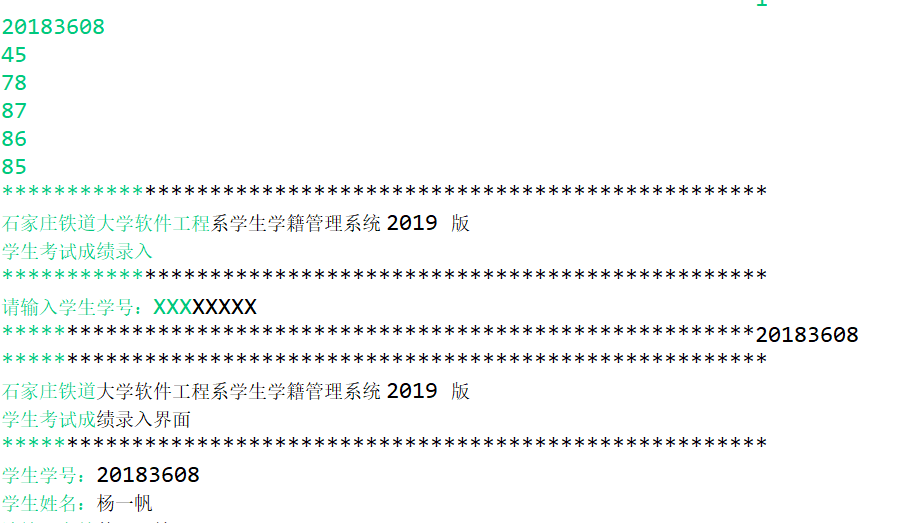
System.out.print(
"***********************************************************\r\n" + "石家庄铁道大学软件工程系学生学籍管理系统 2019 版\r\n"
+ "学生考试成绩录入\r\n" + "***********************************************************\r\n"
+ "请输入学生学号:XXXXXXXX\r\n" + "**********************************************************");
String number = sc.nextLine();
int flag = 0;
for (int i = 0; i < 5; i++)
{
if (stu[i].getStunumber().equals(number))
{
System.out.print("***********************************************************\r\n"
+ "std软件工程系学生学籍管理系统 2019 版\r\n" + "学生考试成绩录入界面\r\n"
+ "***********************************************************\r\n" + "学生学号:"
+ stu[i].getStunumber() + "\r\n" + "学生姓名:" + stu[i].getName() + "\r\n" + "请输入高等数学成绩:XXX\r\n"
+ "**********************************************************");
double math = sc.nextDouble();
System.out.println(stu[i].getName() + "的高数成绩是:" + math);
System.out.println("请输入该生的英语成绩");
double english = sc.nextDouble();
System.out.println(stu[i].getName() + "的英语成绩是:" + english);
System.out.println("请输入该生的网络成绩");
double network = sc.nextDouble();
System.out.println(stu[i].getName() + "的网络成绩是:" + network);
System.out.println("请输入该生的数据库成绩");
double data = sc.nextDouble();
System.out.println(stu[i].getName() + "的网络成绩是:" + data);
System.out.println("请输入该生的软件成绩");
double soft = sc.nextDouble();
System.out.print("***********************************************************\r\n"
+ "std软件工程系学生学籍管理系统 2019 版\r\n" + "学生考试成绩录入\r\n"
+ "***********************************************************\r\n" + "学生学号:"
+ stu[i].getStunumber() + "\r\n" + "学生姓名:" + stu[i].getName() + "\r\n" + "高等数学成绩:" + math
+ "\r\n" + "大学英语成绩:" + english + "\r\n" + "计算机网络成绩:" + network + "\r\n" + "数据库成绩:" + data
+ "\r\n" + "软件工程成绩:" + soft + "\r\n" + "该学生成绩已录入完毕,是否提交(Y/N)\r\n"
+ "**********************************************************"); if (sc.next().equals("Y"))
{
stu[i].setEnglishscore(english);
stu[i].setMathematicsscore(math);
stu[i].setDatabasescore(data);
stu[i].setNetworkscore(network);
stu[i].setSoftwarescore(soft);
mainshow(stu);
} else
{
System.out.println("返回录入");
getgrade(stu);
} flag = 1;
}
}
// 如果没有该学生信息,提示重新输入;
if (flag == 0)
{
System.out.println("该学号不存在,请重新输入");
getgrade(stu);
} } public static void change(ScoreInformation[] stu)
{
Scanner sc = new Scanner(System.in); System.out.print(
"***********************************************************\r\n" + "std软件工程系学生学籍管理系统 2019 版\r\n"
+ "学生考试成绩修改界面\r\n" + "***********************************************************\r\n"
+ "请输入学生学号:XXXXXXXX\r\n" + "**********************************************************");
String number = sc.nextLine();
int flag = 0;
for (int i = 0; i < 5; i++)
{
if (stu[i].getStunumber().equals(number))
{
System.out.print("***********************************************************\r\n"
+ "std软件工程系学生学籍管理系统 2019 版\r\n" + "学生考试成绩录入\r\n"
+ "***********************************************************\r\n" + "学生学号:"
+ stu[i].getStunumber() + "\r\n" + "学生姓名:" + stu[i].getName() + "\r\n" + "1、高等数学成绩:"
+ stu[i].getMathematicsscore() + "\r\n" + "2、大学英语成绩:" + stu[i].getEnglishscore() + "\r\n"
+ "3、计算机网络成绩:" + stu[i].getNetworkscore() + "\r\n" + "4、数据库成绩:" + stu[i].getDatabasescore()
+ "\r\n" + "5、软件工程成绩:" + stu[i].getSoftwarescore() + "\r\n"
+"请输入要修改的选项"+"\r\n"
+ "**********************************************************");
int select = sc.nextInt();
double changed;
switch (select)
{
case 1:
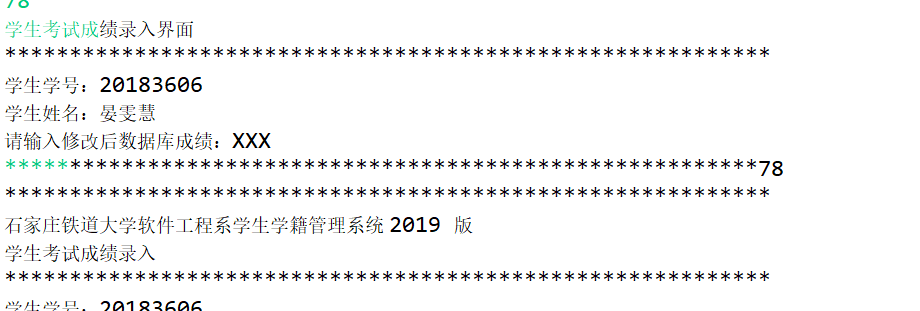
System.out.print("学生考试成绩录入界面\r\n" +
"***********************************************************\r\n" +
"学生学号:"+stu[i].getStunumber()+"\r\n" +
"学生姓名:"+stu[i].getName()+"\r\n" +
"请输入修改后高数成绩:XXX\r\n" +
"**********************************************************");
changed=sc.nextDouble();
System.out.print("***********************************************************\r\n"
+ "std软件工程系学生学籍管理系统 2019 版\r\n" + "学生考试成绩录入\r\n"
+ "***********************************************************\r\n" + "学生学号:"
+ stu[i].getStunumber() + "\r\n" + "学生姓名:" + stu[i].getName() + "\r\n" + "1、高等数学成绩:"
+ changed + "\r\n" + "2、大学英语成绩:" + stu[i].getEnglishscore() + "\r\n"
+ "3、计算机网络成绩:" + stu[i].getNetworkscore() + "\r\n" + "4、数据库成绩:" + stu[i].getDatabasescore()
+ "\r\n" + "5、软件工程成绩:" + stu[i].getSoftwarescore() + "\r\n"
+"该学生成绩已修改完毕,是否提交(Y/N)"+"\r\n"
+ "**********************************************************");
if(sc.next().equals("Y")) {
stu[i].setMathematicsscore(changed);
mainshow(stu);
}
else {
change(stu);
}
break;
case 2:
System.out.print("学生考试成绩录入界面\r\n" +
"***********************************************************\r\n" +
"学生学号:"+stu[i].getStunumber()+"\r\n" +
"学生姓名:"+stu[i].getName()+"\r\n" +
"请输入修改后成绩:英语\r\n" +
"**********************************************************");
changed=sc.nextDouble();
System.out.print("***********************************************************\r\n"
+ "std软件工程系学生学籍管理系统 2019 版\r\n" + "学生考试成绩录入\r\n"
+ "***********************************************************\r\n" + "学生学号:"
+ stu[i].getStunumber() + "\r\n" + "学生姓名:" + stu[i].getName() + "\r\n" + "1、高等数学成绩:"
+ stu[i].getMathematicsscore() + "\r\n" + "2、大学英语成绩:" + changed + "\r\n"
+ "3、计算机网络成绩:" + stu[i].getNetworkscore() + "\r\n" + "4、数据库成绩:" + stu[i].getDatabasescore()
+ "\r\n" + "5、软件工程成绩:" + stu[i].getSoftwarescore() + "\r\n"
+"该学生成绩已修改完毕,是否提交(Y/N)"+"\r\n"
+ "**********************************************************");
if(sc.next().equals("Y")) {
stu[i].setEnglishscore(changed);
mainshow(stu);
}
else {
change(stu);
}
break;
case 3:
System.out.print("学生考试成绩录入界面\r\n" +
"***********************************************************\r\n" +
"学生学号:"+stu[i].getStunumber()+"\r\n" +
"学生姓名:"+stu[i].getName()+"\r\n" +
"请输入修改后网络成绩:\r\n" +
"**********************************************************");
changed=sc.nextDouble();
System.out.print("***********************************************************\r\n"
+ "std软件工程系学生学籍管理系统 2019 版\r\n" + "学生考试成绩录入\r\n"
+ "***********************************************************\r\n" + "学生学号:"
+ stu[i].getStunumber() + "\r\n" + "学生姓名:" + stu[i].getName() + "\r\n" + "1、高等数学成绩:"
+ stu[i].getMathematicsscore() + "\r\n" + "2、大学英语成绩:" + stu[i].getEnglishscore() + "\r\n"
+ "3、计算机网络成绩:" + changed + "\r\n" + "4、数据库成绩:" + stu[i].getDatabasescore()
+ "\r\n" + "5、软件工程成绩:" + stu[i].getSoftwarescore() + "\r\n"
+"该学生成绩已修改完毕,是否提交(Y/N)"+"\r\n"
+ "**********************************************************");
if(sc.next().equals("Y")) {
stu[i].setNetworkscore(changed);
mainshow(stu);
}
else {
change(stu);
}
break;
case 4:
System.out.print("学生考试成绩录入界面\r\n" +
"***********************************************************\r\n" +
"学生学号:"+stu[i].getStunumber()+"\r\n" +
"学生姓名:"+stu[i].getName()+"\r\n" +
"请输入修改后数据库成绩:XXX\r\n" +
"**********************************************************");
changed=sc.nextDouble();
System.out.print("***********************************************************\r\n"
+ "std软件工程系学生学籍管理系统 2019 版\r\n" + "学生考试成绩录入\r\n"
+ "***********************************************************\r\n" + "学生学号:"
+ stu[i].getStunumber() + "\r\n" + "学生姓名:" + stu[i].getName() + "\r\n" + "1、高等数学成绩:"
+ stu[i].getMathematicsscore() + "\r\n" + "2、大学英语成绩:" + stu[i].getEnglishscore() + "\r\n"
+ "3、计算机网络成绩:" + stu[i].getNetworkscore() + "\r\n" + "4、数据库成绩:" + changed
+ "\r\n" + "5、软件工程成绩:" + stu[i].getSoftwarescore() + "\r\n"
+"该学生成绩已修改完毕,是否提交(Y/N)"+"\r\n"
+ "**********************************************************");
if(sc.next().equals("Y")) {
stu[i].setDatabasescore(changed);
mainshow(stu);
}
else {
change(stu);
}
break;
case 5:
System.out.print("学生考试成绩录入界面\r\n" +
"***********************************************************\r\n" +
"学生学号:"+stu[i].getStunumber()+"\r\n" +
"学生姓名:"+stu[i].getName()+"\r\n" +
"请输入修改后软件成绩:XXX\r\n" +
"**********************************************************");
changed=sc.nextDouble();
System.out.print("***********************************************************\r\n"
+ "std软件工程系学生学籍管理系统 2019 版\r\n" + "学生考试成绩录入\r\n"
+ "***********************************************************\r\n" + "学生学号:"
+ stu[i].getStunumber() + "\r\n" + "学生姓名:" + stu[i].getName() + "\r\n" + "1、高等数学成绩:"
+ stu[i].getMathematicsscore() + "\r\n" + "2、大学英语成绩:" + stu[i].getEnglishscore() + "\r\n"
+ "3、计算机网络成绩:" + stu[i].getNetworkscore() + "\r\n" + "4、数据库成绩:" + stu[i].getDatabasescore()
+ "\r\n" + "5、软件工程成绩:" + changed + "\r\n"
+"该学生成绩已修改完毕,是否提交(Y/N)"+"\r\n"
+ "**********************************************************");
if(sc.next().equals("Y")) {
stu[i].setSoftwarescore(changed);
mainshow(stu);
}
else {
change(stu);
}
break;
default:
System.out.println("请选择正确信息输入");
change(stu);
break; } flag = 1;
} }
if (flag == 0)
{
System.out.println("学号输入错误,请重新输入学号");
change(stu);
} } public static void calculate(ScoreInformation[] stu) {
Scanner sc=new Scanner(System.in);
System.out.print("***********************************************************\r\n" +
"std软件工程系学生学籍管理系统 2019 版\r\n" +
"学生考试成绩绩点计算界面\r\n" +
"***********************************************************\r\n" +
"请输入学生学号:XXXXXXXX\r\n" +
"**********************************************************");
String number = sc.nextLine();
float math;
float english;
float net;
float data;
float soft;
int flag = 0;
for (int i = 0; i < 5; i++)
{
if (stu[i].getStunumber().equals(number))
{
double pingjun;
pingjun=(judge(stu[i].getMathematicsscore())*4+judge(stu[i].getEnglishscore())*3+
judge(stu[i].getNetworkscore())*4+judge(stu[i].getDatabasescore())*3+judge(stu[i].getSoftwarescore())*2)
/16;
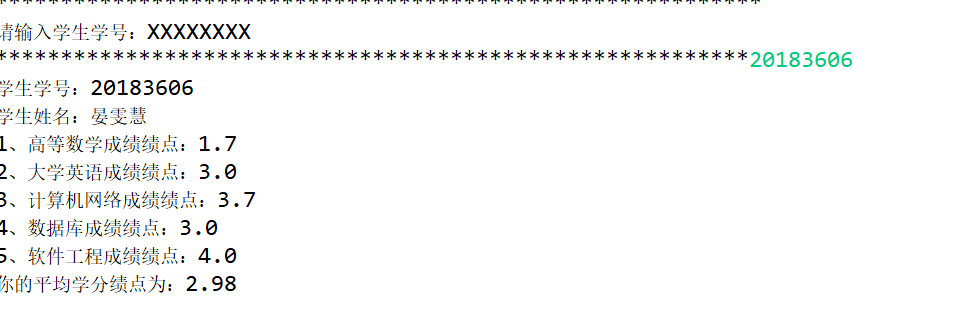
System.out.print("学生学号:"+stu[i].getStunumber()+"\r\n" +
"学生姓名:"+stu[i].getName()+"\r\n" +
"1、高等数学成绩绩点:"+judge(stu[i].getMathematicsscore())+"\r\n" +
"2、大学英语成绩绩点:"+judge(stu[i].getEnglishscore())+"\r\n" +
"3、计算机网络成绩绩点:"+judge(stu[i].getNetworkscore())+"\r\n" +
"4、数据库成绩绩点:"+judge(stu[i].getDatabasescore())+"\r\n" +
"5、软件工程成绩绩点:"+judge(stu[i].getSoftwarescore())+"\r\n" );
System.out.println("你的平均学分绩点为:"+String.format("%.2f", pingjun)+"\r\n" );
if(pingjun>=2) {
System.out.println("提示信息:您的学分绩点已达到毕业要求");
System.out.println("是否返回主界面:Y/N");
if(sc.next().equals("Y")) {
mainshow(stu);
}
}
else {
System.out.println("提示信息:您的学分绩点未达到毕业要求");
System.out.println("是否返回主界面:Y/N");
if(sc.next().equals("Y")) {
mainshow(stu);
}
} flag=1;
}
}
if(flag==0) {
System.out.println("输入信息错误,请重新输入");
mainshow(stu);
}
} public static void exited() {
System.out.print("***********************************************************\r\n" +
"谢谢使用石家庄铁道大学软件工程系学生学籍管理系统 2019 版\r\n" +
"制作人:yanwenhui\r\n" +
"***********************************************************"); }
public static void showgrade(ScoreInformation [] stu) {
for(int i=0;i<stu.length;i++) {
System.out.println(stu[i]);
}
mainshow(stu); } public static double judge(double x) {
double t=0;
if(x>=90) t=4;
else if(x>=85&&x<=89.9) t=3.7;
else if(x>=82&&x<=84.9) t=3.3;
else if(x>=78&&x<=81.9) t=3.0;
else if(x>=75&&x<=77.9) t=2.3;
else if(x>=72&&x<=74.9) t=2.3;
else if(x>=68&&x<=71.9) t=2.0;
else if(x>=66&&x<=67.9) t=1.7;
else if(x>=64&&x<=65.9) t=1.5;
else if(x>=60&&x<=63.9) t=1.0;
else t=0; return t;
}
}

心得:第一次完成的一个系统,哈哈哈;
studentmanagement的更多相关文章
- 基于ADO.NET的SqlHelper类
1.使用Connection连接数据库的步骤: (1).添加命名空间 System.Data.SqlClient(注意:初学者经常会忘记) (2)定义连接字符串.连接SQL Server 数据库时: ...
- MFC listcontrol 分列 添加行数据 点击列头排序
适用于 对话框程序 1.在工具箱中拖出 ListControl,然后右键-属性,view-Report 让你的ListControl变成这幅模样! 2.添加ListControl控件的control类 ...
- 连接mysql遇到的问题
1. 首先使用一个用户名不行时,可以新建一个用户名点击用户,输入名和密码,此时一定要记住密码,别忘了.不过也可以点击编辑用户改.此时连接时发现还是连接不上.出现错误信息为: Access denied ...
- ASP.NET动态的网页增删查改
动态页面的增删查改,不多说了,直接上代码 跟前面的一般处理程序一样我上用的同一套三层,只是UI层的东西不一样,在纠结着要不要重新在上一次以前上过的代码: 纠结来纠结去,最后我觉得还上上吧,毕竟不上为我 ...
- Struts2(二)之封装请求正文、数据类型转换、数据验证
一.封装请求正文到对象中(重点) 1.1.静态参数封装 在struts.xml文件中,给动作类注入值,使用的是setter方法 1.2.动态参数封装 通过用户表单封装请求正文参数 1.2.1.动作类作 ...
- JavaWeb程序利用Servlet的对SQLserver增删改查操作
声明:学了几天终于将增删改查的操作掌握了,也发现了一些问题,所以总结一下. 重点:操作数据库主要用的是SQL语句跟其他无关. 一:前提知识:PreparedStatement PreperedStat ...
- JavaWeb程序连接SQLserver数据库
声明:一直以来都以为javaweb程序连接数据库是一个很高大上很难的问题,结果今天学习了一下,不到两个小时就解决了,所以总结一篇博客. JavaWeb程序连接SQLserver数据库分为一下步骤: 1 ...
- struts2(四)之输入校验
前言 这个本来是昨天就写好的,但是不知道为什么没有保存成功!但是今天起来再写一遍就当巩固一下知识吧. 一.输入校验概述 在以前我们写一个登录页面时,并没有限制用户的输入,不管用户输入什么,我们都存入数 ...
- sb error
width: $("#StudentManagement").parent().width(), height: $("#StudentManagement") ...
随机推荐
- java学习之IO流(学习之旅,一)
个人在学习IO流的时候看到如下所示java 流类图结构的时候,我的感想是,这么多··处于蒙的状态. Java流类图结构 这么多,没有分类不好学,那我们就慢慢一口一口的吃,这样每天学习一点就好了,其实很 ...
- php中date('Y/m/d',time())显示不对
一. 时间不对是因为没设置时区 在xampp/php/php.ini中ctrl + f 查找date.timezone 该行默认注释,去掉 ; 修改为 date.timezone = PRC 二 上述 ...
- vue-cli 局域网可访问配置
vue-cli 使用官方脚手架搭建以后,本地的config配置已经没有了,默认打开localhost,无法ip访问 只要修改项目目录配置和防火墙配置 1.在项目根目录下面加一个文件vue.config ...
- Centos7安装mysql5.7.21
1.卸载系统自带的 MariaDB [root@CentOS ~]# rpm -qa | grep mariadb mariadb-libs--.el7.x86_64 [root@CentOS ~]# ...
- 英语 - take的短语
take care of 照顾 take place 发生 take action 行动 take over 接管 take in 欺骗(某人) take up 拿起 take awa ...
- node - TypeError: argument handler must be a function 路由报错的原因
原因 : 路由一定要暴露给外部使用 var express = require('express') var router = express.Router() router.get('/', ...
- Oracle-SQL 小题
1.查询姓名中不包含C和c的员工信息 ; ①字符函数 instr(input,char,m,n) 的用法:返回在字符值中查找字符串char的数字位置.参数m作为查找的开始,参数n代表第n次发现.m和n ...
- linux解决端口冲突问题
# 查看9000这个端口是否被使用 netstat -lnt | grep 9000 -l 显示正在被监听(listen)的端口 -n 表示直接显示端口数字 -t 表示的 ...
- 165-PHP 文本替换函数str_replace(六)
<?php $str='programming'; //定义一个字符串 $replacement='er'; //定义替换的字符串 $res=substr_replace($str,$repla ...
- 123-PHP类构造函数
<?php class ren{ //定义人类 private $name; //定义成员属性 public function __construct($name){ //定义构造函数 $thi ...