
Winform—C#读写config配置文件
现在FrameWork2.0以上使用的是:ConfigurationManager或WebConfigurationManager。并且AppSettings属性是只读的,并不支持修改属性值.
一、如何使用ConfigurationManager?
1、添加引用:添加System.configguration


2、引用空间

3、config配置文件配置节
常用配置节:
(1)普通配置节
<appSettings>
<add key="COM1" value="COM1,9600,8,None,1,已启用" />
</appSettings>
(2)数据源配置节
<connectionStrings>
<add name="kyd" connectionString="server=.;database=UFDATA_999_2017;user=sa;pwd=123"/>
</connectionStrings>
(3)自定义配置节

二、config文件读写
1、依据连接串名字connectionName返回数据连接字符串
//依据连接串名字connectionName返回数据连接字符串

        public static string GetConnectionStringsConfig(string connectionName)

        {

            //指定config文件读取

            string file = System.Windows.Forms.Application.ExecutablePath;

            System.Configuration.Configuration config = ConfigurationManager.OpenExeConfiguration(file);

            string connectionString =

                config.ConnectionStrings.ConnectionStrings[connectionName].ConnectionString.ToString();

            return connectionString;

        }
2、更新连接字符串
///<summary>

        ///更新连接字符串

        ///</summary>

        ///<param name="newName">连接字符串名称</param>

        ///<param name="newConString">连接字符串内容</param>

        ///<param name="newProviderName">数据提供程序名称</param>

        public static void UpdateConnectionStringsConfig(string newName, string newConString, string newProviderName)

        {

            //指定config文件读取

            string file = System.Windows.Forms.Application.ExecutablePath;

            Configuration config = ConfigurationManager.OpenExeConfiguration(file);

            bool exist = false; //记录该连接串是否已经存在

            //如果要更改的连接串已经存在

            if (config.ConnectionStrings.ConnectionStrings[newName] != null)

            {

                exist = true;

            }

            // 如果连接串已存在,首先删除它

            if (exist)

            {

                config.ConnectionStrings.ConnectionStrings.Remove(newName);

            }

            //新建一个连接字符串实例

            ConnectionStringSettings mySettings =

                new ConnectionStringSettings(newName, newConString, newProviderName);

            // 将新的连接串添加到配置文件中.

            config.ConnectionStrings.ConnectionStrings.Add(mySettings);

            // 保存对配置文件所作的更改

            config.Save(ConfigurationSaveMode.Modified);

            // 强制重新载入配置文件的ConnectionStrings配置节

            ConfigurationManager.RefreshSection("connectionStrings");

        }
3、返回*.exe.config文件中appSettings配置节的value项
///<summary>

        ///返回*.exe.config文件中appSettings配置节的value项

        ///</summary>

        ///<param name="strKey"></param>

        ///<returns></returns>

        public static string GetAppConfig(string strKey)

        {

            string file = System.Windows.Forms.Application.ExecutablePath;

            Configuration config = ConfigurationManager.OpenExeConfiguration(file);

            foreach (string key in config.AppSettings.Settings.AllKeys)

            {

                if (key == strKey)

                {

                    return config.AppSettings.Settings[strKey].Value.ToString();

                }

            }

            return null;

        }
4、在*.exe.config文件中appSettings配置节增加一对键值对
///<summary>

        ///在*.exe.config文件中appSettings配置节增加一对键值对

        ///</summary>

        ///<param name="newKey"></param>

        ///<param name="newValue"></param>

        public static void UpdateAppConfig(string newKey, string newValue)

        {

            string file = System.Windows.Forms.Application.ExecutablePath;

            Configuration config = ConfigurationManager.OpenExeConfiguration(file);

            bool exist = false;

            foreach (string key in config.AppSettings.Settings.AllKeys)

            {

                if (key == newKey)

                {

                    exist = true;

                }

            }

            if (exist)

            {

                config.AppSettings.Settings.Remove(newKey);

            }

            config.AppSettings.Settings.Add(newKey, newValue);

            config.Save(ConfigurationSaveMode.Modified);

            ConfigurationManager.RefreshSection("appSettings");

        }
5、修改IP地址
// 修改system.serviceModel下所有服务终结点的IP地址

        public static void UpdateServiceModelConfig(string configPath, string serverIP)

        {

            Configuration config = ConfigurationManager.OpenExeConfiguration(configPath);

            ConfigurationSectionGroup sec = config.SectionGroups["system.serviceModel"];

            ServiceModelSectionGroup serviceModelSectionGroup = sec as ServiceModelSectionGroup;

            ClientSection clientSection = serviceModelSectionGroup.Client;

            foreach (ChannelEndpointElement item in clientSection.Endpoints)

            {

                string pattern = @"\b\d{1,3}\.\d{1,3}\.\d{1,3}\.\d{1,3}\b";

                string address = item.Address.ToString();

                string replacement = string.Format("{0}", serverIP);

                address = Regex.Replace(address, pattern, replacement);

                item.Address = new Uri(address);

            }

            config.Save(ConfigurationSaveMode.Modified);

            ConfigurationManager.RefreshSection("system.serviceModel");

        }

        // 修改applicationSettings中App.Properties.Settings中服务的IP地址

        public static void UpdateConfig(string configPath, string serverIP)

        {

            Configuration config = ConfigurationManager.OpenExeConfiguration(configPath);

            ConfigurationSectionGroup sec = config.SectionGroups["applicationSettings"];

            ConfigurationSection configSection = sec.Sections["DataService.Properties.Settings"];

            ClientSettingsSection clientSettingsSection = configSection as ClientSettingsSection;

            if (clientSettingsSection != null)

            {

                SettingElement element1 = clientSettingsSection.Settings.Get("DataService_SystemManagerWS_SystemManagerWS");

                if (element1 != null)

                {

                    clientSettingsSection.Settings.Remove(element1);

                    string oldValue = element1.Value.ValueXml.InnerXml;

                    element1.Value.ValueXml.InnerXml = GetNewIP(oldValue, serverIP);

                    clientSettingsSection.Settings.Add(element1);

                }

                SettingElement element2 = clientSettingsSection.Settings.Get("DataService_EquipManagerWS_EquipManagerWS");

                if (element2 != null)

                {

                    clientSettingsSection.Settings.Remove(element2);

                    string oldValue = element2.Value.ValueXml.InnerXml;

                    element2.Value.ValueXml.InnerXml = GetNewIP(oldValue, serverIP);

                    clientSettingsSection.Settings.Add(element2);

                }

            }

            config.Save(ConfigurationSaveMode.Modified);

            ConfigurationManager.RefreshSection("applicationSettings");

        }

        private static string GetNewIP(string oldValue, string serverIP)

        {

            string pattern = @"\b\d{1,3}\.\d{1,3}\.\d{1,3}\.\d{1,3}\b";

            string replacement = string.Format("{0}", serverIP);

            string newvalue = Regex.Replace(oldValue, pattern, replacement);

            return newvalue;

        }
修改IP地址
config 读写方法
using System.Configuration;

//省略其他代码

public SalesOrderData()

        {

            string str = "";

            str = ConfigurationManager.ConnectionStrings["kyd"].ToString();

            conn = new SqlConnection(str);

            cmd = conn.CreateCommand();

        }
实际应用:
1、获取配置节的值
button1 点击获取配置节<appSettings>指定key的value值
button2 点击获取配置节<connectionStrings>指定name的connectionString值


结果为:

2、修改配置节的值
button1 点击获取配置节<appSettings>指定key的value值
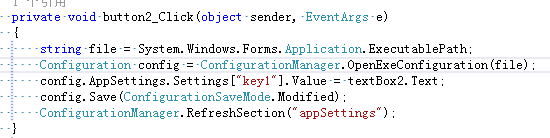
button2 点击修改配置节<connectionStrings>指定key的value值为文本框的值
button3 点击获取配置节<appSettings>指定key新的value值


结果为:

此时配置文件key1的value值为,获取key值仍为修改前的值

如何重置为修改前的值?

如何保存修改后的值?
Winform—C#读写config配置文件的更多相关文章
- C#读写config配置文件
应用程序配置文件(App.config)是标准的 XML 文件,XML 标记和属性是区分大小写的.它是可以按需要更改的,开发人员可以使用配置文件来更改设置,而不必重编译应用程序. 对于一个config ...
- C#读写config配置文件--读取配置文件类
一:通过Key访问Value的方法: //判断App.config配置文件中是否有Key(非null) if (ConfigurationManager.AppSettings.HasKeys()) ...
- winform 写App.config配置文件——IT轮子系列(八)
前言 在winform项目中,常常需要读app.config文件.如: var version = System.Configuration.ConfigurationManager.AppSetti ...
- WPF读写config配置文件
1. 在你的工程中,添加app.config文件.文件的内容默认为: 1 <?xml version="1.0" encoding="utf-8" ?&g ...
- C# 读写App.config配置文件的方法
我们经常会希望在程序中写入一些配置信息,例如版本号,以及数据库的连接字符串等.你可能知道在WinForm应用程序中可以利用Properties.Settings来进行类似的工作,但这些其实都利用了Ap ...
- 读写App.config配置文件的方法
我们经常会希望在程序中写入一些配置信息,例如版本号,以及数据库的连接字符串等.你可能知道在WinForm应用程序中可以利用Properties.Settings来进行类似的工作,但这些其实都利用了Ap ...
- C#中动态读写App.config配置文件
转自:http://blog.csdn.net/taoyinzhou/article/details/1906996 app.config 修改后,如果使用cofnigurationManager立即 ...
- C# 读写App.config配置文件
一.C#项目中添加App.config配置文件 在控制台程序中,默认会有一个App.config配置文件,如果不小心删除掉,或者其他程序需要配置文件,可以通过添加得到. 添加步骤:右键项目名称,选择“ ...
- 关于App.config配置文件
今天在做复习的时候,突然发现自己无法读取配置文件中的数据库连接字符串,而且检查了半天也没找出原因,最后求助万能的度娘才得以解决—— 1.App.config配置文件在项目中添加后不要修改名称,否则会出 ...
随机推荐
- 2018.09.05 bzoj2726: [SDOI2012]任务安排(斜率优化dp+二分)
传送门 跟Ti" role="presentation" style="position: relative;">TiTi为正数的时候差不多. ...
- 2018.08.11 洛谷P3224 [HNOI2012]永无乡(线段树合并)
传送门 给出n个带点权的点,支持连边和查询连通块第k大. 这个貌似就是一道线段树合并的裸板啊... 代码: #include<bits/stdc++.h> #define N 100005 ...
- jsp调用java servlet
1.依赖jar servlet-api.jar 2.工程结构 3.java servlet实现类 package testServlet; import java.io.IOException; im ...
- Mysql & Hive 导入导出数据
---王燕行转列sql select split(concat_ws(',',collect_set(cast(smzq as string))),',')[1] ,split(concat_ws(' ...
- Apache Struts 2 Documentation Core Developers Guide
http://struts.apache.org/docs/core-developers-guide.html
- AirplaceLogger源代码解析
将源代码添加进Eclipse中,右键-->Import-->Existing Projects into Workspace-->选择AirplaceLogger源代码文件夹即可导入 ...
- (KMP)Simpsons’ Hidden Talents -- hdu -- 2594
http://acm.hdu.edu.cn/showproblem.php?pid=2594 Simpsons’ Hidden Talents Time Limit: 2000/1000 MS (Ja ...
- Codeforces 706C Hard problem 2016-09-28 19:47 90人阅读 评论(0) 收藏
C. Hard problem time limit per test 1 second memory limit per test 256 megabytes input standard inpu ...
- Postman - 測試 API 的好工具
POSTMAN in Google APP Store 因為工作的關係,常常寫一些 API 供 APP 使用.以前傻傻的,每次測試的時候都會自己刻一個 HTML 的表單,一個一個填入 input ,接 ...
- java web前端easyui(layout+tree+双tabs)布局+树+2个选项卡tabs
1.列出要实现的样式: 2.实现的代码: 分三大部分: 1):页面主体部分:mian.vm <html> <head> <title>Ks UI</title ...