
Wordpress中文章的特色图像Featured Image究竟存在哪里?
最近项目需要,分析了一下Wordpress的特色图像 Feature Image的上传、保存方式,这一分析觉得Wordpress的数据结构设计还真是有想法。
先简单说一下结论:
Wordpress中图像物理文件保存在
wp-content/uploads目录下,相关信息保存在 wp_posts 表中。post_type 是 attachment,post-mime-type 是 image/png。通过 post_parent 与文章关联。
我原来以为图片信息会有单独的表存放,没想到都放在 wp_posts 中,于是分析了这样做有什么好处。
wp_posts 表
首先来看看 wp_posts 表。该表用来存放文章信息,如文章标题、正文、摘要、作者、发布时间、访问密码、评论数、修改时间、文章地址(非静态化之前的,带?和数字ID)等。这些属性都是与文章相关的,同时根据 post_type的不同,该表还能用来存储特色图像 Featured Image。
| 字段 | 含义 |
|---|---|
| ID | 自增唯一ID |
| post_author | 对应作者ID |
| post_date | 发布时间 |
| post_date_gmt | 发布时间(GMT+0时间) |
| post_content | 正文 |
| post_title | 标题 |
| post_excerpt | 摘录 |
| post_status | 文章状态(publish |
| comment_status | 评论状态(open |
| ping_status | PING/Trackback状态(open/closed) |
| post_password | 文章密码 |
| post_name | 文章缩略名 |
| to_ping | 要引用的URL链接 |
| pinged | 已经PING过的链接 |
| post_modified | 修改时间 |
| post_modified_gmt | 修改时间(GMT+0时间) |
| post_content_filtered | 未知 |
| post_parent | 父文章,主要用于PAGE |
| guid | 文章的一个链接。注意:不能将GUID作为永久链接(虽然在2.5之前的版本中它的确被当作永久链接),也不能将它作为文章的可用链接。GUID是一种独有的标识符,只是目前恰巧成为文章的一个链接。 |
| menu_order | 排序ID |
| post_type | 文章类型(post/page/attachment/revision等) |
| post_mime_type | MIME类型 |
| comment_count | 评论总数 |
由此可以看到,Wordpress 利用 post_type 可以在该表中存储草稿、文章、页面、附件等丰富的信息,一张表就搞定了。
wp_postmeta 表
与这张表相关联的,还有一个 wp_postmeta 表,用来存储与文章相关的元数据。这个表的表结构比较简单。
| 字段 | 含义 |
|---|---|
| meta_id | 元数据记录的ID。 |
| post_id | 就是元数据相关联的post,用户(user),评论(comment)的ID。 |
| meta_key | 元键(meta key)(这个值在不同的记录中经常是重复的)。 |
| meta_value | 元值(meta value)(往往是唯一的)。 |
如何获取特色图像 Featured Image
那么,对于一个文章,是如何来获取特色图像 Featured Image的,下面来看一下。在后台的文章编辑界面,特色图像显示在这个位置。
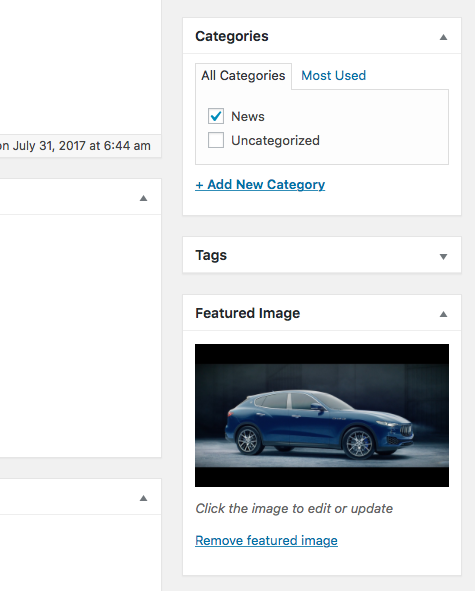
对应的后台代码是 wp-admin/includes/meta-boxes.php
/**

 * Display post thumbnail meta box.

 *

 * @since 2.9.0

 *

 * @param WP_Post $post A post object.

 */

function post_thumbnail_meta_box( $post ) {

    $thumbnail_id = get_post_meta( $post->ID, '_thumbnail_id', true );    //获取特色图像对应的ID

    echo _wp_post_thumbnail_html( $thumbnail_id, $post->ID );    //输出HTML

}
继续找 get_post_meta ,在wp-includes/post.php中。
/**

 * Retrieve post meta field for a post.

 *

 * @since 1.5.0

 *

 * @param int    $post_id Post ID.

 * @param string $key     Optional. The meta key to retrieve. By default, returns

 *                        data for all keys. Default empty.

 * @param bool   $single  Optional. Whether to return a single value. Default false.

 * @return mixed Will be an array if $single is false. Will be value of meta data

 *               field if $single is true.

 */

function get_post_meta( $post_id, $key = '', $single = false ) {

    return get_metadata('post', $post_id, $key, $single);

}
继续找 get_metadata 在 wp-includes/meta.php 中。
/**

 * Retrieve metadata for the specified object.

 *

 * @since 2.9.0

 *

 * @param string $meta_type Type of object metadata is for (e.g., comment, post, or user)

 * @param int    $object_id ID of the object metadata is for

 * @param string $meta_key  Optional. Metadata key. If not specified, retrieve all metadata for

 *                             the specified object.

 * @param bool   $single    Optional, default is false.

 *                          If true, return only the first value of the specified meta_key.

 *                          This parameter has no effect if meta_key is not specified.

 * @return mixed Single metadata value, or array of values

 */

function get_metadata($meta_type, $object_id, $meta_key = '', $single = false) {

    if ( ! $meta_type || ! is_numeric( $object_id ) ) {

        return false;

    }

    $object_id = absint( $object_id );

    if ( ! $object_id ) {

        return false;

    }

    //echo $object_id . ':' . $meta_type . '-' . $meta_key . '-' . $single . '<br />';

    /**

     * Filters whether to retrieve metadata of a specific type.

     *

     * The dynamic portion of the hook, `$meta_type`, refers to the meta

     * object type (comment, post, or user). Returning a non-null value

     * will effectively short-circuit the function.

     *

     * @since 3.1.0

     *

     * @param null|array|string $value     The value get_metadata() should return - a single metadata value,

     *                                     or an array of values.

     * @param int               $object_id Object ID.

     * @param string            $meta_key  Meta key.

     * @param bool              $single    Whether to return only the first value of the specified $meta_key.

     */

    $check = apply_filters( "get_{$meta_type}_metadata", null, $object_id, $meta_key, $single );

    if ( null !== $check ) {

        if ( $single && is_array( $check ) )

            return $check[0];

        else

            return $check;

    }

    $meta_cache = wp_cache_get($object_id, $meta_type . '_meta');

    if ( !$meta_cache ) {

        $meta_cache = update_meta_cache( $meta_type, array( $object_id ) );

        $meta_cache = $meta_cache[$object_id];

    }

    if ( ! $meta_key ) {

        return $meta_cache;

    }

    if ( isset($meta_cache[$meta_key]) ) {

        if ( $single )

            return maybe_unserialize( $meta_cache[$meta_key][0] );

        else

            return array_map('maybe_unserialize', $meta_cache[$meta_key]);

    }

    if ($single)

        return '';

    else

        return array();

}
这个函数中会根据 $meta_key 和 $object_id 、$meta_type 取出特色图像对应的ID。为了避免重复读取数据库,这里用了缓存,我们可以看 update_meta_cache 这个函数。
/**

 * Update the metadata cache for the specified objects.

 *

 * @since 2.9.0

 *

 * @global wpdb $wpdb WordPress database abstraction object.

 *

 * @param string    $meta_type  Type of object metadata is for (e.g., comment, post, or user)

 * @param int|array $object_ids Array or comma delimited list of object IDs to update cache for

 * @return array|false Metadata cache for the specified objects, or false on failure.

 */

function update_meta_cache($meta_type, $object_ids) {

    global $wpdb;

    if ( ! $meta_type || ! $object_ids ) {

        return false;

    }

    $table = _get_meta_table( $meta_type );

    if ( ! $table ) {

        return false;

    }

    $column = sanitize_key($meta_type . '_id');

    if ( !is_array($object_ids) ) {

        $object_ids = preg_replace('|[^0-9,]|', '', $object_ids);

        $object_ids = explode(',', $object_ids);

    }

    $object_ids = array_map('intval', $object_ids);

    $cache_key = $meta_type . '_meta';

    $ids = array();

    $cache = array();

    foreach ( $object_ids as $id ) {

        $cached_object = wp_cache_get( $id, $cache_key );

        if ( false === $cached_object )

            $ids[] = $id;

        else

            $cache[$id] = $cached_object;

    }

    if ( empty( $ids ) )

        return $cache;

    // Get meta info

    $id_list = join( ',', $ids );

    $id_column = 'user' == $meta_type ? 'umeta_id' : 'meta_id';

    echo "SELECT $column, meta_key, meta_value FROM $table WHERE $column IN ($id_list) ORDER BY $id_column ASC" . "<br />";

    $meta_list = $wpdb->get_results( "SELECT $column, meta_key, meta_value FROM $table WHERE $column IN ($id_list) ORDER BY $id_column ASC", ARRAY_A );

    if ( !empty($meta_list) ) {

        foreach ( $meta_list as $metarow) {

            $mpid = intval($metarow[$column]);

            $mkey = $metarow['meta_key'];

            $mval = $metarow['meta_value'];

            // Force subkeys to be array type:

            if ( !isset($cache[$mpid]) || !is_array($cache[$mpid]) )

                $cache[$mpid] = array();

            if ( !isset($cache[$mpid][$mkey]) || !is_array($cache[$mpid][$mkey]) )

                $cache[$mpid][$mkey] = array();

            // Add a value to the current pid/key:

            $cache[$mpid][$mkey][] = $mval;

        }

    }

    foreach ( $ids as $id ) {

        if ( ! isset($cache[$id]) )

            $cache[$id] = array();

        wp_cache_add( $id, $cache[$id], $cache_key );

    }

    return $cache;

}
关键的语句在这里
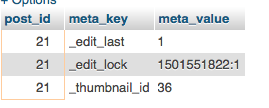
SELECT post_id, meta_key, meta_value FROM wp_postmeta WHERE post_id IN (21) ORDER BY meta_id ASC
可以看到结果如下,_thumbnail_id 对应的就是 wp_posts 中的记录ID,从而可以取到图片对应的地址和相关信息。
本文内容基于 Wordpress 4.8版本
参考资料:
1、如何设置Wordpress的特色图像
2、WordPress数据库表及字段详解
3、理解和利用 WordPress 中的元数据(Metadata)
Wordpress中文章的特色图像Featured Image究竟存在哪里?的更多相关文章
- wordpress中文章发布时间不显示?用get_the_date代替the_date
今天发现,在主题中部分地方使用the_date函数来显示文章发布的时间时,竟然发生不显示时间的情况,再仔细看了一下这些文章,有些都是经过几次修改和保存的,可能是由于the_date只是显示文章第一次发 ...
- 如何设置WordPress文章特色图像(Featured Image)
WordPress的特色图像(Featured Image)是一个很方便的功能,过去为了给每篇文章设置一个缩略图,我们需要用脚本去匹配文章中的第一张或者最后一张图片,或者通过附件方式获取图片,有了特色 ...
- WordPress发布文章前强制要求上传特色图像
如果你的网站需要给每篇文章设置特色图像才能达到理想的显示效果,而且允许其他用户在后台发布文章的,那么您可能需要强制要求他们给文章上传特色图像,否者就无法发布.Require Featured Imag ...
- 为WordPress某个文章添加额外的样式
如需把css直接写在某文章,把下面代码放如function.php /* 为特定文章添加特定css最简单的方式. */ /*添加自定义CSS的meta box*/ add_action('admin_ ...
- wordpress获取文章特色图像路径函数wp_get_attachment_image_src()
特色图像是wordpress主要的文章缩略图功能,几乎全部wordpress模板都使用或支持特色图像.今天介绍的wp_get_attachment_image_src()函数就是获取文章特色图像路径的 ...
- WordPress 获取文章内容页特色图像地址
WordPress获取特色图像地址主要需要用到两个函数get_post_thumbnail_id和wp_get_attachment_image_src.下面是分别获取小.中.大.完整.指定图片规格的 ...
- PHP模版引擎twig wordpress中调用文章第一张图片
wordpress当文章没有添加Featured media的时候, 就调用文章第一张图片, 调用的wordpress代码函数为: <?php echo catch_that_image(); ...
- WordPress获取特色图像的链接地址
为什么要获取WordPress的特色图像呢? 这主要是因为,我们已经写好了静态模板文件,只有获取WordPress特色图像地址插入进去就可以了,非常方便. 还有就是有的时候,我们需要设置图片的宽度为1 ...
- 什么是WebP以及如何在WordPress中使用WebP图像
图像通常是缓慢加载网页的最大原因之一.它们不仅减慢了加载时间,而且还可以占用服务器上的大量空间和资源.仔细选择文件类型并压缩它们有助于降低加载速度,但它们只能在图像质量受损之前进行优化.另一种选择是使 ...
随机推荐
- 【LOJ】#2061. 「HAOI2016」放棋子
题解 水题,可惜要写高精度有点烦 一看障碍物的摆放方式和最后的答案没有关系,于是干脆不读了,直接二项式反演可以得到 设\(g_k\)为一种摆放方式恰好占了k个障碍物 \(f_k = \sum_{i = ...
- 初始Winsock编程
1.套接字的创建和关闭 使用套接字之前,必须使用socket函数创建一个套接字,此函数调用成功将返回一个套接字句柄. 1 SOCKET socket( 2 int af, //用来指定套接字使用的地址 ...
- poj1182 食物链(带权并查集)
题目链接 http://poj.org/problem?id=1182 思路 前面做的带权并查集的权值记录该结点与其父结点是否是同一类,只有两种取值情况(0,1),在这题中某结点a和其父结点b的取值共 ...
- Xcode的快捷键及代码格式化
1. 文件CMD + N: 新文件 CMD + SHIFT + N: 新项目CMD + O: 打开 CMD + S: 保存 CMD+OPt+S:保存所有文件 CMD + SHIFT + S: 另存为 ...
- Android手机系统设置页面跳转
android.provider.Settings. 1. ACTION_ACCESSIBILITY_SETTINGS : // 跳转系统的辅助功能界面 Intent intent = ne ...
- scp和rsync的区别和常用参数
一.scp 命令 1.scp 是 secure copy 的缩写,用于远程的文件的复制. 2.参数: -r: 递归复制整个目录. 3.实例: scp /home/space/music/1.mp3 u ...
- 1005 Spell It Right (20)(20 point(s))
problem Given a non-negative integer N, your task is to compute the sum of all the digits of N, and ...
- openstack policy 鉴权过程分析
转:http://blog.chinaunix.net/uid-20940095-id-4144300.html 1. openstack 鉴权简单介绍 众所周知,openstack通过k ...
- Python处理海量数据的实战研究
最近看了July的一些关于Java处理海量数据的问题研究,深有感触,链接:http://blog.csdn.net/v_july_v/article/details/6685962 感谢July ^_ ...
- NandFlash_control
驱动:编写任何设备的驱动程序,都需要对该设备的原理有一定了解和认识.对于外部设备的访问总是需要通过一个控制器来间接访问,对于这个控制器的控制程序称为驱动程序 Nandflash 原理: 一:角色分析 ...