
使用Properties类和ResourceBundle类读取properties文件
一.介绍:
项目中经常把一些常用的用户名和密码都填写到一个对应的配置文件中,这样每次修改密码或者用户名的时候就可以直接修改这个配置文件了,不用动源码.
这里讲两种方式读取properties文件的方法.一个是用HashTable下的Properties类一个是用国际化的ResourceBundle类.
二.第一种:Properties类读取properties配置文件
下面的代码是在一个web工程中运行的,具体解释看代码中的注释:
 import java.io.InputStream;

 import java.util.Properties;

 import com.chinadigitalvideo.filter.PropertiesUtil;

 public class PropertiesAction {

     //把properties中用到的常量又和全局相关声明为static和final类型的.

     public static final String  CLASSDRIVER ;

     public static final String  URL ;

     public static final String  NAME ;

     public static final String  PASSWORD ;

     public static final String  RETRYTIMES ;

     public static final String  LOCKDEADLINE ;

     /*

      用到Javase中继承于HashTable的Properties类,来读取properties配置文件获得键值对信息.

      如果是读取一个普通的txt文本文件使用File类来读取。

      properties文件中都是一些静态的常量,所以把这块读取的代码写在静态代码块中 不是写在普通的方法

      */

     static{

         Properties props = new Properties();

         /*
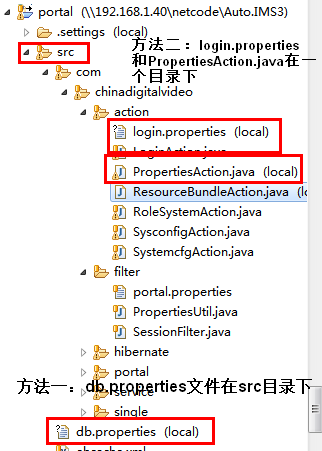
             方式一:

           加载读取该配置文件需要使用Properties的load方法,当然load()方法中是读取文件的流

           props.load(new FileInputStream("src/db.properties"));

           但是此项目是个web项目,打包发布到服务器上,war包中压根没有src目录,所以不能用用这中路径来读取文件.

           应该用类的加载器来读取这个文件.怎么通过类加载器获得这个db.properties文件.

          */

         ClassLoader classLoader = PropertiesAction.class.getClassLoader();

         InputStream is = classLoader.getResourceAsStream("db.properties");

         try {

             props.load(is);

         } catch (Exception e) {

             e.printStackTrace();

         }

         CLASSDRIVER = props.getProperty("driverClass");

         URL = props.getProperty("url");

         NAME = props.getProperty("name");

         PASSWORD = props.getProperty("password");

         /*

           方式二: 需要PropertiesAction.java 文件和 要读取的login.properties配置文件在一个目录下  */

         InputStream inputStream = PropertiesAction.class.getResourceAsStream("login.properties");

         try {

             props.load(inputStream);

         } catch (Exception e) {

             e.printStackTrace();

         }

         RETRYTIMES = props.getProperty("retrytimes");

         LOCKDEADLINE = props.getProperty("lockdeadline");

     }

 }
为说明ClassLoader作用的根目录附录相关截图:
图1:Debug代码,官产ClassLoader对象的信息 和 项目的源码编译路径做比较
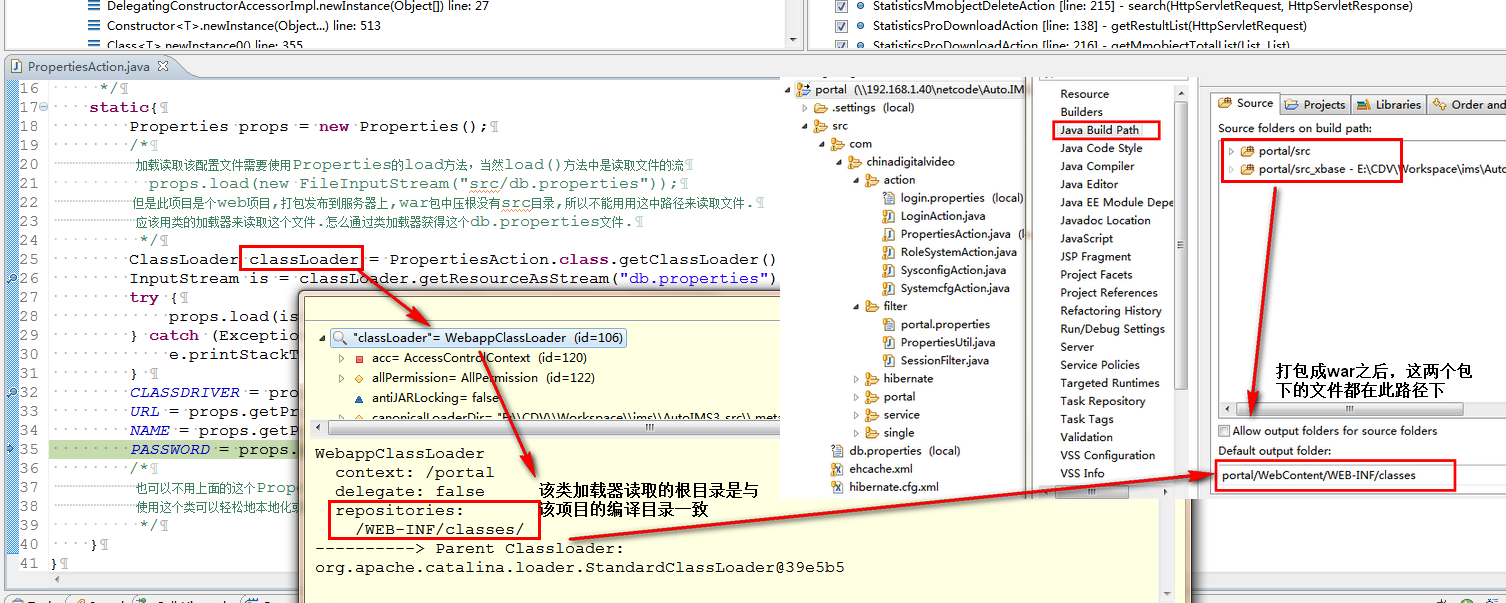
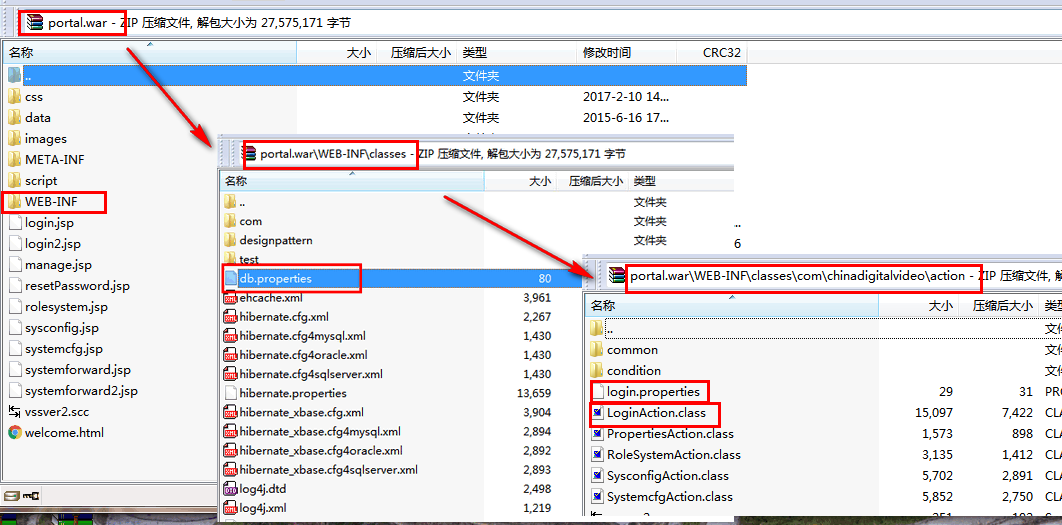
图2:打成war包之后的目录如下,WebContent是这个web项目的根目录,打成war包后,所有的代码资源都在此目录下, 源码编译后的class文件在上图设置的路径/WEB-INF/classes下
三.ResourceBundle类读取Properties方法(此处也是放在web项目中用的)
1.示例代码
import java.util.ResourceBundle;

public class ResourceBundleAction {

    //用到的常量又和全局相关声明成static 和final类型的.

    public static final String  CLASSDRIVER ;

    public static final String  URL ;

    public static final String  NAME ;

    public static final String  PASSWORD ;

    static{

        /*

        javase中的提供的一个国际化的类 ResourceBundle类.使用这个类可以轻松地本地化或翻译成不同的语言

                            其中getBundle(String baseName)方法的作用是

        baseName - 资源包的基本名称,是一个完全限定类名

                            具有给定基本名称和默认语言环境的资源包

         */

        CLASSDRIVER = ResourceBundle.getBundle("db").getString("driverClass");

        URL = ResourceBundle.getBundle("db").getString("url");

        NAME = ResourceBundle.getBundle("db").getString("name");

        PASSWORD = ResourceBundle.getBundle("db").getString("password");

    }

}
2.java.util.ResourceBundle使用详解
myres_zh_CN.properties
TestResourceBundle.java
 import java.util.Locale;

 import java.util.ResourceBundle;

 public class TestResourceBundle {

     public static void main(String[] args) {

             Locale locale1 = new Locale("zh", "CN");

             ResourceBundle resb1 = ResourceBundle.getBundle("myres", locale1);

             System.out.println(resb1.getString("aaa"));

             ResourceBundle resb2 = ResourceBundle.getBundle("myres", Locale.getDefault());

             System.out.println(resb1.getString("aaa"));

             Locale locale3 = new Locale("en", "US");

             ResourceBundle resb3 = ResourceBundle.getBundle("myres", locale3);

             System.out.println(resb3.getString("aaa"));

     }

 }
在src根目录下有:
myres.properties
aaa=good

bbb=thanks
myres_en_US.properties
aaa=good

bbb=thanks
myres_zh_CN.properties
aaa=\u597d

bbb=\u591a\u8c22
运行结果:
好

好

good
3.认识Locale
Locale(String language, String country)
Locale(String language, String country, String variant)
 package cn.itcast.resoucebundle;

 import java.text.MessageFormat;

 import java.util.MissingResourceException;

 import java.util.ResourceBundle;

 public class I18nMessages {

     public static final String KEY_NOT_FOUND_PREFIX = "!!!"; //$NON-NLS-1$

     public static final String KEY_NOT_FOUND_SUFFIX = "!!!"; //$NON-NLS-1$

     private static final String BUNDLE_NAME = "messages"; //$NON-NLS-1$

     private static final String BUNDLE_NAME2 = "cn.itcast.interfaceAbstract.messages"; //$NON-NLS-1$

     private static final String PLUGIN_ID = "cn.itcast.resourcebundle"; //$NON-NLS-1$

     private static ResourceBundle resourceBundle = ResourceBundle.getBundle(BUNDLE_NAME2);

     public static String getString(String key, String pluginId, ResourceBundle resourceBundle) {

         if (resourceBundle == null) {

             return KEY_NOT_FOUND_PREFIX + key + KEY_NOT_FOUND_SUFFIX;

         }

         try {

             return resourceBundle.getString(key);

         } catch (MissingResourceException e) {

             return KEY_NOT_FOUND_PREFIX + key + KEY_NOT_FOUND_SUFFIX;

         }

     }

     public static String getString(String key, String pluginId, ResourceBundle resourceBundle, Object... args){

         return MessageFormat.format(getString(key, pluginId, resourceBundle),args);

     }

     public static String getString(String key, Object... args){

         return getString(key, PLUGIN_ID, resourceBundle, args);

     }

     public static void main(String[] args) {

         String test = "kxh";

         String test2 = "Yes,I am";

         System.out.println(I18nMessages.getString("name",test,test2));//这个方法设置的可以跟多个参数.

     }

 }
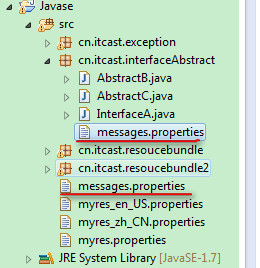
输出:
ResourceBundle.getBundle(BUNDLE_NAME2);的时候
Are you kxh?

Yes,I am

This is the second one
ResourceBundle.getBundle(BUNDLE_NAME);的时候
Are you kxh?

Yes,I am

This is the first one
对应的messages.properties中的参数设置
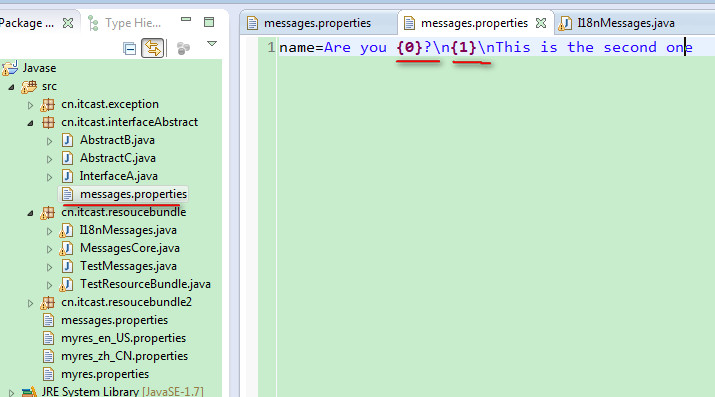
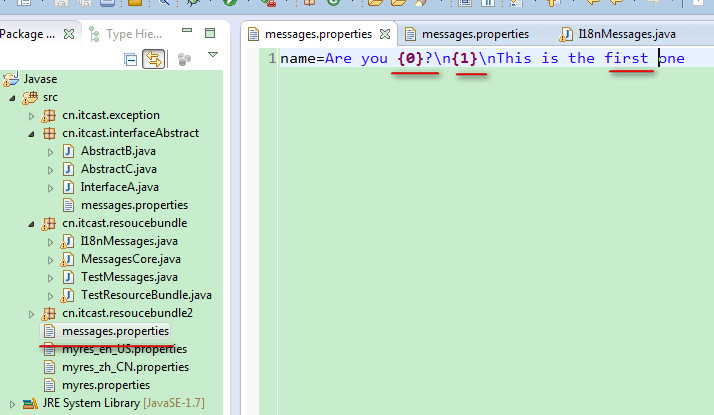
上面用到了MessageFormat.format()方法
使用Properties类和ResourceBundle类读取properties文件的更多相关文章
- Maven ResourceBundle.getBundle读取Properties异常MissingResourceException: Can't find bundlei解决方法
参考:https://blog.csdn.net/thousa_ho/article/details/72817616 问题描述 ResourceBundle读取properties配置文件提示 Mi ...
- ResourceBundle (读取properties文件及中文乱码解决方法)
原文:http://blog.csdn.net/joecheungdishuiya/article/details/6304993 public class test { static Resourc ...
- Java使用ResourceBundle类读取properties文件中文乱码的解决方案
Java使用java.util.ResourceBundle类的方式来读取properties文件时不支持中文,要想支持中文必须将文件设置为ISO-8859-1编码格式,这对于开发工具默认为UTF-8 ...
- 读取.properties的内容1
属性文件方便于项目进行更改,在项目开发中用的也是非常的普遍,在这里就把属性文件的读取通过代码进行一个小结: package com.oyy.test; import java.io.BufferedI ...
- Java 读取properties 配置文件的几种方式
基于ClassLoder读取配置文件 Properties properties = new Properties(); // 使用ClassLoader加载properties配置文件生成对应的输入 ...
- Java 读取 .properties 文件的几种方式
Java 读取 .properties 配置文件的几种方式 Java 开发中,需要将一些易变的配置参数放置再 XML 配置文件或者 properties 配置文件中.然而 XML 配置文件需要通过 ...
- Java读取Properties配置文件
1.Properties类与Properties配置文件 Properties类继承自Hashtable类并且实现了Map接口,使用键值对的形式来保存属性集.不过Properties的键和值都是字符串 ...
- 读取Properties文件以及中文乱码问题
在java类中常见的读取Properties文件方式,是使用Properties.load(inputStream);的方式但是常常出现中文乱码问题,这就很尴尬了 public synchronize ...
- spring利用注解方式实现Java读取properties属性值
1. 建立properties文件:我在resource下面建立一个config文件夹,config文件夹里面有mytest.properties文件,文件内容如下: sam.username=sam ...
随机推荐
- 2018.09.05 bzoj1010: [HNOI2008]玩具装箱toy(斜率优化dp)
传送门 一道经典的斜率优化dp. 推式子ing... 令f[i]表示装前i个玩具的最优代价. 然后用老套路. 我们只考虑把第j+1" role="presentation" ...
- 2018.08.01 BZOJ4552: [Tjoi2016&Heoi2016]排序(二分+线段树)
传送门 线段树简单题. 二分答案+线段树排序. 实际上就是二分答案mid" role="presentation" style="position: relat ...
- Map的常用操作
public static void main(String[] args) { Map<String, String> map = new HashMap<>(); map. ...
- HDU 2393 Higher Math (判断直角三角形)
题意:给定三个边,判断是不是直角三角形. 析:水题,勾股定理... 代码如下: #include <iostream> #include <cstdio> #include & ...
- UVa 11292 Dragon of Loowater (水题,排序)
题意:有n个条龙,在雇佣勇士去杀,每个勇士能力值为x,只能杀死头的直径y小于或等于自己能力值的龙,只能被雇佣一次,并且你要给x赏金,求最少的赏金. 析:很简单么,很明显,能力值高的杀直径大的,低的杀直 ...
- java基础-day3
第03天 java基础知识 今日内容介绍 u 选择流程控制语句 u 循环流程控制语句 u 控制循环语句 第1章 选择流程控制语句 1.1 顺序结构的基本使用 1.1.1 顺序结构概述 是程序中最 ...
- HDU1241 Oil Deposits 2016-07-24 13:38 66人阅读 评论(0) 收藏
Oil Deposits Problem Description The GeoSurvComp geologic survey company is responsible for detectin ...
- 给ubuntu系统的root设置密码:
首先输入:sudo passwd root 然后输入当前用户的密码,例如xiaomeige这个用户的密码为xiaomeige 然后输入希望给root账户设置的密码,例如密码也为root
- window.open()用法说明
1.例子 : window.open("index.jsp","_self"); window.open()格式: window.open( [sURL] [, ...
- python 实现敏感词屏蔽小程序
有一个文件,里面有一些敏感词汇,如果输入这些词,就用**代替,然后输出.敏感词汇 dictionary.txt 文件内容: SB,傻B,傻逼,妈,日,shabi,操,sb,金三胖 代码实现主体: f ...