
iOS 可高度自定义的底部弹框
概述
详细
一. 运行效果图
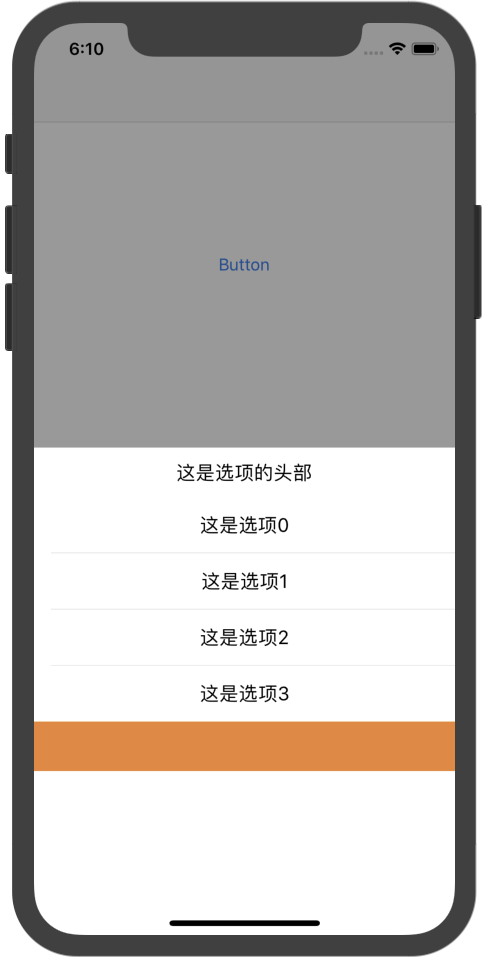
二. 实现过程
1. 实现一个有遮罩效果的半透明 view,然后添加一个可设置展示内容高度的 contentView
// 这个遮罩是可以遮住全屏

- (void)createUI{

    self.frame = CGRectMake(0, 0, SS_ScreenW, SS_ScreenH);

    self.backgroundColor = [UIColor colorWithRed:0 green:0 blue:0 alpha:0.4];

    self.userInteractionEnabled = YES;

    [self addGestureRecognizer:[[UITapGestureRecognizer alloc] initWithTarget:self action:@selector(disMissView)]];

    [self.contentView addSubview:self.tbView];

}

// contentView 是通过懒加载实现的

- (UIView *)contentView{

    if (!_contentView) {

        _contentView = [UIView new];

        _contentView.backgroundColor = [UIColor whiteColor];

        _contentView.frame = CGRectMake(0, SS_ScreenH - _contentHeight - SS_BottomMargin,  SS_ScreenW, _contentHeight + SS_BottomMargin);

        _contentView.opaque = YES;

        [self addSubview:_contentView];

    }

    return _contentView;

}
2. 我们实现的底部弹框实质上一个可滑动的表单(tableView),在 contentView 上添加一个 tableView
- (UITableView *)tbView{

    if (!_tbView) {

//        _tbView = [[UITableView alloc]initWithFrame:CGRectZero style:UITableViewStyleGrouped];

        _tbView = [UITableView new];

        _tbView.delegate = self;

        _tbView.dataSource = self;

        [_tbView registerClass:[UITableViewCell class] forCellReuseIdentifier:@"ss"];

    }

    return _tbView;

}
3. 通过设置UIView 动画,实现遮罩 menuView 的展示和消失效果
// 将 menuView 展示在父 view 上

[view addSubview:self];

    [view addSubview:self.contentView];

    self.contentView.frame = CGRectMake(0, SS_ScreenH, SS_ScreenW, _contentHeight);

    __weak typeof(self) weakSelf = self;

    [UIView animateWithDuration:_animationDuration animations:^{

        self.alpha = 1.0;

        self.contentView.frame = CGRectMake(0, SS_ScreenH - weakSelf.contentHeight - SS_BottomMargin, SS_ScreenW, weakSelf.contentHeight + SS_BottomMargin);

    } completion:^(BOOL finished) {

    }];

// 将 menuView 从父 view 上移除

__weak typeof(self) weakSelf = self;

    [UIView animateWithDuration:_animationDuration animations:^{

        self.alpha = 0.0;

        self.contentView.frame = CGRectMake(0, SS_ScreenH, SS_ScreenW, weakSelf.contentHeight);

    } completion:^(BOOL finished) {

        [self removeFromSuperview];

        [self.contentView removeFromSuperview];

    }];
4. 实现选项和头部的定制化
通过编写自己的代理方法,让开发人员根据自己项目的实际需要设置各个选项,并且可以定制固定的头部以及底部
@protocol SSMenuViewDelegate <NSObject>

@required;

// 返回 tableView 的行数

- (NSInteger)menuTableView:(UITableView *)tableView numberOfRowsInSection:(NSInteger)section;

// 返回 tableViewCell 需要自定义 cell 的分割线

- (UITableViewCell *)menuTableView:(UITableView *)tableView cellForRowAtIndexPath:(NSIndexPath *)indexPath;

@optional;

// 设置组数

- (NSInteger)menuNumberOfSectionsInTableView:(UITableView *)tableView;

// 选中某个 tableView Cell

- (void)menuTableView:(UITableView *)tableView didSelectRowAtIndexPath:(NSIndexPath *)indexPath;

// 定义每个选项的cell的高度

- (CGFloat)menuTableView:(UITableView *)tableView heightForRowAtIndexPath:(NSIndexPath *)indexPath;

// 定义headerView

- (UIView *)menuTableView:(UITableView *)tableView viewForHeaderInSection:(NSInteger)section;

// 定义headerView 的高度

- (CGFloat)menuTableView:(UITableView *)tableView heightForHeaderInSection:(NSInteger)section;

// 定义 footterView

- (UIView *)menuTableView:(UITableView *)tableView viewForFooterInSection:(NSInteger)section;

- (CGFloat)menuTableView:(UITableView *)tableView heightForFooterInSection:(NSInteger)section;

@end
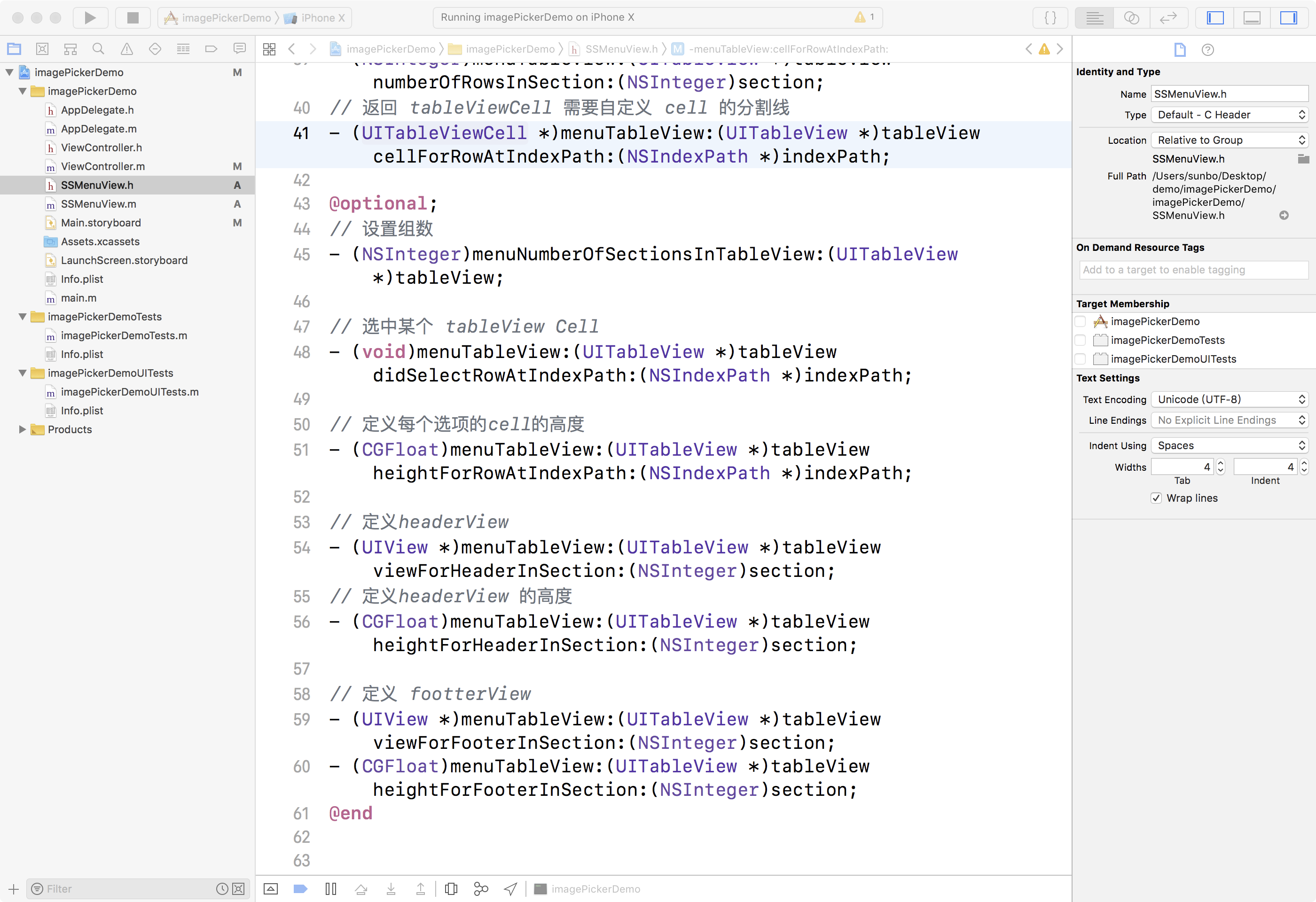
三. 项目结构
四. 使用手册
1. 首先,根据目录,将 SSMenuView.h, SSMenuView.m 文件,添加到自己项目中
2. 创建弹框控件
由于在使用类似弹框的时候,用户可能会多次点击使用,为了避免重复创建,建议使用懒加载创建一个弹窗控件
# pragma

# pragma mark - Lazy -

- (SSMenuView *)menuView{

    if (!_menuView) {

        _menuView = [SSMenuView new];

        _menuView.delegate = self;

//        _menuView.contentHeight = 44 * 6;

//        _menuView.tbView.separatorStyle = UITableViewCellSeparatorStyleNone;

    }

    return _menuView;

}
3. 根据自己的项目需要,创建自己的弹框内容
# pragma

# pragma mark - SSMenuViewDelegate -

- (NSInteger)menuTableView:(UITableView *)tableView numberOfRowsInSection:(NSInteger)section{

    return 4;

}

- (UITableViewCell *)menuTableView:(UITableView *)tableView cellForRowAtIndexPath:(NSIndexPath *)indexPath{

    UITableViewCell *cell = [tableView dequeueReusableCellWithIdentifier:@"cellID"];

    if (!cell) {

        cell = [[UITableViewCell alloc]initWithStyle:(UITableViewCellStyleDefault) reuseIdentifier:@"cellID"];

    }

    cell.textLabel.textAlignment = NSTextAlignmentCenter;

    cell.textLabel.text = [NSString stringWithFormat:@"这是选项%ld",indexPath.row];

    cell.selectionStyle = UITableViewCellSelectionStyleNone;

    return cell;

}

- (CGFloat)menuTableView:(UITableView *)tableView heightForFooterInSection:(NSInteger)section{

    return 44;

}

- (CGFloat)menuTableView:(UITableView *)tableView heightForHeaderInSection:(NSInteger)section{

    return 44;

}

- (UIView *)menuTableView:(UITableView *)tableView viewForFooterInSection:(NSInteger)section{

    UIView *footer = [UIView new];

    footer.backgroundColor = [UIColor orangeColor];

    return footer;

}

- (UIView *)menuTableView:(UITableView *)tableView viewForHeaderInSection:(NSInteger)section{

    UIView *header = [UIView new];

    header.backgroundColor = [UIColor whiteColor];

    header.frame = CGRectMake(0, 0, [UIScreen mainScreen].bounds.size.width, 44);

    UILabel *lab = [UILabel new];

    lab.text = @"这是选项的头部";

    [header addSubview:lab];

    lab.textAlignment = NSTextAlignmentCenter;

    lab.frame = header.frame;

    return header;

}
4. 根据需要,在触发点击事件,弹出弹框
此处,有2种展示方式,根据开发者自己的需要选择是否将弹框完全全屏
- (IBAction)click:(id)sender {

//    [self.menuView showInView:self.view];

    [self.menuView showInWindow];

}

//  隐藏弹框

[self.menuView disMissView];
注:本文著作权归作者,由demo大师发表,拒绝转载,转载需要作者授权
iOS 可高度自定义的底部弹框的更多相关文章
- [组件封装]微信小程序-底部弹框
描述 模仿ios浏览器底部弹框效果. 遮罩层淡入淡出,弹框高度根据内容自适应. 效果 源码 popup-bottom.wxml <!-- popup-bottom.wxml --> < ...
- 微信小程序之底部弹框预约插件
代码地址如下:http://www.demodashi.com/demo/13982.html 一.前期准备工作: 软件环境:微信开发者工具 官方下载地址:https://mp.weixin.qq.c ...
- MUI 自定义从底部弹出的弹出框
1)效果: 点击“点击就送”那个按钮之后,弹窗从底部弹出并自带蒙层,然后点击弹窗之外的灰色部分就从底部消失: 第一步:引入 mui.css或者mui.min.css 引入 mui.min.js或者mu ...
- iOS自定义从底部弹上来的View
概述 自定义蒙层弹起View,点击一下遮罩或界面上关闭按钮,页面会自动下去(从上向下) 详细 代码下载:http://www.demodashi.com/demo/10724.html 在一些少数据没 ...
- 微信小程序底部弹框动画
在写小程序的时候,一般会碰到底部弹出动画,就像下面这样的效果 直接进入正题 https://mp.weixin.qq.com/debug/wxadoc/dev/api/api-animation.ht ...
- MUI 自定义从底部弹出的弹出框内容
最近做的项目都是在使用mui做手机网页,大致是下面的这种弹出效果 首先,引入 mui.css或者mui.min.css 引入 mui.min.js或者mui.js 第二步:<a href=&qu ...
- 微信小程序 --- action-sheet底部弹框
action-sheet:从屏幕底部弹出一个菜单,选择: 使用的时候,在给不同的 action-sheet-item 添加不同的事件. 效果: (这里的确定可以有多个) 代码: <button ...
- presentViewController底部弹框适配ipad
//适配ipad if ([alert respondsToSelector:@selector(popoverPresentationController)]) { alert.popoverPre ...
- svelte组件:Svelte自定义弹窗Popup组件|svelte移动端弹框组件
基于Svelte3.x自定义多功能svPopup弹出框组件(组件式+函数式) 前几天有分享一个svelte自定义tabbar+navbar组件,今天继续带来svelte自定义弹窗组件. svPopup ...
随机推荐
- Pushing Boxes POJ - 1475 (嵌套bfs)
Imagine you are standing inside a two-dimensional maze composed of square cells which may or may not ...
- Android XML shape 标签使用详解(apk瘦身,减少内存好帮手)
Android XML shape 标签使用详解 一个android开发者肯定懂得使用 xml 定义一个 Drawable,比如定义一个 rect 或者 circle 作为一个 View 的背景. ...
- MII接口简介
Standard MII总共使用了15根线,外加2根MDIO线,如果要扩展PHY芯片,这些线除了其中两根(应该是TXCLK和RXCLK)以外都是不可共用的:而Reduce Media Independ ...
- Java数组常用方法
数组基础:http://www.cnblogs.com/mengdd/archive/2013/01/04/2844264.html import java.util.Arrays; 1):创建数组 ...
- VMware5.5-高可用性和动态资源调度(DRS)
高可用性 故障分类:ESX主机---虚拟机(主机通过vmtools监控)---应用程序(基本不用6.0新增了这一功能) 高可用的信号检测目前可分为两种 一.网络信号 二.存储信号 新建群集 上图的自定 ...
- RFID的winform程序心得2
RFID的winform程序心得1 webBrowser1.AllowWebBrowserDrop = false;//将 WebBrowser 控件的 AllowWebBrowserDrop 属性设 ...
- BZOJ.4320.[ShangHai2006]Homework(根号分治 分块)
BZOJ \(\mathbb{mod}\)一个数\(y\)的最小值,可以考虑枚举剩余系,也就是枚举区间\([0,y),[y,2y),[2y,3y)...\)中的最小值(求后缀最小值也一样)更新答案,复 ...
- 常用的Lambda表达式
Java 8 引入Lambda表达式,对于Java开发人员来说是一大福利,简化了代码,提高了开发效率. 本文主要讲解日常开发中使用频率比较高的几类Lambda表达式. 集合 Lambda表达式的引入 ...
- Python2.*与Python3.*共存问题
安装Python 2.7后,本来在3.4下能正常使用的脚本无法运行.网上有的方法是把两个版本的主程序分别改名为python2和python3,人眼判断脚本,手输命令行执行脚本.像我这样喜欢双击.拖拽的 ...
- CRM项目(一)
知识点: 1. 类可以当做字典的key 2. django中的model所在app名称.以及小写类名. 上述两点可以由以下代码实现: def index(request): # print(m1.Us ...