
Learning WCF:Life Cycle of Service instance
示例代码下载地址:WCFDemo1Day
概述
客户端向WCF服务发出请求后,服务端会实例化一个Service对象(实现了契约接口的对象)用来处理请求,实例化Service对象以及维护其生命周期的方式在WCF中共有三种不同的类型,分别是:
- Per-Call
- Per-Session
- Single
程序中通过设置ServiceBehavior特性来指定,如下:
[ServiceBehavior(InstanceContextMode = InstanceContextMode.PerCall)]

public class CommService : ICommContract

{

}
这是枚举InstanceContextMode的内容:
public enum InstanceContextMode

{

    PerSession = 0,

    PerCall = 1,

    Single = 2,

}
Per-Call
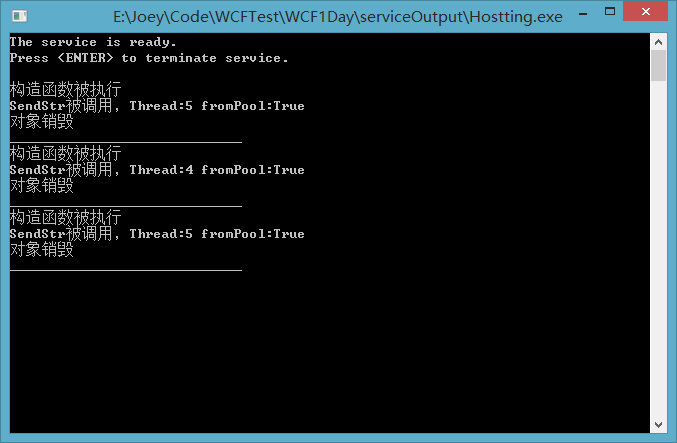
每次调用服务端服务端方法,服务端都会实例化一个对象来处理请求,为观察结果,现编写如下代码:
服务类:
[ServiceBehavior(InstanceContextMode = InstanceContextMode.PerCall)]

public class CommService : ICommContract

{

    public CommService()

    {

        Console.WriteLine("构造函数被执行");

    }

    public int Add(int a, int b)

    {

            Console.WriteLine("Add被调用,Thread:" + Thread.CurrentThread.ManagedThreadId + " fromPool:" + Thread.CurrentThread.IsThreadPoolThread);

        return a + b;

    }

    public void Dispose()

    {

        Console.WriteLine("对象销毁");

        Console.WriteLine("_____________________________");

    }

    public void SendStr(string str)

    {

        Console.WriteLine("SendStr被调用,Thread:" + Thread.CurrentThread.ManagedThreadId + " fromPool:" + Thread.CurrentThread.IsThreadPoolThread);

    }

}
如果服务类实现了接口IDisposable,当服务类被销毁时会回调Dispose方法,可以在Dispose方法中写一些WriteLine语句以观察对象的生命周期。
客户端代码:
class Program

{

    static void Main(string[] args)

    {

        CommService.CommContractClient client = new CommService.CommContractClient();

        client.SendStr("hello");

        client.SendStr("hello");

        client.SendStr("hello");

        client.Close();

    }

}
运行效果:
Per-Session
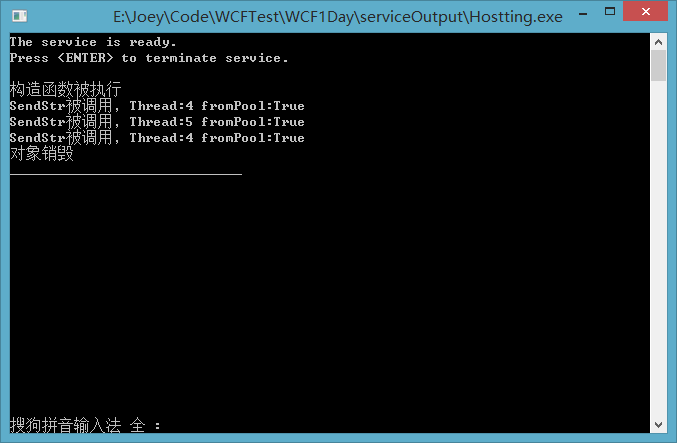
InstanceContextMode被设置为PerSession后,同一个客户端多次调用一个远程Web服务方法时,服务端只会实例化一次,修改上面的服务端代码第一行如下:
[ServiceBehavior(InstanceContextMode = InstanceContextMode.PerSession)]
再看运行效果:
上面的实例代码所使用的绑定模式为WSHttpBinding,如果使用BasicHttpBinding的话,即使是指定了InstanceContextMode为PerSession服务端也不会保存会话,现将支持Per-Session的绑定方式列举如下:
WSXXXBinding(with Message security or reliability)NetTcpXXXBindingNetXXXPipeBinding
后两个容易理解,第一个括号里什么什么玩意儿,请看宿主代码:
 class Program

{

    static void Main(string[] args)

    {

        Uri baseURI = new Uri("http://localhost:8000/Services");

        ServiceHost host = new ServiceHost(typeof(CommService), baseURI);

        try

        {

            WSHttpBinding binding = new WSHttpBinding();

            binding.Security.Mode = SecurityMode.None;

            host.AddServiceEndpoint(typeof(ICommContract), binding, "CommonService");

            ServiceMetadataBehavior smb = new ServiceMetadataBehavior();

            smb.HttpGetUrl = new Uri("http://localhost:8080/Services");

            smb.HttpGetEnabled = true;

            host.Description.Behaviors.Add(smb);

            host.Open();

            Console.WriteLine("The service is ready.");

            Console.WriteLine("Press <ENTER> to terminate service.");

            Console.WriteLine();

            Console.ReadLine();

            host.Close();

        }

        catch (CommunicationException ce)

        {

            Console.WriteLine("An exception occurred: {0}", ce.Message);

            host.Abort();

        }

    }

}
binding.Security.Mode默认为Message,现在把它改成None再运行程序:
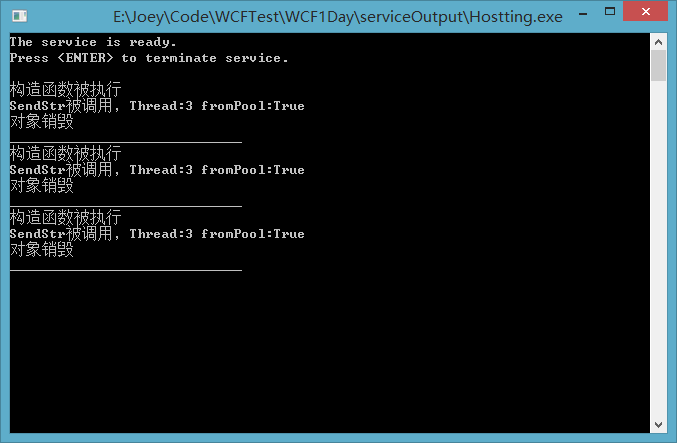
哈,虽然InstanceContextMode设置为了Per-Session,实际上还是Per-Call,这部分内容和安全性有关,希望我有时间以后会写到吧,今天暂时不去研究。
除了绑定方式,还有一个地方也影响到了Per-Session是否起作用,它是契约接口特性ServiceContract的属性SessionMode,该枚举内容如下:
public enum SessionMode

{

    Allowed = 0,

    Required = 1,

    NotAllowed = 2,

}
SessionMode属性默认是Allowed,如果设置为Required表示必须启用会话模式,NotAllowed表示必须不能启动会话模式,Allowed表示无所谓。谁有兴趣可以一一尝试。现将契约接口的特性改成如下:
[ServiceContract(Namespace = "zzy0471.cnblogs.com.CommService", SessionMode = SessionMode.NotAllowed)]

public interface ICommContract : IDisposable

{

    [OperationContract()]

    int Add(int a, int b);

     [OperationContract()]

    void SendStr(String str);

}
再运行程序:
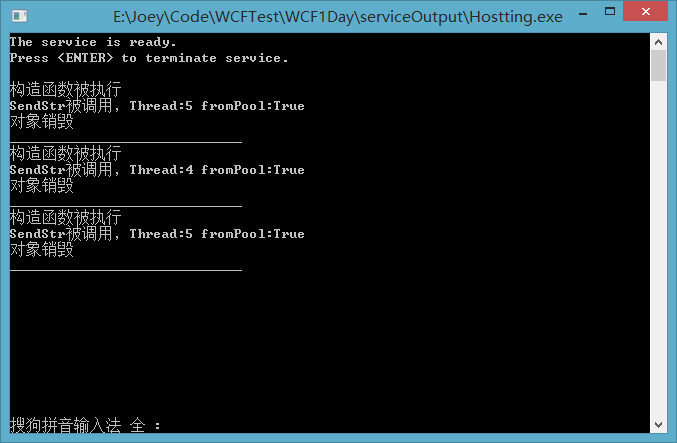
虽然InstanceContextMode设置为了Per-Session,实际上还是Per-Call。
此外,还有一个需要注意的地方,如果在方法契约特性中设置属性IsTerminating为true,如下图
[OperationContract(IsTerminating = true)]

void SendStr(String str);
运行服务端会导致运行时错误,IsTerminating设置为了true和Per-Session模式相矛盾,IsTerminating的意思是:“获取或设置一个值,该值指示服务操作在发送答复消息(如果存在)后,是否会导致服务器关闭会话”
Per-Single
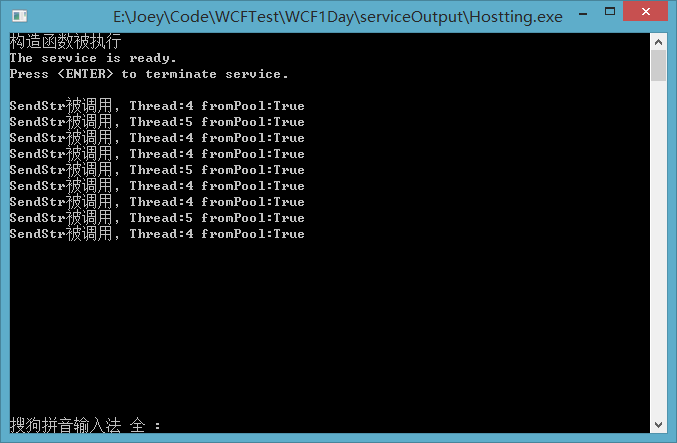
InstanceContextMode被设置为PerSingle后,所有的客户端请求都只有一个服务端实例对象来处理,服务启动时对象创建,服务关闭时对象销毁。现修改InstanceContextMode特性如下:
[ServiceBehavior(InstanceContextMode = InstanceContextMode.Single)]

public class CommService : ICommContract

{

    public CommService()

    {

        Console.WriteLine("构造函数被执行");

    }

    public int Add(int a, int b)

    {

        Console.WriteLine("Add被调用,Thread:" + Thread.CurrentThread.ManagedThreadId + " fromPool:" + Thread.CurrentThread.IsThreadPoolThread);

        return a + b;

    }

    public void Dispose()

    {

        Console.WriteLine("对象销毁");

        Console.WriteLine("_____________________________");

    }

    public void SendStr(string str)

    {

        Console.WriteLine("SendStr被调用,Thread:" + Thread.CurrentThread.ManagedThreadId + " fromPool:" + Thread.CurrentThread.IsThreadPoolThread);

    }

}
为了方便观察,修改客户端代码,以模拟多个客户端:
class Program

{

    static void Main(string[] args)

    {

        for (int i = 0; i < 3; i++)

        {

            CommService.CommContractClient client = new CommService.CommContractClient();

            client.SendStr("hello");

            client.SendStr("hello");

            client.SendStr("hello");

            client.Close();

        }

    }

}
运行程序:
Learning WCF:Life Cycle of Service instance的更多相关文章
- WCF技术剖析之二十三:服务实例(Service Instance)生命周期如何控制[下篇]
原文:WCF技术剖析之二十三:服务实例(Service Instance)生命周期如何控制[下篇] 在[第2篇]中,我们深入剖析了单调(PerCall)模式下WCF对服务实例生命周期的控制,现在我们来 ...
- Learning WCF Chapter1 Creating a New Service from Scratch
You’re about to be introduced to the WCF service. This lab isn’t your typical “Hello World”—it’s “He ...
- Learning WCF:Fault Handling
There are two types of Execptions which can be throwed from the WCF service. They are Application ex ...
- Learning WCF:A Simple Demo
This is a very simple demo which can help you create a wcf applition quickly. Create a Solution Open ...
- Learning WCF Chapter1 Hosting a Service in IIS
How messages reach a service endpoint is a matter of protocols and hosting. IIS can host services ov ...
- Learning WCF Chapter1 Generating a Service and Client Proxy
In the previous lab,you created a service and client from scratch without leveraging the tools avail ...
- Learning WCF Chapter1 Exposing Multiple Service Endpoints
So far in this chapter,I have shown you different ways to create services,how to expose a service en ...
- WCF 的 Service Instance模式和并发处理
WCF 的 Service Instance(实例)有三种模式 PerCall:每一次调用都创建一个实例,每一次调用结束后回收实例.此模式完全无状态. PerSession:调用者打开Channel时 ...
- WCF:为 SharePoint 2010 Business Connectivity Services 构建 WCF Web 服务(第 1 部分,共 4 部分)
转:http://msdn.microsoft.com/zh-cn/library/gg318615.aspx 摘要:通过此系列文章(共四部分)了解如何在 Microsoft SharePoint F ...
随机推荐
- IDEA导入Eclipse项目
目录 一.导入项目 二.启动项目 一.导入项目 1.欢迎界面,选择Import Project 2.选择源码的位置,点击OK 3.选择Eclipse模型,点击Next 4.默认选择,点击Next 5. ...
- leetcode538
/** * Definition for a binary tree node. * public class TreeNode { * public int val; * public TreeNo ...
- json&pickle&shelve模块
之前我们学习过用eval内置方法可以将一个字符串转成python对象,不过,eval方法是有局限性的,对于普通的数据类型,json.loads和eval都能用,但遇到特殊类型的时候,eval就不管用了 ...
- epoll的LT和ET(转)
1 socket IO事件 1.1 读事件 读事件:句柄从不可读变成可读,或者句柄写缓冲区有新的数据进来且超过SO_RCVLOWAT. 常见的产生读事件有如下几种: socket有一个未清除的错误.如 ...
- TXLSReadWriteII 公式计算
unit Unit1; interface uses Windows, Messages, SysUtils, Variants, Classes, Graphics, Controls, Forms ...
- 本学期c#学习总结
本学期c#学习总结 时间转瞬即逝,大一上半学期的学习生涯已经结束.虽然以前我没什么关于学习计算机的基础,但是经过了这几个月的学习我也还是有点收获的. 我发现c#语言的关键词有很多语言特性和固定的用法, ...
- 关于Shader的学习记录
float4 _EmissiveColor; float4 _AmbientColor; float _MySliderValue; void surf (Input IN, inout Surfac ...
- C++11 constexpr常量表达式
常量表达式函数 要求: 函数体内只有单一的return返回语句 例如: constexpr int data() { const int i=1; //含有除了return以外的语句 return i ...
- 算法练习LeetCode初级算法之链表
删除链表中的节点 /** * Definition for singly-linked list. * public class ListNode { * int val; * ListNode ne ...
- rabbitmq shovel插件
官网说明https://www.rabbitmq.com/shovel.html#management-status 启用shovel插件命令: rabbitmq-plugins enable rab ...