
Android--使用Notification在通知栏显示消息
在一个Activity中点击按钮,产生一个通知栏消息通知。
package cn.luxh.mynotice;

import android.os.Bundle;

import android.util.Log;

import android.view.View;

import android.view.View.OnClickListener;

import android.widget.Button;

import android.app.Activity;

import android.app.Notification;

import android.app.NotificationManager;

import android.app.PendingIntent;

import android.content.Intent;

public class MainActivity extends Activity {

    private static String TAG = "MyNotice";

    private static int notificationID = 1;

    @Override

    protected void onCreate(Bundle savedInstanceState) {

        super.onCreate(savedInstanceState);

        setContentView(R.layout.activity_main);

        handleBtnDisplayNotification();

    }

    /**

     * 点击按钮,创建消息通知

     */

    private void handleBtnDisplayNotification() {

        Button btnDisplayNotification = (Button) findViewById(R.id.btn_display_notice);

        btnDisplayNotification.setOnClickListener(new OnClickListener() {

            @Override

            public void onClick(View v) {

                Log.i(TAG, "点击按钮");

                Intent i = new Intent(MainActivity.this,NoticeViewActivity.class);

                i.putExtra("notificationID", notificationID);

                PendingIntent pi = PendingIntent.getActivity(MainActivity.this, 0, i, 0);

                NotificationManager nm = (NotificationManager) getSystemService(NOTIFICATION_SERVICE);

                //创建通知对象

                Notification n = new Notification.Builder(MainActivity.this)

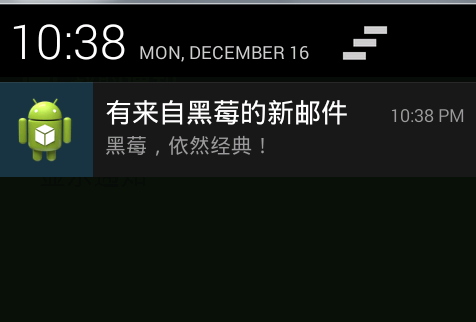
                                                                    .setContentTitle("有来自黑莓的新邮件")

                                                                    .setContentText("黑莓,依然经典!")

                                                                    .setSmallIcon(R.drawable.ic_launcher)

                                                                    .setContentIntent(pi)

                                                                    .build();

                //振动手机

                n.vibrate = new long[]{100,250,100,500};

                nm.notify(notificationID, n);

            }

        });

    }

}
package cn.luxh.mynotice;

import android.app.Activity;

import android.app.NotificationManager;

import android.os.Bundle;

import android.util.Log;

/**

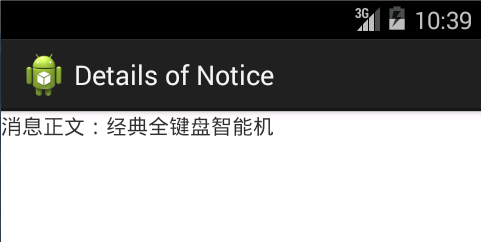
 * 在通知栏点击通知后显示消息的界面

 * @author Luxh

 *

 */

public class NoticeViewActivity extends Activity{

    private static String TAG = "MyNotice";

    @Override

    protected void onCreate(Bundle savedInstanceState) {

        Log.i(TAG, "NoticeViewActivity onCreate");

        super.onCreate(savedInstanceState);

        setContentView(R.layout.activity_notice_view);

        NotificationManager nm = (NotificationManager) getSystemService(NOTIFICATION_SERVICE);

        //取消通知

        nm.cancel(getIntent().getExtras().getInt("notificationID"));

    }

}
运行效果:
Android--使用Notification在通知栏显示消息的更多相关文章
- Android学习笔记通过Toast显示消息提示框
显示消息提示框的步骤 这个很简单我就直接上代码了: Button show = (Button)findViewById(R.id.show); show.setOnClickListener(new ...
- Android 主页面顶部栏的通知Notification ,可以自定义通知消息栏的风格,并且点击通知栏进人本程序。
常用的程序通知,显示到主页面的顶部栏. package com.lixu.tongzhi; import android.app.Activity; import android.app.Notifi ...
- 通知栏发送消息Notification(可以使用自定义的布局)
一个简单的应用场景:假如用户打开Activity以后,按Home键,此时Activity 进入-> onPause() -> onStop() 不可见.代码在此时机发送一个Notifica ...
- android自定义Notification通知栏实例
项目有个需求,需要在发送Notification的时候动态给定url的图片.大概思路如下:自己定义一个Notification的布局文件,这样能够很方便设置View的属性. 首先加载网络图片,使用Bi ...
- 转 android客户端版本检测更新,服务下载,通知栏显示
看图, 只要点击取消或是下载完毕 通知才会消失! 代码是大部分是借用别人的,再自己修改,达到自己所需要的效果 xml文件 update.xml <?xml version=" ...
- Android开发——Notification通知的各种Style详解
本来是想与之前讲解使用Notification通知使用一起写的,查看了资料,觉得有必要将这Style部分单独拿出来讲解 前篇:Android开发——Notification通知的使用及Notifica ...
- Android开发——Notification通知的使用及NotificationCopat.Builder常用设置API
想要看全部设置的请看这一篇 [转]NotificationCopat.Builder全部设置 常用设置: 设置属性 说明 setAutoCancel(boolean autocancel) 设置点击信 ...
- 安卓开发_浅谈Notification(通知栏)
Notification通知栏是显示在手机状态的消息,代表一种全局效果的通知 快速创建一个Notification的步骤简单可以分为以下四步: 第一步:通过getSystemService()方法得到 ...
- Android应用实现Push推送消息原理
本文介绍在Android中实现推送方式的基础知识及相关解决方案.推送功能在手机开发中应用的场景是越来起来了,不说别的,就我 们手机上的新闻客户端就时不j时的推送过来新的消息,很方便的阅 ...
随机推荐
- sqlplus将查询结果重定向到文件,不输出到屏幕
--每行的字符数目 --该参数设置每页输出的行数.n=0表示不产生新页 --显示和拷贝long类型值的最大宽度的设置,最大值2G --sqlplus检索long类型值的增量大小.由于内存的限制 可按增 ...
- jQuery tmpl用法总结
之前很是头疼循环数据的渲染,搞一大堆的命名,一点点的赋值,很是麻烦,今天学习了一下jQuery插件tmpl,下面抛出一些使用方法,供以后参考: 官方网址:http://web.archive.org/ ...
- 服饰行业淘宝商城店铺首页设计报告-转载自http://bbs.paidai.com/topic/88363
店铺的设计 和 美工是2个完全不同的工作. 很多中小卖家,往往会模糊他们之间的差别. 好比要建造一座金茂大厦,先要有建筑设计师设计图纸,明确好建造的楼层数,具体框架结构,所用材料等等. 然后建筑施工队 ...
- DBA常用SQL之表空间与数据文件
)), ) ts_size from dba_tablespaces t, dba_data_files d where t.tablespace_name = d.tablespace_name g ...
- Android Bitmap和Canvas学习笔记 [转]
原文:http://www.cnblogs.com/feisky/archive/2010/01/10/1643460.html 位图是我们开发中最常用的资源,毕竟一个漂亮的界面对用户是最有吸引力的. ...
- 会话控制:SESSION,COOKIE
1.http协议: HTTP—超文本传输协议,在TCP协议(长连接.像一个硬件)基础上; 特点:短连接,无状态协议,没法记录本次连接的状态;适用于静态页面的访问,对于后期某些页面是需要浏览器预知客户信 ...
- Crypto库实现PKCS7签名与签名验证
在windows中,可以直接使用微软提供的crypto库实现PKCS7签名与签名验证.签名接口函数为CryptSignMessage,其接口定义为: BOOL WINAPI CryptSignMess ...
- Neutron分析(3)—— neutron-l3-agent
一.Layer-3 Networking Extension neutron l3作为一种API扩展,向租户提供了路由和NAT功能. l3扩展包含两种资源: router:在不同内部子网中转发数据包: ...
- VS 使用Sql Server 数据库增删改查
/// <summary> /// 执行查询语句,返回DataSet /// </summary> /// <param name="SQLString&quo ...
- 黄聪:如何删除wordpress登录之后wp_footer、wp_head自行加载的Open Sans字体、fonts.googleapis.com连接导致卡死的问题
有时候在浏览自己的WordPress网站时,发现网页长时间无响应, 卡在正在连接到fonts.googleapis.com ,如下图所示: 查看网页源码时,发现Head里面有如下一段代码: <l ...