
不等高cell搭建(二)
 // 给模型的top_cmt属性赋值调用

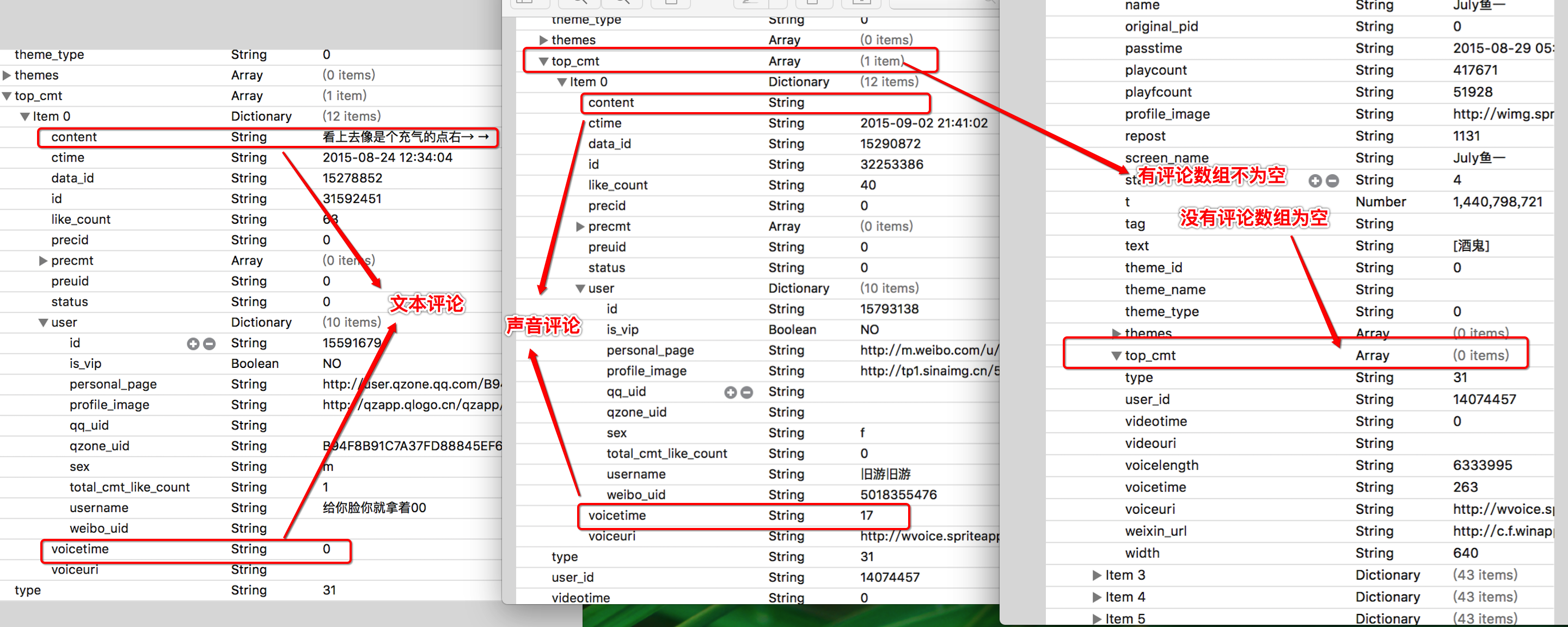
 - (void)setTop_cmt:(NSArray *)top_cmt

 {

     _top_cmt = top_cmt;

     if (top_cmt.count) {

         _commentItem = top_cmt.firstObject;

     }

 }
 // key:哪个数组需要转换

 + (NSDictionary *)mj_objectClassInArray

 {

     return @{@"top_cmt":@"XTCommentItem"};

 }
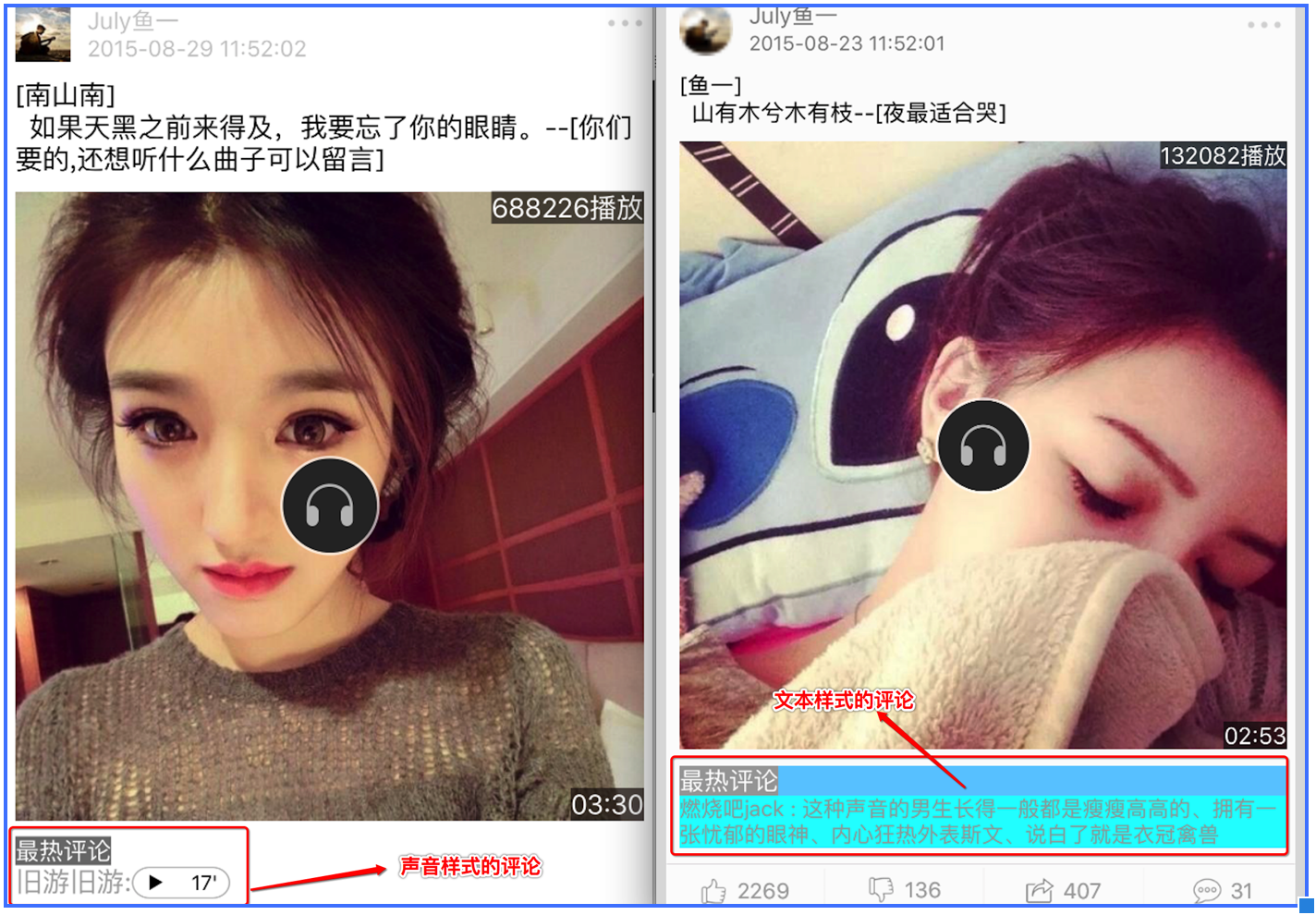
   if (item.commentItem) { // 先判断有没有最热评论,有评论才需要计算

         CGFloat commentH = ;  声音评论,高度是确定的

         注意点:以后只要判断字符串有没有内容,用长度

         if (item.commentItem.content.length) { // 有内容,就是文本评论

             根据文字的高度来计算评论的高度

             NSString *totalStr = [NSString stringWithFormat:@"%@:%@",item.commentItem.user.username,item.commentItem.content];

             textH = [totalStr sizeWithFont:[UIFont systemFontOfSize:] constrainedToSize:CGSizeMake(textW, MAXFLOAT)].height;

             commentH =  + textH;

         }

         CGFloat commentW = textW;

         CGFloat commentX = margin;

         CGFloat commentY = _cellH;

         _commentViewFrame = CGRectMake(commentX, commentY, commentW, commentH);

         _cellH = CGRectGetMaxY(_commentViewFrame) + margin;

     }
 处理数据原码

 - (void)setItem:(XTThemeItem *)item

 {

     [super setItem:item];

     [self setButton:_dingView count:item.ding title:@"赞"];

     [self setButton:_caiView count:item.cai title:@"踩"];

     [self setButton:_shareView count:item.repost title:@"转发"];

     [self setButton:_commentView count:item.comment title:@"评论"];

 }

 - (void)setButton:(UIButton *)button count:(NSInteger)count title:(NSString *)title

 {

      如何抽取一个方法:先把要抽取成方法的源代码拷贝过来,缺什么补什么就行了,需要外界决定的东西,写成参数,让外界传递进来

     CGFloat valueF = ;

     NSString *str = title;

     if (count > 10000.0) {

         valueF = count / 10000.0;

         str = [NSString stringWithFormat:@"%.1f万",valueF];

         str = [str stringByReplacingOccurrencesOfString:@".0" withString:@""];

     } else if (count > ) {

         str = [NSString stringWithFormat:@"%ld",count];

     }

     [button setTitle:str forState:UIControlStateNormal];

 }
self.selectionStyle = UITableViewCellSelectionStyleNone;
- (instancetype)initWithStyle:(UITableViewCellStyle)style reuseIdentifier:(NSString *)reuseIdentifier
self.tableView.separatorStyle = UITableViewCellSeparatorStyleNone;
 设置frame源代码

 - (void)setFrame:(CGRect)frame

 {

     frame.origin.y += ;

     frame.size.height -= ;

 注意:一定要调用super方法

     [super setFrame:frame];

 }
 设置cell背景图片原码

  UIImage *image = [UIImage imageNamed:@"mainCellBackground"];

 处理图片:设置可拉伸区域

 image = [image stretchableImageWithLeftCapWidth:image.size.width * 0.5 topCapHeight:image.size.height * 0.5];

 self.backgroundView = [[UIImageView alloc] initWithImage:image];
不等高cell搭建(二)的更多相关文章
- 不等高cell的tableView界面搭建
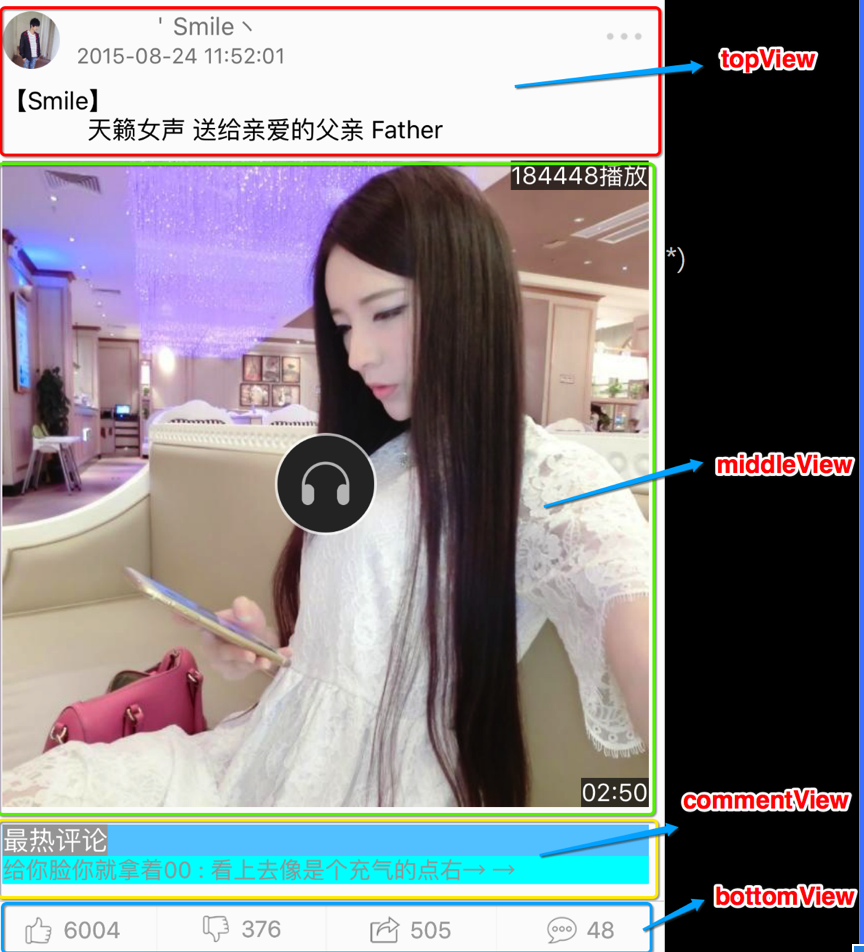
一.搭建界面 1.界面分析 分析界面的层次结构,分析界面应该用什么控件来搭建 2.界面层次结构 分析之后,我们可以把这个界面分为四个模块(topView middleView commentView ...
- iOS开发——UI进阶篇(三)自定义不等高cell,如何拿到cell的行高,自动计算cell高度,(有配图,无配图)微博案例
一.纯代码自定义不等高cell 废话不多说,直接来看下面这个例子先来看下微博的最终效果 首先创建一个继承UITableViewController的控制器@interface ViewControll ...
- 自定义不等高cell—storyBoard或xib自定义不等高cell
1.iOS8之后利用storyBoard或者xib自定义不等高cell: 对比自定义等高cell,需要几个额外的步骤(iOS8开始才支持) 添加子控件和contentView(cell的content ...
- 不等高cell的搭建(一)
一.界面搭建 1.确定开发模式 如果界面是固定的,可以用xib 界面的一些内容不固定,就用纯代码 cell用什么方式去开发(我们采用纯代码和xib结合的方式) 2 ...
- 纯代码自定义不等高cell
数据模型.plist解析这里就不过多赘述. 错误思路之一: 通过在heightForRowAtIndexPath:方法中调用cellForRowAtIndexPath:拿到cell,再拿到cell的子 ...
- iOS之处理不等高TableViewCell的几种方法
课题一:如何计算Cell高度 方案一:直接法(面向对象) 直接法,就是把数据布局到Cell上,然后拿到Cell最底部控件的MaxY值. 第一步:创建Cell并正确设置约束,使文字区域高度能够根据文字内 ...
- 处理不等高TableViewCell
课题一:如何计算Cell高度 方案一:直接法(面向对象) 想知道妹纸爱你有多深?直接去问妹纸本人吧! 嗯!Cell也是一样的,想知道cell到底有多高?直接问Cell本人就好了.直接法,就是把数据布局 ...
- iOS-UI控件之UITableView(二)- 自定义不等高的cell
不等高的cell 给模型增加frame数据 所有子控件的frame cell的高度 @interface XMGStatus : NSObject /**** 文字\图片数据 ****/ // ... ...
- iOS开发——UI进阶篇(二)自定义等高cell,xib自定义等高的cell,Autolayout布局子控件,团购案例
一.纯代码自定义等高cell 首先创建一个继承UITableViewCell的类@interface XMGTgCell : UITableViewCell在该类中依次做一下操作1.添加子控件 - ( ...
随机推荐
- Configuration.ConfigurationSettings.AppSettings已过时
1.在项目中引用System.Configuration.dll,在需要的页面加上using System.Configuration; 2.把ConfigurationSettings.AppSet ...
- $().html(value) vs $().empty().append(value)
当需要清空某个dom结点内容时,我所知道的有两种方法: 1.Element.removeChild(child) // Removing all children from an element va ...
- Jsoncpp 数组的使用
JsonCpp 是一个C++用来处理JSON 数据的开发包.下面讲一下怎么使用JsonCpp来序列化和反序列化Json对象,以实际代码为例子. 反序列化Json对象 比如一个Json对象的字符串序列如 ...
- Java 判断图片资源的存在否
question: 如题,举个例子吧 String image ="http://info-database.csdn.net/Upload/2010-10-30/735-60sap1030 ...
- Squid 操作实践
Squid简介 Squid可以做什么 性能要素 Squid安装 Squid快速体验 Squid配置 Squid简介 Squid is a caching proxy for the Web suppo ...
- MySQL-中文全文检索
一.概述 MySQL全文检索是利用查询关键字和查询列内容之间的相关度进行检索,可以利用全文索引来提高匹配的速度. 二.语法 1 2 MATCH (col1,col2,...) AGAINST (exp ...
- RESTFul Web Api 服务框架(一)
简介: 基于 REST 的 Web 服务日益成为后端企业服务集成的首选,因为它比 SOAP 更加简单.这篇文章介绍了一 个简单的可扩展框架,使用Asp.net Web Api作为 REST 服务的实现 ...
- QcheckBox
#include "dialog.h" #include "ui_dialog.h" #include <QtCore> #include < ...
- Chip Factory---hdu5536(异或值最大,01字典树)
题目链接:http://acm.hdu.edu.cn/showproblem.php?pid=5536 题意:有一个数组a[], 包含n个数,从n个数中找到三个数使得 (a[i]+a[j])⊕a[k] ...
- 如何设置启动页 LaunchImage