
不等高cell的搭建(一)

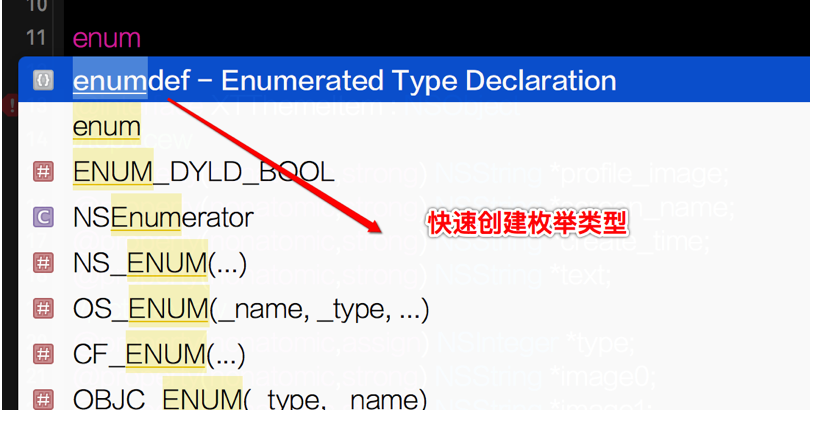
 typedef enum : NSUInteger {

     XTThemeItemTypeAll = ,

     XTThemeItemTypeVideo = ,

     XTThemeItemTypeVoice = ,

     XTThemeItemTypePicture = ,

     XTThemeItemTypeText =

 } XTThemeItemType;
      // middleView:一样计算方式

     // 不是段子的时候,才需要计算中间View的Frame

     if (item.type != XMGThemeItemTypeText) {

         CGFloat middleW = textW;

         CGFloat middleH = middleW / item.width * item.height;

         if (middleH > XTScreenH) {  // 大图

             middleH = ;

             item.is_bigPicture = YES;

         }

         CGFloat middleX = margin;

         CGFloat middleY = _cellH;

         _middleViewFrame = CGRectMake(middleX, middleY, middleW, middleH);

         _cellH = CGRectGetMaxY(_middleViewFrame) + margin;

     }
   [[SDImageCache sharedImageCache] storeImage:image forKey:item.image0];

           注意:要到入头文件: #import <SDImageCache.h>
UIImage *image = [[SDImageCache sharedImageCache] imageFromDiskCacheForKey:item.image0];
注意:key值就是图片的url
            - (void)awakeFromNib

 {

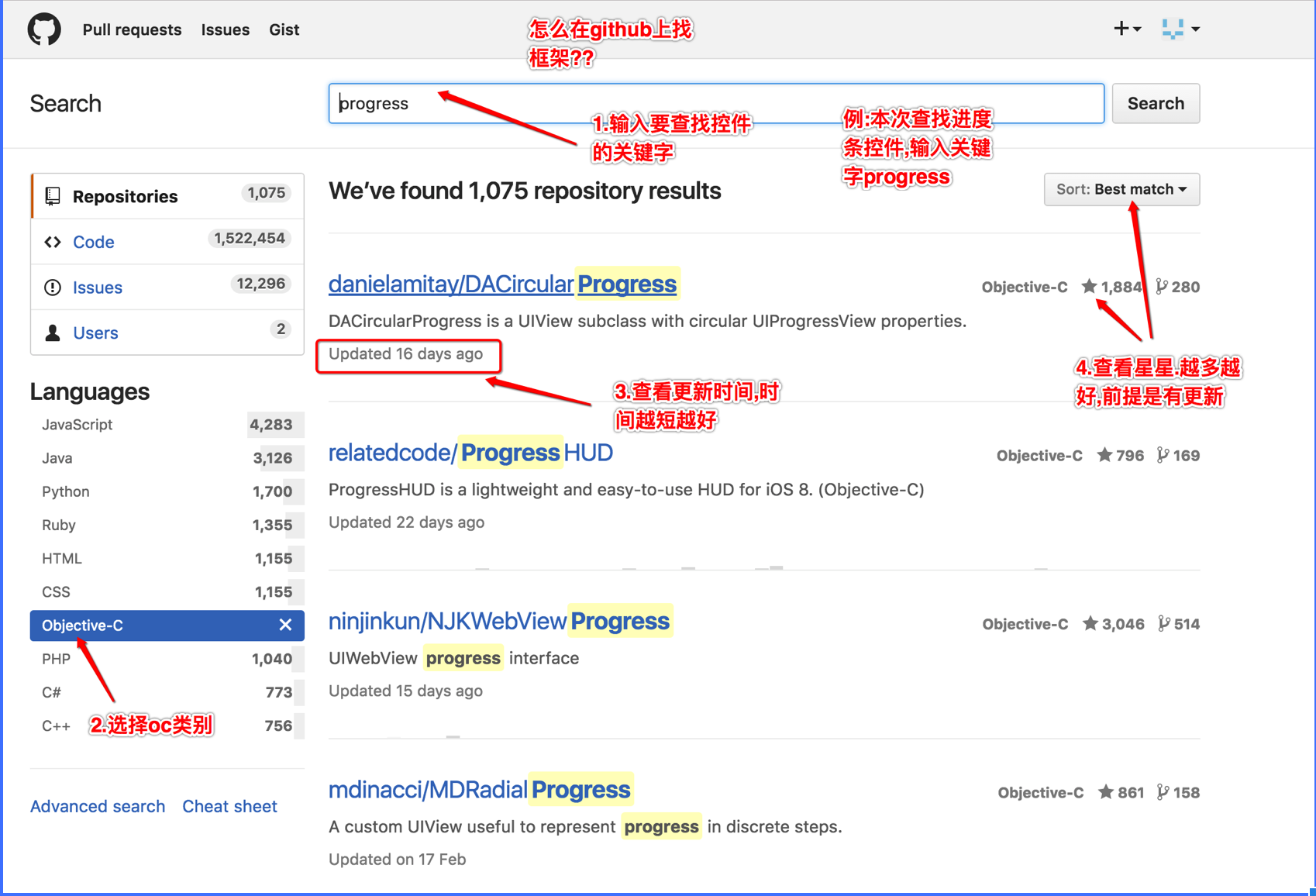
     _progressView.progressLabel.textColor = [UIColor whiteColor];

     _progressView.progressTintColor = [UIColor whiteColor];

     _progressView.roundedCorners = ;

     _progressView.progressLabel.text = [NSString stringWithFormat:@"%.1f%%",0.0 * ];

     _progressView.progress = ;

 }

 - (void)setItem:(XMGThemeItem *)item

 {

     _item = item;

     // 设置图片

     UIImage *image = [[SDImageCache sharedImageCache] imageFromDiskCacheForKey:item.image0];

     if (image) {   如果有图片直接设置,并把进度设为100%

         _imageView.image = image;

         _progressView.progressLabel.text = [NSString stringWithFormat:@"%.1f%%",1.0 * ];

         _progressView.progress = ;

     } else {    如果没有图片,就先把进度设置为0 ,再去下载图片

         _progressView.progressLabel.text = [NSString stringWithFormat:@"%.1f%%",0.0 * ];

         _progressView.progress = ;

         // 下载网络图片

         [_imageView sd_setImageWithURL:[NSURL URLWithString:item.image0]  placeholderImage:nil options:SDWebImageRetryFailed progress:^(NSInteger receivedSize, NSInteger expectedSize) {

             进度就为已下载的文件大小 / 总文件大小

             CGFloat progress = 1.0 * receivedSize / expectedSize;

             运行发现,进度有时候为-,打印发现总文件大小该开始为-       当为- 的时候就返回

           注意:该block会频换调用,所以  returen一次没关系

             if (expectedSize < ) return ;

             _progressView.progressLabel.text = [NSString stringWithFormat:@"%.1f%%",progress * ];

             _progressView.progress = progress;

         } completed:^(UIImage *image, NSError *error, SDImageCacheType cacheType, NSURL *imageURL) {

             if (!item.is_bigPicture) return ;

             // 生成一个新拉伸好图片

             CGFloat w = XMGScreenW - ;

             CGFloat h = w / item.width * item.height;

             // 开启图形上下文

             UIGraphicsBeginImageContextWithOptions(CGSizeMake(w, h), NO, );

             // 绘图

             [image drawInRect:CGRectMake(, , w, h)];

             // 获取上下文图片

             image = UIGraphicsGetImageFromCurrentImageContext();

             // 保存图片到沙盒

             [[SDImageCache sharedImageCache] storeImage:image forKey:item.image0];

             // 关闭上下文

             UIGraphicsEndImageContext();

             _imageView.image = image;

         }];

     }

     根据服务器数据,决定gif图片是否显示

     _gifView.hidden = !item.is_gif;

      根据自己判断保存的属性,来决定显示大图按钮是否显示

     _seeBigButton.hidden = !item.is_bigPicture;

     if (item.is_bigPicture) {

         _imageView.contentMode = UIViewContentModeTop;

         _imageView.clipsToBounds = YES;

     } else {

         _imageView.contentMode = UIViewContentModeScaleToFill;

         _imageView.clipsToBounds = NO;

     }

 }


     NSInteger minute = item.voicetime / ;

     NSInteger second = item.voicetime % ;

     self.timeLabel.text = [NSString stringWithFormat:@"%02ld:%02ld",minute,second];
     // middleView

     if (vm.item.type == XMGThemeItemTypePicture) { // 图片

         _pictureView.hidden = NO;

         _videoView.hidden = YES;

         _voiceView.hidden = YES;

         _pictureView.item = vm.item;

         _pictureView.frame = vm.middleViewFrame;

     } else if (vm.item.type == XMGThemeItemTypeVideo) { // 视频

         _pictureView.hidden = YES;

         _videoView.hidden = NO;

         _voiceView.hidden = YES;

         _videoView.item = vm.item;

         _videoView.frame = vm.middleViewFrame;

     } else if (vm.item.type == XMGThemeItemTypeVoice) { // 音频

         _pictureView.hidden = YES;

         _videoView.hidden = YES;

         _voiceView.hidden = NO;

         _voiceView.item = vm.item;

         _voiceView.frame = vm.middleViewFrame;

     } else {

         _voiceView.hidden = YES;

         _pictureView.hidden = YES;

         _videoView.hidden = YES;

     }
不等高cell的搭建(一)的更多相关文章
- 不等高cell的tableView界面搭建
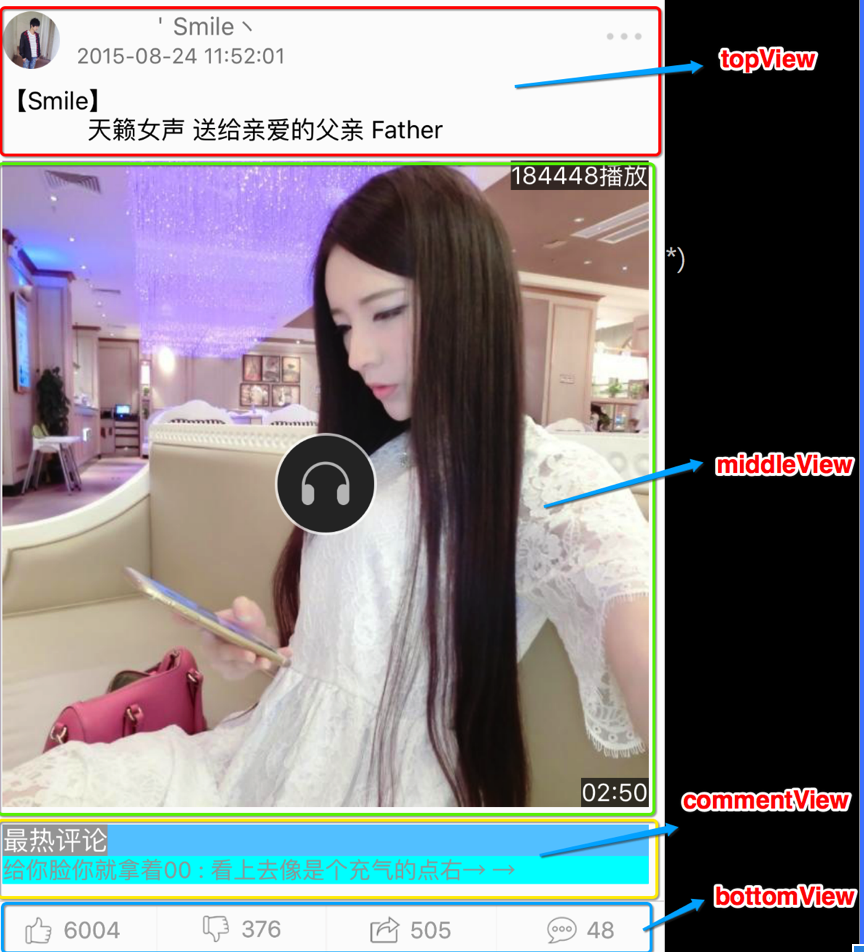
一.搭建界面 1.界面分析 分析界面的层次结构,分析界面应该用什么控件来搭建 2.界面层次结构 分析之后,我们可以把这个界面分为四个模块(topView middleView commentView ...
- 自定义不等高cell—storyBoard或xib自定义不等高cell
1.iOS8之后利用storyBoard或者xib自定义不等高cell: 对比自定义等高cell,需要几个额外的步骤(iOS8开始才支持) 添加子控件和contentView(cell的content ...
- iOS开发——UI进阶篇(三)自定义不等高cell,如何拿到cell的行高,自动计算cell高度,(有配图,无配图)微博案例
一.纯代码自定义不等高cell 废话不多说,直接来看下面这个例子先来看下微博的最终效果 首先创建一个继承UITableViewController的控制器@interface ViewControll ...
- 不等高cell搭建(二)
一.commentView模块搭建 commentView样式分为两种 1.xib搭建界面 1.1 因为评论的样式大体上一样,我们可以用同一个xib来处理 1.2 最热评论 用 ...
- 纯代码自定义不等高cell
数据模型.plist解析这里就不过多赘述. 错误思路之一: 通过在heightForRowAtIndexPath:方法中调用cellForRowAtIndexPath:拿到cell,再拿到cell的子 ...
- iOS之处理不等高TableViewCell的几种方法
课题一:如何计算Cell高度 方案一:直接法(面向对象) 直接法,就是把数据布局到Cell上,然后拿到Cell最底部控件的MaxY值. 第一步:创建Cell并正确设置约束,使文字区域高度能够根据文字内 ...
- 处理不等高TableViewCell
课题一:如何计算Cell高度 方案一:直接法(面向对象) 想知道妹纸爱你有多深?直接去问妹纸本人吧! 嗯!Cell也是一样的,想知道cell到底有多高?直接问Cell本人就好了.直接法,就是把数据布局 ...
- iOS-UI控件之UITableView(三)- 自定义不等高的cell
Storyboard_不等高 对比自定义等高cell,需要几个额外的步骤(iOS8开始才支持) 添加子控件和contentView之间的间距约束 设置tableViewCell的真实行高和估算行高 / ...
- iOS-UI控件之UITableView(二)- 自定义不等高的cell
不等高的cell 给模型增加frame数据 所有子控件的frame cell的高度 @interface XMGStatus : NSObject /**** 文字\图片数据 ****/ // ... ...
随机推荐
- css修改,类似elememt.style样式修改
使用!important 语法优先权. .yui-b { margin-left:0px ! important; }
- var wi = 0; wi < arr.length; wi++
思维 <?php$w = 123;$wb = $w;$w = 456;echo $wb;?><script type="text/javascript"> ...
- 原生js实现跑马灯抽奖效果
目前好多的微信活动都有一些抽奖活动,其中就有跑马灯. <!DOCTYPE html> <html> <head> <title>跑马灯效果</ti ...
- jenkins password reset,and git integration
0. SSH to server 1. Edit /opt/bitnami/apps/jenkins/jenkins_home/config.xml 2. set userSecurity to ...
- Socket通信原理探讨(C++为例) good
http://www.cnblogs.com/xufeiyang/articles/4878096.html http://www.cnblogs.com/xufeiyang/articles/453 ...
- How to Move Magento to a New Server or Domain
Magento is one of the fastest growing eCommerce platforms on the internet and with its recent acquis ...
- [LeetCode]题解(python):053-Maximum Subarray
题目来源 https://leetcode.com/problems/maximum-subarray/ Find the contiguous subarray within an array (c ...
- magento
打开 magento/app/code/core/Mage/Core/Model/Session/Abstract/varien.php//if (isset($cookieParams['doma ...
- backgroundworker的应用
一种情况是当凭证界面加载时,因为加载项比较多,辅助项的处理,可以应用backgroundworker启用另一线程进行加载,不影响当前界面的显示,提高响应速度. 情况2 是月末结转余额时,因为用时间较长 ...
- C#遍历List并删除某个或者几个元素的方法
C#遍历List并删除某个或者几个元素的方法,你的第一反应使用什么方法实现呢?foreach? for? 如果是foreach,那么恭喜你,你答错了.如果你想到的是用for,那么你只是离成功进了一步. ...