
CentOS7.5 搭建mycat1.6.6
1、环境及版本
操作系统: CentOS 7.5
MySQL:5.7.23
jdk:1.8.0_191
MyCat:1.6.6.1
cat /etc/centos-release

mysql -V

java -version

2、安装包准备
下载网站:http://dl.mycat.io/1.6.6/
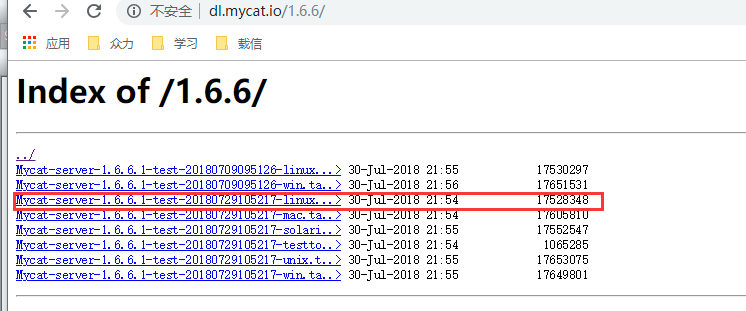
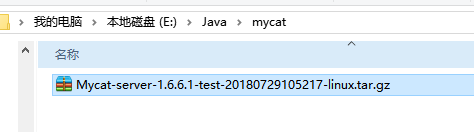
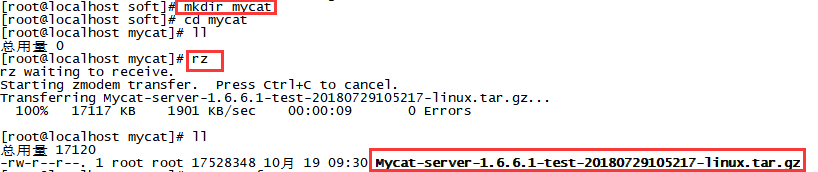
【2】上传至linux服务器:
mkdir /home/rhr/soft/mycat

cd /home/rhr/soft/mycat

rz
3、开始安装
【1】解压
tar -zxvf Mycat-server-1.6-RELEASE-20161028204710-linux.tar.gz
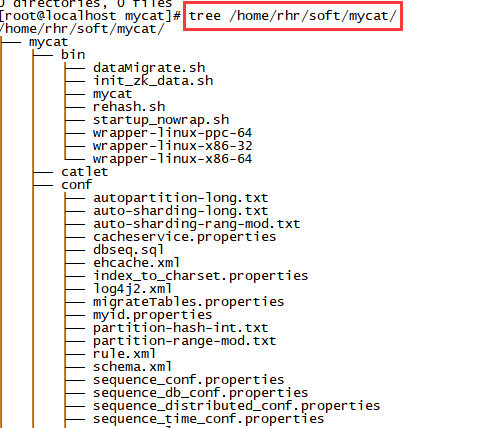
【2】安装tree(可选,使目录结构更好看)
yum -y install tree
查看tree:
4、创建用户并修改配置文件
【1】为了更好的进入mycat,设置MYCAT_HOME的变量
vim /etc/profile
添加绿色部分:
export JAVA_HOME=/home/rhr/soft/jdk/jdk1.8.0_191

export MYCAT_HOME=/home/rhr/soft/mycat/mycat

export PATH=$JAVA_HOME/bin:$JAVA_HOME/jre/bin:/usr/local/mysql/bin:$MYCAT_HOME/bin:$PATH

使得变量生效
source /etc/profile
检查

【2】配置mycat文件
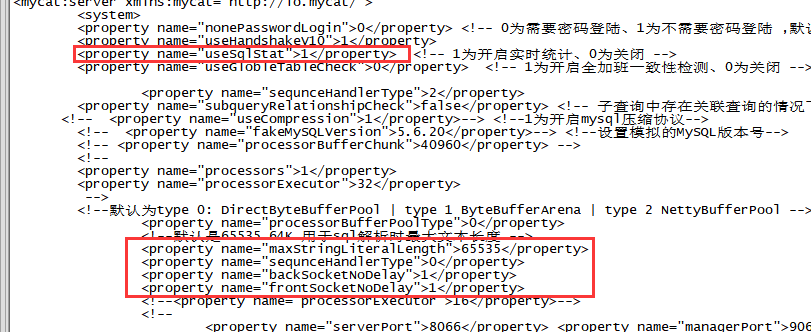
(1)修改server.xml
cd home/rhr/soft/mycat/mycat/conf

cp server.xml server_bak.xml

vim  server.xml
修改前:

修改后:
(2)修改schema.xml
1) 修改schema 标签
修改前:
    <schema name="TESTDB" checkSQLschema="false" sqlMaxLimit="100">

        <!-- auto sharding by id (long) -->

        <table name="travelrecord" dataNode="dn1,dn2,dn3" rule="auto-sharding-long" />

        <!-- global table is auto cloned to all defined data nodes ,so can join

                with any table whose sharding node is in the same data node -->

        <table name="company" primaryKey="ID" type="global" dataNode="dn1,dn2,dn3" />

        <table name="goods" primaryKey="ID" type="global" dataNode="dn1,dn2" />

        <!-- random sharding using mod sharind rule -->

        <table name="hotnews" primaryKey="ID" autoIncrement="true" dataNode="dn1,dn2,dn3" rule="mod-long" />

        <!-- <table name="dual" primaryKey="ID" dataNode="dnx,dnoracle2" type="global"

                needAddLimit="false"/> <table name="worker" primaryKey="ID" dataNode="jdbc_dn1,jdbc_dn2,jdbc_dn3" rule="mod-long" /> -->

        <table name="employee" primaryKey="ID" dataNode="dn1,dn2" rule="sharding-by-intfile" />

        <table name="customer" primaryKey="ID" dataNode="dn1,dn2" rule="sharding-by-intfile">

            <childTable name="orders" primaryKey="ID" joinKey="customer_id" parentKey="id">

                <childTable name="order_items" joinKey="order_id" parentKey="id" />

            </childTable>

            <childTable name="customer_addr" primaryKey="ID" joinKey="customer_id"  parentKey="id" />

        </table>

        <!-- <table name="oc_call" primaryKey="ID" dataNode="dn1$0-743" rule="latest-month-calldate" /> -->

    </schema>
修改后:
    <schema name="TESTDB" checkSQLschema="false" sqlMaxLimit="100">

        <!-- auto sharding by id (long) -->

    <table name="travelrecord" dataNode="dn1,dn2,dn3" rule="auto-sharding-long" />

    <!-- global table is auto cloned to all defined data nodes ,so can join

        with any table whose sharding node is in the same data node -->

    <table name="company" primaryKey="company_id" type="global" dataNode="dn1,dn2,dn3" />

    <table name="goods" primaryKey="goods_id" type="global" dataNode="dn1,dn2" />

    <!-- random sharding using mod sharind rule -->

    <table name="hotnews" primaryKey="hotnews_id" autoIncrement="true" dataNode="dn1,dn2,dn3" rule="mod-long" />

    <!-- <table name="dual" primaryKey="ID" dataNode="dnx,dnoracle2" type="global"

            needAddLimit="false"/> <table name="worker" primaryKey="ID" dataNode="jdbc_dn1,jdbc_dn2,jdbc_dn3" rule="mod-long" /> -->

    <table name="employee" primaryKey="employee_id" dataNode="dn1,dn2" rule="sharding-by-intfile" />

    <table name="customer" primaryKey="customer_id" dataNode="dn1,dn2" rule="sharding-by-murmur">

        <childTable name="orders" primaryKey="order_id" joinKey="customer_id" parentKey="customer_id">

            <childTable name="order_items" joinKey="order_id" parentKey="order_id" />

        </childTable>

        <childTable name="customer_addr" primaryKey="customer_addr_id" joinKey="customer_id"  parentKey="customer_id" />

    </table>

    <!-- <table name="oc_call" primaryKey="ID" dataNode="dn1$0-743" rule="latest-month-calldate" /> -->

    </schema>
2) 修改schema 标签
修改前
        <!-- can have multi write hosts -->

        <writeHost host="hostM1" url="localhost:3306" user="root" password="123">

            <!-- can have multi read hosts -->

            <readHost host="hostS2" url="localhost:3306" user="root" password="123" />

        </writeHost>

        <writeHost host="hostS1" url="localhost:3306" user="root" password="123" />

        <!-- <writeHost host="hostM2" url="localhost:3316" user="root" password="123456"/> -->
修改后:
    <!-- can have multi write hosts -->

    <writeHost host="hostM1" url="localhost:3306" user="root"  password="YYBrhr_2018">

        <!-- can have multi read hosts -->

        <!-- <readHost host="hostS2" url="localhost:3306" user="root" password="123" /> -->

    </writeHost>

    <!-- <writeHost host="hostS1" url="localhost:3306" user="root" password="123" /> -->

    <!-- <writeHost host="hostM2" url="localhost:3316" user="root" password="123456"/> -->

    </dataHost>
(3)修改role.xml
修改前:
<tableRule name="sharding-by-intfile">

        <rule>

            <columns>sharding_id</columns>

            <algorithm>hash-int</algorithm>

        </rule>

    </tableRule>

    <tableRule name="auto-sharding-long">

        <rule>

            <columns>id</columns>

            <algorithm>rang-long</algorithm>

        </rule>

    </tableRule>

    <tableRule name="mod-long">

        <rule>

            <columns>id</columns>

            <algorithm>mod-long</algorithm>

        </rule>

    </tableRule>

    <tableRule name="sharding-by-murmur">

        <rule>

            <columns>id</columns>

            <algorithm>murmur</algorithm>

        </rule>

    </tableRule>
修改后:
    <tableRule name="sharding-by-intfile">

        <rule>

            <columns>employee_id</columns>

            <algorithm>hash-int</algorithm>

        </rule>

    </tableRule>

    <tableRule name="auto-sharding-long">

        <rule>

            <columns>id</columns>

            <algorithm>rang-long</algorithm>

        </rule>

    </tableRule>

    <tableRule name="mod-long">

        <rule>

            <columns>hotnews_id</columns>

            <algorithm>mod-long</algorithm>

        </rule>

    </tableRule>

    <tableRule name="sharding-by-murmur">

        <rule>

            <columns>customer_id</columns>

            <algorithm>murmur</algorithm>

        </rule>

    </tableRule>
5、启动mycat并测试
【1】启动mycat
mycat start

mycat status
【2】测试
mysql -u root -p -P8066 -h 127.0.0.1
这里输入的密码,是在/home/rhr/soft/mycat/mycat/conf/server.xml里面看到的密码

这样就说明安装成功了,安装或者启动mycat之前

CentOS7.5 搭建mycat1.6.6的更多相关文章
- centos7 环境搭建
centos7 环境搭建 CentOS-7-x86_64-DVD-1511.iso vmware121. 安装 使用iso安装系统:2. 修改yum源到光盘 先把光盘C ...
- Kafka(二)CentOS7.5搭建Kafka2.11-1.1.0集群与简单测试
一.下载 下载地址: http://kafka.apache.org/downloads.html 我这里下载的是Scala 2.11对应的 kafka_2.11-1.1.0.tgz 二.kaf ...
- 在Centos7下搭建Socks5代理服务器
在Centos7下搭建Socks5代理服务器 http://blog.51cto.com/quliren/2052776 采用socks协议的代理服务器就是SOCKS服务器,是一种通用的代理服务器 ...
- 第四百零五节,centos7下搭建sentry错误日志服务器,接收python以及Django错误,
第四百零五节,centos7下搭建sentry错误日志服务器,接收python以及Django错误, 注意:版本,不然会报错 Docker >=1.11Compose >1.6.0 通过d ...
- Hyperledger超级账本在Centos7下搭建运行环境
超级账本(hyperledger)是Linux基金会于2015年发起的推进区块链数字技术和交易验证的开源项目,加入成员包括:荷兰银行(ABN AMRO).埃森哲(Accenture)等十几个不同利益体 ...
- git操作:在CentOS7上面搭建GitLab服务器
在这篇文章中将要讲解如何在CentOS7上面搭建本地的GitLab服务器. 一.安装并配置必要的依赖关系 首先要在CentOS系统上面安装所需的依赖:ssh.防火墙.postfix(用于邮件通知).w ...
- Storm(二)CentOS7.5搭建Storm1.2.2集群
一.Storm的下载 官网下载地址:http://storm.apache.org/downloads.html 这里下载最新的版本storm1.2.2,进入之后选择一个镜像下载 二.Storm伪分布 ...
- HBase(二)CentOS7.5搭建HBase1.2.6HA集群
一.安装前提 1.HBase 依赖于 HDFS 做底层的数据存储 2.HBase 依赖于 MapReduce 做数据计算 3.HBase 依赖于 ZooKeeper 做服务协调 4.HBase源码是j ...
- Spark(二)CentOS7.5搭建Spark2.3.1分布式集群
一 下载安装包 1 官方下载 官方下载地址:http://spark.apache.org/downloads.html 2 安装前提 Java8 安装成功 zookeeper 安 ...
随机推荐
- NO2:设置RedHat Linux下的samba开机启动
安装的samba默认不是开机启动的,这样每次都要进入系统人为启动,很不方便,当然系统肯定可以设置开机启动的. 因为我的是RedHat Linux系统,支持chkconfig命令直接配置,会简单些,其它 ...
- Qt之log数据展示模块简要实现
Log模块主要用于实时测井数据的显示和测后曲线数据的预览和打印,为更好的展示对Qt中相关知识点的应用,特以Log模块为例对其进行简要实现. 内容导图: 一.功能需求 1.界面效果图 Log模块实现曲线 ...
- Money Systems
链接 分析:来看看背包九讲里面的一段话: 对于一个给定了背包容量.物品费用.物品间相互关系(分组.依赖等) 的背包问题,除了再给定每个物品的价值后求可得到的最大价值外,还可以得 到装满背包或将背包装至 ...
- Father Christmas flymouse
Father Christmas flymouse Time Limit: 1000MS Memory Limit: 131072K Total Submissions: 3479 Accep ...
- Redis 客户端安装与远程连接图解
Linux环境:Centos 6.8 Redis服务端版本:3.2.6 Redis客户端下载链接:https://redisdesktop.com/download 省略Linux系统安装Redis教 ...
- unicode和utf-8互转
1.1 ASCII码 我们知道, 在计算机内部, 所有的信息最终都表示为一个二进制的字符串. 每一个二进制位(bit)有0和1两种状态, 因此八个二进制位就可以组合出 256种状态, 这被称为一个字节 ...
- [51nod1065]最小正子段和
题意:求一个序列中大于0的最小子段和. 解题关键: 先求出前缀和和,对于每个位置求某个位置到当前位置和大于1的和的最小值.然而这是复杂度是O(n^2)的.其实可以通过排序优化到O(nlogn).对前缀 ...
- my emacs configuration
modified from https://github.com/flyingmachine/emacs-for-clojure ;;;; ;; Packages ;;;; ;; Define pac ...
- 测试你开发的web系统在各种类型浏览器上的兼容性
可以使用 https://www.browserstack.com 来测试你所开发的web系统在各种各样的浏览器,以及各种手机平台上的兼容性.
- C++11之lambda表达式应用
应用 foreach语句中 #include <time.h> #include <algorithm> using namespace std; void func(int ...