
异步 HttpContext.Current 为空null 另一种解决方法
1、场景
在导入通讯录过程中,把导入的失败、成功的号码数进行统计,然后保存到session中,客户端通过轮询显示状态。
在实现过程中,使用的async调用方法,出现HttpContext.Current为null的情况,如下:

2、网络解答
从百度与谷歌查询,分以下两种情况进行解答:
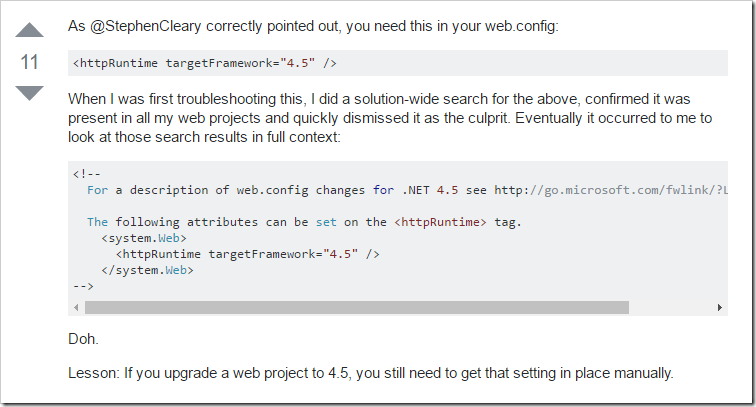
1、更改web.config配置文件
Stackoverflow给出如下解决方案:http://stackoverflow.com/questions/18383923/why-is-httpcontext-current-null-after-await
2、缓存HttpContext
博客地址:http://www.cnblogs.com/pokemon/p/5116446.html
本博客,给出了异步下HttpContext.Current为空的原因分析。本文中的最后提取出如下方法:
using System;

using System.Linq.Expressions;

using System.Reflection;

using System.Threading;

using System.Web;

namespace TxSms

{

    /// <summary>

    /// 解决Asp.net Mvc中使用异步的时候HttpContext.Current为null的方法

    /// <remarks>

    /// http://www.cnblogs.com/pokemon/p/5116446.html

    /// </remarks>

    /// </summary>

    public static class HttpContextHelper

    {

        /// <summary>

        /// 在同步上下文中查找当前会话<see cref="System.Web.HttpContext" />对象

        /// </summary>

        /// <param name="context"></param>

        /// <returns></returns>

        public static HttpContext FindHttpContext(this SynchronizationContext context)

        {

            if (context == null)

            {

                return null;

            }

            var factory = GetFindApplicationDelegate(context);

            return factory?.Invoke(context).Context;

        }

        private static Func<SynchronizationContext, HttpApplication> GetFindApplicationDelegate(SynchronizationContext context)

        {

            Delegate factory = null;

            Type type = context.GetType();

            if (!type.FullName.Equals("System.Web.LegacyAspNetSynchronizationContext"))

            {

                return null;

            }

            //找到字段

            ParameterExpression sourceExpression = Expression.Parameter(typeof(SynchronizationContext), "context");

            //目前支持 System.Web.LegacyAspNetSynchronizationContext 内部类

            //查找        private HttpApplication _application 字段

            Expression sourceInstance = Expression.Convert(sourceExpression, type);

            FieldInfo applicationFieldInfo = type.GetField("_application", BindingFlags.NonPublic | BindingFlags.Instance);

            Expression fieldExpression = Expression.Field(sourceInstance, applicationFieldInfo);

            factory = Expression.Lambda<Func<SynchronizationContext, HttpApplication>>(fieldExpression, sourceExpression).Compile();

            //返回委托

            return ((Func<SynchronizationContext, HttpApplication>)factory);

        }

        /// <summary>

        /// 确定异步状态的上下文可用

        /// </summary>

        /// <param name="context"></param>

        /// <returns></returns>

        public static HttpContext Check(this HttpContext context)

        {

            return context ?? (context = SynchronizationContext.Current.FindHttpContext());

        }

    }

}
3、实现
通过2对两种方法都进行尝试,发现还是不可用的。使用session共享数据行不通,换另外一种思路,使用cache,封装类库如下:
using System;

using System.Collections;

using System.Web;

using System.Web.Caching;

namespace TxSms

{

    /// <summary>

    /// HttpRuntime Cache读取设置缓存信息封装

    /// <auther>

    ///     <name>Kencery</name>

    ///     <date>2015-8-11</date>

    /// </auther>

    /// 使用描述:给缓存赋值使用HttpRuntimeCache.Set(key,value....)等参数(第三个参数可以传递文件的路径(HttpContext.Current.Server.MapPath()))

    /// 读取缓存中的值使用JObject jObject=HttpRuntimeCache.Get(key) as JObject,读取到值之后就可以进行一系列判断

    /// </summary>

    public static class HttpRuntimeCache

    {

        /// <summary>

        /// 设置缓存时间,配置(从配置文件中读取)

        /// </summary>

        private const double Seconds = 30 * 24 * 60 * 60;

        /// <summary>

        /// 缓存指定对象,设置缓存

        /// </summary>

        public static bool Set(string key, object value)

        {

            return Set(key, value, null, DateTime.Now.AddSeconds(Seconds), Cache.NoSlidingExpiration, CacheItemPriority.Default, null);

        }

        /// <summary>

        ///  缓存指定对象,设置缓存

        /// </summary>

        public static bool Set(string key, object value, string path)

        {

            try

            {

                var cacheDependency = new CacheDependency(path);

                return Set(key, value, cacheDependency);

            }

            catch

            {

                return false;

            }

        }

        /// <summary>

        /// 缓存指定对象,设置缓存

        /// </summary>

        public static bool Set(string key, object value, CacheDependency cacheDependency)

        {

            return Set(key, value, cacheDependency, Cache.NoAbsoluteExpiration, Cache.NoSlidingExpiration, CacheItemPriority.Default, null);

        }

        /// <summary>

        /// 缓存指定对象,设置缓存

        /// </summary>

        public static bool Set(string key, object value, double seconds, bool isAbsulute)

        {

            return Set(key, value, null, (isAbsulute ? DateTime.Now.AddSeconds(seconds) : Cache.NoAbsoluteExpiration),

                (isAbsulute ? Cache.NoSlidingExpiration : TimeSpan.FromSeconds(seconds)), CacheItemPriority.Default, null);

        }

        /// <summary>

        /// 获取缓存对象

        /// </summary>

        public static object Get(string key)

        {

            return GetPrivate(key);

        }

        /// <summary>

        /// 判断缓存中是否含有缓存该键

        /// </summary>

        public static bool Exists(string key)

        {

            return (GetPrivate(key) != null);

        }

        /// <summary>

        /// 移除缓存对象

        /// </summary>

        /// <param name="key"></param>

        /// <returns></returns>

        public static bool Remove(string key)

        {

            if (string.IsNullOrEmpty(key))

            {

                return false;

            }

            HttpRuntime.Cache.Remove(key);

            return true;

        }

        /// <summary>

        /// 移除所有缓存

        /// </summary>

        /// <returns></returns>

        public static bool RemoveAll()

        {

            IDictionaryEnumerator iDictionaryEnumerator = HttpRuntime.Cache.GetEnumerator();

            while (iDictionaryEnumerator.MoveNext())

            {

                HttpRuntime.Cache.Remove(Convert.ToString(iDictionaryEnumerator.Key));

            }

            return true;

        }

        /// <summary>

        /// 设置缓存

        /// </summary>

        public static bool Set(string key, object value, CacheDependency cacheDependency, DateTime dateTime,

            TimeSpan timeSpan, CacheItemPriority cacheItemPriority, CacheItemRemovedCallback cacheItemRemovedCallback)

        {

            if (string.IsNullOrEmpty(key) || value == null)

            {

                return false;

            }

            HttpRuntime.Cache.Insert(key, value, cacheDependency, dateTime, timeSpan, cacheItemPriority, cacheItemRemovedCallback);

            return true;

        }

        /// <summary>

        /// 获取缓存

        /// </summary>

        private static object GetPrivate(string key)

        {

            return string.IsNullOrEmpty(key) ? null : HttpRuntime.Cache.Get(key);

        }

    }

}
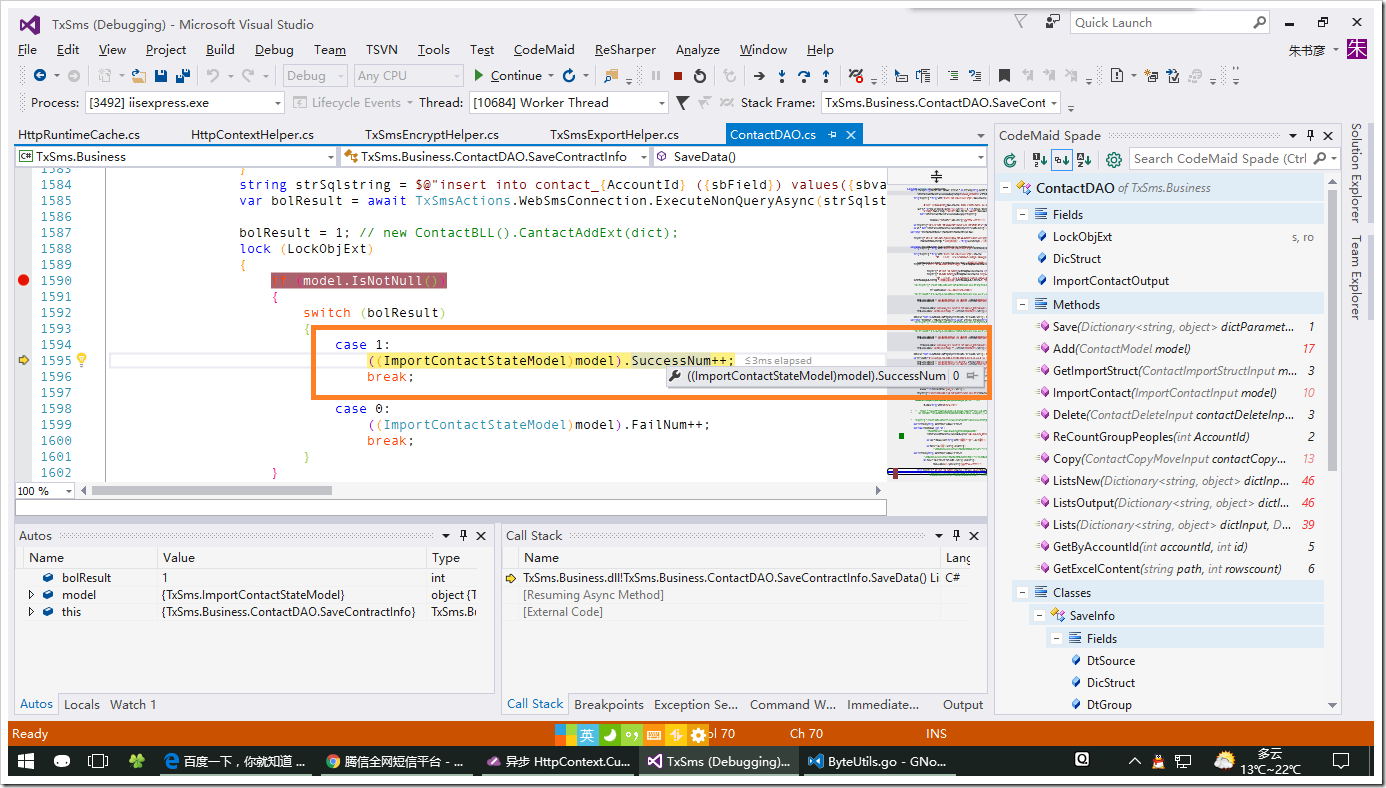
在此调试,完全可以找到((ImportContactStateModel)model).SuccessNum,如下图:
异步 HttpContext.Current 为空null 另一种解决方法的更多相关文章
- WORD 的 Open 和Workbook 的 LoadFromFile 函数返回null的一种解决方法
WORD Application.Documents.Open 和 Workbook workbookExcel.LoadFromFile 函数返回null的一种解决方法 DCOM Config Se ...
- WORD Application.Documents.Open函数返回null的一种解决方法
DCOM Config Setting for "Microsoft Office Word 97 - 2003 Document" 内部配置一切正常,但调用Application ...
- System.Web.HttpContext.Current.Session为NULL解决方法
http://www.cnblogs.com/tianguook/archive/2010/09/27/1836988.html 自定义 HTTP 处理程序,从IHttpHandler继承,在写Sys ...
- 为什么获取的System.Web.HttpContext.Current值为null,HttpContext对象为null时如何获取程序(站点)的根目录
ASP.NET提供了静态属性System.Web.HttpContext.Current,因此获取HttpContext对象就非常方便了.也正是因为这个原因,所以我们经常能见到直接访问System.W ...
- System.Web.HttpContext.Current.Session为NULL值的问题?
自定义 HTTP 处理程序,从IHttpHandler继承,在写System.Web.HttpContext.Current.Session["Value"]的时 候,没有问题,但 ...
- c# 异步方法中HttpContext.Current为空
调用异步方法前 HttpContext context = System.Web.HttpContext.Current; HttpRuntime.Cache.Insert("context ...
- 百度编辑器ueditor 异步加载时,初始化没办法赋值bug解决方法
百度编辑器ueditor 异步加载时,初始化没办法赋值bug解决方法 金刚 前端 ueditor 初始化 因项目中使用了百度编辑器——ueditor.整体来说性能还不错. 发现问题 我在做一个编辑页面 ...
- 异步 HttpContext.Current实现取值的方法(解决异步Application,Session,Cache...等失效的问题)
在一个项目中,为了系统执行效率更快,把一个经常用到的数据库表通过dataset放到Application中,发现在异步实现中每一次都会出现HttpContext.Current为null的异常,后来在 ...
- HttpContext.Current.User is null after installing .NET Framework 4.5
故障原因:从framework4.0到framework4.5的升级过程中,原有的form认证方式发生了变化,所以不再支持User.Identity.Name原有存储模式(基于cookie),要恢复这 ...
随机推荐
- 消息队列 Kafka 的基本知识及 .NET Core 客户端
前言 最新项目中要用到消息队列来做消息的传输,之所以选着 Kafka 是因为要配合其他 java 项目中,所以就对 Kafka 了解了一下,也算是做个笔记吧. 本篇不谈论 Kafka 和其他的一些消息 ...
- web全栈开发之网站开发二(弹出式登录注册框前端实现-类腾讯)
这次给大家分享的是目前很多网站中流行的弹出式登录框,如下面的腾讯网登录界面,采用弹出式登录的好处是大大提升了网站的用户体验和交互性,用户不用重新跳转到指定的页面就能登录,非常方便 先来个演示地址 要实 ...
- CorelDRAW X8 如何破解激活(附国际版安装包+激活工具) 2016-12-15
之前有位搞平面的好友“小瘦”说CDR X8无法破解,只能用X7.呃……呃……呃……好像是的 其实CDR8难激活主要在于一个点“没有离线激活了,只可以在线激活”,逆天不是专供逆向的,当然没能力去破解,这 ...
- ExtJS 4.2 第一个程序
本篇介绍如何创建一个ExtJS应用程序.并通过创建目录.导入文件.编写代码及分析代码等步骤来解释第一个ExtJS程序. 目录 1. 创建程序 1.1 创建目录建议 1.2 实际目录 1.3 index ...
- ASP.NET MVC开发日常一:SessionID合理清除
在MVC Web开发中临时存储数据一般会用到Session,Cookie,ViewBag,ViewData,TempData.每个的使用场景是不同,具体区别有空再补上. Session数据最敏感,最需 ...
- 【转】39个让你受益的HTML5教程
闲话少说,本文作者为大家收集了网上学习HTML5的资源,期望它们可以帮助大家更好地学习HTML5. 好人啊! 不过,作者原来说的40个只有39个,因为第5个和第8个是重复的. 原文在此! 1. 五分钟 ...
- 自己写的数据交换工具——从Oracle到Elasticsearch
先说说需求的背景,由于业务数据都在Oracle数据库中,想要对它进行数据的分析会非常非常慢,用传统的数据仓库-->数据集市这种方式,集市层表会非常大,查询的时候如果再做一些group的操作,一个 ...
- Boost信号/槽signals2
信号槽是Qt框架中一个重要的部分,主要用来解耦一组互相协作的类,使用起来非常方便.项目中有同事引入了第三方的信号槽机制,其实Boost本身就有信号/槽,而且Boost的模块相对来说更稳定. signa ...
- django 第三天 有关库使用
项目中经常会用到第三方的lib和app,有些lib和app会进行不断更新,更新后可能会存在冲突,因此可以创建externals目录,下面欧app和libs.app存放django-cms,haysta ...
- Idea下用SBT搭建Spark Helloworld
没用过IDEA工具,听说跟Eclipse差不多,sbt在Idea其实就等于maven在Eclipse.Spark运行在JVM中,所以要在Idea下运行spark,就先要安装JDK 1.8+ 然后加入S ...