
Unity3D学习笔记(三十三):矩阵
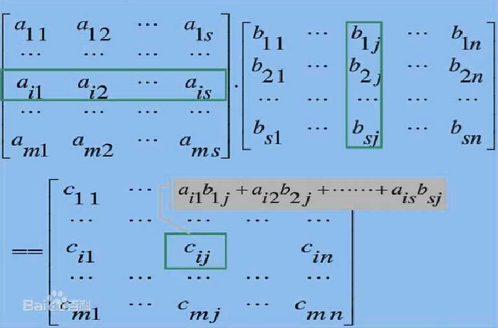

  -

  -

-

a b c d f

g h i j k

k

 k

1x- + -2x4, 1x7 + -2x1/

5x- + 0x4, 5x7 + 0x1/

3x- + -1x0 + 4x3, 3x0 + -1x7 + 4x-, 3x3 + -1x- + 4x2,

2x2 + 3x5 +4x3, 2x3 + 3x7 +4x4, 2x1 + 3x2 +4x5

2x2 + 7x5 +10x3, 2x3 + 7x7 +10x4, 2x1 + 7x2 +10x5
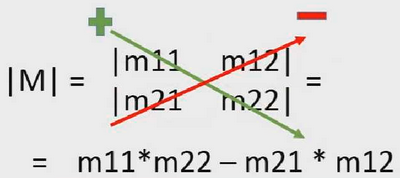
三阶方阵的行列式的计算:
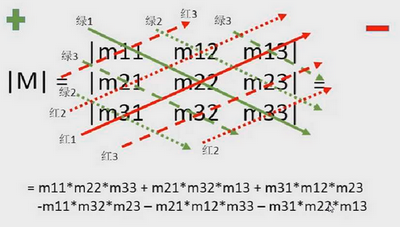
2x2x8+ 3x5x1 + 7x3x3

-2x5x3 - 3x3x8 - 7x2x1

2x5 - 3x4
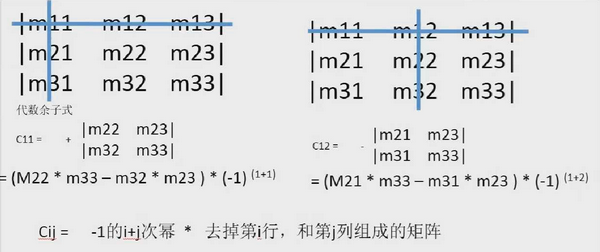
矩阵

C11 =(4x2 - 3x1 ) x (-)(+)

C12 =(3x2 - 5x1 ) x (-)(+)

C13 =(3x3 - 5x4 ) x (-)(+)

C21 =(4x2 - 3x5 ) x (-)(+)

C22 =(2x2 - 5x5 ) x (-)(+)

C23 =(2x3 - 5x4 ) x (-)(+)

C31 =(4x1 - 4x5 ) x (-)(+)

C32 =(2x1 - 3x5 ) x (-)(+)

C33 =(2x4 - 3x4 ) x (-)(+)

 -  -

 -

- - -
矩阵

矩阵的行列式

|M| =  -  = -

标准伴随矩阵

 -

-

转置矩阵

 -

-

逆矩阵

-/ /

/ -/
矩阵

矩阵的行列式

|M| = ++ --- = -

标准伴随矩阵

 -

-

  -

转置矩阵

 -

-

  -

逆矩阵

-/ /

/ -/ -/

-/ -/ /
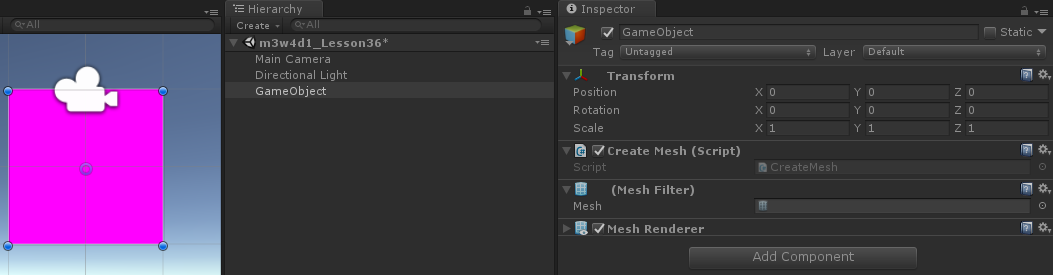
using System.Collections;

using System.Collections.Generic;

using UnityEngine;

public class CreateMesh : MonoBehaviour

{

       void Start () {

        MeshFilter mf = gameObject.AddComponent<MeshFilter>();

        MeshRenderer mr = gameObject.AddComponent<MeshRenderer>();

        //先实例化一个网格

        Mesh mesh = new Mesh();

        //确定网格的四个顶点

        //先创建一个Vector3类型的数组

        Vector3[] vertexs = new Vector3[];

        vertexs[] = new Vector3(-, , );

        vertexs[] = new Vector3(, , );

        vertexs[] = new Vector3(-, -, );

        vertexs[] = new Vector3(, -, );

        //把顶点给mesh

        mesh.vertices = vertexs;

        //再确定顶点组成三角面的顺序,注意数组的数量一定是3的倍数

        //因为3个顶点才能组成1个三角面,注意三角面的顶点的顺序,顺时针在正面,逆时针在反面

        int[] triangles = new int[] {,,,,,};

        mesh.triangles = triangles;

        //最终把网格给MeshFilter

        mf.mesh = mesh;

    }

}
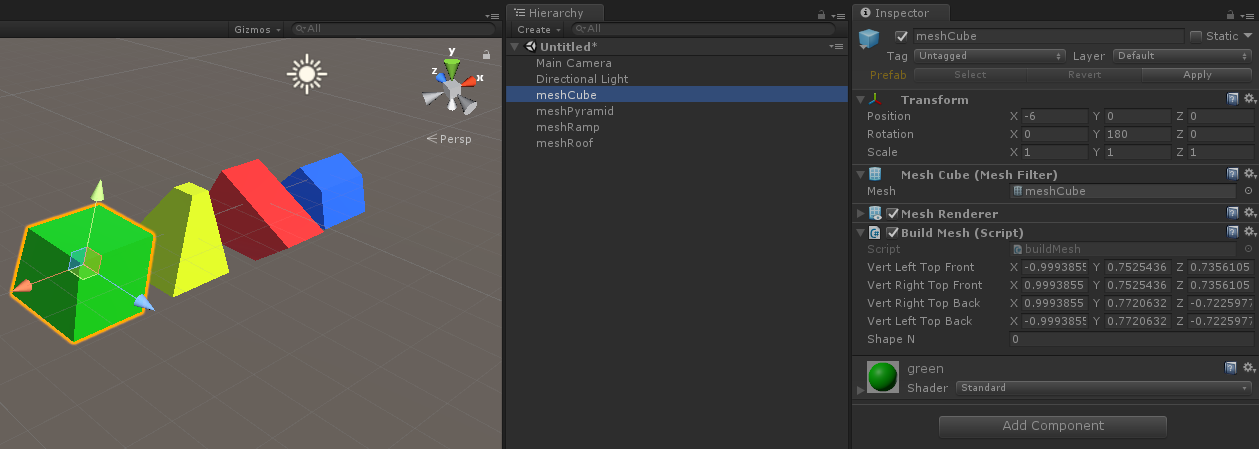
using UnityEngine;

using System.Collections;

public class buildMesh : MonoBehaviour {

       public Vector3 vertLeftTopFront = new Vector3(-,,);

       public Vector3 vertRightTopFront = new Vector3(,,);

       public Vector3 vertRightTopBack = new Vector3(,,-);

       public Vector3 vertLeftTopBack = new Vector3(-,,-);

       private float waitN = 3f;

       private float waitD = 3f;

       public int shapeN = ;

       void Start ()

       {

              MeshFilter mf = GetComponent<MeshFilter>();

              Mesh mesh = mf.mesh;

              //Vertices//

              Vector3[] vertices = new Vector3[]

              {

                     //front face//

                     vertLeftTopFront,//left top front, 0

                     vertRightTopFront,//right top front, 1

                     new Vector3(-,-,),//left bottom front, 2

                     new Vector3(,-,),//right bottom front, 3

                     //back face//

                     vertRightTopBack,//right top back, 4

                     vertLeftTopBack,//left top back, 5

                     new Vector3(,-,-),//right bottom back, 6

                     new Vector3(-,-,-),//left bottom back, 7

                     //left face//

                     vertLeftTopBack,//left top back, 8

                     vertLeftTopFront,//left top front, 9

                     new Vector3(-,-,-),//left bottom back, 10

                     new Vector3(-,-,),//left bottom front, 11

                     //right face//

                     vertRightTopFront,//right top front, 12

                     vertRightTopBack,//right top back, 13

                     new Vector3(,-,),//right bottom front, 14

                     new Vector3(,-,-),//right bottom back, 15

                     //top face//

                     vertLeftTopBack,//left top back, 16

                     vertRightTopBack,//right top back, 17

                     vertLeftTopFront,//left top front, 18

                     vertRightTopFront,//right top front, 19

                     //bottom face//

                     new Vector3(-,-,),//left bottom front, 20

                     new Vector3(,-,),//right bottom front, 21

                     new Vector3(-,-,-),//left bottom back, 22

                     new Vector3(,-,-)//right bottom back, 23

              };

              //Triangles// 3 points, clockwise determines which side is visible

              int[] triangles = new int[]

              {

                     //front face//

                     ,,,//first triangle

                     ,,,//second triangle

                     //back face//

                     ,,,//first triangle

                     ,,,//second triangle

                     //left face//

                     ,,,//first triangle

                     ,,,//second triangle

                     //right face//

                     ,,,//first triangle

                     ,,,//second triangle

                     //top face//

                     ,,,//first triangle

                     ,,,//second triangle

                     //bottom face//

                     ,,,//first triangle

                     ,,//second triangle

              };

              //UVs//

              Vector2[] uvs = new Vector2[]

              {

                     //front face// 0,0 is bottom left, 1,1 is top right//

                     new Vector2(,),

                     new Vector2(,),

                     new Vector2(,),

                     new Vector2(,),

                     new Vector2(,),

                     new Vector2(,),

                     new Vector2(,),

                     new Vector2(,),

                     new Vector2(,),

                     new Vector2(,),

                     new Vector2(,),

                     new Vector2(,),

                     new Vector2(,),

                     new Vector2(,),

                     new Vector2(,),

                     new Vector2(,),

                     new Vector2(,),

                     new Vector2(,),

                     new Vector2(,),

                     new Vector2(,),

                     new Vector2(,),

                     new Vector2(,),

                     new Vector2(,),

                     new Vector2(,)

              };

              mesh.Clear ();

              mesh.vertices = vertices;

              mesh.triangles = triangles;

              mesh.uv = uvs;

              ;

              mesh.RecalculateNormals();

       }

       void Update ()

       {

              if(waitN > 0f)

              {

                     waitN -= Time.deltaTime;

              }

              else

              {

                     waitN = waitD;

                     shapeN ++;

                     if(shapeN > )

                     {

                           shapeN = ;

                     }

              }

              //morph to cube//

              if(shapeN == )

              {

                     vertLeftTopFront = Vector3.Lerp(vertLeftTopFront, new Vector3(-,,),Time.deltaTime);

                     vertRightTopFront = Vector3.Lerp(vertRightTopFront, new Vector3(,,),Time.deltaTime);

                     vertRightTopBack = Vector3.Lerp(vertRightTopBack, new Vector3(,,-),Time.deltaTime);

                     vertLeftTopBack = Vector3.Lerp(vertLeftTopBack, new Vector3(-,,-),Time.deltaTime);

              }

              //morph to pyramid//

              if(shapeN == )

              {

                     vertLeftTopFront = Vector3.Lerp(vertLeftTopFront, new Vector3(,,),Time.deltaTime);

                     vertRightTopFront = Vector3.Lerp(vertRightTopFront, new Vector3(,,),Time.deltaTime);

                     vertRightTopBack = Vector3.Lerp(vertRightTopBack, new Vector3(,,),Time.deltaTime);

                     vertLeftTopBack = Vector3.Lerp(vertLeftTopBack, new Vector3(,,),Time.deltaTime);

              }

              //morph to ramp//

              if(shapeN == )

              {

                     vertLeftTopFront = Vector3.Lerp(vertLeftTopFront, new Vector3(-,-,),Time.deltaTime);

                     vertRightTopFront = Vector3.Lerp(vertRightTopFront, new Vector3(,-,),Time.deltaTime);

                     vertRightTopBack = Vector3.Lerp(vertRightTopBack, new Vector3(,0.5f,-),Time.deltaTime);

                     vertLeftTopBack = Vector3.Lerp(vertLeftTopBack, new Vector3(-,0.5f,-),Time.deltaTime);

              }

              //morph to roof//

              if(shapeN == )

              {

                     vertLeftTopFront = Vector3.Lerp(vertLeftTopFront, new Vector3(-,0.2f,),Time.deltaTime);

                     vertRightTopFront = Vector3.Lerp(vertRightTopFront, new Vector3(,0.2f,),Time.deltaTime);

                     vertRightTopBack = Vector3.Lerp(vertRightTopBack, new Vector3(,0.2f,),Time.deltaTime);

                     vertLeftTopBack = Vector3.Lerp(vertLeftTopBack, new Vector3(-,0.2f,),Time.deltaTime);

              }

              Start();

       }

}
Unity3D学习笔记(三十三):矩阵的更多相关文章
- Unity3D学习笔记(十三):委托、考试复习
委托:比较什么时候用委托好 下课案例:不用下课铃 1.ClassManager需要拿到所有教室的引用,课堂管理者应该只负责计时并告知每间教室 2.每间教室应该是由当班老师负责是否需要下课,而课堂管 ...
- PHP学习笔记三十三【自定义错误处理器】
<?php //自定义错误处理器 //$errorno 错误号 //$errmes错误信息 //这两个参数是必须的 function my_error($errorno,$errmes) { e ...
- 【Unity 3D】学习笔记三十三:游戏元素——天空盒子
天空盒子 一般的3D游戏都会有着北京百年一遇的蓝天.让人惊叹不已.事实上天空这个效果没有什么神奇的仅仅需用到天空盒子这个组件即可.能够将天空设想成一个巨大的盒子,这个盒子将整个游戏视图和全部的游戏元素 ...
- Unity3D学习笔记3——Unity Shader的初步使用
目录 1. 概述 2. 详论 2.1. 创建材质 2.2. 着色器 2.2.1. 名称 2.2.2. 属性 2.2.3. SubShader 2.2.3.1. 标签(Tags) 2.2.3.2. 渲染 ...
- VSTO 学习笔记(十三)谈谈VSTO项目的部署
原文:VSTO 学习笔记(十三)谈谈VSTO项目的部署 一般客户计算机专业水平不高,但是有一些Office水平相当了得,尤其对Excel的操作非常熟练.因此如果能将产品的一些功能集成在Office中, ...
- Unity3D学习笔记2——绘制一个带纹理的面
目录 1. 概述 2. 详论 2.1. 网格(Mesh) 2.1.1. 顶点 2.1.2. 顶点索引 2.2. 材质(Material) 2.2.1. 创建材质 2.2.2. 使用材质 2.3. 光照 ...
- Unity3D学习笔记6——GPU实例化(1)
目录 1. 概述 2. 详论 3. 参考 1. 概述 在之前的文章中说到,一种材质对应一次绘制调用的指令.即使是这种情况,两个三维物体使用同一种材质,但它们使用的材质参数不一样,那么最终仍然会造成两次 ...
- Unity3D学习笔记7——GPU实例化(2)
目录 1. 概述 2. 详论 2.1. 实现 2.2. 解析 3. 参考 1. 概述 在上一篇文章<Unity3D学习笔记6--GPU实例化(1)>详细介绍了Unity3d中GPU实例化的 ...
- Unity3D学习笔记8——GPU实例化(3)
目录 1. 概述 2. 详论 2.1. 自动实例化 2.2. MaterialPropertyBlock 3. 参考 1. 概述 在前两篇文章<Unity3D学习笔记6--GPU实例化(1)&g ...
- Oracle学习笔记三 SQL命令
SQL简介 SQL 支持下列类别的命令: 1.数据定义语言(DDL) 2.数据操纵语言(DML) 3.事务控制语言(TCL) 4.数据控制语言(DCL)
随机推荐
- [博客迁移]探索Windows Azure 监控和自动伸缩系列1 - 连接中国区Azure
最近准备基于Microsoft Azure Management Libraries 实现虚拟机的监控.主要的需求就是获取虚拟机内置的性能计数器数据,基于性能计数器实现后续的监控和自动伸缩. 作为这一 ...
- 如何用新安装的jdk替换掉Linux系统默认jdk
版主写的非常棒: http://blog.csdn.net/u011364306/article/details/48375653
- httpclient get post
https://www.cnblogs.com/wutongin/p/7778996.html post请求方法和get请求方法 package com.xkeshi.paymentweb.contr ...
- 自定义schema 流程
参考 https://www.cnblogs.com/googlemeoften/p/5746684.html
- Cheerleaders UVA - 11806
题目大意是: 在一个m行n列的矩形网格中放置k个相同的石子,问有多少种方法?每个格子最多放一个石子,所有石子都要用完,并且第一行.最后一行.第一列.最后一列都要有石子. 容斥原理.如果只是n * m放 ...
- Java连接数据库 #02# JDBC经典套路
内容索引 LocalConnectionFactory.java LocalConnectionProxy.java ProfileDAO.java-2.0 ProfileDAOImpl.java-2 ...
- centos7 static for django2.1
#user nobody; worker_processes 1; #error_log logs/error.log; #error_log logs/error.log notice; #erro ...
- Linux学习笔记之查看Linux版本信息
0x00 概述 这里所谓的Linux版本信息,包括Linux内核版本信息和Linux系统版本信息. 0x01 查看Linux内核版本信息 方法1:登陆Linux,在终端输入 cat /proc/ver ...
- gdb调试程序函数名为问号,什么原因?step by step解决方案
gdb调试程序函数名为问号,什么原因? http://bbs.chinaunix.net/thread-1823649-1-1.html http://www.bubuko.com/infodetai ...
- python之块包导入
一.模块 1.什么是模块 常见的场景:一个模块就是一个包含了python定义和声明的文件,文件名就是模块名字加上.py的后缀. 但其实import加载的模块分为四个通用类别: 1 使用python编写 ...