
[Tensorflow] Object Detection API - build your training environment
一、前期准备
Prepare protoc
Download Protocol Buffers

Create folder: protoc and unzip it.
unsw@unsw-UX303UB$ ls

models  Others  protoc  train_data

unsw@unsw-UX303UB$ ls protoc/

bin  include  readme.txt

unsw@unsw-UX303UB$ ls protoc/bin/

protoc
Prepare model
Download model folder from tensorflow github.
unsw@unsw-UX303UB$ git clone https://github.com/tensorflow/models.git

Cloning into 'models'...

remote: Counting objects: 7518, done.

remote: Compressing objects: 100% (5/5), done.

remote: Total 7518 (delta 0), reused 1 (delta 0), pack-reused 7513

Receiving objects: 100% (7518/7518), 157.87 MiB | 1.17 MiB/s, done.

Resolving deltas: 100% (4053/4053), done.

Checking connectivity... done.

unsw@unsw-UX303UB$ ls

annotations  images  models  Others  raccoon_labels.csv  xml_to_csv.py

unsw@unsw-UX303UB$ ls models/

AUTHORS     CONTRIBUTING.md    LICENSE   README.md  tutorials

CODEOWNERS  ISSUE_TEMPLATE.md  official  research   WORKSPACE
Enter: models/research/
# Set python env.
$ export PYTHONPATH=/home/unsw/Dropbox/Programmer/1-python/Tensorflow/ssd_proj/models/research/slim::pwd:pwd/slim:$PYTHONPATH

$ python object_detection/builders/model_builder_test.py

.......

----------------------------------------------------------------------

Ran 7 tests in 0.022s

OK
Prepare train.record
Download: https://github.com/datitran/raccoon_dataset/blob/master/generate_tfrecord.py
"""

Usage:

  # From tensorflow/models/

  # Create train data:

  python generate_tfrecord.py --csv_input=data/train_labels.csv  --output_path=train.record

  # Create test data:

  python generate_tfrecord.py --csv_input=data/test_labels.csv  --output_path=test.record

"""

from __future__ import division

from __future__ import print_function

from __future__ import absolute_import

import os

import io

import pandas as pd

import tensorflow as tf

from PIL import Image

from object_detection.utils import dataset_util

from collections import namedtuple, OrderedDict

flags = tf.app.flags

flags.DEFINE_string('csv_input', '', 'Path to the CSV input')

flags.DEFINE_string('output_path', '', 'Path to output TFRecord')

FLAGS = flags.FLAGS

# TO-DO replace this with label map

def class_text_to_int(row_label):

    if row_label == 'raccoon':

        return 1

    else:

        None

def split(df, group):

    data = namedtuple('data', ['filename', 'object'])

    gb = df.groupby(group)

    return [data(filename, gb.get_group(x)) for filename, x in zip(gb.groups.keys(), gb.groups)]

def create_tf_example(group, path):

    with tf.gfile.GFile(os.path.join(path, '{}'.format(group.filename)), 'rb') as fid:

        encoded_jpg = fid.read()

    encoded_jpg_io = io.BytesIO(encoded_jpg)

    image = Image.open(encoded_jpg_io)

    width, height = image.size

    filename = group.filename.encode('utf8')

    image_format = b'jpg'

    xmins = []

    xmaxs = []

    ymins = []

    ymaxs = []

    classes_text = []

    classes = []

    for index, row in group.object.iterrows():

        xmins.append(row['xmin'] / width)

        xmaxs.append(row['xmax'] / width)

        ymins.append(row['ymin'] / height)

        ymaxs.append(row['ymax'] / height)

        classes_text.append(row['class'].encode('utf8'))

        classes.append(class_text_to_int(row['class']))

    tf_example = tf.train.Example(features=tf.train.Features(feature={

        'image/height': dataset_util.int64_feature(height),

        'image/width': dataset_util.int64_feature(width),

        'image/filename': dataset_util.bytes_feature(filename),

        'image/source_id': dataset_util.bytes_feature(filename),

        'image/encoded': dataset_util.bytes_feature(encoded_jpg),

        'image/format': dataset_util.bytes_feature(image_format),

        'image/object/bbox/xmin': dataset_util.float_list_feature(xmins),

        'image/object/bbox/xmax': dataset_util.float_list_feature(xmaxs),

        'image/object/bbox/ymin': dataset_util.float_list_feature(ymins),

        'image/object/bbox/ymax': dataset_util.float_list_feature(ymaxs),

        'image/object/class/text': dataset_util.bytes_list_feature(classes_text),

        'image/object/class/label': dataset_util.int64_list_feature(classes),

    }))

    return tf_example

def main(_):

    writer = tf.python_io.TFRecordWriter(FLAGS.output_path)

    path = os.path.join(os.getcwd(), 'images')

    examples = pd.read_csv(FLAGS.csv_input)

    grouped = split(examples, 'filename')

    for group in grouped:

        tf_example = create_tf_example(group, path)

        writer.write(tf_example.SerializeToString())

    writer.close()

    output_path = os.path.join(os.getcwd(), FLAGS.output_path)

    print('Successfully created the TFRecords: {}'.format(output_path))

if __name__ == '__main__':

    tf.app.run()
generate_tfrecord.py
NB: we will do everything in models/research/ where the env has been set well.
So, move data/images here for generate_tfrecord.py
unsw@unsw-UX303UB$ pwd

/home/unsw/Dropbox/Programmer/1-python/Tensorflow/ssd_proj/models/research

unsw@unsw-UX303UB$ python ../../generate_tfrecord.py --csv_input=../../data/raccoon_labels.csv  --output_path=../../data/train.record

Successfully created the TFRecords: /home/unsw/Programmer/1-python/Tensorflow/ssd_proj/models/research/../../data/train.record
Now, we have got train_labels.csv (name changed from raccoon_labels.csv) train.record.
tfrecord数据文件是一种将图像数据和标签统一存储的二进制文件,能更好的利用内存,在tensorflow中快速的复制,移动,读取,存储等。
Prepare pre-train model
Download pre-trained model: https://github.com/tensorflow/models/blob/master/research/object_detection/g3doc/detection_model_zoo.md
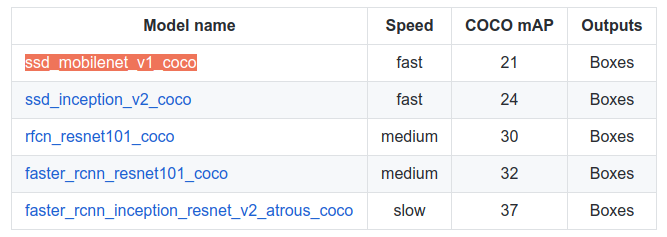
Download configure file for pre-trained model: https://github.com/tensorflow/models/tree/master/research/object_detection/samples/configs

This configure is already in our model folder:
unsw@unsw-UX303UB$ pwd

/home/unsw/Programmer/1-python/Tensorflow/ssd_proj/models/research/object_detection/samples/configs


unsw@unsw-UX303UB$ ls

faster_rcnn_inception_resnet_v2_atrous_coco.config  faster_rcnn_resnet101_voc07.config  faster_rcnn_resnet50_pets.config  ssd_inception_v2_pets.config

faster_rcnn_inception_resnet_v2_atrous_pets.config  faster_rcnn_resnet152_coco.config   rfcn_resnet101_coco.config        ssd_mobilenet_v1_coco.config

faster_rcnn_resnet101_coco.config                   faster_rcnn_resnet152_pets.config   rfcn_resnet101_pets.config        ssd_mobilenet_v1_pets.config

faster_rcnn_resnet101_pets.config                   faster_rcnn_resnet50_coco.config    ssd_inception_v2_coco.config
Configure based on your own data.
  1 # SSD with Mobilenet v1, configured for Oxford-IIIT Pets Dataset.

  2 # Users should configure the fine_tune_checkpoint field in the train config as

  3 # well as the label_map_path and input_path fields in the train_input_reader and

  4 # eval_input_reader. Search for "PATH_TO_BE_CONFIGURED" to find the fields that

  5 # should be configured.

  6

  7 model {

  8   ssd {

  9     num_classes: 1


158   fine_tune_checkpoint: "ssd_mobilenet_v1_coco_11_06_2017/model.ckpt"

159   from_detection_checkpoint: true

160   # Note: The below line limits the training process to 200K steps, which we

161   # empirically found to be sufficient enough to train the pets dataset. This

162   # effectively bypasses the learning rate schedule (the learning rate will

163   # never decay). Remove the below line to train indefinitely.

164   num_steps: 200000

165   data_augmentation_options {

166     random_horizontal_flip {

167     }

168   }

169   data_augmentation_options {

170     ssd_random_crop {

171     }

172   }

173 }

174

175 train_input_reader: {

176   tf_record_input_reader {

177     input_path: "data/train.record"

178   }

179   label_map_path: "data/object-detection.pbtxt"

180 }

181

182 eval_config: {

183   num_examples: 2000

184   # Note: The below line limits the evaluation process to 10 evaluations.

185   # Remove the below line to evaluate indefinitely.

186   max_evals: 10

187 }

188

189 eval_input_reader: {

190   tf_record_input_reader {

191     input_path: "data/test.record"

192   }

193   label_map_path: "data/object-detection.pbtxt"

194   shuffle: false

195   num_readers: 1

196 }
As above, we need to create object-detection.pbtxt as following:
item {

    id: 1

    name: 'raccoon'

}
二、开始训练
Prepare training
Move all configure files based on ssd_mobilenet_v1_pets.config as following:
training folder: object-detection.pbtxt and ssd_mobilenet_v1_pets.config.
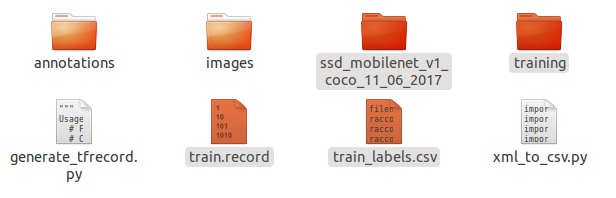
data folder: train.record and train_labels.csv.
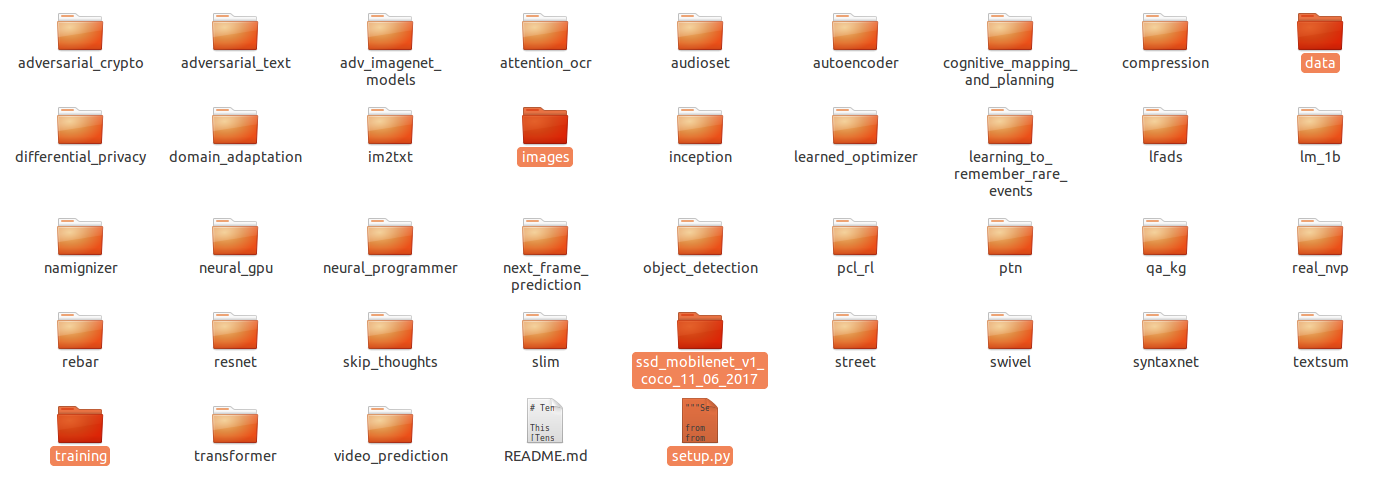
Training on the way
Start training.
python object_detection/train.py --logtostderr --train_dir=training/ --pipeline_config_path=training/ssd_mobilenet_v1_pets.config

INFO:tensorflow:Starting Session.

INFO:tensorflow:Saving checkpoint to path training/model.ckpt

INFO:tensorflow:Starting Queues.

INFO:tensorflow:global_step/sec: 0

INFO:tensorflow:Recording summary at step 0.

INFO:tensorflow:global step 1: loss = 14.5804 (33.780 sec/step)

INFO:tensorflow:global step 2: loss = 12.6232 (19.210 sec/step)

INFO:tensorflow:global step 3: loss = 12.0996 (17.102 sec/step)
Obviously, without GPU, life will be hard. GPU as following:
INFO:tensorflow:global step : loss = 15.2152 (9.041 sec/step)

INFO:tensorflow:global step : loss = 12.7308 (0.483 sec/step)

INFO:tensorflow:global step : loss = 11.9776 (0.450 sec/step)

INFO:tensorflow:global step : loss = 11.4102 (0.402 sec/step)

INFO:tensorflow:global step : loss = 10.8128 (0.427 sec/step)

INFO:tensorflow:global step : loss = 10.1892 (0.405 sec/step)

INFO:tensorflow:global step : loss = 9.2219 (0.396 sec/step)

INFO:tensorflow:global step : loss = 9.1491 (0.421 sec/step)

INFO:tensorflow:global step : loss = 8.5584 (0.400 sec/step)
[Tensorflow] Object Detection API - build your training environment的更多相关文章
- [Tensorflow] Object Detection API - prepare your training data
From: TensorFlow Object Detection API This chapter help you to train your own model to identify obje ...
- Install Tensorflow object detection API in Anaconda (Windows)
This blog is to explain how to install Tensorflow object detection API in Anaconda in Windows 10 as ...
- Tensorflow object detection API 搭建物体识别模型(三)
三.模型训练 1)错误一: 在桌面的目标检测文件夹中打开cmd,即在路径中输入cmd后按Enter键运行.在cmd中运行命令: python /your_path/models-master/rese ...
- 使用TensorFlow Object Detection API+Google ML Engine训练自己的手掌识别器
上次使用Google ML Engine跑了一下TensorFlow Object Detection API中的Quick Start(http://www.cnblogs.com/take-fet ...
- Tensorflow object detection API 搭建属于自己的物体识别模型
一.下载Tensorflow object detection API工程源码 网址:https://github.com/tensorflow/models,可通过Git下载,打开Git Bash, ...
- Tensorflow object detection API 搭建物体识别模型(四)
四.模型测试 1)下载文件 在已经阅读并且实践过前3篇文章的情况下,读者会有一些文件夹.因为每个读者的实际操作不同,则文件夹中的内容不同.为了保持本篇文章的独立性,制作了可以独立运行的文件夹目标检测. ...
- Tensorflow object detection API 搭建物体识别模型(二)
二.数据准备 1)下载图片 图片来源于ImageNet中的鲤鱼分类,下载地址:https://pan.baidu.com/s/1Ry0ywIXVInGxeHi3uu608g 提取码: wib3 在桌面 ...
- [Tensorflow] Object Detection API - predict through your exclusive model
开始预测 一.训练结果 From: Testing Custom Object Detector - TensorFlow Object Detection API Tutorial p.6 训练结果 ...
- TensorFlow object detection API应用
前一篇讲述了TensorFlow object detection API的安装与配置,现在我们尝试用这个API搭建自己的目标检测模型. 一.准备数据集 本篇旨在人脸识别,在百度图片上下载了120张张 ...
随机推荐
- BZOJ 5381 or & Codeforces 623E Transforming Sequence DP+NTT
两道题题意都是一样的 不过$CF$的模数是$10^9+7$ 很简单的分析发现$A_i$项一定要有一个之前没有出现过的二进制位才能满足条件 考虑$DP$来做 设$f_{i,j}$表示$i$个数用了二进制 ...
- 模拟一个带背景的 TPanel
https://www.cnblogs.com/del/archive/2008/09/01/1281345.html
- Delphi识别读取验证码
unit OCR; interface uses Windows, SysUtils, Graphics, Classes, PNGImage, GIFImage, JPEG, Math, Asphy ...
- [Java] 简化正则表达式的使用
使用 RegexString.with(string).pattern(pattern).start() + 后续操作(matches,find或者是replace) 源码 package com; ...
- Spark机器学习(3):保序回归算法
保序回归即给定了一个无序的数字序列,通过修改其中元素的值,得到一个非递减的数字序列,要求是使得误差(预测值和实际值差的平方)最小.比如在动物身上实验某种药物,使用了不同的剂量,按理说剂量越大,有效的比 ...
- VTK拾取网格模型上的可见点
消隐与Z-Buffer 使用缓冲器记录物体表面在屏幕上投影所覆盖范围内的全部像素的深度值,依次访问屏幕范围内物体表面所覆盖的每一像素,用深度小(深度用z值表示,z值小表示离视点近)的像素点颜色替代深度 ...
- centos7.4 开启ftp服务
1.安装vsftpd yum install -y ftp vsftpd 2.配置/etc/vsftpd/vsftpd.conf 修改项如下: #不允许匿名访问 anonymous_enable=NO ...
- nginx跨域
在 conf文件server块里面加上: add_header 'Access-Control-Allow-Origin' "$http_origin"; add_header ' ...
- 7.翻译系列:EF 6中的继承策略(EF 6 Code-First 系列)
原文地址:http://www.entityframeworktutorial.net/code-first/inheritance-strategy-in-code-first.aspx EF 6 ...
- android 显示gif图片
在android中不支持gif格式的图片,但是由于我希望在我的程序中刚刚加载的时候有一个小人在跑步表示正在加载.而这个小人跑就是一个gif图片.也就是希望程序一启动时就加载gif图片.在网上查找了一些 ...