
IOS开发之Core Location
IOS 支持三种检测当前位置的方式:手机基站、Wi-Fi、和GPS,其中GPS是经度最高的,同时也是最耗费手机电量的。一般情况下在室内是无法通过GPS获 取位置信息的,通过Wi-Fi获取位置的原理是通过网络提供商的IP地址信息来获取位置,经度不是很高,最后是通过手机基站获取位置,手机开机后会连接附 近的基站塔获取信号,通过基站可以得到手机所在的位置信息,基站越密集,所获取的位置信息经度就越高。
IOS SDK提供的Core Location能比较好的提供获取位置信息的功能,获取位置信息涉及如下几个类,CLLocationManager(位置管理器), CLLocation, CLLocationManagerdelegate(协议、提供委托方法),CLLocationCoodinate2D(存储坐标位置)
另外CLLocationManager还有几个属性;
desiredAccuracy:位置的精度属性
取值有如下几种:
|
kCLLocationAccuracyBest |
精确度最佳 |
|
kCLLocationAccuracynearestTenMeters |
精确度10m以内 |
|
kCLLocationAccuracyHundredMeters |
精确度100m以内 |
|
kCLLocationAccuracyKilometer |
精确度1000m以内 |
|
kCLLocationAccuracyThreeKilometers |
精确度3000m以内 |
distanceFilter:横向移动多少距离后更新位置信息
delegate:响应CLLocationManagerdelegate的对象
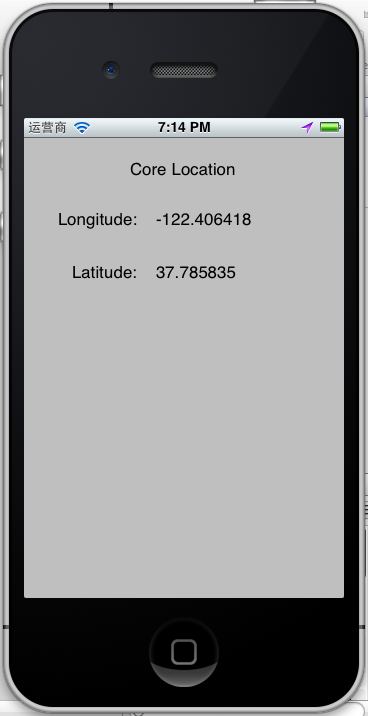
下面来构建一个获取位置的例子:
首先建立一个Single View Application工程,然后引入CoreLocation.framework,并在ViewController.h中修改如下:
#import <UIKit/UIKit.h> #import <CoreLocation/CoreLocation.h>

@interface ViewController : UIViewController<CLLocationManagerDelegate>  {      CLLocationManager *locManager;  }

 @property (retain, nonatomic) IBOutletUILabel *lonLabel;  @property (retain, nonatomic) IBOutletUILabel *latLabel;  @property (retain, nonatomic) CLLocationManager *locManager;

@end
#import "ViewController.h"

@interfaceViewController ()

@end

@implementation ViewController @synthesize lonLabel; @synthesize latLabel; @synthesize locManager;

- (void)viewDidLoad {     [superviewDidLoad];          //初始化位置管理器     locManager = [[CLLocationManager alloc]init];     //设置代理     locManager.delegate = self;     //设置位置经度     locManager.desiredAccuracy = kCLLocationAccuracyBest;     //设置每隔100米更新位置     locManager.distanceFilter = 100;     //开始定位服务     [locManagerstartUpdatingLocation]; }

- (void)viewDidUnload {     [selfsetLonLabel:nil];     [selfsetLatLabel:nil];     [superviewDidUnload];     // Release any retained subviews of the main view. }

- (BOOL)shouldAutorotateToInterfaceOrientation:(UIInterfaceOrientation)interfaceOrientation {     return (interfaceOrientation != UIInterfaceOrientationPortraitUpsideDown); }

- (void)dealloc {     //停止定位服务     [locManagerstopUpdatingLocation];     [lonLabelrelease];     [latLabelrelease];     [superdealloc]; }

//协议中的方法,作用是每当位置发生更新时会调用的委托方法 -(void)locationManager:(CLLocationManager *)manager didUpdateToLocation:(CLLocation *)newLocation fromLocation:(CLLocation *)oldLocation {     //结构体,存储位置坐标     CLLocationCoordinate2D loc = [newLocation coordinate];     float longitude = loc.longitude;     float latitude = loc.latitude;     self.lonLabel.text = [NSStringstringWithFormat:@"%f",longitude];     self.latLabel.text = [NSStringstringWithFormat:@"%f",latitude];      }

//当位置获取或更新失败会调用的方法 -(void)locationManager:(CLLocationManager *)manager didFailWithError:(NSError *)error {     NSString *errorMsg = nil;     if ([error code] == kCLErrorDenied) {         errorMsg = @"访问被拒绝";     }     if ([error code] == kCLErrorLocationUnknown) {         errorMsg = @"获取位置信息失败";     }          UIAlertView *alertView = [[UIAlertViewalloc]initWithTitle:@"Location"                                                     message:errorMsg delegate:self cancelButtonTitle:@"Ok"otherButtonTitles:nil, nil];     [alertView show];     [alertView release]; }

@end
IOS开发之Core Location的更多相关文章
- iOS开发之Core Animation
在IOS中如果使用普通的动画则可以使用UIKit提供的动画方式来实现,如果想实现更复杂的效果,则需要使用Core Animation了. 在Core Animation中我们经常使用的是 CABasi ...
- 李洪强iOS开发之RunLoop的原理和核心机制
李洪强iOS开发之RunLoop的原理和核心机制 搞iOS之后一直没有深入研究过RunLoop,非常的惭愧.刚好前一阵子负责性能优化项目,需要利用RunLoop做性能优化和性能检测,趁着这个机会深入研 ...
- iOS开发之Socket通信实战--Request请求数据包编码模块
实际上在iOS很多应用开发中,大部分用的网络通信都是http/https协议,除非有特殊的需求会用到Socket网络协议进行网络数 据传输,这时候在iOS客户端就需要很好的第三方CocoaAsyncS ...
- iOS开发之UISearchBar初探
iOS开发之UISearchBar初探 UISearchBar也是iOS开发常用控件之一,点进去看看里面的属性barStyle.text.placeholder等等.但是这些属性显然不足矣满足我们的开 ...
- iOS开发之UIImage等比缩放
iOS开发之UIImage等比缩放 评论功能真不错 评论开通后,果然有很多人吐槽.谢谢大家的支持和关爱,如果有做的不到的地方,还请海涵.毕竟我一个人的力量是有限的,我会尽自己最大的努力大家准备一些干货 ...
- iOS开发之 Xcode6 添加xib文件,去掉storyboard的hello world应用
iOS开发之 Xcode6.1创建仅xib文件,无storyboard的hello world应用 由于Xcode6之后,默认创建storyboard而非xib文件,而作为初学,了解xib的加载原理 ...
- iOS开发之loadView、viewDidLoad及viewDidUnload的关系
iOS开发之loadView.viewDidLoad及viewDidUnload的关系 iOS开发之loadView.viewDidLoad及viewDidUnload的关系 标题中所说的3个方 ...
- iOS开发之info.pist文件和.pch文件
iOS开发之info.pist文件和.pch文件 如果你是iOS开发初学者,不用过多的关注项目中各个文件的作用.因为iOS开发的学习路线起点不在这里,这些文件只会给你学习带来困扰. 打开一个项目,我们 ...
- iOS开发之WKWebView简单使用
iOS开发之WKWebView简单使用 iOS开发之 WKWebVeiw使用 想用UIWebVeiw做的,但是突然想起来在iOS8中出了一个新的WKWebView,算是UIWebVeiw的升级版. ...
随机推荐
- Linux —— 目录(文件夹)及文件相关处理指令
可参考这篇文章:https://mp.weixin.qq.com/s?__biz=MzU4MTU3OTI0Mg==&mid=2247484269&idx=1&sn=38869a ...
- Unicode字符编码表(转)
Unicode字符编码表 版权声明:本文为博主原创文章,未经博主允许不得转载. https://blog.csdn.net/zhenyu5211314/article/details/5153 ...
- asp.net core for vs code
1,命令 2,模板 3,更换启动浏览器 4,vscode使用nuget 5,使用ef migration 6,配置.net core的工作目录 7,使用dotnet ef migrations命令 8 ...
- 模拟页面获取的php数据(一)
<?php return array( "aData" => array(//通勤方式 "trafficType" => array( 0 = ...
- Javascript实现对象的创建
能使用{}创建对象就不要使用new Object,能使用[]创建数组就不要使用new Array,JS中字面量的访问速度要高于对象. 1.通过object构造函数创建单个对象 var o = new ...
- [BZOJ3674]可持久化并查集加强版&[BZOJ3673]可持久化并查集 by zky
思路: 用主席树维护并查集森林,每次连接时新增结点. 似乎并不需要启发式合并,我随随便便写了一个就跑到了3674第一页?3673是这题的弱化版,本来写个暴力就能过,现在借用加强版的代码(去掉异或),直 ...
- 在web.xml中设置全局编码
在web.xml中配置 <filter> <filter-name>characterFilter</filter-name> <filter-class&g ...
- 以为是tomcat出现using问题,怎么改都改不好终于找到原因
我也是醉了被自己打败了,以上问题困扰我半天是时间,百度好久都没有解决.应该打开tomcat的bin下的starup.bat结果打开了tomcat-src中的了,怪不得死活出现不了startup
- 使用 IntraWeb (33) - Cookie
在 IW.HTTP.Cookie 单元提供有两个相关类: THTTPCookie.TCookieList; 另外 IWServerController 还有一个 CookieOptions 选项. 但 ...
- VMware内CentOS7虚拟机硬盘扩容
转自:https://blog.csdn.net/Wang_Xin_SH/article/details/77872885 简介 CentOS7虚拟机原硬盘空间只分配了10GB,需要扩容到20GB. ...