
Flutter——FloatingActionButton组件(浮动按钮组件)
| 属性名称 | 属性值 |
|
child
|
子视图,一般为 Icon,不推荐使用文字
|
|
tooltip
|
FAB 被长按时显示,也是无障碍功能
|
|
backgroundColor
|
背景颜色
|
|
elevation
|
未点击的时候的阴影
|
|
hignlightElevation
|
点击时阴影值,默认 12.0
|
|
onPressed
|
点击事件回调
|
|
shape
|
可以定义 FAB 的形状等
|
|
mini
|
是否是 mini 类型默认 false
|
FloatingActionButton实现闲鱼APP底部凸起按钮:
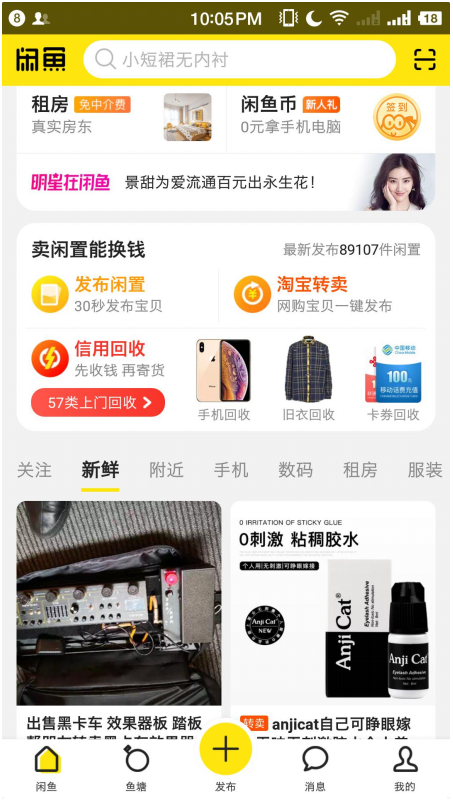
import 'package:flutter/material.dart';

void main() {

  runApp(MaterialApp(

    title: "FloatingActionButton",

    home: MyApp(),

  ));

}

class MyApp extends StatefulWidget {

  @override

  _MyAppState createState() => _MyAppState();

}

class _MyAppState extends State<MyApp> {

  int _currentIndex = 0;

  List _pageList = [

    Page("闲鱼页面"),

    Page("鱼塘页面"),

    Page("发布页面"),

    Page("消息"),

    Page("我的")

  ];

  @override

  Widget build(BuildContext context) {

    return Scaffold(

      body: _pageList[_currentIndex],

      bottomNavigationBar: BottomNavigationBar(

        currentIndex: _currentIndex,

        type: BottomNavigationBarType.fixed,

        fixedColor: Colors.yellow,

        onTap: (int index) {

          setState(() {

            this._currentIndex = index;

          });

        },

        items: [

          BottomNavigationBarItem(

              icon: Icon(Icons.home),

              title: Text("闲鱼", style: TextStyle(color: Colors.black54))),

          BottomNavigationBarItem(

              icon: Icon(Icons.category),

              title: Text("鱼塘", style: TextStyle(color: Colors.black54))),

          BottomNavigationBarItem(

              icon: Icon(Icons.settings),

              title: Text("发布", style: TextStyle(color: Colors.black54))),

          BottomNavigationBarItem(

              icon: Icon(Icons.message),

              title: Text("消息", style: TextStyle(color: Colors.black54))),

          BottomNavigationBarItem(

              icon: Icon(Icons.settings),

              title: Text("我的", style: TextStyle(color: Colors.black54))),

        ],

      ),

      floatingActionButton: Container(

        margin: EdgeInsets.only(top: 5),

        child: FloatingActionButton(

          child: Icon(Icons.add, color: Colors.black54),

          backgroundColor: Colors.yellow,

          onPressed: () {

            setState(() {

              this._currentIndex = 2;

            });

          },

        ),

      ),

      floatingActionButtonLocation: FloatingActionButtonLocation.centerDocked,

    );

  }

}

class Page extends StatelessWidget {

  String text;

  Page(this.text);

  @override

  Widget build(BuildContext context) {

    return Center(

      child: Text(text),

    );

  }

}
Flutter——FloatingActionButton组件(浮动按钮组件)的更多相关文章
- Flutter中的浮动按钮FloatingActionButton 及融合底部工具栏
FloatingActionButton 简称 FAB,从字面理解可以看出,它是“可交互的浮动按钮”,其实在Flutter默认生成的代码中就有这家伙,只是我们没有正式的接触. 一般来说,它是一个圆形, ...
- Flutter中的浮动按钮 FloatingActionButton
FloatingActionButton 简称 FAB ,可以实现浮动按钮,也可以实现类似闲鱼 app 的底部凸起导航 . 常用属性 FloatingActionButton的常用属性,同flutte ...
- "浮动按钮"组件:<fab> —— 快应用组件库H-UI
    <import name="fab" src="../Common/ui/h-ui/basic/c_fab"></import ...
- Flutter学习笔记(11)--文本组件、图标及按钮组件
如需转载,请注明出处:Flutter学习笔记(10)--容器组件.图片组件 文本组件 文本组件(text)负责显示文本和定义显示样式,下表为text常见属性 Text组件属性及描述 属性名 类型 默认 ...
- Flutter 中的常见的按钮组件 以及自定义按钮组件
Flutter 里有很多的 Button 组件很多,常见的按钮组件有:RaisedButton.FlatButton. IconButton.OutlineButton.ButtonBar.Float ...
- flutter中的按钮组件
Flutter 里有很多的 Button 组件很多,常见的按钮组件有:RaisedButton.FlatButton.IconButton.OutlineButton.ButtonBar.Floati ...
- 【Flutter学习】基本组件之基本按钮组件
一,概述 由于Flutter是跨平台的,所以有适用于Android和iOS的两种风格的组件.一套是Google极力推崇的Material,一套是iOS的Cupertino风格的组件.无论哪种风格,都是 ...
- Flutter 中的常见的按钮组件 以及自 定义按钮组件
一.Flutter 中的按钮组件介绍 Flutter 里有很多的 Button 组件很多,常见的按钮组件有:RaisedButton.FlatButton. IconButton.Outlin ...
- Flutter中的按钮组件介绍
Flutter 里有很多的 Button 组件很多,常见的按钮组件有:RaisedButton.FlatButton.IconButton.OutlineButton.ButtonBar.Floati ...
随机推荐
- 使用SoapUI测试wsdl
webservice服务wsdl地址:http://localhost:8080/services/HelloWorld?wsdl new project: new soap project: 调用测 ...
- bootstrap 自带字体颜色
<!DOCTYPE html PUBLIC "-//W3C//DTD XHTML 1.0 Transitional//EN" "http://www.w3.org/ ...
- composer 添加贝宝PayPal
composer require "paypal/rest-api-sdk-php:1.7.2"
- (模板)hdoj1251(字典树模板题)
题目链接:https://vjudge.net/problem/HDU-1251 题意:给定一系列字符串之后,再给定一系列前缀,对每个前缀查询以该字符串为前缀的字符串个数. 思路: 今天开始学字典树, ...
- vw、vh、vmin、vmax 的含义
像 px.em 这样的长度单位大家肯定都很熟悉,前者为绝对单位,后者为相对单位.CSS3 又引入了新单位:vw.vh.vmin.vmax.下面对它们做个详细介绍. 一.基本说明 1,vw.vh.v ...
- WiFi、ZigBee、BLE用哪个?
小米是这么选的: 1) 插电的设备,用WiFi: 2) 需要和手机交互的,用BLE: 3) 传感器用ZigBee. WIFI,WIFI是目前应用最广泛的无线通信技术,传输距离在100-300M,速率可 ...
- Java基础笔试练习(六)
1.在Java中,一个类可同时定义许多同名的方法,这些方法的形式参数个数.类型或顺序各不相同,传回的值也可以不相同.这种面向对象程序的特性称为? A.隐藏 B.覆盖 C.重载 D.Java不支持此特性 ...
- 图像处理库 Pillow与PIL
PIL只支持python2的版本到2.7: Python imaging Library : Pillow 是PIL派生的一个分支,支持3以上Python版本. 命令使用pip安装: pip inst ...
- 解决找不到mkfs.ubifs命令
解决找不到mkfs.ubifs命令 ubuntu 版本:14.04 sudo apt-get update sudo apt-get install mtd-utils sudo apt-get in ...
- MySQL 索引机制
MySQL 原理篇 MySQL 索引机制 MySQL 体系结构及存储引擎 MySQL 语句执行过程详解 MySQL 执行计划详解 MySQL InnoDB 缓冲池 MySQL InnoDB 事务 My ...