
vscode安装eslint插件,代码统一自动修复
ESlint:是用来统一JavaScript代码风格的工具,不包含css、html等。
方法和步骤:
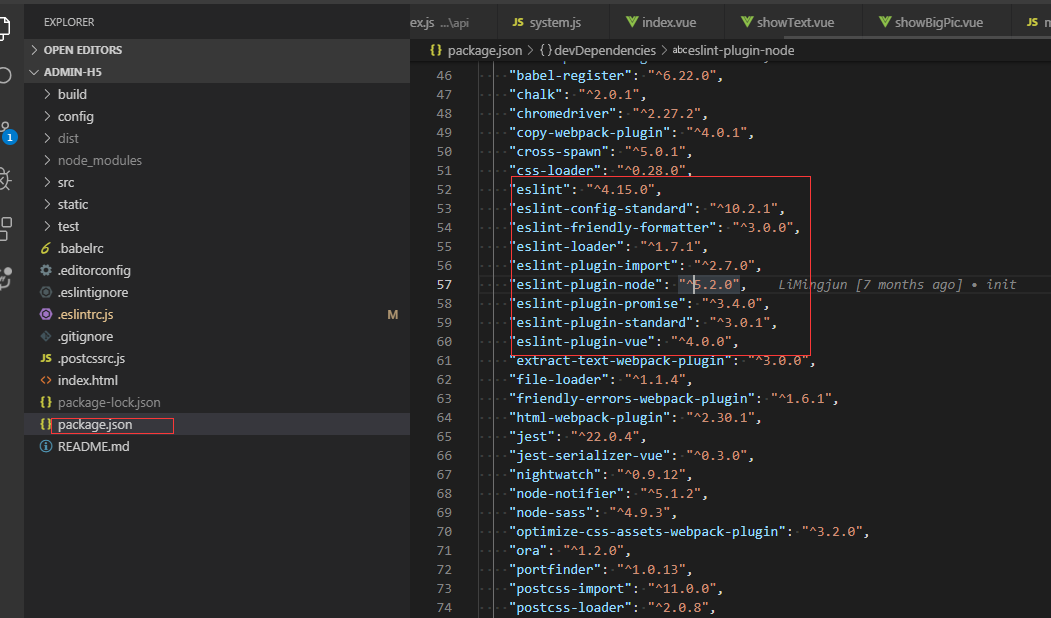
通常情况下vue项目都会添加eslint组件,我们可以查看webpack的配置文件package.json查看,也可以查看工程下是否有.eslintrc.js和.eslintignore查看到eslint是否开启。

当我们编写不符合eslint规范的代码时,启动项目会报错,比如
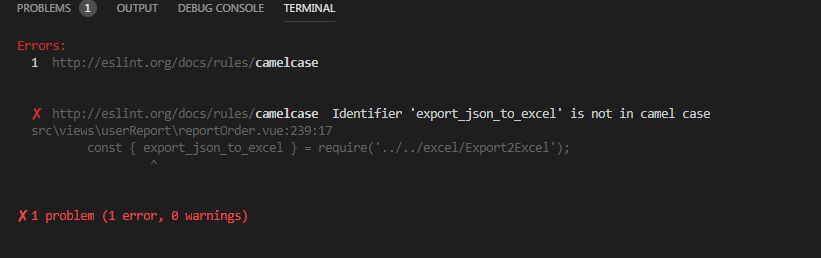
这个时候可以安装vscode eslint插件,就可以自动检测不符合规范的代码。打开vscode左侧扩展面板,搜索eslint,点击安装,重启后生效

安装好之后,还需要在vscode文件中进行设置:
通过 file->preferences->Settings 出现如下界面:

点击红框,则会出现配置文件
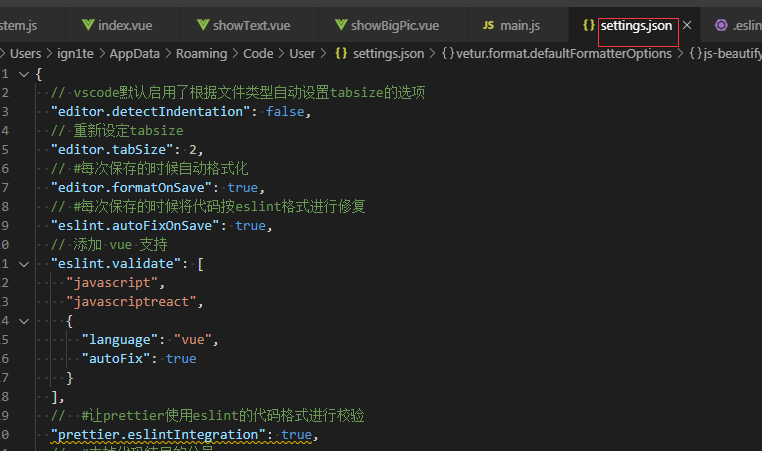
把以下代码复制到这个文件中:
{

  // vscode默认启用了根据文件类型自动设置tabsize的选项

  "editor.detectIndentation": false,

  // 重新设定tabsize

  "editor.tabSize": 2,

  // #每次保存的时候自动格式化

  "editor.formatOnSave": true,

  // #每次保存的时候将代码按eslint格式进行修复

  "eslint.autoFixOnSave": true,

  // 添加 vue 支持

  "eslint.validate": [

    "javascript",

    "javascriptreact",

    {

      "language": "vue",

      "autoFix": true

    }

  ],

  //  #让prettier使用eslint的代码格式进行校验

  "prettier.eslintIntegration": true,

  //  #去掉代码结尾的分号

  "prettier.semi": false,

  //  #使用带引号替代双引号

  "prettier.singleQuote": true,

  //  #让函数(名)和后面的括号之间加个空格

  "javascript.format.insertSpaceBeforeFunctionParenthesis": true,

  // #让vue中的js按编辑器自带的ts格式进行格式化

  "vetur.format.defaultFormatter.js": "vscode-typescript",

  "vetur.format.defaultFormatterOptions": {

    "js-beautify-html": {

      "wrap_attributes": "force-aligned"

      // #vue组件中html代码格式化样式

    }

  },

  "window.zoomLevel": 0,

  "explorer.confirmDelete": false,

  "explorer.confirmDragAndDrop": false,

  "editor.renderControlCharacters": true,

  "editor.renderWhitespace": "all"

}
然后在项目的.eslintrc.js中添加如下代码:
// https://eslint.org/docs/user-guide/configuring

module.exports = {

  root: true,

  parserOptions: {

    parser: 'babel-eslint'

  },

  env: {

    browser: true

  },

  extends: [

    // https://github.com/vuejs/eslint-plugin-vue#priority-a-essential-error-prevention

    // consider switching to `plugin:vue/strongly-recommended` or `plugin:vue/recommended` for stricter rules.

    'plugin:vue/essential',

    // https://github.com/standard/standard/blob/master/docs/RULES-en.md

    'standard'

  ],

  // required to lint *.vue files

  plugins: ['vue'],

  // add your custom rules here

  rules: {

    // allow async-await

    'no-console': 'off',

    indent: ['error', 2, { SwitchCase: 1 }],

    semi: ['error', 'always'],

    'space-before-function-paren': [

      'error',

      { anonymous: 'always', named: 'never' }

    ],

    'generator-star-spacing': 'off',

    // allow debugger during development

    'no-debugger': process.env.NODE_ENV === 'production' ? 'error' : 'off'

  }

}
ctrl + s保存代码后,便会自动修复格式不正确的代码
vscode安装eslint插件,代码统一自动修复的更多相关文章
- vscode如何安装eslint插件 代码自动修复
ESlint:是用来统一JavaScript代码风格的工具,不包含css.html等. 方法和步骤: 通常情况下vue项目都会添加eslint组件,我们可以查看webpack的配置文件package. ...
- VSCode 使用 ESLint + Prettier 来统一 JS 代码
环境: VSCode 1.33.1 Node.js 8.9.1 一.ESLint 1.介绍 ESLint是最流行的JavaScript Linter. Linter 是检查代码风格/错误的小工具.其他 ...
- vscode安装golang插件失败问题
vscode安装golang插件失败问题 dlv go-outline go-symbols gocode-gomod gocode 代码补全 godef 代码跳转 golint gopkgs gor ...
- 踩坑:VScode 集成 eslint 插件
本文以 Vue 官方脚手架 Vue-cli 为例: 1. 创建 Vue 项目 注意:Vue-cli 默认给出了 eslint 配置,一路回车即可.最后在安装模块的时候,选择直接安装!我用淘宝镜像安装时 ...
- vscode安装dlv插件报错:There is no tracking information for the current branch.
vscode安装dlv插件报错:There is no tracking information for the current branch. https://blog.csdn.net/a7859 ...
- VSCode安装jshint插件报错
Mac电脑上使用VSCode安装jshint插件时提示如下错误: Failed to load jshint library. Please install jshint in your worksp ...
- win10中,vscode安装go插件排雷指南
最近学习go,想着使用强大的vscode编写go,在安装go插件过程中,遇到了很多问题.下面记录解决方案. 1)win10环境,安装go,vscode,git 配置GOPATH环境变量,在我的电脑-& ...
- vscode 安装go插件失败后,最简单的方法
vscode 安装go插件 参考: https://github.com/goproxy/goproxy.cn/blob/master/README.zh-CN.md https://goproxy. ...
- ubuntu下vscode安装go插件失败解决办法
go env -w GO111MODULE=on go env -w GOPROXY=https://goproxy.io,direct go env -w GOSUMDB=gosum.io+ce6e ...
随机推荐
- PTA (Advanced Level)1082.Read Number in Chinese
Given an integer with no more than 9 digits, you are supposed to read it in the traditional Chinese ...
- Hive远程连接
HIVE的连接模式== 本地连接模式 直接启动hive命令 HIVE的远程连接 这里要启动HIVE的服务 thirft进行编写 hiveserver2 —- > 前台启动 后台启动 前台启动 h ...
- 【Redis】Redis持久化
Redis数据持久化 Redis的特性: 易扩展,大数据高性能,多样灵活的数据模型,受限内存 Redis默认端口: 6379 Redis数据持久化分为有两种: RDB: 每隔一段时间就把内存数据写入磁 ...
- localStorage 杂记
localStorage html5标准 Web 存储现在的主流浏览器,包括IE 8+.Chrome 4+.Firefox 3.5+.Opera 10.5+.Safari 4+.iPhone 2+.A ...
- 8.bash编辑命令行
8.编辑命令行本章介绍 GNU 命令行编辑界面的基本功能.命令行编辑是 Readline 库提供的:这个库被几个不同的程序共用,Bash 是其中一个.使用交互式的 shell 时,默认已经打开了命令行 ...
- TCP/IP协议栈各个层次及分别的功能
网络接口层:这是协议栈的最低层,对应OSI的物理层和数据链路层,主要完成数据帧的实际发送和接收.网络层:处理分组在网络中的活动,例如路由选择和转发等,这一层主要包括IP协议.ARP.ICMP协议等.传 ...
- Laravel 查询或写入Enum字段出错的bug解决办法
查询: if($request->filled('type')){ $where[] = ['type', strval(intval($request->input('type')))] ...
- ubuntu - 14.04,安装Git(源代码管理工具)
在shell中执行:sudo apt-get install git-core
- windows2012获取明文密码
windows 2012获取明文密码 导hash的话用常规的方法就可以. 修改注册表 reg add HKEY_LOCAL_MACHINE\SYSTEM\CurrentControlSet\Contr ...
- centos7 php7.3
./configure --prefix=/root/php/php-7.3.10/output \ --with-mhash \ --with-openssl \ --with-mysqli=sha ...