
2017-2018-2 20165218 实验三《敏捷开发与XP实践》实验报告
实验三 敏捷开发与XP实践
课程:java程序设计
姓名:赵冰雨
学号:20165218
指导教师:娄嘉鹏
实验日期:2018.4.30
实验内容、步骤与体会:
(一)编码标准
//实验要求

//参考 http://www.cnblogs.com/rocedu/p/6371315.html#SECCODESTANDARD 安装alibaba 插件,解决代码中的规范问题。

//在IDEA中使用工具(Code->Reformate Code)把下面代码重新格式化,再研究一下Code菜单,找出一项让自己感觉最好用的功能。

public class CodeStandard {

public static void main(String [] args){

StringBuffer buffer = new StringBuffer();

buffer.append('S');

buffer.append("tringBuffer");

System.out.println(buffer.charAt(1));

System.out.println(buffer.capacity());

System.out.println(buffer.indexOf("tring"));

System.out.println("buffer = " + buffer.toString());

if(buffer.capacity()<20)

buffer.append("1234567");

for(int i=0; i<buffer.length();i++)

System.out.println(buffer.charAt(i));

}

}
将代码复制进IDEA,使用
Code->Reformate Code或快捷键Ctrl+Alt+L进行整理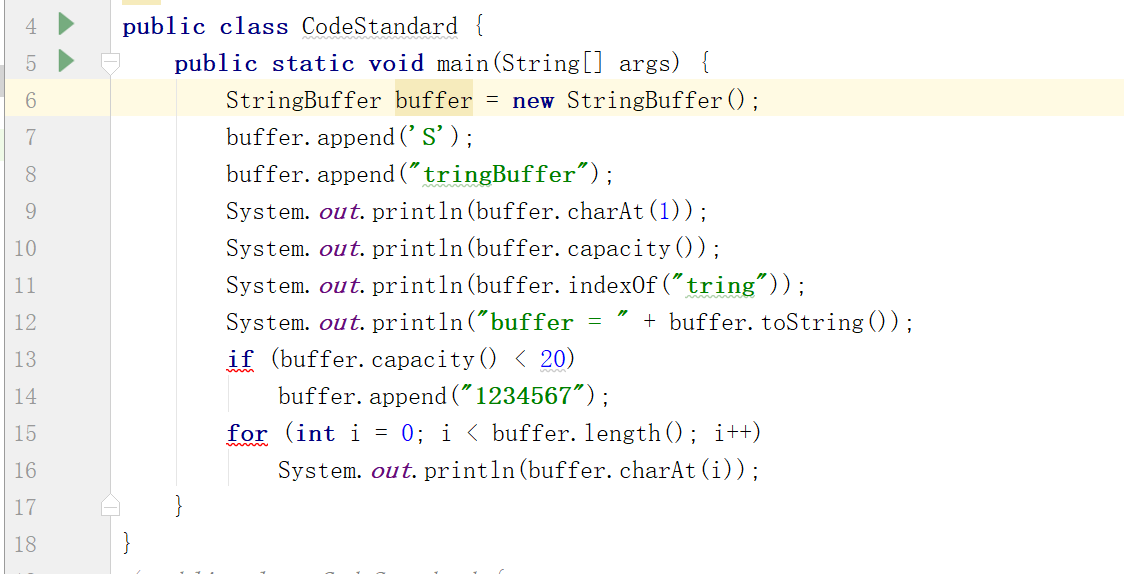
根据代码逻辑加入空行

15和17行的红线提示是由于安装了alibaba 插件,检测出代码中有不符合《阿里巴巴Java开发手册》的地方,根据提示更改完毕即可

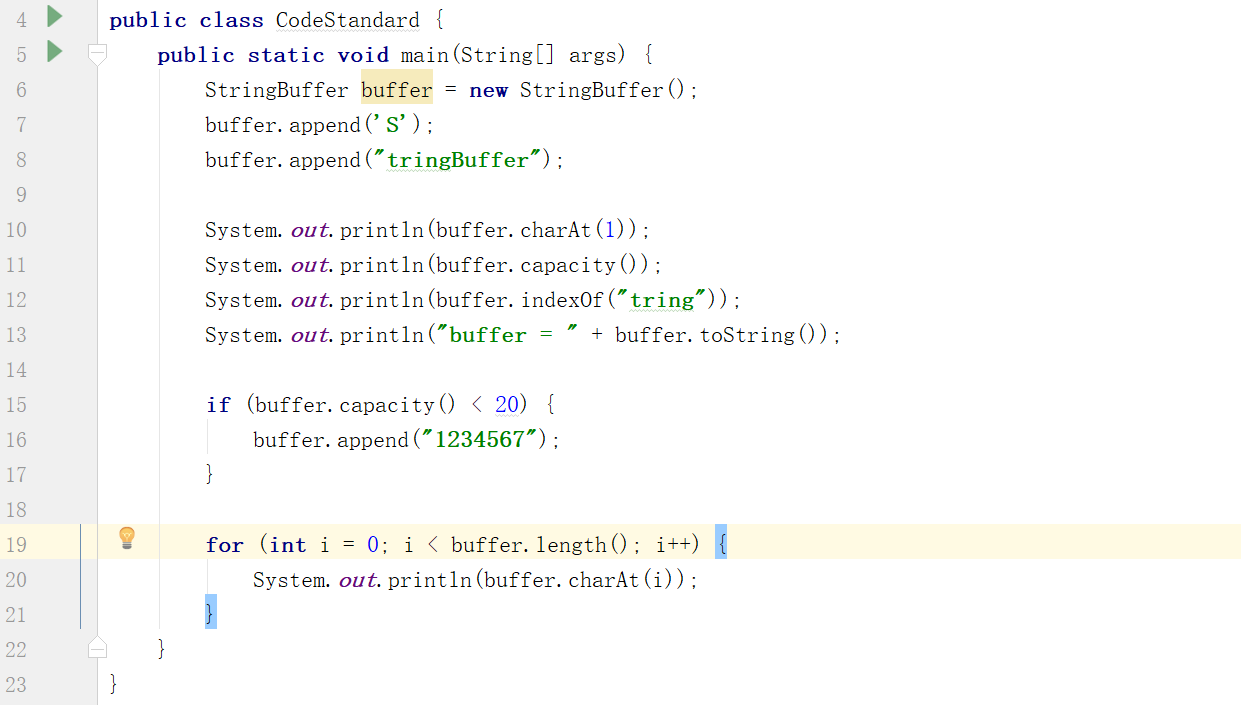
| code菜单 | 功能 |
|---|---|
| Override Methods | 重载基本类的方法 |
| Implement Methods | 完成当前类implements的(或者抽象基本类的)接口的方法 |
| Generate | 创建类里面任何字段的 getter 与 setter 方法 |
| Code->Comment with Line Comment | 此行改写为注释 |
| Reformat Code | 将代码按标准格式缩进 |
(二)结对编程
- 搭档代码
public class Complex {

    // 定义属性并生成getter,setter

    private double RealPart;

    private double ImagePart;

    // 定义构造函数

    public Complex() {

    }

    public Complex(double R, double I) {

        this.RealPart = R;

        this.ImagePart = I;

    }

    public double getRealPart() {

        return RealPart;

    }

    public void setRealPart(double realPart) {

        RealPart = realPart;

    }

    public double getImagePart() {

        return ImagePart;

    }

    public void setImagePart(double imagePart) {

        ImagePart = imagePart;

    }

    //Override Object

    public boolean equals(Object obj) {

        if (this == obj) {

            return true;

        }

        if (!(obj instanceof Complex)) {

            return false;

        }

        Complex complex = (Complex) obj;

        if (complex.RealPart != ((Complex) obj).RealPart) {

            return false;

        }

        if (complex.ImagePart != ((Complex) obj).ImagePart) {

            return false;

        }

        return true;

    }

    public String toString() {

        String string = "";

        if (ImagePart > 0)

            string = RealPart + "+" + ImagePart + "i";

        if (ImagePart == 0)

            string = RealPart + "";

        if (ImagePart < 0)

            string = RealPart + " " + ImagePart + "i";

        return string;

    }

    // 定义公有方法:加减乘除

    Complex ComplexAdd(Complex a) {

        return new Complex(RealPart + a.RealPart, ImagePart + a.ImagePart);

    }

    Complex ComplexSub(Complex a) {

        return new Complex(RealPart - a.RealPart, ImagePart - a.ImagePart);

    }

    Complex ComplexMulti(Complex a) {

        return new Complex(RealPart * a.RealPart - ImagePart * a.ImagePart, ImagePart * a.RealPart + RealPart * a.ImagePart);

    }

    Complex ComplexDiv(Complex a) {

        Complex d = new Complex();

        d.RealPart = (this.RealPart * a.RealPart + this.ImagePart * a.ImagePart) / (a.RealPart * a.RealPart + a.ImagePart * a.ImagePart);

        d.ImagePart = (this.ImagePart * a.RealPart - this.RealPart * a.ImagePart) / (a.RealPart * a.RealPart + a.ImagePart * a.ImagePart);

        return d;

    }

}
- 测试代码
/**

 * Created by zby on 2018/4/16.

 */

import org.junit.*;

import static org.junit.Assert.*;

public class ComplexTest {

    Complex a = new Complex(1, 2);

    Complex b = new Complex(1, -4);

    @Test

    public void testAdd() {

        assertEquals("2.0 -2.0i", a.ComplexAdd(b).toString());

        System.out.println(a.ComplexAdd(b));

    }

    @Test

    public void testSub() {

        assertEquals("0.0+6.0i", a.ComplexSub(b).toString());

        System.out.println(a.ComplexSub(b));

    }

    @Test

    public void testMulti() {

        assertEquals("9.0 -2.0i", a.ComplexMulti(b).toString());

        System.out.println(a.ComplexMulti(b));

    }

    @Test

    public void testDiv() {

        assertEquals("-0.4117647058823529+0.35294117647058826i", a.ComplexDiv(b).toString());

        System.out.println(a.ComplexDiv(b));

    }

}
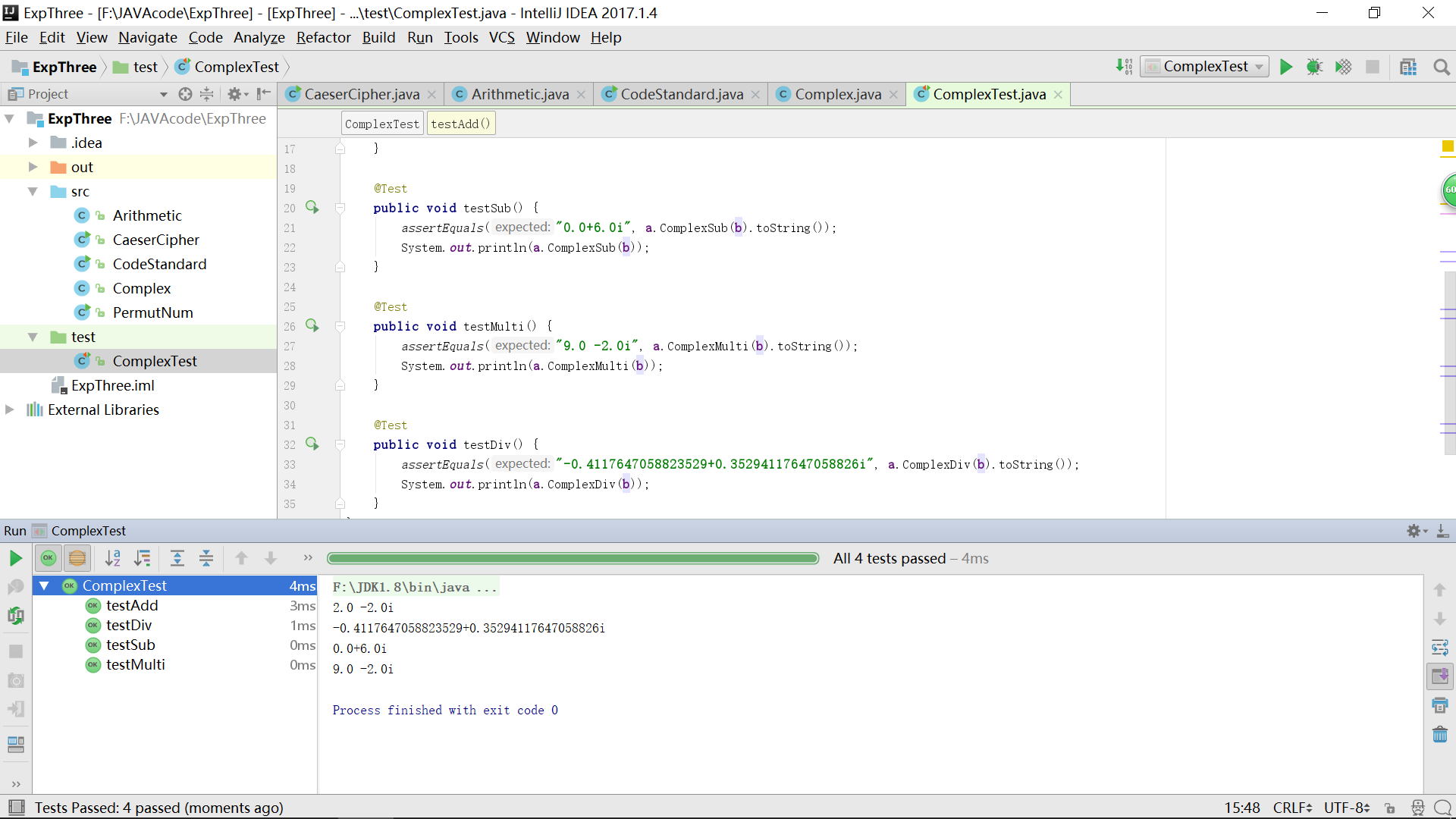
- 运行结果
(三)重构
- 搭档代码:我选择的是搭档实验一中的练习题,实现排列数
import java.util.*;

public class Pnm {

    static Scanner in=new Scanner(System.in);

    public static void main(String args[]) {

	System.out.println("请输入n:");

	int n = in.nextInt();

	System.out.println("请输入m:");

	int m=in.nextInt();

	count(n,m);

    }

    public static void count(int n,int m){

        if(n<m||n<0||m<=0){

            System.out.println("输入错误,请重新输入");

            System.out.println("确保0<m<=n");

            return ;

        }

        int result=1;

        for (int i=0;i<m;i++){

            result*=n;

            n--;

        }

        System.out.println("Pnm="+result);

    }

}
- 重构以后
import java.util.*;

public class PermutNum {

    static Scanner input = new Scanner(System.in);

    public static void main(String args[]) {

        System.out.println("请输入n:");

        int n = input.nextInt();

        System.out.println("请输入m:");

        int m = input.nextInt();

        count(n, m);

    }

    public static void count(int n, int m) {

        if (n < m || n < 0 || m <= 0) {

            System.out.println("输入错误,请重新输入");

            System.out.println("确保0<m<=n");

            return;

        }

        int result = 1;

        for (int i = 0; i < m; i++) {

            result *= n;

            n--;

        }

        System.out.println("PermutNum=" + result);

    }

}
- 将类名改为
PermutNum, 体现排列数的功能 - 定义输入对象改为
input
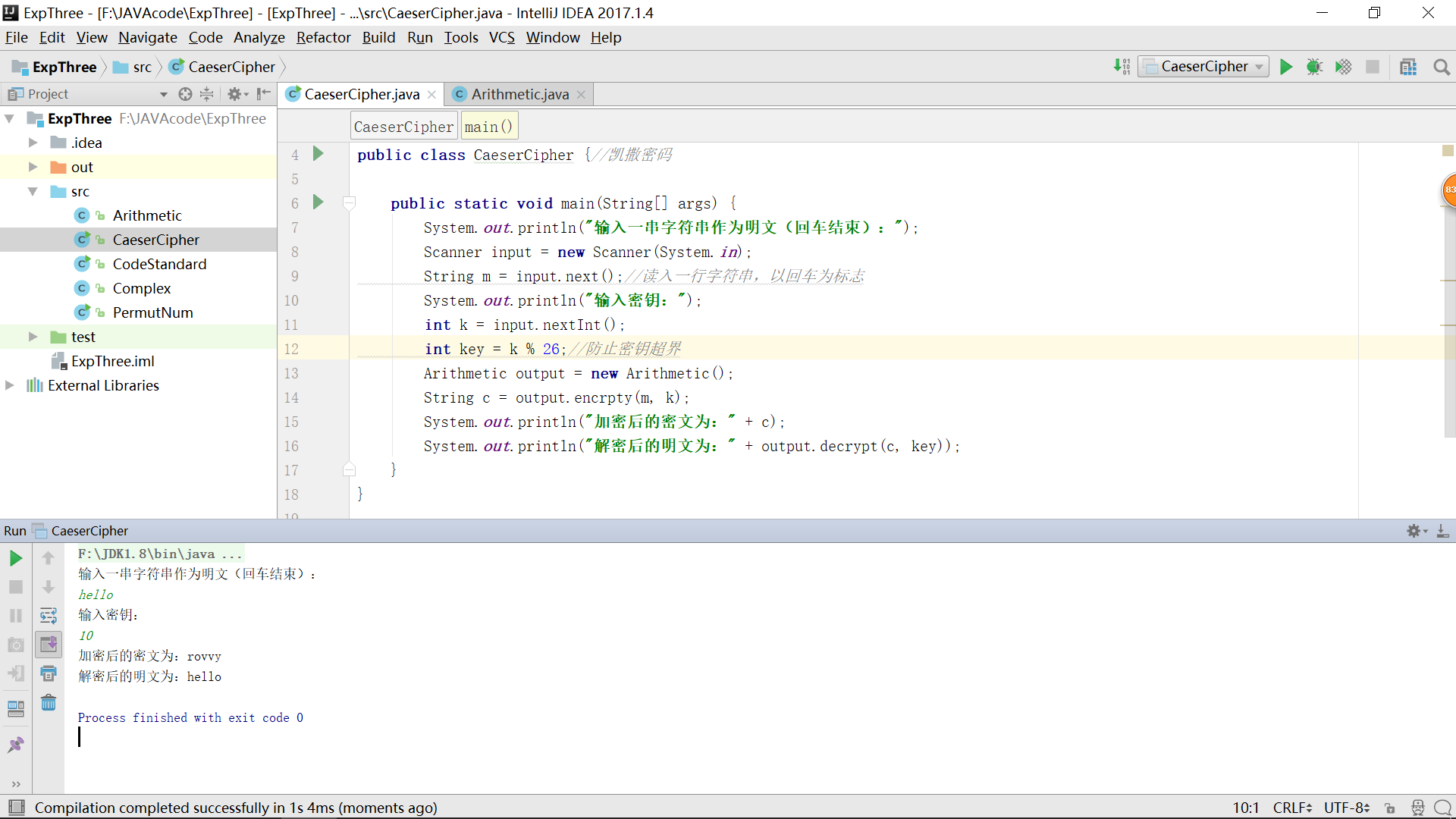
(三)实现凯撒密码
 /**

 * Created by zby on 2018/4/2.

 */

import java.util.*;

import java.lang.*;

public class CaeserCipher {//凯撒密码

    public static void main(String[] args) {

        System.out.println("输入一串字符串作为明文(回车结束):");

        Scanner input = new Scanner(System.in);

        String m = input.next();//读入一行字符串,以回车为标志

        Arithmetic output = new Arithmetic();

        String c = output.encrpty(m);

        System.out.println("加密后的密文为:" + c);

        System.out.println("解密后的明文为:" + output.decrypt(c));

    }

}
算法方法所在类
/**

 * Created by zby on 2018/4/2.

 */

import java.lang.*;

public class Arithmetic {//加密和解密算法

    public String encrpty(String m) {

        StringBuilder result = new StringBuilder();

        char[] mi = m.toCharArray();

        int n = mi.length;

        for (int c : mi) {

            if (c >= 'a' && c <= 'z') {

                c += 3; // 移动key%26位

                if (c < 'a')

                    c += 26; // 向左超界

                if (c > 'z')

                    c -= 26; // 向右超界

            }

            // 如果字符串中的某个字符是大写字母

            else if (c >= 'A' && c <= 'Z') {

                c += 3; // 移动key%26位

                if (c < 'A')

                    c += 26;// 同上

                if (c > 'Z')

                    c -= 26;// 同上

            }

            result.append((char) c);

        }

        return result.toString();

    }

    public String decrypt(String m) {

        StringBuilder result = new StringBuilder();

        char[] mi = m.toCharArray();

        int n = mi.length;

        for (int c : mi) {

            if (c >= 'a' && c <= 'z') {

                c -= 3; // 向前移动3位

                if (c < 'a')

                    c += 26; // 向左超界

                if (c > 'z')

                    c -= 26; // 向右超界

            }

            // 如果字符串中的某个字符是大写字母

            else if (c >= 'A' && c <= 'Z') {

                c -= 3; // 向前移动3位

                if (c < 'A')

                    c += 26;// 同上

                if (c > 'Z')

                    c -= 26;// 同上

            }

            result.append((char) c);

        }

        return result.toString();

    }

}
参考资料
2017-2018-2 20165218 实验三《敏捷开发与XP实践》实验报告的更多相关文章
- 20162311 实验三 敏捷开发与XP实践 实验报告
20162311 实验三 敏捷开发与XP实践 实验报告 实验内容 一.研究学习IDEA中的Code菜单 使用Code ->Reformate Code功能将以下代码格式化 public clas ...
- 20165230 《Java程序设计》实验三 敏捷开发与XP实践 实验报告
20165230 <Java程序设计>实验三 敏捷开发与XP实践 实验报告 一.实验报告封面 课程:Java程序设计 班级:1652班 姓名:田坤烨 学号:20165230 成绩: 指导教 ...
- 20145308刘昊阳 《Java程序设计》实验三 敏捷开发与XP实践 实验报告
20145308刘昊阳 <Java程序设计>实验三 敏捷开发与XP实践 实验报告 实验名称 敏捷开发与XP实践 实验内容 XP基础 XP核心实践 相关工具 统计的PSP(Personal ...
- 20165308实验三 敏捷开发与XP实践实验报告
实验三 敏捷开发与XP实践实验报告 实验目的 安装 alibaba 插件,解决代码中的规范问题.再研究一下Code菜单,找出一项让自己感觉最好用的功能. 在码云上把自己的学习搭档加入自己的项目中,确认 ...
- 20155207王雪纯 《Java程序设计》实验三 敏捷开发与XP实践 实验报告
20155207王雪纯 <Java程序设计>实验三 敏捷开发与XP实践 实验报告 实验名称 敏捷开发与XP实践 实验内容 XP基础 XP核心实践 相关工具 统计的PSP(Personal ...
- 20155220 实验三 敏捷开发与XP实践 实验报告
20155220 实验三 敏捷开发与XP实践 实验报告 实验内容 XP基础 XP核心实践 相关工具 实验要求 没有Linux基础的同学建议先学习<Linux基础入门(新版)><Vim ...
- # 20155224 实验三 敏捷开发与XP实践 实验报告
20155224 实验三 敏捷开发与XP实践 实验报告 实验内容 XP基础 XP核心实践 相关工具 实验要求 没有Linux基础的同学建议先学习<Linux基础入门(新版)><Vim ...
- 20155226 实验三 敏捷开发与XP实践 实验报告
20155226 实验三 敏捷开发与XP实践 实验报告 实验内容 XP基础 XP核心实践 相关工具 实验要求 没有Linux基础的同学建议先学习<Linux基础入门(新版)><Vim ...
- 20155311 实验三 敏捷开发与XP实践 实验报告
20155311 实验三 敏捷开发与XP实践 实验报告 实验内容 XP基础 xp核心工具 相关工具 实验要求 没有Linux基础的同学建议先学习<Linux基础入门(新版)><Vim ...
- 2016-2017-2 20155339 《Java面向对象程序设计》实验三敏捷开发与XP实践实验报告
2016-2017-2 20155339 <Java面向对象程序设计>实验三敏捷开发与XP实践实验报告 实验内容 XP基础 XP核心实践 相关工具 实验内容 一.在IDEA中使用工具(Co ...
随机推荐
- IL指令
这是网上搜集到的il指令修改时可作为参考 名称说明Add将两个值相加并将结果推送到计算堆栈上.Add.Ovf将两个整数相加,执行溢出检查,并且将结果推送到计算堆栈上.Add.Ovf.Un将两个无符号整 ...
- Linux的常用命令笔记
这里使用的是centos操作系统 一.简单命令 (1)查看历史纪录: history (2)查看当前目录: pwd (3)查看系统当前时间和日期 date (4)查看当前登陆到系统的所有用户 who ...
- Linux权限管理命令
查询linux命令用法网址:cht.sh 1.chmod——改变文件/目录的权限 用法: ① chmod [{ugoa}{+-=}{rwx}] [文件/目录] ---给文件的(用户.所属组.其他人 ...
- 高可用Kubernetes集群-3. etcd高可用集群
五.部署高可用etcd集群 etcd是key-value存储(同zookeeper),在整个kubernetes集群中处于中心数据库地位,以集群的方式部署,可有效避免单点故障. 这里采用静态配置的方式 ...
- 2019CSUST集训队选拔赛题解(三)
PY学长的放毒题 Description 下面开始PY的香港之行,PY有n个要去的小吃店,这n个小吃店被m条路径联通起来. PY有1个传送石和n−1个传送石碎片. PY可以用传送石标记一个小吃店作为根 ...
- asp.net mvc同一个view展示多个不同列表思路
asp.net mvc一个模型一个view容易展示,可是遇到像首页那样,要同时调用好几个不同表的内容一小部分展示时,该怎么是好呢? 下边根据我的测试,用的是mvc access数据测试 先建立一个强类 ...
- 标准版 Eclipse (Eclipse standard 4.3.3) 添加 Tomcat 支持
步骤1:下载 Eclipse Tomcat 插件最新版:tomcatPluginV33.zip,官网下载最新版:http://www.eclipsetotale.com/tomcatPlugin.ht ...
- CodeForces 154A Hometask dp
题目链接: http://codeforces.com/problemset/problem/154/A 题意: 给你一个字符串,和若干模板串(长度为2),至少删除多少个字母,使得字符串的字串里面没有 ...
- lintcode-413-反转整数
413-反转整数 将一个整数中的数字进行颠倒,当颠倒后的整数溢出时,返回 0 (标记为 32 位整数). 样例 给定 x = 123,返回 321 给定 x = -123,返回 -321 标签 整数 ...
- bond下改变网卡
浪潮服务器打开控制台 用ip addr查看哪个网卡是绑定的,eth2和eth4是绑定状态 用mv命令,更改网卡名称 并将每个网卡里的信息更改 reboot,重启 ip addr查看,eth6和eth8 ...