
基于Cocos2d-x-1.0.1的飞机大战游戏开发实例(中)
接《基于Cocos2d-x-1.0.1的飞机大战游戏开发实例(上)》
三、代码分析
1.界面初始化
 bool PlaneWarGame::init()

 {

     bool bRet = false;

     do

     {

         CC_BREAK_IF(! CCLayer::init());

         _size = CCDirector::sharedDirector()->getWinSize();

         // 设置触摸可用

         this->setIsTouchEnabled(true);

         // 从窗口中取消息

         CCDirector::sharedDirector()->getOpenGLView()->SetWin32KeyLayer( this );

         // 初始化游戏背景

         CC_BREAK_IF(!initBackground());

         // 菜单1(暂停/声音/炸弹)

         CC_BREAK_IF(!initMenu1());

         // 菜单2(继续/重新开始/返回)

         CC_BREAK_IF(!initMenu2());

         // 菜单3(重新开始/返回)

         CC_BREAK_IF(!initMenu3());

         // 创建玩家飞机

         _player = new PlaySprite;

         _player->setPosition(CCPointZero);

         addChild(_player);

         // 调度器:定时调用自定义的回扫函数

         this->schedule( schedule_selector(PlaneWarGame::gameLoop));

         this->schedule( schedule_selector(PlaneWarGame::shoot), 0.1 );

         this->schedule( schedule_selector(PlaneWarGame::addEnemy), 0.3 );

         this->schedule( schedule_selector(PlaneWarGame::addProp),  );

         // 初始化两个数组

         _enemys = CCArray::array();

         _enemys->retain();

         _bullets = CCArray::array();

         _bullets->retain();

         // 背景音乐

         CocosDenshion::SimpleAudioEngine::sharedEngine()->playBackgroundMusic(

             "planewar/game_music.wav", true);

         bRet = true;

     } while ();

     return bRet;

 }
初始化的工作包括:
- 设置触摸可用
- 设置可自定义处理消息
- 初始化游戏背景
- 初始化三个菜单(界面菜单/游戏暂停时的菜单/游戏结束时的菜单)
- 初始化两个CCArray类型的数组,分别用来存储有效的敌机精灵对象和子弹对象
- 设置需要定时调用函数的调度器
- 设置背景音乐
- 添加玩家角色
2.初始化游戏背景
 bool PlaneWarGame::initBackground()

 {

     // 显示分数

     _label = CCLabelBMFont::labelWithString("","planewar/font.fnt");

     _label->setPosition(ccp(,_size.height-));

     _label->setColor(ccc3(,,));

     this->addChild(_label, );

     // 显示炸弹数量

     CCLabelBMFont* bombcount = CCLabelBMFont::labelWithString("X09","planewar/font.fnt");

     bombcount->setAnchorPoint(ccp(,));

     bombcount->setPosition(ccp(,));

     bombcount->setColor(ccc3(,,));

     addChild(bombcount, ,);

     // 添加背景

     CCSprite* bg1 = CCSprite::spriteWithFile("planewar/bg1.png");

     if (!bg1)return false;

     bg1->setAnchorPoint(ccp(,));

     bg1->setPosition( ccp(, _size.height) );

     this->addChild(bg1, , );

     bg1->runAction(

         CCSequence::actions(

         CCMoveBy::actionWithDuration(,ccp(,-)),

         CCCallFunc::actionWithTarget(this, callfunc_selector(PlaneWarGame::bg1roll)),NULL));

     CCSprite* bg2 = CCSprite::spriteWithFile("planewar/bg2.png");

     if (!bg1)return false;

     bg2->setAnchorPoint(ccp(,));

     bg2->setPosition( ccp(, _size.height*) );

     this->addChild(bg2, , );

     bg2->runAction(

         CCSequence::actions(

         CCMoveBy::actionWithDuration(,ccp(,-)),

         CCCallFunc::actionWithTarget(this, callfunc_selector(PlaneWarGame::bg2roll)),NULL));

     return true;

 }

 void PlaneWarGame::bg1roll(){

     //运动出屏幕重设位置,运动

     CCSprite * bg = (CCSprite *)getChildByTag();

     bg->setPosition(ccp(,));

     CCAction* seq = CCSequence::actions(

         CCMoveBy::actionWithDuration(,ccp(,-)),

         CCCallFunc::actionWithTarget(this, callfunc_selector(PlaneWarGame::bg1roll)),NULL);

     bg->runAction(seq);

 }

 void PlaneWarGame::bg2roll(){

     //运动出屏幕重设位置,运动

     CCSprite * bg = (CCSprite *)getChildByTag();

     bg->setPosition(ccp(,));

     CCAction* seq = CCSequence::actions(

         CCMoveBy::actionWithDuration(,ccp(,-)),

         CCCallFunc::actionWithTarget(this, callfunc_selector(PlaneWarGame::bg2roll)),NULL);

     bg->runAction(seq);

 }
初始化游戏背景时,需要注意的是:要做出飞机向上走的视觉效果,就要把背景向下滚动,这里使用两个背景bg1和bg2,大小分别为屏幕大小。初始bg1在屏幕内,bg2在屏幕上方,两个同事向下运动;当bg1刚刚运动到屏幕外,bg2刚好盖住屏幕,bg1挪到屏幕上方向下运动...循环操作,就能做出循环滚动的背景效果了。
3.子弹的处理
 // 确定子弹类型

 void PlaneWarGame::shoot(float dt)

 {

     if (_isOver)return;

     if(_player==NULL) return;

     if(_player->_bulletKind == BK_SINGLE)

     {

         CCSprite *bullet = CCSprite::spriteWithFile(

             "planewar/plane.png", CCRectMake(,,,));

         addBullet(bullet,_player->getPlayerPt());

     }else if (_player->_bulletKind == BK_DOUBLE)

     {

         CCSprite *bullet = CCSprite::spriteWithFile(

             "planewar/plane.png", CCRectMake(,,,));

         addBullet(bullet,ccp(_player->getPlayerPt().x-,_player->getPlayerPt().y));

         CCSprite *bullet1 = CCSprite::spriteWithFile(

             "planewar/plane.png", CCRectMake(,,,));

         addBullet(bullet1,ccp(_player->getPlayerPt().x+,_player->getPlayerPt().y));

     }

 }

 // 添加子弹

 void PlaneWarGame::addBullet(CCSprite* bullet, CCPoint pt)

 {

     bullet->setPosition(pt);

     this->addChild(bullet);

     bullet->runAction( CCSequence::actions(

         CCMoveTo::actionWithDuration(0.5, ccp(pt.x,_size.height+bullet->getContentSize().height/)),

         CCCallFuncN::actionWithTarget(this,callfuncN_selector(PlaneWarGame::spriteMoveFinished)),

         NULL) );

     bullet->setTag();

     _bullets->addObject(bullet);

 }

 // 回收

 void PlaneWarGame::spriteMoveFinished(CCNode* sender)

 {

     CCSprite *sprite = (CCSprite *)sender;

     this->removeChild(sprite, true);

     if (sprite->getTag()==)//子弹

         _bullets->removeObject(sprite);

 }
吃道具可改变子弹类型。子弹的回收方式:从飞机坐标处出发,运动到屏幕外被回收。道具的处理类似。
4.设置触摸/鼠标点击控制玩家角色的移动
 bool PlaneWarGame::ccTouchBegan(CCTouch *pTouch, CCEvent *pEvent)

 {

     if(_player==NULL) return false;

     CCPoint pt = CCDirector::sharedDirector()->convertToGL(

         pTouch->locationInView(pTouch->view()));

     CCRect rt = _player->getRect();

     if (CCRect::CCRectContainsPoint(rt,pt))

         _player->_isDragEnabled = true;

     return true;

 }

 void PlaneWarGame::ccTouchMoved(CCTouch *pTouch, CCEvent *pEvent)

 {

     if(_player==NULL) return;

     CCSize size = CCDirector::sharedDirector()->getWinSize();

     CCPoint pt = CCDirector::sharedDirector()->convertToGL(

         pTouch->locationInView(pTouch->view()));

     CCRect rt = CCRect(,,size.width,size.height);

     if (_player->_isDragEnabled && CCRect::CCRectContainsPoint(rt,pt))

         _player->setPlayerPt(pt);

 }

 void PlaneWarGame::ccTouchEnded(CCTouch *pTouch, CCEvent *pEvent)

 {

     _player->_isDragEnabled = false;

 }
这里重写3个虚函数。移动角色的方式:触摸/鼠标按下时,如果点击位置在角色上,将角色可被拖拽状态置为true;触摸/鼠标移动时,根据角色的可被拖拽状态和屏幕范围确定是否移动;触摸/鼠标弹起时,将角色的可被拖拽状态恢复为false。
5.碰撞检测
 void PlaneWarGame::updateGame(float dt)

 {

     CCArray *bulletsToDelete = CCArray::array();

     CCObject* it = NULL;

     CCObject* jt = NULL;

     if(_player==NULL) return;

     CCRect playerRect = _player->getRect();

     // 己方飞机和敌方飞机的碰撞

     CCARRAY_FOREACH(_enemys, jt)

     {

         EnemySprite *enemy = dynamic_cast<EnemySprite*>(jt);

         if (!enemy->isNull() && CCRect::CCRectIntersectsRect(playerRect, enemy->getRect()))

         {

             _player->die();

             gameover(false);

             return;

         }

     }

     //////////////////////////////////////////////////////////////////////////

         // 道具和角色的碰撞检测

     CCSprite* prop = (CCSprite*)getChildByTag();//子弹

     if (NULL != prop)

     {

         CCRect propRect = CCRectMake(

             prop->getPosition().x - (prop->getContentSize().width/),

             prop->getPosition().y - (prop->getContentSize().height/),

             prop->getContentSize().width,

             prop->getContentSize().height);

         if (CCRect::CCRectIntersectsRect(playerRect, propRect))

         {

             _player->_bulletKind = BK_DOUBLE;

             removeChild(prop,true);

             CocosDenshion::SimpleAudioEngine::sharedEngine()->

                 playEffect("planewar/get_double_laser.wav",false);

         }

     }

     CCSprite* prop1 = (CCSprite*)getChildByTag();//炸弹

     if (NULL != prop1)

     {

         CCRect prop1Rect = CCRectMake(

             prop1->getPosition().x - (prop1->getContentSize().width/),

             prop1->getPosition().y - (prop1->getContentSize().height/),

             prop1->getContentSize().width,

             prop1->getContentSize().height);

         if (CCRect::CCRectIntersectsRect(playerRect, prop1Rect))

         {

             _player->_bombCount++;

             removeChild(prop1,true);

             CocosDenshion::SimpleAudioEngine::sharedEngine()->

                 playEffect("planewar/get_bomb.wav",false);

         }

     }

     //////////////////////////////////////////////////////////////////////////

         // 子弹和敌机的碰撞检测

     CCARRAY_FOREACH(_bullets, it)

     for (int i=; i<_bullets->count(); i++)

     {

         CCSprite *bullet = dynamic_cast<CCSprite*>(_bullets->objectAtIndex(i));

         CCRect bulletRect = CCRectMake(

             bullet->getPosition().x - (bullet->getContentSize().width/),

             bullet->getPosition().y - (bullet->getContentSize().height/),

             bullet->getContentSize().width,

             bullet->getContentSize().height);

         CCArray* enemysToDelete =CCArray::array();

         CCARRAY_FOREACH(_enemys, jt)

         {

             EnemySprite *enemy = dynamic_cast<EnemySprite*>(jt);

             if (!enemy->_die && CCRect::CCRectIntersectsRect(bulletRect, enemy->getRect()))

             {

                 if (enemy->_hp>)

                 {

                     enemy->_hp--;

                     //bulletsToDelete->addObject(bullet);

                     _bullets->removeObject(bullet);

                     removeChild(bullet,true);

                 }

                 else if (enemy->_hp<=)

                 {

                     //bulletsToDelete->addObject(bullet);

                     _bullets->removeObject(bullet);

                     removeChild(bullet,true);

                     enemysToDelete->addObject(enemy);

                 }

             }

         }

         CCARRAY_FOREACH(enemysToDelete, jt)

         {

             EnemySprite *enemy = dynamic_cast<EnemySprite*>(jt);

             enemy->_die = true;

             enemy->die();

             _bulletsDestroyed++;

         }

         enemysToDelete->release();

     }

     // 释放已死亡的子弹

     CCARRAY_FOREACH(bulletsToDelete, it)

     {

         CCSprite* projectile = dynamic_cast<CCSprite*>(it);

         _bullets->removeObject(projectile);

         this->removeChild(projectile, true);

     }

     bulletsToDelete->release();

 }
碰撞检测使用最简单的矩形检测。
6.玩家角色的添加和操作
 void PlaySprite::onEnter()

 {

     CCNode::onEnter();

     CCSize size = CCDirector::sharedDirector()->getWinSize();

     _sprite = CCSprite::spriteWithFile("planewar/hero1.png");

     _sprite->setContentSize(CCSize(,));

     _sprite->setPosition( ccp(size.width/,_sprite->getContentSize().height/) );

     addChild(_sprite,);

     CCAnimation * animation = CCAnimation::animation();

     animation->addFrameWithFileName("planewar/hero1.png");

     animation->addFrameWithFileName("planewar/hero2.png");

     CCAction* action = CCRepeatForever::actionWithAction(

         CCAnimate::actionWithDuration(0.1f, animation, false));

     action->setTag();

     _sprite->runAction(action);

     // 调度器

     schedule( schedule_selector(PlaySprite::move), 0.002 );

 }

 CCRect PlaySprite::getRect()

 {

     if (_sprite!=NULL)

         return CCRect(

         _sprite->getPosition().x - (_sprite->getContentSize().width/),

         _sprite->getPosition().y - (_sprite->getContentSize().height/),

         _sprite->getContentSize().width,

         _sprite->getContentSize().height);

 }

 CCPoint PlaySprite::getPlayerPt()

 {

     if (_sprite!=NULL)

         return _sprite->getPosition();

 }

 void PlaySprite::setPlayerPt(CCPoint pt)

 {

     if (_sprite!=NULL)

         return _sprite->setPosition(pt);

 }

 void  PlaySprite::setMoveMode( UINT  message, WPARAM  wParam)

 {

     if (message == WM_KEYDOWN)

     {// 控制飞机移动

         if (wParam == VK_UP)

             _mode = MM_UP;

         else if (wParam == VK_DOWN)

             _mode = MM_DOWN;

         else if (wParam == VK_LEFT)

             _mode = MM_LEFT;

         else if (wParam == VK_RIGHT)

             _mode = MM_RIGHT;

     }else if (message == WM_KEYUP)

     {

         if (wParam == VK_UP || wParam == VK_DOWN ||wParam == VK_LEFT||wParam == VK_RIGHT)

             _mode = MM_NONE;

     }

 }

 void PlaySprite::move(float dt)

 {

     CCSize winSize = CCDirector::sharedDirector()->getWinSize();

     switch(_mode)

     {

     case MM_NONE:

         break;

     case MM_UP:

         if (getPlayerPt().y<winSize.height)

             setPlayerPt(ccp(getPlayerPt().x,getPlayerPt().y+));

         break;

     case MM_DOWN:

         if (getPlayerPt().y>)

             setPlayerPt(ccp(getPlayerPt().x,getPlayerPt().y-));

         break;

     case MM_LEFT:

         if (getPlayerPt().x>)

             setPlayerPt(ccp(getPlayerPt().x-,getPlayerPt().y));

         break;

     case  MM_RIGHT:

         if (getPlayerPt().x<winSize.width)

             setPlayerPt(ccp(getPlayerPt().x+,getPlayerPt().y));

         break;

     }

 }

 void PlaySprite::die()

 {

     if (_sprite==NULL)return;

     _sprite->stopActionByTag();

     CCAnimation * animation = CCAnimation::animation();

     animation->addFrameWithFileName("planewar/hero_blowup_n1.png");

     animation->addFrameWithFileName("planewar/hero_blowup_n2.png");

     animation->addFrameWithFileName("planewar/hero_blowup_n3.png");

     animation->addFrameWithFileName("planewar/hero_blowup_n4.png");

     _sprite->runAction(CCSequence::actions(

         CCAnimate::actionWithDuration(0.1f, animation, false),

         CCCallFunc::actionWithTarget(this, callfunc_selector(PlaySprite::destroy)),NULL));

 }

 void PlaySprite::destroy()

 {

     if (_sprite==NULL)return;

     removeChild(_sprite,true);

     _sprite = NULL;

 }
- 玩家角色类是派生自CCNode类,用组合的方式包含一个CCSprite类的成员对象,在玩家角色类内部封装对精灵的操作。
- 重写onEnter函数初始化_sprite成员,设置位置、大小、图片和帧动画等。
- 玩家的方向键控制移动和鼠标拖拽移动方式类似,在操作时设置移动状态,在schedule定时调用的函数move中根据移动状态来移动玩家角色。
- 关于碰撞之后的动画和销毁,参照上面的die和destroy函数,对象被碰撞时调用die函数运行爆炸的帧动画,动画结束后自动调用destroy函数销毁对象。
- 敌机对象的操作和玩家角色类似。
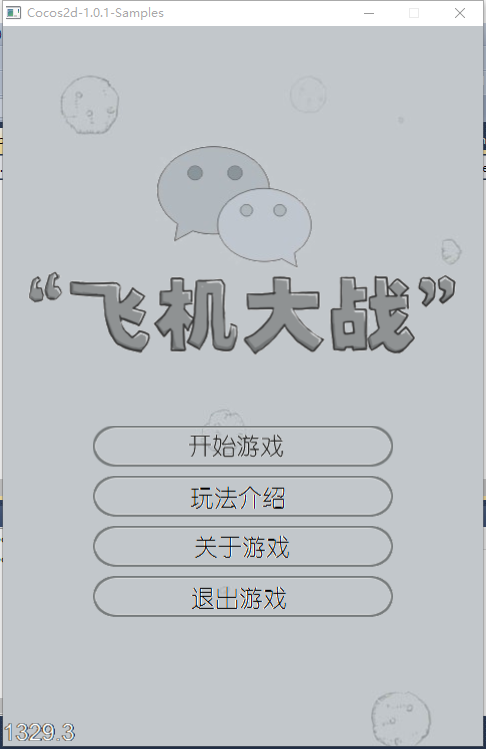
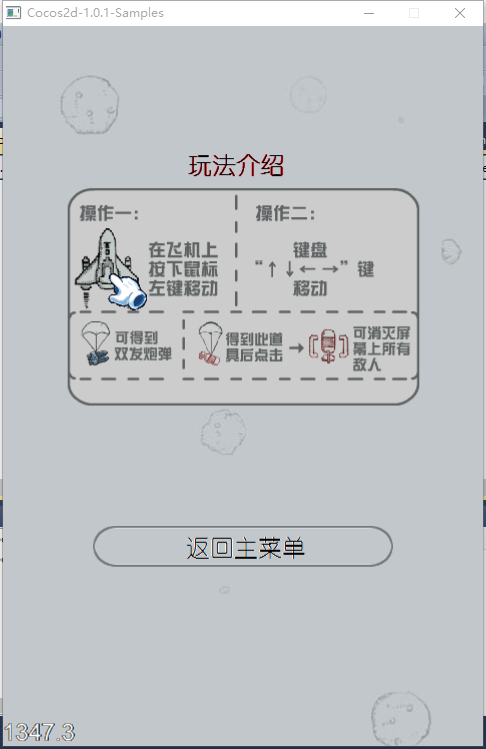
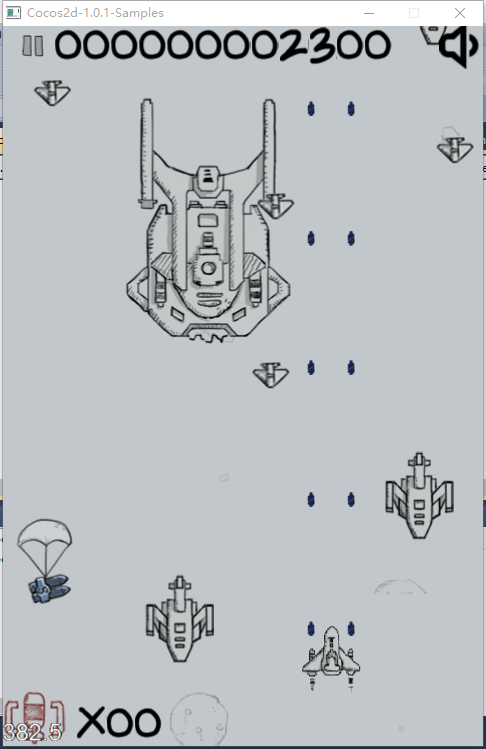
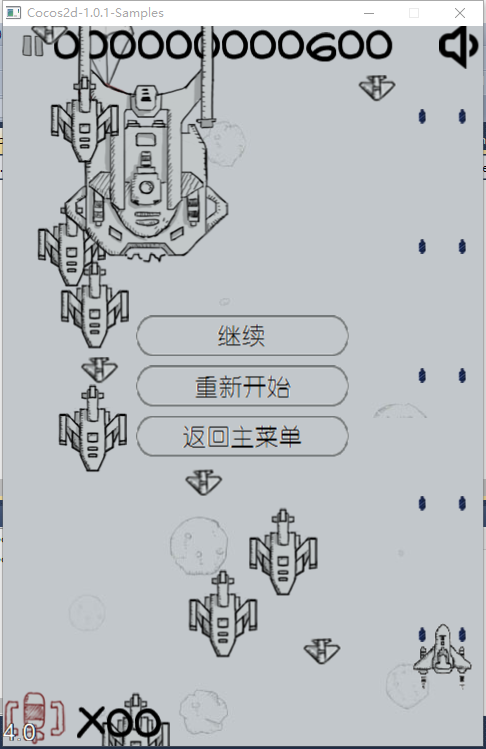
四、完成效果图
经过不到一周的时间,从什么都没有,到游戏正常运行、功能完整,体会了cocos2dx的调用机制。
下面是运行效果图:
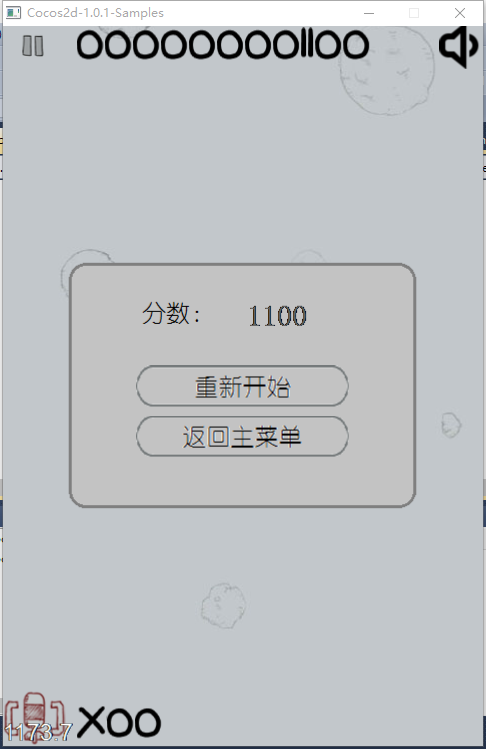
如果实现中有什么问题,欢迎大家在评论中指教!
基于Cocos2d-x-1.0.1的飞机大战游戏开发实例(中)的更多相关文章
- 基于Cocos2d-x-1.0.1的飞机大战游戏开发实例(下)
在飞机大战游戏开发中遇到的问题和解决方法: 1.在添加菜单时,我要添加一个有背景的菜单,需要在菜单pMenu中添加一个图片精灵,结果编译过了但是运行出错,如下图: 查了很多资料,调试了很长时间,整个人 ...
- 基于Cocos2d-x-1.0.1的飞机大战游戏开发实例(上)
最近接触过几个版本的cocos2dx,决定每个大变动的版本都尝试一下.本实例模仿微信5.0版本中的飞机大战游戏,如图: 一.工具 1.素材:飞机大战的素材(图片.声音等)来自于网络 2.引擎:coco ...
- 基于Cocos2d-x-1.0.1的飞机大战游戏迁移到Cocos2d-x-3.0版本,并移植到Android平台成功运行
一.版本迁移中的问题 1.游戏元素Sprite.Label.Action等等的创建函数名都改为create. 2.函数的回调callfunc_selectorcallfuncN_selectorcal ...
- 微信5.0 Android版飞机大战破解无敌模式手记
微信5.0 Android版飞机大战破解无敌模式手记 转载: http://www.blogjava.net/zh-weir/archive/2013/08/14/402821.html 微信5.0 ...
- 11.pygame飞机大战游戏整体代码
主程序 # -*- coding: utf-8 -*- # @Time: 2022/5/20 22:26 # @Author: LiQi # @Describe: 主程序 import pygame ...
- "飞机大战"游戏_Java实现_详细注释
1 package cn.xiaocangtian.Util; import java.awt.Frame; import java.awt.Graphics; import java.awt.Ima ...
- 用Javascript模拟微信飞机大战游戏
最近微信的飞机大战非常流行,下载量非常高. 利用JS进行模拟制作了一个简单的飞机大战[此源码有很多地方可以进行重构和优化] [此游戏中没有使用HTML5 任何浏览器都可以运行]. 效果图: 原理:利用 ...
- 一、利用Python编写飞机大战游戏-面向对象设计思想
相信大家看到过网上很多关于飞机大战的项目,但是对其中的模块方法,以及使用和游戏工作原理都不了解,看的也是一脸懵逼,根本看不下去.下面我做个详细讲解,在做此游戏需要用到pygame模块,所以这一章先进行 ...
- "飞机大战"游戏_Java
1 package cn.xiaocangtian.Util; import java.awt.Frame; import java.awt.Graphics; import java.awt.Ima ...
随机推荐
- 2048总结 JavaScript+jQuery(取元素方便,.css,text方法)
Html部分(界面):1.开始新游戏:2.返回上一步:3.记分栏: 4.16个小格组成: 其中1,2由链接形式实现. a标签中href属性调用js方法: <a href="javasc ...
- 2、Android-UI(自定义控件&ListView)
2.4.系统控件不够用创建自定义控件 控件的和布局的集成结构: 所有的控件都是间接或者直接集成View的 所有的布局都是直接或者间接继承自ViewGroup的 View是Android种最基本的一种U ...
- c++学习笔记(新手学习笔记,如有错误请与作者联系)
逗号”,“运算符:a = 公式1,公式2:把公式1的结果放进公式2中进行运算,如: a = 3*5 , a*4; 计算结果:a = 3*5*4=60; typedef:类型别名,为已有类型另外命名 t ...
- MySQL学习【第八篇索引优化】
一.建立索引的原则(规范) 1.选择唯一性索引 只要可以创建唯一性索引的,一律创建唯一索引(因为速度快呀) 判断是否能创建唯一索引,用count(列名),count(distinct(列名))一样就能 ...
- 搭建Jenkins自动化持续构建和部署系统
什么是Jenkins? Jenkins是一个持续集成和持续交付的java应用程序,可以处理任何类型的构建或持续集成.集成Jenkins可以用于一些测试和部署技术.简单得说就是一款自动化构建测试和部署的 ...
- 搭建php服务器网站
一.Apache安装 yum install httpd启动systemctl start httpd.service #启动systemctl stop httpd.service #停止syste ...
- c#开发微信公众号——关于c#对象与xml的转换
在成为微信公众号开发者以后,整个交互流程:用户->微信服务器->自己的服务器->返回微信服务器->用户: 举个例子:用户在微信公众号里面发了个“您好!”,微信服务器会以特定的x ...
- Java实例 Part5:面向对象入门
目录 Part5:面向对象入门 Example01:成员变量的初始化值 Example02:单例模式的应用 -----懒汉式 -----饿汉式 Example03:汉诺塔问题的求解 Example04 ...
- php中的Register Globals
参考: http://php.net/manual/zh/security.globals.php
- stm32 IO口八种模式区别
初学STM32,遇到I/O口八种模式的介绍,网上查了一下资料,下面简明写出这几种模式的区别,有不对的地方请大家多多指正! 上拉输入模式:区别在于没有输入信号的时候默认输入高电平(因为有弱上拉).下拉输 ...