
Xamarin.Forms 学习系列之底部tab
App中一般都会有一个底部tab,用于切换不同的功能,在Xamarin中应该制作底部tab了,需要把Android的TabbedPage做一次渲染,IOS的则不用,接下来说下详细步骤:

1、在共享项目代码中添加MainPage,继承自TabbedPage,然后再添加几个测试的切换页面(HomePage、FunctionPage、AccountPage)
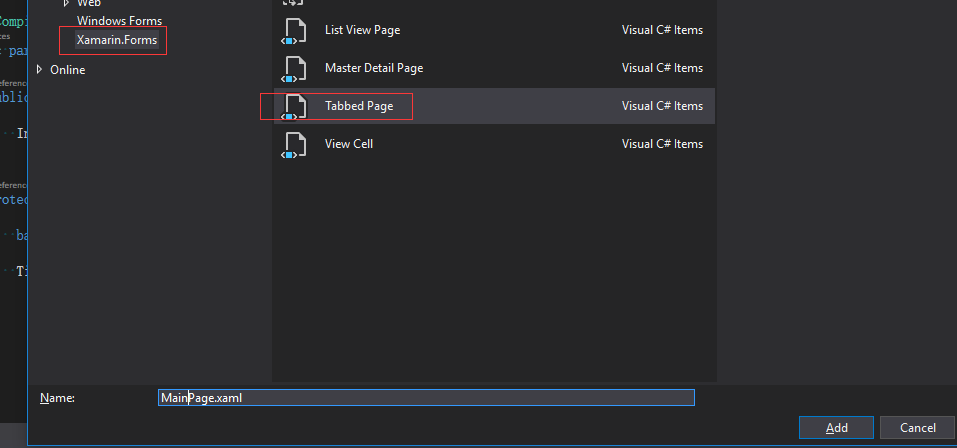
在MainPage.xaml页面中添加如下代码:
<TabbedPage xmlns="http://xamarin.com/schemas/2014/forms"

             xmlns:x="http://schemas.microsoft.com/winfx/2009/xaml"

             x:Class="Mobile.Views.MainPage"

            xmlns:local="clr-namespace:Mobile.Views">

    <local:HomePage Icon="menu_home"/>

    <local:FunctionPage Icon="menu_function"/>

    <local:AccountPage Icon="menu_account"/>

</TabbedPage>
2、在Android项目中添加BottomNavigationBar引用
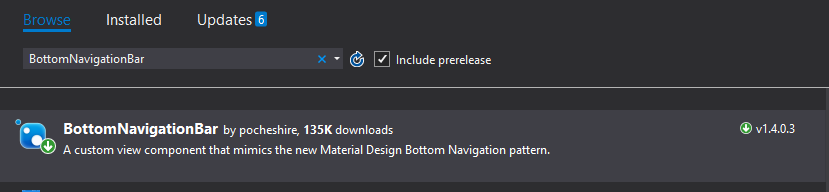
3、在Android项目中添加渲染类 MainPageRenderer
using System;

using System.Collections.Generic;

using System.Linq;

using System.Text;

using Android.App;

using Android.Content;

using Android.OS;

using Android.Runtime;

using Android.Views;

using Android.Widget;

using BottomNavigationBar;

using BottomNavigationBar.Listeners;

using Mobile.Controls;

using Mobile.Droid.Renderers;

using Mobile.Views;

using Xamarin.Forms;

using Xamarin.Forms.Platform.Android;

[assembly: ExportRenderer(typeof(MainPage), typeof(MainPageRenderer))]

namespace Mobile.Droid.Renderers

{

    /// <summary>

    /// MainPage渲染器

    /// </summary>

    class MainPageRenderer : VisualElementRenderer<MainPage>, IOnTabClickListener

    {

        private BottomBar _bottomBar;

        private Page _currentPage;

        private int _lastSelectedTabIndex = -;

        public MainPageRenderer()

        {

            //不添加子页面

            AutoPackage = false;

        }

        public void OnTabSelected(int position)

        {

            LoadPageContent(position);

        }

        public void OnTabReSelected(int position)

        {

        }

        protected override void OnElementChanged(ElementChangedEventArgs<MainPage> e)

        {

            base.OnElementChanged(e);

            if (e.OldElement != null)

            {

                ClearElement(e.OldElement);

            }

            if (e.NewElement != null)

            {

                InitializeElement(e.NewElement);

            }

        }

        protected override void Dispose(bool disposing)

        {

            if (disposing)

            {

                ClearElement(Element);

            }

            base.Dispose(disposing);

        }

        /// <summary>

        /// 重写布局的方法

        /// </summary>

        /// <param name="changed"></param>

        /// <param name="l"></param>

        /// <param name="t"></param>

        /// <param name="r"></param>

        /// <param name="b"></param>

        protected override void OnLayout(bool changed, int l, int t, int r, int b)

        {

            if (Element == null)

            {

                return;

            }

            int width = r - l;

            int height = b - t;

            _bottomBar.Measure(

                MeasureSpec.MakeMeasureSpec(width, MeasureSpecMode.Exactly),

                MeasureSpec.MakeMeasureSpec(height, MeasureSpecMode.AtMost));

            //这里需要重新测量位置和尺寸,为了重新布置tab菜单的位置

            _bottomBar.Measure(

                MeasureSpec.MakeMeasureSpec(width, MeasureSpecMode.Exactly),

                MeasureSpec.MakeMeasureSpec(_bottomBar.ItemContainer.MeasuredHeight, MeasureSpecMode.Exactly));

            int barHeight = _bottomBar.ItemContainer.MeasuredHeight;

            _bottomBar.Layout(, b - barHeight, width, b);

            float density = Resources.DisplayMetrics.Density;

            double contentWidthConstraint = width / density;

            double contentHeightConstraint = (height - barHeight) / density;

            if (_currentPage != null)

            {

                var renderer = Platform.GetRenderer(_currentPage);

                renderer.Element.Measure(contentWidthConstraint, contentHeightConstraint);

                renderer.Element.Layout(new Rectangle(, , contentWidthConstraint, contentHeightConstraint));

                renderer.UpdateLayout();

            }

        }

        /// <summary>

        /// 初始化方法

        /// </summary>

        /// <param name="element"></param>

        private void InitializeElement(MainPage element)

        {

            PopulateChildren(element);

        }

        /// <summary>

        /// 生成新的底部控件

        /// </summary>

        /// <param name="element"></param>

        private void PopulateChildren(MainPage element)

        {

            //我们需要删除原有的底部控件,然后添加新的

            _bottomBar?.RemoveFromParent();

            _bottomBar = CreateBottomBar(element);

            AddView(_bottomBar);

            LoadPageContent();

        }

        /// <summary>

        /// 清除旧的底部控件

        /// </summary>

        /// <param name="element"></param>

        private void ClearElement(MainPage element)

        {

            if (_currentPage != null)

            {

                IVisualElementRenderer renderer = Platform.GetRenderer(_currentPage);

                if (renderer != null)

                {

                    renderer.ViewGroup.RemoveFromParent();

                    renderer.ViewGroup.Dispose();

                    renderer.Dispose();

                    _currentPage = null;

                }

                if (_bottomBar != null)

                {

                    _bottomBar.RemoveFromParent();

                    _bottomBar.Dispose();

                    _bottomBar = null;

                }

            }

        }

        /// <summary>

        /// 创建新的底部控件

        /// </summary>

        /// <param name="element"></param>

        /// <returns></returns>

        private BottomBar CreateBottomBar(MainPage element)

        {

            var bar = new BottomBar(Context);

            // TODO: Configure the bottom bar here according to your needs

            bar.SetOnTabClickListener(this);

            bar.UseFixedMode();

            PopulateBottomBarItems(bar, element.Children);

            var barcolor = element.BarBackgroundColor;

            // Color a = new Color(Convert.ToByte(barcolor.), Convert.ToByte(barcolor.G), Convert.ToByte(barcolor.B), Convert.ToByte(barcolor.A));

            bar.ItemContainer.SetBackgroundColor(barcolor.ToAndroid());

            //bar.SetActiveTabColor(Color.White);

            //bar.ItemContainer.

            //bar.ItemContainer.SetBackgroundColor(Color.Red);

            return bar;

        }

        /// <summary>

        /// 查询原来底部的菜单,并添加到新的控件

        /// </summary>

        /// <param name="bar"></param>

        /// <param name="pages"></param>

        private void PopulateBottomBarItems(BottomBar bar, IEnumerable<Page> pages)

        {

            var barItems = pages.Select(x => new BottomBarTab(Context.Resources.GetDrawable(x.Icon), x.Title));

            bar.SetItems(barItems.ToArray());

        }

        /// <summary>

        /// 通过选择的下标加载Page

        /// </summary>

        /// <param name="position"></param>

        private void LoadPageContent(int position)

        {

            ShowPage(position);

        }

        /// <summary>

        /// 显示Page的方法

        /// </summary>

        /// <param name="position"></param>

        private void ShowPage(int position)

        {

            if (position != _lastSelectedTabIndex)

            {

                Element.CurrentPage = Element.Children[position];

                if (Element.CurrentPage != null)

                {

                    LoadPageContent(Element.CurrentPage);

                }

            }

            _lastSelectedTabIndex = position;

        }

        /// <summary>

        /// 加载方法

        /// </summary>

        /// <param name="page"></param>

        private void LoadPageContent(Page page)

        {

            UnloadCurrentPage();

            _currentPage = page;

            LoadCurrentPage();

            Element.CurrentPage = _currentPage;

        }

        /// <summary>

        /// 加载当前Page

        /// </summary>

        private void LoadCurrentPage()

        {

            var renderer = Platform.GetRenderer(_currentPage);

            if (renderer == null)

            {

                renderer = Platform.CreateRenderer(_currentPage);

                Platform.SetRenderer(_currentPage, renderer);

            }

            else

            {

                var basePage = _currentPage as BaseContentPage;

                basePage?.SendAppearing();

            }

            AddView(renderer.ViewGroup);

            renderer.ViewGroup.Visibility = ViewStates.Visible;

        }

        /// <summary>

        /// 释放上一个Page

        /// </summary>

        private void UnloadCurrentPage()

        {

            if (_currentPage != null)

            {

                var basePage = _currentPage as BaseContentPage;

                basePage?.SendDisappearing();

                var renderer = Platform.GetRenderer(_currentPage);

                if (renderer != null)

                {

                    renderer.ViewGroup.Visibility = ViewStates.Invisible;

                    RemoveView(renderer.ViewGroup);

                }

            }

        }

    }

}
注意上面代码中的MainPage是我们在共享项目中添加MainPage,需要引入相应的命名空间,然后还需要在共享项目中添加BaseContentPage类,
public class BaseContentPage : ContentPage

    {

        public void SendAppearing()

        {

            OnAppearing();

        }

        public void SendDisappearing()

        {

            OnDisappearing();

        }

    }
Xamarin.Forms 学习系列之底部tab的更多相关文章
- Xamarin.Forms学习系列之Android集成极光推送
一般App都会有消息推送的功能,如果是原生安卓或者IOS集成消息推送很容易,各大推送平台都有相关的Sample,但是关于Xamarin.Forms的消息推送集成的资料非常少,下面就说下Xamarin. ...
- Xamarin.Forms 学习系列之优秀UI收集
1.各种优秀UI例子 https://github.com/jsuarezruiz/xamarin-forms-goodlooking-UI 输入框例子 https://github.com/enis ...
- Xamarin.Forms学习系列之Syncfusion 制作图形报表
Syncfusion是一家微软生态下的第三方组件/控件供应商,除了用于HTML5和JavaScript的控件外,他们产品还涉及如下领域: WEB ASP.NET MVC ASP.NET WebForm ...
- Xamarin.Forms学习系列之SQLite
在App中我们通常不会实时获取服务器数据,会在用户手机中保存历史数据,这个时候就需要用到数据库SQLite,由于微软的封装,在Xamarin中操作SQLite非常简单,类似EF的操作. 1.我们需要在 ...
- Xamarin.Forms学习之Platform-specific API和文件操作
这篇文章的分享原由是由于上篇关于Properties的保存不了,调用SavePropertiesAsync()方法也不行,所以我希望通过操作文件的方式保存我的需要的数据,然后我看了一下电子书中的第二十 ...
- Xamarin.Forms学习之Page Navigation(一)
在最初接触Xamarin.Forms的时候,我是跟着Xamarin官方的名为“learning-xamarin-ebook”的pdf文档进行学习的,我在成功运行Hello world程序之后,我开始跟 ...
- Xamarin.Forms学习之XAML命名空间
大家好,我又悄咪咪的来了,在上一篇的Xamarin文章中简单介绍了Xamarin的安装过程,妈蛋没想到很多小朋友很感激我,让他们成功的安装了Xamarin,然后......成功的显示了经典的两个单词( ...
- Xamarin.Forms学习之初
微软的Build 2016结束的有段时间了,对于一个简单的小屌丝程序员--我来说,关注最大的无疑是Xamarin的免费(开源什么的让大神们上吧),内心激动啊.大会结束的周末我就迫不及待的安装了,然后. ...
- Xamarin.Forms学习之位图(二)
上篇文章分享了如何加载网络图片和PCL中的图片,所以今天继续分享关于如何加载平台的内嵌图片,在这之前说一下上篇文章开头的一个问题:为什么不能加载UWP项目,这是因为我升级了UWP的SDK,而Xamar ...
随机推荐
- SpringCloud之Feign负载均衡(四)
整合Feign pom.xml <dependency> <groupId>org.springframework.cloud</groupId> <arti ...
- vue引入css文件报错Unrecognised input
一个vue项目中用到了swiper插件,引入swiper.css时报错 显示引入的css文件Unrecognised input ,在文件的line4,column12 . 其实是引入位置不对,样式文 ...
- 小白学 Python(15):基础数据结构(集合)(下)
人生苦短,我选Python 前文传送门 小白学 Python(1):开篇 小白学 Python(2):基础数据类型(上) 小白学 Python(3):基础数据类型(下) 小白学 Python(4):变 ...
- mysql如何解除死锁状态
第一种: 1.查询是否锁表 show OPEN TABLES where In_use > 0; 2.查询进程(如果您有SUPER权限,您可以看到所有线程.否则,您只能看到您自己的线程) sho ...
- (数据科学学习手札70)面向数据科学的Python多进程简介及应用
本文对应脚本已上传至我的Github仓库https://github.com/CNFeffery/DataScienceStudyNotes 一.简介 进程是计算机系统中资源分配的最小单位,也是操作系 ...
- 子树问题(DP)
这题显然是DP 首先,\(dp[i][j]\)表示树深度小于等于i,树的大小为j的有根树的数量$ 可以循环枚举根节点编号次大的子树的大小k. \(dp[i][j]=\sum^{j-1}_{k=1}dp ...
- MIT线性代数:5.转置,置换,向量空间
- WebGL简易教程(十二):包围球与投影
目录 1. 概述 2. 实现详解 3. 具体代码 4. 参考 1. 概述 在之前的教程中,都是通过物体的包围盒来设置模型视图投影矩阵(MVP矩阵),来确定物体合适的位置的.但是在很多情况下,使用包围盒 ...
- os模块操作文件
os模块: path=os.path.join(os.path.dirname(os.path.dirname(__file__)),'images') path:运行脚本的当前文件下的上一个文件的地 ...
- Ubuntu16.04下nvidia驱动+nvidia-docker+cuda9+cudnn7安装
一.宿主机安装nvidia驱动 打开终端,先删除旧的驱动: sudo apt-get purge nvidia* 禁用自带的 nouveau nvidia驱动 sudo gedit /etc/modp ...