
Android五大布局详解——FrameLayout(帧布局)
FrameLayout
这个布局相对前面两节介绍的布局就简单了很多,因此它的应用场景也就特别的少。这种布局没有方便的定位方式,所有的控件都会默认摆放在布局的左上角。新建UILayoutTestThree工程,修改activity_main.xml的代码:
<?xml version="1.0" encoding="utf-8"?>

<FrameLayout xmlns:android="http://schemas.android.com/apk/res/android"

    android:layout_width="match_parent"

    android:layout_height="match_parent">

    <TextView

        android:id="@+id/text_view"

        android:layout_width="wrap_content"

        android:layout_height="wrap_content"

        android:text="This is FrameLayout"

        />

    <Button

        android:id="@+id/button"

        android:layout_width="wrap_content"

        android:layout_height="wrap_content"

        android:text="FrameLayout"

        />

</FrameLayout>
运行程序,效果如图:
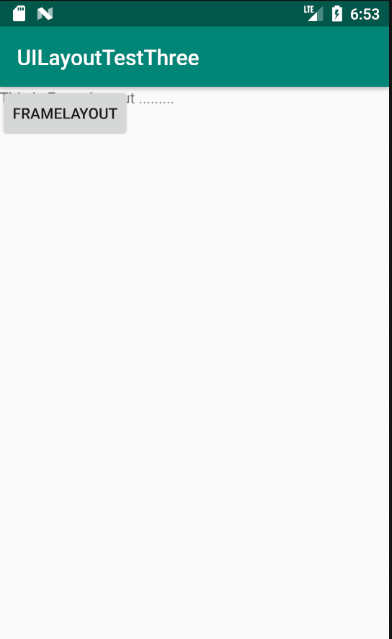
可以看到两个控件都集中在了左上角的位置。因为TextView控件在Button控件之前添加,因此Button在TextView上面。之前我们学习了layout_gravity属性来指定控件在布局中的对齐方式,这里也同样适用。修改activity_main.xml中的代码:
<?xml version="1.0" encoding="utf-8"?>

<FrameLayout xmlns:android="http://schemas.android.com/apk/res/android"

    android:layout_width="match_parent"

    android:layout_height="match_parent">

    <TextView

        android:id="@+id/text_view"

        android:layout_width="wrap_content"

        android:layout_height="wrap_content"

        android:layout_gravity="top"

        android:text="This is FrameLayout ........."

        />

    <Button

        android:id="@+id/button"

        android:layout_width="wrap_content"

        android:layout_height="wrap_content"

        android:layout_gravity="bottom"

        android:text="FrameLayout"

        />

</FrameLayout>

Android五大布局详解——FrameLayout(帧布局)的更多相关文章
- Android 布局详解 -三表格布局(TableLayout)以及重要属性
TableLayout跟TableRow 是一组搭配应用的布局,TableLayout置底,TableRow在TableLayout的上方,而Button.TextView等控件就 ...
- Html5移动端页面自适应布局详解(阿里rem布局)
在移动设备上进行网页的重构或开发,首先得搞明白的就是移动设备上的viewport,通读网上的各种对于viewport的解释之后 大概viewport可以理解为三种 1.layout viewport ...
- Android 布局详解
Android 布局详解 1.重用布局 当一个布局文件被多处使用时,最好<include>标签来重用布局. 例如:workspace_screen.xml的布局文件,在另一个布局文件中被重 ...
- Android精通:TableLayout布局,GridLayout网格布局,FrameLayout帧布局,AbsoluteLayout绝对布局,RelativeLayout相对布局
在Android中提供了几个常用布局: LinearLayout线性布局 RelativeLayout相对布局 FrameLayout帧布局 AbsoluteLayout绝对布局 TableLayou ...
- FrameLayout帧布局
一.FrameLayout(帧布局)重点: FrameLayout(帧布局)可以说是五大布局中最为简单的一个布局,这个布局会默认把控件放在屏幕上的左上角的区域,后续添加的控件会覆盖前一个,如果控件的大 ...
- Grid 网格布局详解
Grid网格布局详解: Grid布局与Flex布局有着一定的相似性,Grid布局是将容器划分成行和列,产生单元格,可以看做是二维布局. 基本概念: 采用网格布局的区域,称为"容器" ...
- android布局 FrameLayout(帧布局)详解
看到一篇很有趣的文章对我就是冲着萌妹子看的 FrameLayout(帧布局) 前言 作为android六大布局中最为简单的布局之一,该布局直接在屏幕上开辟出了一块空白区域, 当我们往里面添加组件的时候 ...
- Android布局详解之一:FrameLayout
原创文章,如有转载,请注明出处:http://blog.csdn.net/yihui823/article/details/6702273 FrameLayout是最简单的布局了.所有放在布局里的 ...
- Android零基础入门第30节:两分钟掌握FrameLayout帧布局
原文:Android零基础入门第30节:两分钟掌握FrameLayout帧布局 前面学习了线性布局.相对布局.表格布局,那么本期来学习第四种布局--FrameLayout帧布局. 一.认识FrameL ...
随机推荐
- react文本溢出hover气泡显示全部文本——JS判断文本溢出
需求: 在文本溢出的时候,显示气泡 JS相关知识 // target js元素 const containerLength = target.width; //当前容器的宽度 const textLe ...
- mac 安装 XX-Net-3.12.11
目录 一 下载xx-net稳定版 二 使用Chrome浏览器 三 开启IPv6 mac禁用SIP机制 SIP 步骤 其他 附完整的csrutil命令 一 下载xx-net稳定版 github稳定版-X ...
- atom常用快捷键-mac亲测
目录 最常用 其他 测试没成功 最常用 中文 快捷键 功能 新建界面窗口 Ctrl + Shift + N 新建文件 Ctrl + N 打开文件 Ctrl + O 打开文件夹 Ctrl + Shift ...
- python2和python3编码问题
欢迎加入python学习交流群 667279387 一.什么是编解码 1.什么是unicode 2.编码方式 二.python中的编解码 1.python2 (1).encode() 和 .decod ...
- HTML5学习第二天!
学习了一天,然后整理内容到现在,感觉昨天的学习效率有点差,哎! 感受尽在代码中,布局真的脑壳疼,仅仅只整理了CSS中的list: <!DOCTYPE html> <html> ...
- Java并发编程系列-(2) 线程的并发工具类
2.线程的并发工具类 2.1 Fork-Join JDK 7中引入了fork-join框架,专门来解决计算密集型的任务.可以将一个大任务,拆分成若干个小任务,如下图所示: Fork-Join框架利用了 ...
- 使用iCamera 测试AR0331 300w高分辨率摄像头小结
使用iCamera 测试AR0331 300w高分辨率摄像头小结 先看下sensor特性 分辨率最高可达:2048*1536=300w像素 1080p帧率最高可达60fps 本次使用usb2,帧率14 ...
- Linux-tac、diff、tree、echo、seq、重定向
1.tac 方向输出文件,最后一行放在第一行的位置输出 2.diff 比较文件的内容 vimdiff:在vim中比较 3. tree 树状图显示目录内容 -d 只显示目录 -L 树状 目录 ...
- 为什么要使用MQ消息中间件?这3个点让你彻底明白!
前言 一个用消息队列的人,不知道为啥用,有点尴尬.没有复习这点,很容易被问蒙,然后就开始胡扯了. 回答:这个问题,咱只答三个最主要的应用场景,不可否认还有其他的,但是只答三个主要的,即以下六个字: 解 ...
- Java使用ObjectMapper做数据转换的常用工具类实现
1.介绍 ObjectMapper类是Jackson库的主要类,它提供一些功能将数据集或对象转换的实现 2.依赖包 <!-- https://mvnrepository.com/artifact ...