
soapUI系列之—-02 Groovy脚本常用方法
------Groovy脚本常用方法
1. 设置参数值:setPropertyValue
a. 设置 project level property
//set to project level property 下面两种写法都可
testRunner.testCase.testSuite.project.setPropertyValue("Name", "propValue");
testRunner.testCase.getTestSuite().getProject().setPropertyValue("Name", "propValue");; //项目对象
b. 设置 testSuite level property
//set to testSuite level property
testRunner.testCase.testSuite.setPropertyValue("Name","testSuiteValue");
testRunner.testCase.getTestSuite().setPropertyValue("Name","testSuiteValue");
c. 设置 testCase level property
//set to testCase level property
testRunner.testCase.setPropertyValue("Name","testCaseValue");
d. 设置 testStep level property
//set to testStep level property
testRunner.testCase.testSteps['Groovy'].setPropertyValue("Name","testSuiteValue");
testRunner.testCase.getTestStepByName("Groovy").setPropertyValue("Name","testSuiteValue");
2. 定位到某个testSuites
def testSuite = testRunner.testCase.testSuite.project.testSuites['testSuites Name'];
3. 获取TestCase个数:getTestCaseCount()
for(int i=0; i<testSuite.getTestCaseCount(); i++) {
if (!testSuite.getTestCaseAt(i).isDisabled()) {
if (!(testSuite.getTestCaseAt(i).getTestStepByName("stepName")).equals()){
.....
}
}
}
4. 获取TestSuite个数:getTestSuiteCount()
testRunner.testCase.testSuite.project.getTestSuiteCount()
5. 获取名称
a. 取test case的名称:getLabel()
def tc = testRunner.testCase;
log.info (tc.getLabel());
b. 取test suite的名称:getLabel()
def ts = testRunner.testCase.testSuite;
log.info (ts.getLabel());
c. 取project 名称
def tp = testRunner.testCase.testSuite.project;
log.info (tp.getName());
6.层级访问
testRunner.testCase.testSuite.project.testSuites[testSuiteName].testCases[testCaseName].testSteps[testStepName]
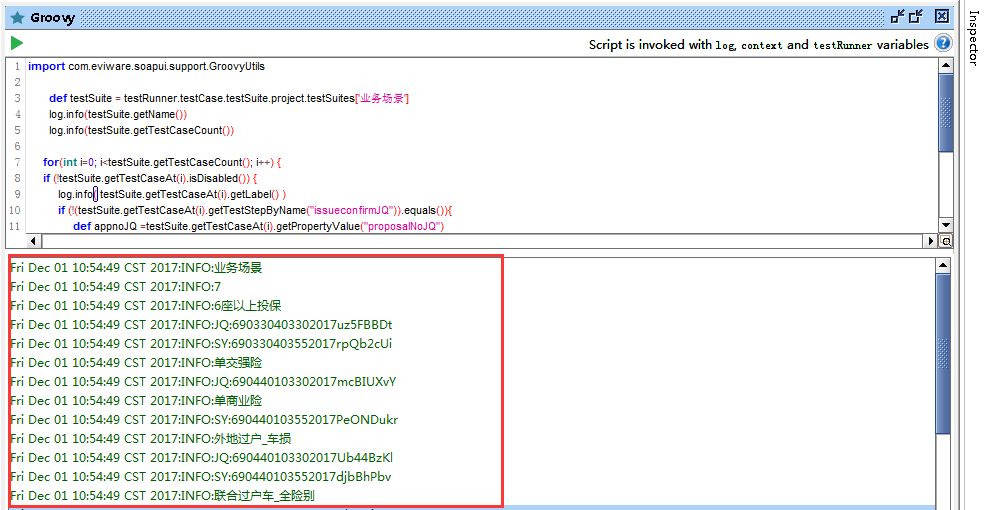
/*Case1:练手详图如下*/
import com.eviware.soapui.support.GroovyUtils
def testSuite = testRunner.testCase.testSuite.project.testSuites['业务场景']
log.info(testSuite.getName())
log.info(testSuite.getTestCaseCount())
for(int i=0; i<testSuite.getTestCaseCount(); i++) {
if (!testSuite.getTestCaseAt(i).isDisabled()) {
log.info( testSuite.getTestCaseAt(i).getLabel() )
if (!(testSuite.getTestCaseAt(i).getTestStepByName("issueconfirmJQ")).equals()){
def appnoJQ =testSuite.getTestCaseAt(i).getPropertyValue("proposalNoJQ")
log.info( "JQ:"+ appnoJQ)
}
if (!(testSuite.getTestCaseAt(i).getTestStepByName("issueconfirmSY")).equals()){
def appnoSY =testSuite.getTestCaseAt(i).getPropertyValue("proposalNoSY")
log.info( "SY:"+ appnoSY)
}
}
}
层级关系如下图所示

log 如下图:
7.SoapUI允许在项目的各个层次中定义变量,常用的层次包括: Project,TestSuite,TestCase,Global等
如果在 Groovy Script中使用这些全局变量的话,可以用以下方法:
def time_num= context.expand ('${#Project#hospitalId}') //##号内为定义哪个级别的属性变量,后面为属性名
soapUI系列之—-02 Groovy脚本常用方法的更多相关文章
- soapUI系列之—-03 Groovy脚本常用方法2
------Groovy脚本常用方法 1.解析Json数据脚本 //groovy读取json的方式很简单,re.body.businessinfo.c2rate读取c2rate对应的值 import ...
- [SoapUI] Post请求Body里面限制特殊字符(&、%),Groovy脚本里特殊字符需要添加“\”转义($)。
SoapUI的Post请求,在body里面不能包含(&.%),如果含有这些特殊字符,请求会报错:在添加的Groovy脚本里有些特殊字符需要使用“\”转义($),不然也会报错.
- soapUI参数中文乱码问题解决方法 (groovy脚本中文乱码)
soapUI参数中文乱码问题解决方法 可能方案1: 字体不支持中文,将字体修改即可: file-preferences-editor settings-select font 修改字体,改成能显示中文 ...
- excel文件的groovy脚本在SoapUI中进行数据驱动测试
SoapUI Pro具有从外部文件读取数据的功能,例如:excel,csv等.但SoapUI不提供从excel文件读取数据的功能.因此,为了从SoapUI中的excel文件中读取数据,我们需要在gro ...
- 180807-Quick-Task 动态脚本支持框架之Groovy脚本加载执行
Quick-Task 动态脚本支持框架之Groovy脚本加载执行 上一篇简答说了如何判断有任务动态添加.删除或更新,归于一点就是监听文件的变化,判断目录下的Groovy文件是否有新增删除和改变,从而判 ...
- [Tomcat 源码分析系列] (二) : Tomcat 启动脚本-catalina.bat
概述 Tomcat 的三个最重要的启动脚本: startup.bat catalina.bat setclasspath.bat 上一篇咱们分析了 startup.bat 脚本 这一篇咱们来分析 ca ...
- jenkins2 groovy脚本参考
使用plugin生成groovy脚本,或者参考已有的groovy脚本. 文章来自:http://www.ciandcd.com文中的代码来自可以从github下载: https://github.co ...
- ODI 12c中使用Groovy脚本创建工程
本文主要介绍在ODI中使用groovy创建工程,并添加一个表转换的映射.要创建groovy脚本,可以从ODI Studio的菜单:工具->Groovy->新脚本 打开一个编辑窗口.在执行下 ...
- JAVA嵌入运行Groovy脚本
摘自: http://shift-alt-ctrl.iteye.com/blog/1938238 . 最近设计一个数据统计系统,系统中上百种数据统计维度,而且这些数据统计的指标可能随时会调整.如果基于 ...
随机推荐
- Vue之computed与watch的使用
<!DOCTYPE html> <html lang="en"> <head> <meta charset="UTF-8&quo ...
- docker 离线安装
适用于: 1.内网安装docker 2.内网升级docker debian 8 sudo apt-get updatesudo apt-get install -d apt-transport-htt ...
- Android流行界面结构——Fragment通过ViewPager(带指示器)嵌套Fragment结构的创建方法详解
原创文章,转载请注明出处http://www.cnblogs.com/baipengzhan/p/6287213.html 当前Android流行界面结构的一种——Fragment通过ViewPage ...
- [LUOGU] P1962 斐波那契数列
求斐波那契第n项. [f(n-1) f(n)] * [0,1] = [f(n) f(n+1)] [1,1] 由此原理,根据矩阵乘法的结合律,用快速幂算出中间那个矩阵的n次方即可. 快速幂本质和普通快速 ...
- dubbo负载均衡策略和集群容错策略
dubbo负载均衡策略 random loadbalance 默认情况下,dubbo是random load balance随机调用实现负载均衡,可以对provider不同实例设置不同的权重,会按照权 ...
- INFORMATION_SCHEMA InnoDB 表
INFORMATION_SCHEMA InnoDB Tables 本节提供InnoDB INFORMATION_SCHEMA表的表定义. 有关相关信息和示例,请参见"InnoDB INFOR ...
- web即时通信技术
ajax jsonp polling setInterval定期发送ajax请求.服务器压力大,浪费流量,大部分是无效请求 ajax long polling ajax发起请求,服务器对于这个请求一直 ...
- centos6.7升级python3.6.1
--安装依赖包 yum -y install openssl-devel bzip2-devel expat-devel gdbm-devel readline-devel sqlite-devel ...
- NLog在asp.net core中的应用
Asp.net core中,自带的Log是在当selfhost运行时,在控制台中输出,不便于查阅,如果用一个log架框,把日志持久化,便于查询. NLog是一个免费的日志记录框架,专门为.net平台下 ...
- Python数据分析 Pandas模块 基础数据结构与简介(一)
pandas 入门 简介 pandas 组成 = 数据面板 + 数据分析工具 poandas 把数组分为3类 一维矩阵:Series 把ndarray强大在可以存储任意数据类型可以专门处理时间数据 二 ...