
Get Start StrangeIOC for Unity3D
好久没有发blog了,因为只发原创内容,而去年发布的那几篇后来发现随便百度到处都是转载的或者各种网站自动扒的,我觉得既然大家都不尊重这种东西就没必要发上来了!不过由于工作原因最近在看Unity的一个IOC框架:StrangeIOC,官方的文档都不是很好理解,找到了一篇比较好的GetStart文章,顺手翻译一下,一来方便自己加深理解,二来还是想共享出来,没事,随意转吧,拜托注明下出处!原文在这里(不太清楚有没有被墙)
译文:
Strange是一个Unity3D中用于控制反转的第三方框架,控制反转(IOC-Inversion of Control)思想是类间解耦的一个重要方法,对于我来说,任何解耦技术都值得去学习。什么是IOC?这里有详细解答。IOC框架已经在企业级开发和其他非游戏软件的开发中成为了主流,并且可以说已经非常成熟。我觉得它可以帮助游戏开发变得更加容易测试,更好的进行协作开发。我非常想尝试它看看到底可以在游戏开发过程中起到多大的帮助程度。
- 在阅读本篇文章之前,最好先去上面提到的官方说明页面了解一下Strange框架的架构(看看它的每个部分的功能以及怎么整合到一块工作的)。
- 这篇文档使用的是signal(消息)而非event(事件)(因为相比event我更喜欢signal)
- 我不会把文档中的Unity项目提供出来,因为我希望大家自己动手去做,这样肯定会学到更多:)
- 这个Hello World示例只是简单的提供注入绑定(injection binding)、命令绑定(command binding)、调解绑定(mediation binding)的示例。
Signal
Assets

    StrangeIoC

        scripts
在Assets文件夹下创建"Game"文件夹,即用来创建Hello World示例的文件夹。文件夹的的结构应该是这样的:
Assets

    Game

        Scenes

        Scripts
在Scripts文件夹下新建名为HelloWorldSignals.cs的c#脚本,这个类将包含所有用到的signal,让我们coding起来:
using System;

using strange.extensions.signal.impl;

namespace Game {

    public class StartSignal : Signal {}

}
在Strange中,这个signal的概念非常像观察者模式(observer pattern)中的事件(events)。在这里,它以命名类的方式实现了继承Strange的Signal类.别急,我们马上会看到怎么去使用它。
using System;

using UnityEngine;

using strange.extensions.context.impl;

using strange.extensions.command.api;

using strange.extensions.command.impl;

using strange.extensions.signal.impl;

namespace Game {

    public class SignalContext : MVCSContext {

        /**

         * Constructor

         */

        public SignalContext (MonoBehaviour contextView) : base(contextView) {

        }

        protected override void addCoreComponents() {

            base.addCoreComponents();

            // bind signal command binder

            injectionBinder.Unbind<ICommandBinder>();

            injectionBinder.Bind<ICommandBinder>().To<SignalCommandBinder>().ToSingleton();

        }

        public override void Launch() {

            base.Launch();

            Signal startSignal = injectionBinder.GetInstance<StartSignal>();

            startSignal.Dispatch();

        }

    }

}
在"Scripts"文件夹下创建一个新文件夹"Controller",到这里有了一点MVC模式的特征。Strange作者建议我们应该以指令类(Command Class)的形式实现各个Controller接口,这个文件夹将包含所有的Command类,现在我们创建一个在StartSignal指令调用时执行的指令。在Controller文件夹下创建名为HelloWorldStartCommand.cs的类:
using System;

using UnityEngine;

using strange.extensions.context.api;

using strange.extensions.command.impl;

namespace Game {

    public class HelloWorldStartCommand : Command {

        public override void Execute() {

            // perform all game start setup here

            Debug.Log("Hello World");

        }

    }

}
using System;

using UnityEngine;

using strange.extensions.context.impl;

namespace Game {

    public class HelloWorldContext : SignalContext {

        /**

         * Constructor

         */

        public HelloWorldContext(MonoBehaviour contextView) : base(contextView) {

        }

        protected override void mapBindings() {

            base.mapBindings();

            // we bind a command to StartSignal since it is invoked by SignalContext (the parent class) on Launch()

            commandBinder.Bind<StartSignal>().To<HelloWorldStartCommand>().Once();

        }

    }

}
在这里,我们把StartSignal类绑定(bind)给了HelloWorldStartCommand类。这样在StartSignal的实例被调用时,HelloWorldStartCommand会进行实例化(instantiated)和执行(executed),注意在我们的示例中StartSignal信号会在SignalContext.Launch()方法中调用发出。
using System;

using UnityEngine;

using strange.extensions.context.impl;

namespace Game {

    public class HelloWorldBootstrap : ContextView {

        void Awake() {

            this.context = new HelloWorldContext(this);

        }

    }

}

namespace Game {

    public interface ISomeManager {

        /**

         * Perform some management

         */

        void DoManagement();

    }

}
这就是我们示例当中的manager接口,注意:Strange的作者建议我们总是使用一个接口然后通过injectionBinder将它映射到一个真正的实现类,当然,你也可以使用多对多的映射。接下来我们创建一个具体实现类,在Scripts文件夹下创建ManagerAsNormalClass.cs脚本:
using System;

using UnityEngine;

namespace Game {

    public class ManagerAsNormalClass : ISomeManager {

        public ManagerAsNormalClass() {

        }

        #region ISomeManager implementation

        public void DoManagement() {

            Debug.Log("Manager implemented as a normal class");

        }

        #endregion

    }

}
如果你仔细在看你可能会发现这是一个没有MonoBehaviour的manager,别急,一会再介绍怎么bind有MonoBehaviour的
现在我们来创建一个简单的交互场景,效果是当一个Button按下时,ISomeManager的DoManagement函数执行,这里我们有一个要求:用MVC思想---对controll层(ISomeManager)和view层(控制Button触发事件的脚本)完全解耦,view层只需要通知controll层:"hey!button被点击了",至于接下来发生什么交由controll层进行逻辑处理。
现在缺一个view层,把它创建出来吧---在Game文件夹下创建"View"文件夹,创建HelloWorldView.cs脚本:
using System;

using UnityEngine;

using strange.extensions.mediation.impl;

using strange.extensions.signal.impl;

namespace Game {

    public class HelloWorldView : View {

        public Signal buttonClicked = new Signal();

        private Rect buttonRect = new Rect(, , , );

        public void OnGUI() {

            if(GUI.Button(buttonRect, "Manage")) {

                buttonClicked.Dispatch();

            }

        }

    }

}
这里继承的Strange框架中的View类已经包含了MonoBehaviour。所有使用Strange context的View层类都必须继承这个Strange的View类,我们刚刚创建的View类只有一个交互功能:在点击名为"Manage"的Button后,调用一个 generic signal(通用信号) 。
Strange作者建议对每个View创建对应的Mediator。Mediator是一个薄层,他的作用是让与之对应的View和整个程序进行交互。mediation binder的作用是把View映射到它对应的mediator上。所以接下来为View层创建对应的mediator---在"view"文件夹下创建HelloWorldMediator.cs脚本:
using System;

using UnityEngine;

using strange.extensions.mediation.impl;

namespace Game {

    public class HelloWorldMediator : Mediator {

        [Inject]

        public HelloWorldView view {get; set;}

        [Inject]

        public ISomeManager manager {get; set;}

        public override void OnRegister() {

            view.buttonClicked.AddListener(delegate() {

                manager.DoManagement();

            });

        }

    }

}
在这段代码里我们可以看到神奇的"Inject"标注(Inject attribute)。这个"Inject"标注只能和变量搭配使用,当一个变量上面有"Inject"标注时,意味着Strange会把这个变量的一个实例自动注入到它对应映射的context中。据此从我们上面的代码来分析,在这里我们获取到了"view"和"manager"的实例,并且不用去关心这些个实例是怎么来的。
OnRegister()是一个可以被重写的方法,它用来标记实例注入完成已经可以使用了,它的意义主要是进行初始化,或者说做准备。在上面的类中,OnRegister方法中为HellowWorldView.buttonClicked signal添加了一个监听器,这个监听器的逻辑是按下就执行manager.DoManagement方法。
protected override void mapBindings() {

    base.mapBindings();

    // we bind a command to StartSignal since it is invoked by SignalContext (the parent class) during on Launch()

    commandBinder.Bind<StartSignal>().To<HelloWorldStartCommand>().Once();

    // bind our view to its mediator

    mediationBinder.Bind<HelloWorldView>().To<HelloWorldMediator>();

    // bind our interface to a concrete implementation

    injectionBinder.Bind<ISomeManager>().To<ManagerAsNormalClass>().ToSingleton();

}
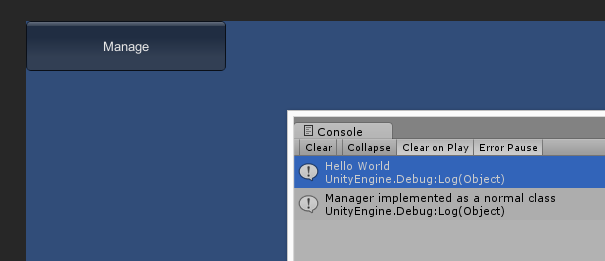
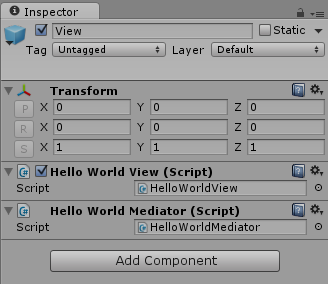
using System;

using UnityEngine;

namespace Game {

    public class ManagerAsMonoBehaviour : MonoBehaviour, ISomeManager {

        #region ISomeManager implementation

        public void DoManagement() {

            Debug.Log("Manager implemented as MonoBehaviour");

        }

        #endregion

    }

}
在HelloStrangeScene中,创建一个新的GameObject名为"Manager",add 上面创建好的 ManagerAsMonobehaviour脚本
protected override void mapBindings() {

    base.mapBindings();

    // we bind a command to StartSignal since it is invoked by SignalContext (the parent class) during on Launch()

    commandBinder.Bind<StartSignal>().To<HelloWorldStartCommand>().Once();

    // bind our view to its mediator

    mediationBinder.Bind<HelloWorldView>().To<HelloWorldMediator>();

    // REMOVED!!!

    //injectionBinder.Bind<ISomeManager>().To<ManagerAsNormalClass>().ToSingleton();

    // bind the manager implemented as a MonoBehaviour

    ManagerAsMonoBehaviour manager = GameObject.Find("Manager").GetComponent<ManagerAsMonoBehaviour>();

    injectionBinder.Bind<ISomeManager>().ToValue(manager);

}
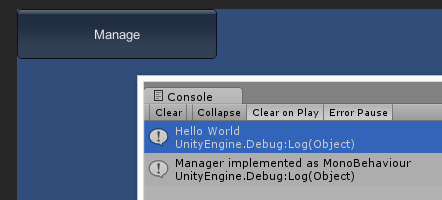
与把ISomeManager映射为一个类型相反,我们把这个ManagerAsMonobehaviour映射为一个实例值(instance value)。
using System;

using strange.extensions.signal.impl;

namespace Game {

    public class StartSignal : Signal {}

    public class DoManagementSignal : Signal {} // A new signal!

}
我们创建command映射到signal:在Controller文件夹下创建一个脚本DoManagementCommand.cs
using System;

using UnityEngine;

using strange.extensions.context.api;

using strange.extensions.command.impl;

namespace Game {

    public class DoManagementCommand : Command {

        [Inject]

        public ISomeManager manager {get; set;}

        public override void Execute() {

            manager.DoManagement();

        }

    }

}
在这个类,我们把ISomeManager注入到command类,并且在Execute方法中让它的DoManagement方法执行。
using System;

using UnityEngine;

using strange.extensions.mediation.impl;

namespace Game {

    public class HelloWorldMediator : Mediator {

        [Inject]

        public HelloWorldView view {get; set;}

        [Inject]

        public DoManagementSignal doManagement {get; set;}

        public override void OnRegister() {

            view.buttonClicked.AddListener(doManagement.Dispatch);

        }

    }

}
现在我们的mediator类中已经没有任何对ISomeManager接口的调用了。取而代之的是要在mediator类获取到DoManagementSignal的实例,当button点击时,这个类会发出DoManagementSignal。mediator层不需要知道任何manager的事情,它只管发送信号(signal)出去。
protected override void mapBindings() {

    base.mapBindings();

    // we bind a command to StartSignal since it is invoked by SignalContext (the parent class) during on Launch()

    commandBinder.Bind<StartSignal>().To<HelloWorldStartCommand>().Once();

    commandBinder.Bind<DoManagementSignal>().To<DoManagementCommand>().Pooled(); // THIS IS THE NEW MAPPING!!!

    // bind our view to its mediator

    mediationBinder.Bind<HelloWorldView>().To<HelloWorldMediator>();

    // bind the manager implemented as a MonoBehaviour

    ManagerAsMonoBehaviour manager = GameObject.Find("Manager").GetComponent<ManagerAsMonoBehaviour>();

    injectionBinder.Bind<ISomeManager>().ToValue(manager);

}
运行场景,效果和之前一样,但是我们在代码层面把这块代码重构了。
Get Start StrangeIOC for Unity3D的更多相关文章
- 框架学习笔记:Unity3D的MVC框架——StrangeIoC
作为从AS3页游走过来的人,看见StrangeIoC会额外亲切,因为StrangeIoC的设计和RobotLegs几乎一致,作为一款依赖注入/控制反转(IoC)的MVC框架,StrangeIoC除了使 ...
- 关于StrangeIOC框架
在Unity上进行开发,请先看对其开发模式应用的讨论: http://www.reddit.com/r/Unity3D/comments/1nb06h/unity_design_patterns_an ...
- Unity3D手游开发实践
<腾讯桌球:客户端总结> 本次分享总结,起源于腾讯桌球项目,但是不仅仅限于项目本身.虽然基于Unity3D,很多东西同样适用于Cocos.本文从以下10大点进行阐述: 架构设计 原生插件/ ...
- StrangeIoc框架学习
StrangeIoc是一款基于MVCS的一种框架,是对MVC思想的扩展,是专门针对Unity3D开发的一款框架,非常好用. 一.MVCS分别代表什么 MVCS框架是一种模块的分离,一种写代码的规则,目 ...
- (转)Unity3D手游开发实践
作者:吴秦出处:http://www.cnblogs.com/skynet/本文基于署名 2.5 中国大陆许可协议发布,欢迎转载,演绎或用于商业目的,但是必须保留本文的署名吴秦(包含链接). (转)& ...
- Unity3d学习 预设体(prefab)的一些理解
之前一直在想如果要在Unity3d上创建很多个具有相同结构的对象,是如何做的,后来查了相关资料发现预设体可以解决这个问题! 预设体的概念: 组件的集合体 , 预制物体可以实例化成游戏对象. 创建预设体 ...
- Unity3d入门 - 关于unity工具的熟悉
上周由于工作内容较多,花在unity上学习的时间不多,但总归还是学习了一些东西,内容如下: .1 根据相关的教程在mac上安装了unity. .2 学习了unity的主要的工具分布和对应工具的相关的功 ...
- TDD在Unity3D游戏项目开发中的实践
0x00 前言 关于TDD测试驱动开发的文章已经有很多了,但是在游戏开发尤其是使用Unity3D开发游戏时,却听不到特别多关于TDD的声音.那么本文就来简单聊一聊TDD如何在U3D项目中使用以及如何使 ...
- warensoft unity3d 更新说明
warensoft unity3d 组件的Alpha版本已经发布了将近一年,很多网友发送了改进的Email,感谢大家的支持. Warensoft Unity3D组件将继续更新,将改进的功能如下: 1. ...
随机推荐
- PHP获取文件后缀名的三种方法
如下: <? PHP获取文件后缀名的几种方法1: function get_file_type($filename){ $type = substr($filename, strrpos($fi ...
- 【6】Laravel5.1的migration数据库迁移
查看Laravel5.1的目录 当你配置好数据库后,在命令行执行下边的操作 php artisan migrate 打开数据库会发现,我们的数据库多了四个表,神奇吧! 打开任意一个migration查 ...
- myeclipse10 如何把代码预览的窗口去掉
1,选择菜单: windows -> preferences2,在弹出窗口中选择General-> Editors -> FileAssociations3,在上方框内选择*.jsp ...
- Effective Java 电子书 apk版本下载
下载安装包以后,安装即可阅读该书了,并且实时展示每章节代码哦,并且可以运行哦,赶快下载体验吧. Effective Java中文第二版下载地址:下载 应用截图:
- Yii 2.0: yii2-highcharts-widget创建饼状图
安装 The preferred way to install this extension is through composer. 项目根目录下执行: php composer.phar requ ...
- ecshop安全方面的一些参考建议
一,ecshop安装,其实很简单,只要一直下一步下一步点击即可,这样总是没有错的,因为官方不可能给我们一个有问题的程序,尽量从简即可. 请注意一下两点 A:在安装ecshop的时候,不要将所有文件都设 ...
- Python(四):数字连珠2
对上次的代码作了一些修改.在码的过程中发现,最核心的部分是在横向.竖向和两个对角方向上找到5个以上相同的数字. 自己的思路是将x行y列所在的x行.y列,以及以此为交叉点的两点对角线上的数字,转化成字符 ...
- Django 403错误:CSRF verification failed. Request aborted
网上有解决办法,我自己的组合是: 一,FORM加标识 <form action="" method="post"> {% csrf_token %} ...
- 这样就算会了PHP么?-11
PHP中关于类的基本内容练习: <?php class SportObject{ public $name; public $height; public $avirdupois; public ...
- ASP.NET MVC3快速入门——第四节、添加一个模型
在本节中我们将追加一些类来管理数据库中的电影.这些类将成为我们的MVC应用程序中的“模型”部分.我们将使用一个.NET Framework的被称之为“Entiry Framework”的数据访问技术来 ...