
springboot2.x整合JPA
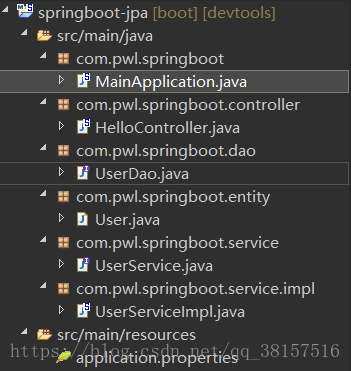
项目结构
pom
-
<project xmlns="http://maven.apache.org/POM/4.0.0"
-
xmlns:xsi="http://www.w3.org/2001/XMLSchema-instance"
-
xsi:schemaLocation="http://maven.apache.org/POM/4.0.0 http://maven.apache.org/maven-v4_0_0.xsd">
-
<modelVersion>4.0.0</modelVersion>
-
<groupId>com.pwl.springboot-jpa</groupId>
-
<artifactId>springboot-jpa</artifactId>
-
<packaging>war</packaging>
-
<version>0.0.1-SNAPSHOT</version>
-
<name>Mybatis Maven Webapp</name>
-
<url>http://maven.apache.org</url>
-
<parent>
-
<groupId>org.springframework.boot</groupId>
-
<artifactId>spring-boot-starter-parent</artifactId>
-
<version>2.0.1.RELEASE</version>
-
</parent>
-
<dependencies>
-
<dependency>
-
<groupId>junit</groupId>
-
<artifactId>junit</artifactId>
-
<scope>test</scope>
-
</dependency>
-
<dependency>
-
<groupId>org.springframework.boot</groupId>
-
<artifactId>spring-boot-starter-web</artifactId>
-
</dependency>
-
<dependency>
-
<groupId>org.springframework.boot</groupId>
-
<artifactId>spring-boot-starter-data-jpa</artifactId>
-
</dependency>
-
<dependency>
-
<groupId>mysql</groupId>
-
<artifactId>mysql-connector-java</artifactId>
-
</dependency>
-
<dependency>
-
<groupId>org.springframework.boot</groupId>
-
<artifactId>spring-boot-devtools</artifactId>
-
<optional>true</optional>
-
</dependency>
-
</dependencies>
-
<build>
-
<plugins>
-
<plugin>
-
<groupId>org.apache.maven.plugins</groupId>
-
<artifactId>maven-compiler-plugin</artifactId>
-
<configuration>
-
<source>1.8</source>
-
<target>1.8</target>
-
</configuration>
-
</plugin>
-
</plugins>
-
</build>
-
-
</project>
然后配置数据库连接
-
spring.datasource.url=jdbc:mysql://127.0.0.1:3306/springboot?useSSL=false
-
spring.datasource.username=root
-
spring.datasource.password=root
-
spring.datasource.driver-class-name=com.mysql.jdbc.Driver
-
-
spring.jpa.properties.hibernate.hbm2ddl.auto=update
-
spring.jpa.properties.hibernate.dialect=org.hibernate.dialect.MySQL5InnoDBDialect
-
spring.jpa.show-sql= true
实体类
-
package com.pwl.springboot.entity;
-
-
import javax.persistence.Entity;
-
import javax.persistence.Id;
-
import javax.persistence.Table;
-
-
@Entity
-
@Table(name="user") //指定数据库表名
-
public class User {
-
@Id
-
private String id;
-
private String name;
-
private String age;
-
public String getId() {
-
return id;
-
}
-
public void setId(String id) {
-
this.id = id;
-
}
-
public String getName() {
-
return name;
-
}
-
public void setName(String name) {
-
this.name = name;
-
}
-
public String getAge() {
-
return age;
-
}
-
public void setAge(String age) {
-
this.age = age;
-
}
-
}
service层
UserService接口
-
package com.pwl.springboot.service;
-
-
import com.pwl.springboot.entity.User;
-
-
public interface UserService {
-
public User getUserByname(String name);
-
}
UserServiceImpl实现类
-
package com.pwl.springboot.service.impl;
-
-
import org.springframework.beans.factory.annotation.Autowired;
-
import org.springframework.stereotype.Service;
-
-
import com.pwl.springboot.dao.UserDao;
-
import com.pwl.springboot.entity.User;
-
import com.pwl.springboot.service.UserService;
-
-
@Service
-
public class UserServiceImpl implements UserService{
-
@Autowired
-
private UserDao userDao;
-
@Override
-
public User getUserByname(String name) {
-
User user = userDao.findByName(name);
-
return user;
-
}
-
-
}
dao
-
package com.pwl.springboot.dao;
-
-
import org.springframework.data.jpa.repository.JpaRepository;
-
-
import com.pwl.springboot.entity.User;
-
-
public interface UserDao extends JpaRepository<User, String> {
-
public User findByName(String name);
-
}
主要就是继承了JpaRepository
具体的关键字,使用方法和生产成SQL如下表所示
| Keyword | Sample | JPQL snippet |
|---|---|---|
| And | findByLastnameAndFirstname | … where x.lastname = ?1 and x.firstname = ?2 |
| Or | findByLastnameOrFirstname | … where x.lastname = ?1 or x.firstname = ?2 |
| Is,Equals | findByFirstnameIs,findByFirstnameEquals | … where x.firstname = ?1 |
| Between | findByStartDateBetween | … where x.startDate between ?1 and ?2 |
| LessThan | findByAgeLessThan | … where x.age < ?1 |
| LessThanEqual | findByAgeLessThanEqual | … where x.age ⇐ ?1 |
| GreaterThan | findByAgeGreaterThan | … where x.age > ?1 |
| GreaterThanEqual | findByAgeGreaterThanEqual | … where x.age >= ?1 |
| After | findByStartDateAfter | … where x.startDate > ?1 |
| Before | findByStartDateBefore | … where x.startDate < ?1 |
| IsNull | findByAgeIsNull | … where x.age is null |
| IsNotNull,NotNull | findByAge(Is)NotNull | … where x.age not null |
| Like | findByFirstnameLike | … where x.firstname like ?1 |
| NotLike | findByFirstnameNotLike | … where x.firstname not like ?1 |
| StartingWith | findByFirstnameStartingWith | … where x.firstname like ?1 (parameter bound with appended %) |
| EndingWith | findByFirstnameEndingWith | … where x.firstname like ?1 (parameter bound with prepended %) |
| Containing | findByFirstnameContaining | … where x.firstname like ?1 (parameter bound wrapped in %) |
| OrderBy | findByAgeOrderByLastnameDesc | … where x.age = ?1 order by x.lastname desc |
| Not | findByLastnameNot | … where x.lastname <> ?1 |
| In | findByAgeIn(Collection ages) | … where x.age in ?1 |
| NotIn | findByAgeNotIn(Collection age) | … where x.age not in ?1 |
| TRUE | findByActiveTrue() | … where x.active = true |
| FALSE | findByActiveFalse() | … where x.active = false |
| IgnoreCase | findByFirstnameIgnoreCase | … where UPPER(x.firstame) = UPPER(?1) |
最后就是controller
-
package com.pwl.springboot.controller;
-
-
import org.springframework.beans.factory.annotation.Autowired;
-
import org.springframework.stereotype.Controller;
-
import org.springframework.web.bind.annotation.RequestMapping;
-
import org.springframework.web.bind.annotation.ResponseBody;
-
import com.pwl.springboot.entity.User;
-
import com.pwl.springboot.service.UserService;
-
-
@Controller
-
@RequestMapping("/")
-
public class HelloController {
-
@Autowired
-
private UserService userService;
-
-
@RequestMapping("hello")
-
@ResponseBody
-
public String hello() {
-
return "hello_world";
-
}
-
-
@RequestMapping("getUser")
-
@ResponseBody
-
public User getUser(String name) {
-
return userService.getUserByname(name);
-
}
-
-
}
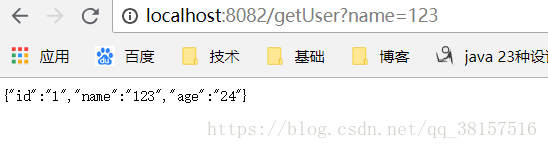
测试结果

原文地址:https://blog.csdn.net/qq_38157516/article/details/82379078
springboot2.x整合JPA的更多相关文章
- springboot2.0整合jpa
在整合的遇到各种坑,以下是我整合的流程 1.pom.xml文件 <dependencies> <dependency> <groupId>org.springfra ...
- spring boot 系列之四:spring boot 整合JPA
上一篇我们讲了spring boot 整合JdbcTemplate来进行数据的持久化, 这篇我们来说下怎么通过spring boot 整合JPA来实现数据的持久化. 一.代码实现 修改pom,引入依赖 ...
- 玩转spring mvc(四)---在spring MVC中整合JPA
关于在Spring MVC中整合JPA是在我的上一篇关于spring mvc基本配置基础上进行的,所以大家先参考一下我的上一篇文章:http://blog.csdn.net/u012116457/ar ...
- SpringBoot整合系列-整合JPA
原创作品,可以转载,但是请标注出处地址:https://www.cnblogs.com/V1haoge/p/9959865.html SpringBoot整合JPA进行数据库开发 步骤 第一步:添加必 ...
- 【SpringBoot】息队列介绍和SpringBoot2.x整合RockketMQ、ActiveMQ
========================13.消息队列介绍和SpringBoot2.x整合RockketMQ.ActiveMQ ======================= 1.JMS介绍和 ...
- 第二篇:SpringBoot2.0整合ActiveMQ
本篇开始将具体介绍SpringBoot如何整合其它项目. 如何创建SpringBoot项目 访问https://start.spring.io/. 依次选择构建工具Maven Project.语言ja ...
- 消息队列介绍和SpringBoot2.x整合RockketMQ、ActiveMQ 9节课
1.JMS介绍和使用场景及基础编程模型 简介:讲解什么是小写队列,JMS的基础知识和使用场景 1.什么是JMS: Java消息服务(Java Message Service),Java ...
- SpringBoot2.x整合Redis实战 4节课
1.分布式缓存Redis介绍 简介:讲解为什么要用缓存和介绍什么是Redis,新手练习工具 1.redis官网 https://redis.io/download 2.新手 ...
- Spring Boot整合JPA、Redis和Swagger2
好久没有总结了,最近也一直在学习.今天就把spring boot与其它技术的整合做个小总结,主要是jpa.redis和swagger2.公司里有用到这些,整合起来也很简单. 首先,新建一个Spring ...
随机推荐
- objectarx之判断三点是否在一条直线上
bool CCommonFuntion::IsOnLine(AcGePoint2d& pt1, AcGePoint2d& pt2, AcGePoint2d& pt3){ AcG ...
- [已转移]js事件流之事件冒泡的应用----事件委托
该文章已转移到博客:https://cynthia0329.github.io/ 什么是事件委托? 它还有一个名字叫事件代理. JavaScript高级程序设计上讲: 事件委托就是利用事件冒泡,只指定 ...
- SQL执行计划Cost与性能之间的的关系
关于执行计划Cost的三个疑问: 1. 执行计划的Cost越低,SQL就一定跑得越快吗?或者说Cost 和 执行时间成比例关系吗? 2. Oracle 默认产生的执行计划是Cost最低的吗? 3. 如 ...
- mysql通过日志恢复数据库
案例:http://www.linuxidc.com/Linux/2012-11/74005.htm http://blog.csdn.net/ssrc0604hx/article/details/1 ...
- 封装:PDO与MySQL之间的无缝切换
以下的例子是将MySQL和PDO封装好,再无缝切换: 文件目录: config.php文件: <?php return array( // 数据库配置 'DB' => array( ' ...
- Java练习 SDUT - 2669_2-2 Time类的定义
2-2 Time类的定义 Time Limit: 1000 ms Memory Limit: 65536 KiB Problem Description 通过本题目的练习可以掌握类与对象的定义: 设计 ...
- 洛谷4137 mex题解 主席树
题目链接 虽然可以用离线算法水过去,但如果强制在线不就gg了. 所以要用在线算法. 首先,所有大于n的数其实可以忽略,因为mex的值不可能大于n 我们来设想一下,假设已经求出了从0到n中所有数在原序列 ...
- 阿里云MaxCompute 2019-4月刊
摘要: 4月新功能发布,精彩技术好文推荐,5月线上线下活动抢先知道,尽在4月刊. 您好,MaxCompute 2019.4月刊为您带来产品最新动态和丰富的产品技术内容,欢迎阅读. 导读 [功能发布]4 ...
- 60.0.1(64位)windows版 uploadify使用有问题
http://mozilla.com.cn/thread-403024-1-1.html 60.0.1(64位)版,在使用uploadify插件,上传附件时,上传没有问题,可以成功,但执行上传成功后的 ...
- hdu 3832 Earth Hour(最短路变形)
Earth Hour Time Limit: 2000/1000 MS (Java/Others) Memory Limit: 125536/65536 K (Java/Others)Total ...