
[转]vue router基本使用
第一步:安装 cnpm install vue-router --save
路由配置基本语法
router下index.js引入
import Vue from "vue";

import Router from "vue-router";

import HelloWorld from "@/components/HelloWorld";

按需引入  底下会写到懒加载路由
export default new Router({

  routers: [{

    path: "router",

    component: '',

    meta: {}

    children: [{

        path: 'router1',

        component: Router1

      },

      {

        path: 'router2',

        component: Router2

      }

    ]

  }]

})

在main.js中
import router from './router' //引入

//使用

new Vue({

  el: '#app',

  router,

  store,

  components: {

    App

  },

  template: '<App/>'

})
正式入代码环节~
组件:
<template>

  <div class="router">

    <h3>路由基本使用</h3>

  </div>

</template>

<script>

export default {

  name: "router",

  data() {

    return {};

  }

};

</script>

<style scoped>

</style>
路由index.js:
import Vue from "vue";

import Router from "vue-router";

//组件

import router from "@/components/router";

Vue.use(Router);

export default new Router({

  routes: [{

    path: "/router",

    component: router,

  }]

});
路由的跳转
使用标签router-link 通过to绑定到上面
<router-link to="/lifeCycle">生命周期</router-link>   直接复制

<router-link :to="vuex">vuex</router-link>           给变量

data() {

    return {

      vuex: "/vuex",

    };

  }
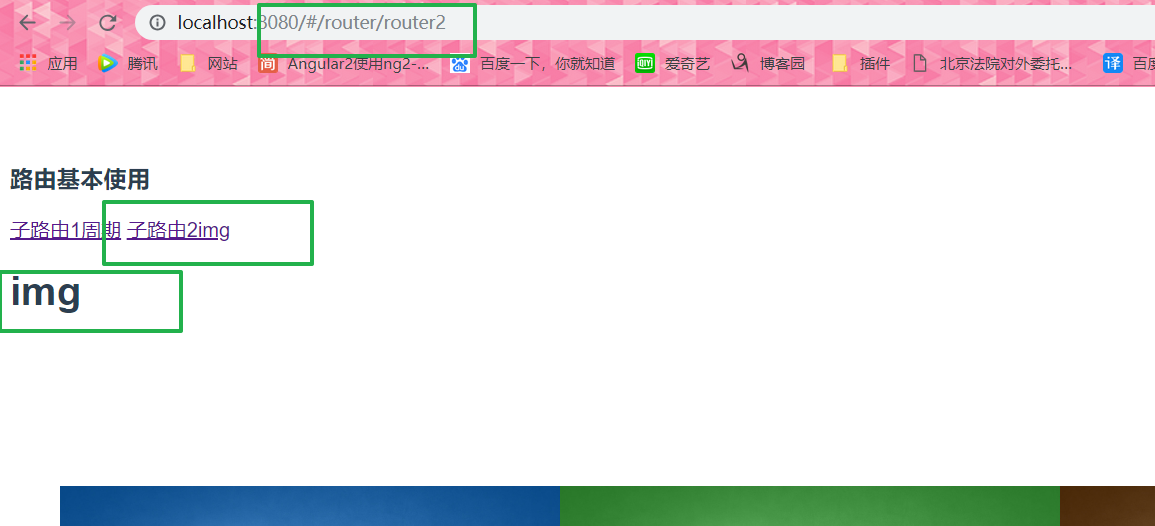
定义子路由
<router-link to="/router/router1">子路由1周期</router-link>

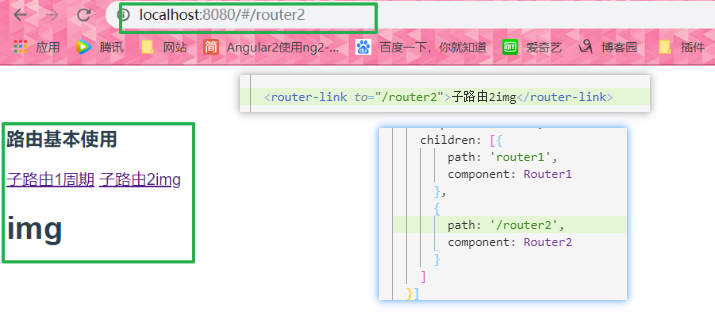
<router-link to="/router2">子路由2img</router-link>

<router-view></router-view>
routes: [{

    path: "/router",

    component: router,

    children: [{

        path: 'router1',

        component: Router1

      },

      {

        path: 'router2',

        component: Router2

      }

    ]

  }]

子路由中不用加'/' 如果加了就是从根路径跳转
路由传递参数
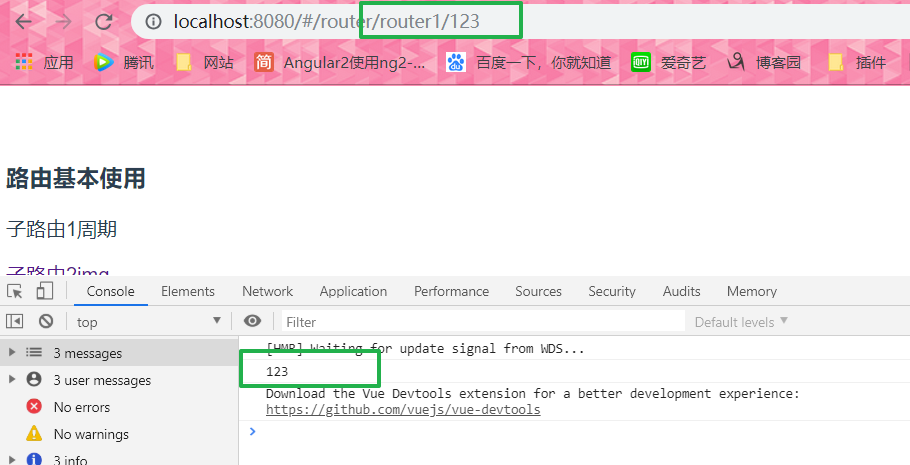
1.路由中配置 获取: this.$route.params.id
直接写:
  <router-link to="/router/router2/11111">子路由2img</router-link>      路由中一定别忘记了 path: 'router2/:名字',
<p @click="getDescribe('123')">子路由1周期</p>

  methods: {

    getDescribe(id) {

      this.$router.push({

        path: `/router/router1/${id}`

      });

    }

  },

  mounted() {

    console.log(this.$route.params.id);

  }
2.params 获取: this.$route.params.id
    <p @click="getDescribe('222222')">子路由1周期</p>

    methods: {

    getDescribe(id) {

      this.$router.push({

        name: "router1",

        params: {

          id: id

        }

      });

    }

  },

  mounted() {

    console.log(this.$route.params.id);

  }
可以看见 地址栏参数不显示 与query相反
 children: [{

        path: 'router1/:id',

        name: "router1",       //通过name值 params

        component: Router1

      },

      {

        path: 'router2',

        component: Router2

      }

    ]
3.query 获取: this.$route.query.id
直接写:
<p @click="getDescribe('6666')">子路由1周期</p>
methods: {
getDescribe(id) {
this.$router.push({
path: "/router/router1",
query: {
id: id
}
});
}
}
//子组件
mounted: function() {
console.log(this.$route.query.id);
}
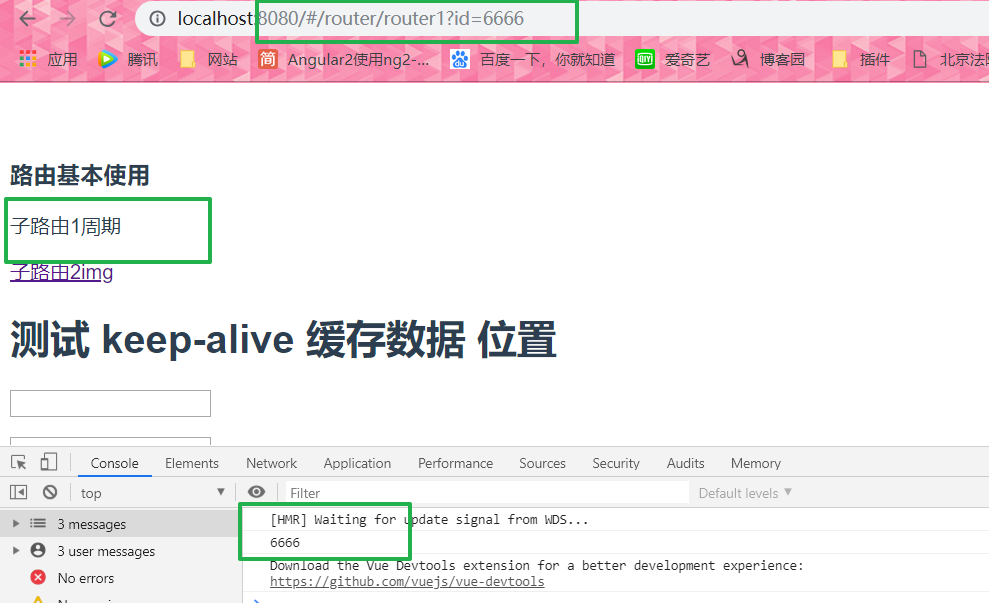 注意看 现在的地址栏和上面两种方式不同 ?=
上面例举了三种跳转传参 第一路由配置 第二params 第三query 注意获取的时候是$route 没有 r
下面三种跳转的方法与区别:push replace go
router.go(n)

这个方法的参数是一个整数, 意思是在 history 记录中向前或者后退多少步, 类似 window.history.go(n)
methods:{

    next(){

        this.$router.go(1);  //前进

    },

    prevent(){

        this.$router.go(-1);  //后退

    }

}
router.push(location)

想要导航到不同的 URL, 则使用 router.push 方法。 这个方法会向 history 栈添加一个新的记录, 所以, 当用户点击浏览器后退按钮时, 则回到之前的 URL。

router.replace(location)

跟 router.push 很像, 唯一的不同就是, 它不会向 history 添加新记录, 而是替换掉当前的 history 记录。是当前一次哦~
路由的别名和重定向
别名:alias
/a 的别名是 /b,意味着,当用户访问 /b 时,URL 会保持为 /b,但是路由匹配则为 /a,就像用户访问 /a 一样
export default new Router({

  routes: [{

    path: "/",

    alias: '/router',

    component: router,

  }]

});
重定向:redirect
“重定向”的意思是,当用户访问 /a时,URL 将会被替换成 /b,然后匹配路由为 /b
export default new Router({

  routes: [{

    path: "/",

    alias: '/router',

    component: router,

    redirect: '/watch'

  }, {

    path: "/watch",

    component: watch,

  }]

});
router懒加载
export default new Router({

  routes: [{

    path: "/",

    alias: '/router',

    component: (resolve) => require(['@/components/router.vue'], resolve),

    children: [{

        path: 'router1/:id',

        name: "router1",

        component: Router1

      },

      {

        path: 'router2/:cy',

        component: Router2

      }

    ]

  }, {

    path: "/watch",

    component: (resolve) => require(['@/components/watch.vue'], resolve),

  }]

});
路由守卫钩子
beforeRouteEnter (to, from, next) {

    // 在渲染该组件的对应路由被 confirm 前调用

    // 不!能!获取组件实例 `this`

    // 因为当守卫执行前,组件实例还没被创建
    next(vm => {
// 通过 `vm` 访问组件实例} beforeRouteUpdate (to, from, next) {
})
// 在当前路由改变,但是该组件被复用时调用
// 举例来说,对于一个带有动态参数的路径 /foo/:id,在 /foo/1 和 /foo/2 之间跳转的时候,
// 由于会渲染同样的 Foo 组件,因此组件实例会被复用。而这个钩子就会在这个情况下被调用。
// 可以访问组件实例 `this`
next();
} beforeRouteLeave (to, from, next) {
// 导航离开该组件的对应路由时调用
// 可以访问组件实例 `this`
next()
}

路由就告一段落了~~~~~~~~~~~~by~~~
---------------------
作者:love编程的小可爱
来源:CNBLOGS
原文:https://www.cnblogs.com/chen-yi-yi/p/11151941.html
版权声明:本文为作者原创文章,转载请附上博文链接!
内容解析By:CSDN,CNBLOG博客文章一键转载插件
[转]vue router基本使用的更多相关文章
- Vue 2.0 + Vue Router + Vuex
用 Vue.js 2.x 与相配套的 Vue Router.Vuex 搭建了一个最基本的后台管理系统的骨架. 当然先要安装 node.js(包括了 npm).vue-cli 项目结构如图所示: ass ...
- vue router 只需要这么几步
<!DOCTYPE html><html lang="en"><head> <meta charset="UTF-8" ...
- Vue.js 2.x笔记:路由Vue Router(6)
1. Vue Router简介与安装 1.1 Vue Router简介 Vue Router 是 Vue.js 官方的路由管理器.它和 Vue.js 的核心深度集成,构建单页面应用. Vue Rout ...
- Vue Router学习笔记
前端的路由:一个地址对应一个组件 Vue Router中文文档 一.路由基本使用 第1步:导入Vue Router: <script src="https://unpkg.com/vu ...
- vue router.push(),router.replace(),router.go()和router.replace后需要返回两次的问题
转载:https://www.cnblogs.com/lwwen/p/7245083.html https://blog.csdn.net/qq_15385627/article/details/83 ...
- 前端MVC Vue2学习总结(八)——Vue Router路由、Vuex状态管理、Element-UI
一.Vue Router路由 二.Vuex状态管理 三.Element-UI Element-UI是饿了么前端团队推出的一款基于Vue.js 2.0 的桌面端UI框架,手机端有对应框架是 Mint U ...
- 深入浅出的webpack4构建工具---webpack+vue+router 按需加载页面(十五)
1. 为什么需要按需加载? 对于vue单页应用来讲,我们常见的做法把页面上所有的代码都打包到一个bundle.js文件内,但是随着项目越来越大,文件越来越多的情况下,那么bundle.js文件也会越来 ...
- 深入浅出的webpack构建工具--webpack4+vue+router项目架构(十四)
阅读目录 一:vue-router是什么? 二:vue-router的实现原理 三:vue-router使用及代码配置 四:理解vue设置路由导航的两种方法. 五:理解动态路由和命名视图 六:理解嵌套 ...
- python 全栈开发,Day91(Vue实例的生命周期,组件间通信之中央事件总线bus,Vue Router,vue-cli 工具)
昨日内容回顾 0. 组件注意事项!!! data属性必须是一个函数! 1. 注册全局组件 Vue.component('组件名',{ template: `` }) var app = new Vue ...
- vue router 跳转到新的窗口方法
在CreateSendView2.vue 组件中的方法定义点击事件,vue router 跳转新的窗口通过采用如下的方法可以实现传递参数跳转相应的页面goEditor: function (index ...
随机推荐
- spring拦截器Interceptor
在Spring Boot中,拦截器可以分为两种类型: 一是WebMVC,负责拦截请求,类似于过滤器,对用户的请求在Controller接收前进行处理,在Controller处理完成后加工结果等.使用时 ...
- 关于android SDK安装Failed to fetch URL http://dl-ssl.google.com/android/repository/addons_list-1.xml出错
最近SDK出问题了,然后在google下载了一个android-sdk-windows.rar,然后点击SDK Manager,结果一直不能刷新API Level,然后就开始在网上找了好多 ...
- 一句python,一句R︱python中的字符串操作、中文乱码、NaN情况
一句python,一句R︱python中的字符串操作.中文乱码.NaN情况 先学了R,最近刚刚上手Python,所以想着将python和R结合起来互相对比来更好理解python.最好就是一句pytho ...
- linux下的OpenCV安装&学习笔记
http://www.linuxdiyf.com/viewarticle.php?id=20731 (本想在fedora下安装编译的,但目前opencv官网.sourceforge等网站都无法访问下载 ...
- IOS 后台挂起程序 当程序到后台后,继续完成Long-Running Task 任务
我们知道,到我们程序从前台退到后台(安home)键后,将执行程序的委托方法. // 当应用程序掉到后台时,执行该方法 - (void)applicationDidEnterBackground:(UI ...
- HZOJ 集合论
考场用的set,代码复杂度很低,时间复杂度$O(sum log)$,一发过了大样例,以为1e6的数据很稳了就没再管(然后就挂掉了……) 考后把set化成unordered_set就A了.其实$sum ...
- UVa 10599【lis dp,记忆化搜索】
UVa 10599 题意: 给出r*c的网格,其中有些格子里面有垃圾,机器人从左上角移动到右下角,只能向右或向下移动.问机器人能清扫最多多少个含有垃圾的格子,有多少中方案,输出其中一种方案的格子编号. ...
- IO流实现文件及文件夹的复制
TestCopyDocuments.java package com.sxt.parc; /* * 复制文件夹 包含文本 视频 音频 用字节流 */ import java.io.BufferedIn ...
- 2019.8.3 [HZOI]NOIP模拟测试12 B. 数颜色
2019.8.3 [HZOI]NOIP模拟测试12 B. 数颜色 全场比赛题解:https://pan.baidu.com/s/1eSAMuXk 数据结构学傻的做法: 对每种颜色开动态开点线段树直接维 ...
- Mysql——ERROR 1045 (28000): Access denied for user 'root'@'localhost'
1.修改my.ini,最后一行添加 skip-grant-tables ,保存关闭.(win10默认安装路径:C:\ProgramData\MySQL\MySQL Server 5.7) 2.重启 ...