
asp.net 下载Excel (数据流,不保存)--客户端
效果图:
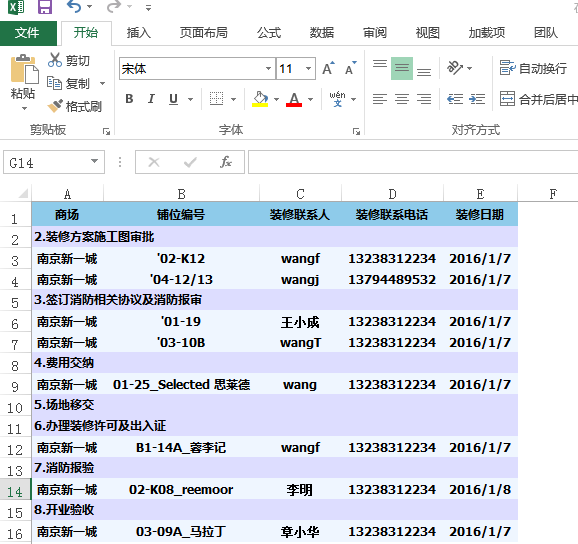
前端页面
<html>

<head>

    <title>Test For Excel</title>

<script src="js/jquery.js" />

<script type="text/javascript">

    function btnDownExel_Click()

    {var url = "TScheduleRExcelDown.aspx";

        window.open(url);

    }

</script>

</head>

<body>

<div class="form-group" style="margin-left:15%">

     <input type="button" name="btnSearch" id="btnDownExel" class="btn btn-default" onclick="btnDownExel_Click()" value="DownExcel" />

</div>

</body>

</html>
后台页面:TScheduleRExcelDown.aspx.cs
protected void Page_Load(object sender, EventArgs e)

{

  string sqlNode= "/*你的SQL语句*/";

  //返回table

  DataTable dtAll = DBFunction.ExecuteTableSql(sqlNode);

  DownExcel(dtAll);

}

/// <summary>

/// 下载Excel档

/// </summary>

/// <param name="dt">数据源</param>

public void DownExcel(DataTable dt)

{

  HttpResponse resp = System.Web.HttpContext.Current.Response;

  resp.Charset = "utf-8";

  resp.Clear();

  string filename = "在装修店铺表_" + DateTime.Now.ToString("yyyyMMdd");

  resp.AppendHeader("Content-Disposition", "attachment;filename=" + filename + ".xls");

  resp.ContentEncoding = System.Text.Encoding.UTF8;

  resp.ContentType = "application/ms-excel";

  string style = "<meta http-equiv=\"content-type\" content=\"application/ms-excel; charset=utf-8\"/>" + "<style> .table{ font: 9pt Tahoma, Verdana; font-weight:bold; color: #000000; text-align:center;  background-color:#8ECBE8;  }.tableTd{text-align:center;height:21px;background-color:#EFF6FF;}.tdNode{text-align:left;height:21px;background-color:#DDDDFF;}.table th{ font: 9pt Tahoma, Verdana; color: #000000; font-weight: bold; background-color: #8ECBEA; height:25px;  text-align:center; padding-left:10px;}</style>";

  resp.Write(style);

  resp.Write("<table class='table'><tr><th>商场</th><th>铺位编号</th><th>装修联系人</th><th>装修联系电话</th><th>装修日期</th></tr>");

  foreach (DataRow tmpRow in dt.Rows)

  {

    resp.Write("<tr><td class='tableTd'>" + tmpRow["BMarketName"].ToString() + "</td><td class='tableTd'> " + tmpRow["BStoreCode"].ToString() + "_" + tmpRow["BStoreName"].ToString() + " </td><td class='tableTd'>" + tmpRow["BContactor"].ToString() + "</td><td class='tableTd'>" + tmpRow["BContactPhone"].ToString() + "</td><td class='tableTd'>" + tmpRow["BCreatedTime"].ToString() + "</td></tr>");

  }

  resp.Write("<table>");

  resp.Flush();

  resp.End();

}
asp.net 下载Excel (数据流,不保存)--客户端的更多相关文章
- asp.net 下载EXCEL文件
一.需要导入NPOI 库文件 打开VS2012 工具>>库程序包管理器>>管理解决方案的NuGet程序包,搜索NPOI,如下图 安装完成: 添加 using NPOI.HSSF ...
- asp.net导出excel并弹出保存提示框
asp.net导出excel并弹出保存提示框 2013-07-12 | 阅:1 转:78 | 分享 腾讯空间 人人网 开心网 新浪微博 腾讯微博 搜狐空间 推荐给朋友 举报 ...
- IE8下导入EXCEL数据传到客户端以附件下载
IE8下导入EXCEL数据传到客户端以附件下载方式出现,而不显示数据,解决方法:以text/html格式返回. HttpResponseMessage message = new HttpRespon ...
- ASP.NET导出Excel文件
第一种最常见,并且最简单的方式,直接把GridView导出,导出格式为文本表格形式. protected void btnSaveExcel_Click(object sender, EventArg ...
- asp.net导出excel示例代码
asp.net导出excel的简单方法. excel的操作,最常用的就是导出和导入. 本例使用NPOI实现. 代码:/// <summary> ); ; ...
- Asp.net操作Excel(终极方法NPOI)(转)
原文:Asp.net操作Excel(终极方法NPOI) 先去官网:http://npoi.codeplex.com/下载需要引入dll(可以选择.net2.0或者.net4.0的dll),然后在网站中 ...
- [转] Asp.Net 导出 Excel 数据的9种方案
湛刚 de BLOG 原文地址 Asp.Net 导出 Excel 数据的9种方案 简介 Excel 的强大之处在于它不仅仅只能打开Excel格式的文档,它还能打开CSV格式.Tab格式.website ...
- ASP.NET 状态的传递和保存
1,HTTP协议是无状态的.服务器不会记住上次给浏览器的处理结果,如果需要上次处理结果(上次状态)就需要浏览器把处理结果值(上次状态)再次给服务器. 2,URL传值:通过URL参数或者通过Form表单 ...
- IE11下ASP.NET Forms身份认证无法保存Cookie的问题
IE11下ASP.NET Forms身份认证无法保存Cookie的问题 折腾了三四天,今天才找到资料,解决了. 以下会转贴,还没来得及深究,先放着,有空再学习下. ASP.NET中使用Forms身份认 ...
随机推荐
- iOS 7 Pushing the Limits Notes - create a layer like notification center's or control center's background
Problem: How to create a layer that looks like your notification center's or control center's backgr ...
- hdu 4739 Zhuge Liang's Mines 随机化
Zhuge Liang's Mines Time Limit: 20 Sec Memory Limit: 256 MB 题目连接 http://acm.hdu.edu.cn/showproblem.p ...
- 如何选择Javascript模板引擎(javascript template engine)?
译者 jjfat 日期:2012-9-17 来源: GBin1.com 随着前端开发的密集度越来越高,Ajax和JSON的使用越来越频繁,大家肯定免不了在前台开发中大量的使用标签,常见到的例子如下: ...
- [CSS] Introduction to CSS Columns
Learn how to use CSS columns to quickly lay out fluid columns that are responsive, degrade gracefull ...
- Qt多线程学习:创建多线程
[为什么要用多线程?] 传统的图形用户界面应用程序都仅仅有一个运行线程,而且一次仅仅运行一个操作.假设用户从用户界面中调用一个比較耗时的操作,当该操作正在运行时,用户界面一般会冻结而不再响应.这个问题 ...
- iOS开发——UI篇Swift篇&玩转UItableView(四)自定义&封装
UItableView自定义&封装 一:Model class AppsModel: NSObject { //定义模型的三个属性 var imageName:String! //图片名称 v ...
- GIT GUI的使用(转)
前段时间跟着Ruby On Rails的toturial玩了一把Git,今天再回过头来,觉得这个版本控制工具真的很不错.下面来讲一下,在windows下如何通过git gui来管理代码. 首先,要在h ...
- python类型转换、数值操作(转)
最近学习python语言,碰到数据类型间的转换问题.看到一篇文章总结的挺详细,收藏之备用. 类型转换 代码 Code highlighting produced by Actipro CodeHigh ...
- System.setProperty()
/* * 设置指定键对值的系统属性 * setProperty (String prop, String value); * * 參数: * prop - 系统属性的名称. * value ...
- QT核心编程之Qt线程 (c)
QT核心编程之Qt线程是本节要介绍的内容,QT核心编程我们要分几个部分来介绍,想参考更多内容,请看末尾的编辑推荐进行详细阅读,先来看本篇内容. Qt对线程提供了支持,它引入了一些基本与平台无关的线程类 ...