
系统的Drawable(四)-LayerListDrawable
系统的Drawable(四)-LayerListDrawable
学习自
https://blog.csdn.net/u014695188/article/details/52815444
LayerListDrawable 漫谈
使用layer-list可以将多个drawable按照顺序层叠在一起显示,默认情况下,所有的item中的drawable都会自动根据它附上view的大小而进行缩放。巧妙的利用此Drawable,我们可以实现丰富的效果。
实现Tab效果
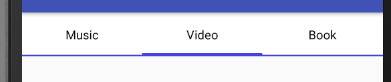
TabDrawable
<?xml version="1.0" encoding="utf-8"?>

<selector xmlns:android="http://schemas.android.com/apk/res/android">

    <!--非选中状态下的Drawable-->

    <item android:state_checked="false">

        <!--蓝色衬底-->

        <layer-list>

            <item>

                <color android:color="#4144d6" />

            </item>

            <!--白色覆盖蓝色衬底,同时向上偏移一些,漏出下面的蓝色衬底-->

            <item android:bottom="2dp">

                <color android:color="#FFF" />

            </item>

        </layer-list>

    </item>

    <!--选中状态下的Drawable-->

    <item android:state_checked="true">

        <layer-list>

            <!--蓝色衬底-->

            <item>

                <color android:color="#4144d6" />

            </item>

            <!--

            白色覆盖蓝色衬底,

            同时向上偏移一些,漏出下面的蓝色衬底

            选中状态下的蓝色衬底要比非选中状态下的蓝色衬底要多一些

            以视区别

            -->

            <item android:bottom="4dp">

                <color android:color="#FFF" />

            </item>

        </layer-list>

    </item>

</selector>
Activity的布局文件
<?xml version="1.0" encoding="utf-8"?>

<LinearLayout xmlns:android="http://schemas.android.com/apk/res/android"

    xmlns:app="http://schemas.android.com/apk/res-auto"

    xmlns:tools="http://schemas.android.com/tools"

    android:layout_width="match_parent"

    android:layout_height="match_parent"

    android:orientation="horizontal"

    tools:context="com.example.it.studynotification.MainActivity">

    <RadioGroup

        android:layout_width="match_parent"

        android:layout_height="wrap_content"

        android:orientation="horizontal">

        <RadioButton

            android:layout_width="0dp"

            android:layout_height="50dp"

            android:layout_weight="1"

            android:background="@drawable/tab"

            android:button="@null"

            android:checked="false"

            android:gravity="center"

            android:text="Music" />

        <RadioButton

            android:layout_width="0dp"

            android:layout_height="50dp"

            android:layout_weight="1"

            android:background="@drawable/tab"

            android:button="@null"

            android:checked="false"

            android:gravity="center"

            android:text="Video" />

        <RadioButton

            android:layout_width="0dp"

            android:layout_height="50dp"

            android:layout_weight="1"

            android:background="@drawable/tab"

            android:button="@null"

            android:checked="false"

            android:gravity="center"

            android:text="Book" />

    </RadioGroup>

</LinearLayout>
实现带阴影的Button

<?xml version="1.0" encoding="utf-8"?>

<layer-list xmlns:android="http://schemas.android.com/apk/res/android">

    <!--灰色的衬底,用来当做阴影-->

    <item>

        <shape>

            <corners android:radius="10dp" />

            <solid android:color="#eddfdf" />

        </shape>

    </item>

    <!--

    使用粉色将灰色覆盖的同时露出一点灰色

    形成阴影效果

    -->

    <item android:bottom="5dp">

        <shape>

            <corners android:radius="10dp" />

            <solid android:color="#efbcbc" />

        </shape>

    </item>

</layer-list>
系统的Drawable(四)-LayerListDrawable的更多相关文章
- 系统的Drawable(一)
系统的Drawable(一) 学习自 <Android 开发艺术探索> <官方文档> https://www.cnblogs.com/popfisher/p/6238119.h ...
- Android系统--输入系统(十四)Dispatcher线程情景分析_dispatch前处理
Android系统--输入系统(十四)Dispatcher线程情景分析_dispatch前处理 1. 回顾 我们知道Android输入系统是Reader线程通过驱动程序得到上报的输入事件,还要经过处理 ...
- 系统的Drawable(二)-Selector
系统的Drawable(二)-Selector Selector漫谈 Selector是定义 StateListDrawable 的标签,该Drawable代表着一个Drawable的集合,每一个Dr ...
- 我是如何一步步编码完成万仓网ERP系统的(四)登录的具体实现
https://www.cnblogs.com/smh188/p/11533668.html(我是如何一步步编码完成万仓网ERP系统的(一)系统架构) https://www.cnblogs.com/ ...
- Ubuntu 中查看内核版本和系统版本的四个命令
一.查看内核版本:cat /proc/version 二.查看内核版本:uname -a 三.查看系统版本:lsb_release -a 四.查看发行版类型:cat /etc/issue
- 简单的web三层架构系统【第四版】
上一次写了第三版, 因为之前无意之间看到一段视频,说是把系统中所有的SQL语句都做成存储过程.可以在很大程度上优化系统的SQL执行速度.所以百度了一下细节问题,之后我把所有的SQL语句,都做成了存储过 ...
- Java中获取系统时间的四种方式
第一种: Date day=new Date(); SimpleDateFormat df = new SimpleDateFormat("yyyy-MM-dd HH:mm:ss" ...
- CRM系统(第四部分)
阅读目录 1.引入权限组件rbac 2.分配权限 3.登录.引入中间件 1.引入权限组件rbac 1.settings配置app.中间件 INSTALLED_APPS = [ ... ... ...
- iOS 系统架构及常用框架(iOS的系统架构分为四个层次)
1.iOS基于UNIX系统,因此从系统的稳定性上来说它要比其他操作系统的产品好很多 2.iOS的系统架构分为四层,由上到下一次为:可触摸层(Cocoa Touch layer).媒体层(Media l ...
随机推荐
- 函数和常用模块【day06】:logging模块(八)
本节内容 1.简述 2.简单用法 3.复杂日志输出 4.handler详解 5.控制台和文件日志共同输出 一.简述 很多程序都有记录日志的需求,并且日志中包含的信息即有正常的程序访问日志,还可能有错误 ...
- 基于docker的spark-hadoop分布式集群之一: 环境搭建
一.软件准备 1.基础docker镜像:ubuntu,目前最新的版本是18 2.需准备的环境软件包: (1) spark-2.3.0-bin-hadoop2.7.tgz (2) hadoop-2.7. ...
- bzoj千题计划221:bzoj1500: [NOI2005]维修数列(fhq treap)
http://www.lydsy.com/JudgeOnline/problem.php?id=1500 1.覆盖标记用INF表示无覆盖标记,要求可能用0覆盖 2.代表空节点的0号节点和首尾的两个虚拟 ...
- 如何克服presentation恐惧呢?
- 使用JWPL (Java Wikipedia Library)操作维基百科数据
使用JWPL (Java Wikipedia Library)操作维基百科数据 1. JWPL介绍 JWPL(Java Wikipedia Library)是一个开源的访问wikipeida数据的Ja ...
- html5 canvas简单的直线路径
<!DOCTYPE html PUBLIC "-//W3C//DTD XHTML 1.0 Transitional//EN" "http://www.w3.org/ ...
- [整理]Git使用文章整理
http://pcottle.github.io/learnGitBranching/ http://www.ruanyifeng.com/blog/2012/07/git.html
- 第8月第22天 python scrapy
1. cd /Users/temp/Downloads/LagouSpider-master ls ls ls lagou/settings.py cat lagou/settings.py ls p ...
- Maven私服安装及配置——(十二)
0.私服实际是B/S架构的,需要通过浏览器访问.访问地址在 nexus-2.12.0-01\conf\nexus.properties中查看.
- 洛谷 P3749: LOJ 2146: [SHOI2017]寿司餐厅
题目传送门:LOJ #2146. 题意简述: 有 \(n\) 种寿司,第 \(i\) 种寿司的类型为 \(a_i\). 如果你吃了第 \(i\) 种到第 \(j\) 种寿司,你会得到 \(d_{i,j ...