
vue教程1-04 事件 v-on:click="函数"
vue教程1-04 事件 v-on:click="函数"
v-on:click/mouseout/mouseover/dblclick/mousedown.....
实例:为data添加数据
实例,点击按钮,div显示/隐藏切换
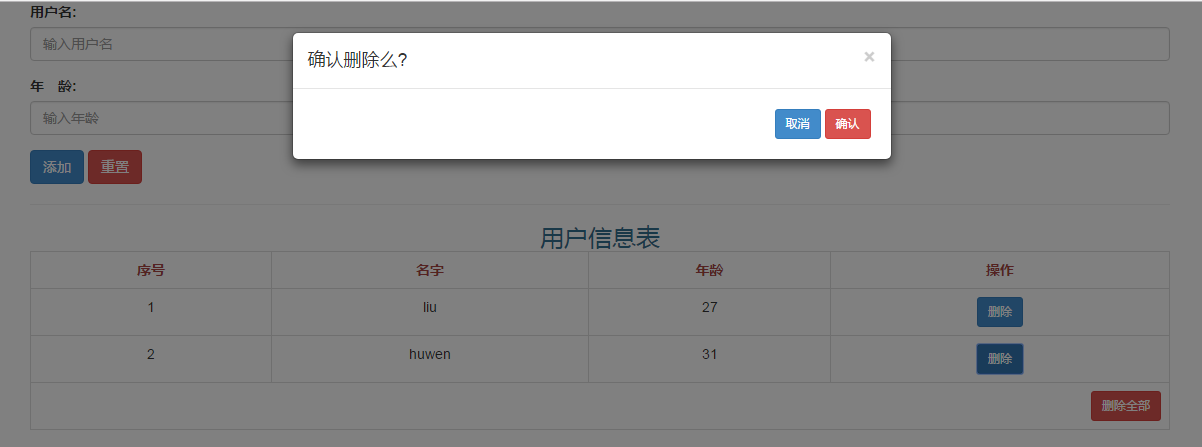
实例,vue实现简易留言本
事件:

        v-on:click="函数"

        v-on:click/mouseout/mouseover/dblclick/mousedown.....

        new Vue({

            el:'#box',

            data:{ //数据

                arr:['apple','banana','orange','pear'],

                json:{a:'apple',b:'banana',c:'orange'}

            },

            methods:{

                show:function(){    //方法,这里是show,不能用alert

                    alert(1);

                }

            }

        });
实例:为data添加数据
<!DOCTYPE html>

<html lang="en">

<head>

    <meta charset="UTF-8">

    <title> </title>

    <style>

    </style>

    <script src="vue.js"></script>

    <script>

        window.onload=function(){

            new Vue({

                el:'#box',

                data:{ //数据

                    arr:['apple','banana','orange','pear'],

                    json:{a:'apple',b:'banana',c:'orange'}

                },

                methods:{

                    add:function(){

                        this.arr.push('tomato');//this指代new Vue(),也是data

                    }

                }

            });

        };

    </script>

</head>

<body>

    <div id="box">

        <input type="button" value="按钮" v-on:dblclick="add()">

        <br>

        <ul>

            <li v-for="value in arr">

                {{value}}

            </li>

        </ul>

    </div>

</body>

</html>

实例:点击按钮,div显示/消失,切换。v-show="a"
<!DOCTYPE html>

<html lang="en">

<head>

    <meta charset="UTF-8">

    <title></title>

    <style>

    </style>

    <script src="vue.js"></script>

    <script>

        window.onload=function(){

            new Vue({

                el:'#box',

                data:{ //数据

                    a:true

                },

                methods:{

                    adjust:function(){

                        console.log(this.a);

                        if(this.a == true){

                            this.a = false;

                        }else{

                            this.a = true;

                        }

                    }

                }

            });

        };

    </script>

</head>

<body>

    <div id="box">

        <input type="button" value="按钮" v-on:click="adjust()">

        <div style="width:100px; height:100px; background: red" v-show="a">

        </div>

    </div>

</body>

</html>
实例:vue简易留言本
<!DOCTYPE html>
<html lang="en">
<head>
<meta charset="UTF-8">
<title></title>
<style>
</style>
<link rel="stylesheet" href="lib/bootstrap.min.css">
<script src="lib/jquery-1.7.2.js"></script>
<script src="lib/bootstrap.js"></script>
<script src="vue.js"></script>
<script>
window.onload=function(){
new Vue({
el:'#box',
data:{
myData:[],
username:'',
name:'',
age:'',
nowIndex:-100
},
methods:{
add:function(){
this.myData.push({
name:this.username,
age:this.age
}); this.username='';
this.age='';
},
deleteMsg:function(n){
if(n==-2){
this.myData=[];
}else{
this.myData.splice(n,1);
}
}
}
});
};
</script>
</head>
<body>
<div class="container" id="box">
<form role="form">
<div class="form-group">
<label for="username">用户名:</label>
<input type="text" id="username" class="form-control" placeholder="输入用户名" v-model="username">
</div>
<div class="form-group">
<label for="age">年 龄:</label>
<input type="text" id="age" class="form-control" placeholder="输入年龄" v-model="age">
</div>
<div class="form-group">
<input type="button" value="添加" class="btn btn-primary" v-on:click="add()">
<input type="reset" value="重置" class="btn btn-danger">
</div>
</form>
<hr>
<table class="table table-bordered table-hover">
<caption class="h3 text-info">用户信息表</caption>
<tr class="text-danger">
<th class="text-center">序号</th>
<th class="text-center">名字</th>
<th class="text-center">年龄</th>
<th class="text-center">操作</th>
</tr>
<tr class="text-center" v-for="item in myData">
<td>{{$index+1}}</td>
<td>{{item.name}}</td>
<td>{{item.age}}</td>
<td>
<button class="btn btn-primary btn-sm" data-toggle="modal" data-target="#layer" v-on:click="nowIndex=$index">删除</button>
</td>
</tr>
<tr v-show="myData.length!=0">
<td colspan="4" class="text-right">
<button class="btn btn-danger btn-sm" v-on:click="nowIndex=-2" data-toggle="modal" data-target="#layer" >删除全部</button>
</td>
</tr>
<tr v-show="myData.length==0">
<td colspan="4" class="text-center text-muted">
<p>暂无数据....</p>
</td>
</tr>
</table> <!--模态框 弹出框-->
<div role="dialog" class="modal fade bs-example-modal-sm" id="layer">
<div class="modal-dialog">
<div class="modal-content">
<div class="modal-header">
<button type="button" class="close" data-dismiss="modal">
<span>×</span>
</button>
<h4 class="modal-title">确认删除么?</h4>
</div>
<div class="modal-body text-right">
<button data-dismiss="modal" class="btn btn-primary btn-sm">取消</button>
<button data-dismiss="modal" class="btn btn-danger btn-sm" v-on:click="deleteMsg(nowIndex)">确认</button>
</div>
</div>
</div>
</div>
</div>
</body>
</html>
vue教程1-04 事件 v-on:click="函数"的更多相关文章
- vue 的点击事件怎么获取当前点击的元素
手机赚钱怎么赚,给大家推荐一个手机赚钱APP汇总平台:手指乐(http://www.szhile.com/),辛苦搬砖之余用闲余时间动动手指,就可以日赚数百元 首先 vue的点击事件 是用 @cl ...
- vue教程1-05 事件 简写、事件对象、冒泡、默认行为、键盘事件
vue教程1-05 事件 简写.事件对象.冒泡.默认行为.键盘事件 v-on:click/mouseover...... 简写的: @click="" 推荐 事件对象: @clic ...
- vue教程3-05 vue组件数据传递、父子组件数据获取,slot,router路由
vue教程3-05 vue组件数据传递 一.vue默认情况下,子组件也没法访问父组件数据 <!DOCTYPE html> <html lang="en"> ...
- [转]vue数据绑定(数据,样式,事件)
1.mounted 与 methods 与 computed 与 watched区别 From:https://blog.csdn.net/qinlulucsdn/article/details/80 ...
- Vue样式绑定和事件处理器
一.样式绑定 class 与 style 是 HTML 元素的属性,用于设置元素的样式,我们可以用 v-bind 来设置样式属性. v-bind 在处理 class 和 style 时, 专门增强了它 ...
- vue样式操作与事件绑定
Vue笔记 1 Vue实例 (VM) var vm = new Vue({ el:'#app', //挂载元素 //数据 data: { title:'值', ...
- CPF 入门教程 - 属性和事件(七)
CPF C#跨平台桌面UI框架 系列教程 CPF 入门教程(一) CPF 入门教程 - 数据绑定和命令绑定(二) CPF 入门教程 - 样式和动画(三) CPF 入门教程 - 绘图(四) CPF 入门 ...
- Vue(四)事件和属性
1. 事件 1.1 事件简写 v-on:click="" 简写方式 @click="" <button v-on:click="show&quo ...
- vue教程3-03 vue组件,定义全局、局部组件,配合模板,动态组件
vue教程3-03 vue组件,定义全局.局部组件,配合模板,动态组件 一.定义一个组件 定义一个组件: 1. 全局组件 var Aaa=Vue.extend({ template:'<h3&g ...
随机推荐
- p标签在div中垂直居中,并且div高度随着p标签文字内容的变化而变化
1.div设置flex布局 div{ display: flex; align-items: center; } 2.div不要设置height,设置min-height
- css基本图形绘制(基本的矩形、圆形、椭圆、三角形、多边形,也包括稍微复杂一点的爱心、钻石、阴阳八卦等)
正方形: 代码: <style> .square { width: 100px; height: 100px; background-color: cornflowerblue; } &l ...
- PHP发起POST DELETE GET POST 请求
原文链接:http://blog.csdn.net/lengxue789/article/details/8254667 关于POST,DELETE,GET,POST请求 get:是用来取得数据.其要 ...
- Ng第十一课:机器学习系统的设计(Machine Learning System Design)
11.1 首先要做什么 11.2 误差分析 11.3 类偏斜的误差度量 11.4 查全率和查准率之间的权衡 11.5 机器学习的数据 11.1 首先要做什么 在接下来的视频将谈到机器学习系 ...
- Java类、超类、包
定义和实例化与C#相同 特殊变量 super当前对象的父类,用于调用父类的变量和方法 this当前类对象 存取限制有3个 没有C#的inter ...
- python编写producer、consumer
自主producer.consumer 首先在不同的终端,分别开启两个consumer,保证groupid一致 ]# python consumer_kafka.py 执行一次producer ]# ...
- 认识Hadoop
概述 开源.分布式存储.分布式计算 大数据生态体系 特点:开源.社区活跃 囊括了大数据处理的方方面面 成熟的生态圈 推荐系统 应用场景 搭建大型数据仓库,PB级数据的存储.处理.分析.统计 日志分析 ...
- 新建django需要设置的地方
urls:urlpatterns = [ path('admin/', admin.site.urls), path('login/', views.Login.as_view())#类方法url对应 ...
- fping常用参数介绍
fping的主要参数有以下两个: -a:只显示存活主机: -u:只显示不存活主机: -l:循环ping目标IP地址的输入方式: fping IP1 IP2 IP3 ...: fping -f file ...
- WordPress建站指南(1)
写在前面: 3月份用10天零碎时间火速完成了建站,后台95%的工作都交给了WP(WordPress).如果想偷懒的话,WP是一个绝好的选择,估计有个小半天就建完收工了. 想有片自己的小花园,可是不会P ...