
高仿Windows Phone QQ登录界面
给 TextBox文本框前添加图片
扩展PhoneTextBox:添加一个类“ExtentPhoneTextBox”继承 PhoneTextBox ,在“ExtentPhoneTextBox”类中添加属性项:
 public class ExtentPhoneTextBox : PhoneTextBox

    {

        /// <summary>

        /// 文本框图片属性

        /// </summary>

        public static readonly DependencyProperty TextHeadImageProperty =

            DependencyProperty.Register("TextHeadImage", typeof(ImageSource), typeof(ExtentPhoneTextBox), new PropertyMetadata(null)

            );

        /// <summary>

        /// 文本框头图片

        /// </summary>

        public ImageSource TextHeadImage

        {

            get { return base.GetValue(TextHeadImageProperty) as ImageSource; }

            set { base.SetValue(TextHeadImageProperty, value); }

        }

        /// <summary>

        /// 文本图片宽度

        /// </summary>

        public double TextHeadImageWidth

        {

            get { return (double)GetValue(TextHeadImageWidthProperty); }

            set { SetValue(TextHeadImageWidthProperty, value); }

        }

        // Using a DependencyProperty as the backing store for TextHeadImageWidth.  This enables animation, styling, binding, etc...

        public static readonly DependencyProperty TextHeadImageWidthProperty =

            DependencyProperty.Register("TextHeadImageWidth", typeof(double), typeof(ExtentPhoneTextBox), new PropertyMetadata(null));

        /// <summary>

        /// 文本图片高度

        /// </summary>

        public double TextHeadImageHeight

        {

            get { return (double)GetValue(TextHeadImageHeightProperty); }

            set { SetValue(TextHeadImageHeightProperty, value); }

        }

        // Using a DependencyProperty as the backing store for TextHeadImageHeight.  This enables animation, styling, binding, etc...

        public static readonly DependencyProperty TextHeadImageHeightProperty =

            DependencyProperty.Register("TextHeadImageHeight", typeof(double), typeof(ExtentPhoneTextBox), new PropertyMetadata(null));

    }

}
ExtentPhoneText 样式编辑:
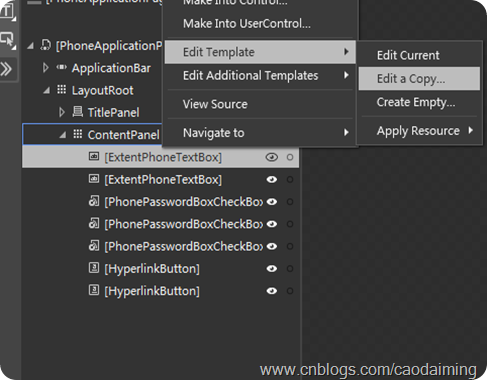
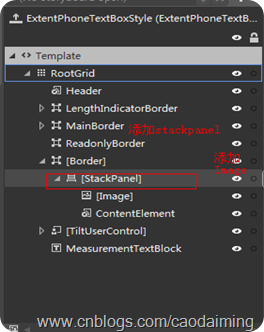
全部样式如下:
<DataTemplate x:Key="ControlHeaderTemplate">
<TextBlock FontSize="{StaticResource PhoneFontSizeNormal}" FontFamily="{StaticResource PhoneFontFamilyNormal}" LineStackingStrategy="BlockLineHeight" LineHeight="23.333" Margin="0,-9,0,0" TextWrapping="Wrap" Text="{Binding}">
<TextBlock.RenderTransform>
<TranslateTransform X="-1" Y="4"/>
</TextBlock.RenderTransform>
</TextBlock>
</DataTemplate>
<toolkit:SingleDataTemplateSelector x:Key="ControlHeaderTemplateSelector" Template="{StaticResource ControlHeaderTemplate}"/>
<Style x:Key="ExtentPhoneTextBoxStyle" TargetType="ExtentCtrs:ExtentPhoneTextBox">
<Setter Property="FontFamily" Value="{StaticResource PhoneFontFamilyNormal}"/>
<Setter Property="FontSize" Value="{StaticResource PhoneFontSizeMediumLarge}"/>
<Setter Property="Background" Value="{StaticResource PhoneTextBoxBrush}"/>
<Setter Property="Foreground" Value="{StaticResource PhoneTextBoxForegroundBrush}"/>
<Setter Property="BorderBrush" Value="{StaticResource PhoneTextBoxBrush}"/>
<Setter Property="SelectionBackground" Value="{StaticResource PhoneAccentBrush}"/>
<Setter Property="SelectionForeground" Value="{StaticResource PhoneTextBoxSelectionForegroundBrush}"/>
<Setter Property="BorderThickness" Value="{StaticResource PhoneBorderThickness}"/>
<Setter Property="Padding" Value="6,0,6,4"/>
<Setter Property="HorizontalContentAlignment" Value="Left"/>
<Setter Property="Template">
<Setter.Value>
<ControlTemplate TargetType="ExtentCtrs:ExtentPhoneTextBox">
<Grid x:Name="RootGrid" Background="Transparent">
<Grid.RowDefinitions>
<RowDefinition Height="Auto"/>
<RowDefinition/>
</Grid.RowDefinitions>
<VisualStateManager.VisualStateGroups>
<VisualStateGroup x:Name="CommonStates">
<VisualState x:Name="Normal"/>
<VisualState x:Name="Disabled">
<Storyboard>
<ObjectAnimationUsingKeyFrames Storyboard.TargetProperty="Foreground" Storyboard.TargetName="Header">
<DiscreteObjectKeyFrame KeyTime="0" Value="{StaticResource PhoneTextLowContrastBrush}"/>
</ObjectAnimationUsingKeyFrames>
<ObjectAnimationUsingKeyFrames Storyboard.TargetProperty="Background" Storyboard.TargetName="MainBorder">
<DiscreteObjectKeyFrame KeyTime="0" Value="Transparent"/>
</ObjectAnimationUsingKeyFrames>
<ObjectAnimationUsingKeyFrames Storyboard.TargetProperty="BorderBrush" Storyboard.TargetName="MainBorder">
<DiscreteObjectKeyFrame KeyTime="0" Value="{StaticResource PhoneDisabledBrush}"/>
</ObjectAnimationUsingKeyFrames>
<ObjectAnimationUsingKeyFrames Storyboard.TargetProperty="Foreground" Storyboard.TargetName="ContentElement">
<DiscreteObjectKeyFrame KeyTime="0" Value="{StaticResource PhoneDisabledBrush}"/>
</ObjectAnimationUsingKeyFrames>
</Storyboard>
</VisualState>
<VisualState x:Name="ReadOnly">
<Storyboard>
<ObjectAnimationUsingKeyFrames Storyboard.TargetProperty="Visibility" Storyboard.TargetName="MainBorder">
<DiscreteObjectKeyFrame KeyTime="0">
<DiscreteObjectKeyFrame.Value>
<Visibility>Collapsed</Visibility>
</DiscreteObjectKeyFrame.Value>
</DiscreteObjectKeyFrame>
</ObjectAnimationUsingKeyFrames>
<ObjectAnimationUsingKeyFrames Storyboard.TargetProperty="Visibility" Storyboard.TargetName="ReadonlyBorder">
<DiscreteObjectKeyFrame KeyTime="0">
<DiscreteObjectKeyFrame.Value>
<Visibility>Visible</Visibility>
</DiscreteObjectKeyFrame.Value>
</DiscreteObjectKeyFrame>
</ObjectAnimationUsingKeyFrames>
<ObjectAnimationUsingKeyFrames Storyboard.TargetProperty="Background" Storyboard.TargetName="ReadonlyBorder">
<DiscreteObjectKeyFrame KeyTime="0" Value="{StaticResource PhoneTextBoxBrush}"/>
</ObjectAnimationUsingKeyFrames>
<ObjectAnimationUsingKeyFrames Storyboard.TargetProperty="BorderBrush" Storyboard.TargetName="ReadonlyBorder">
<DiscreteObjectKeyFrame KeyTime="0" Value="{StaticResource PhoneTextBoxBrush}"/>
</ObjectAnimationUsingKeyFrames>
<ObjectAnimationUsingKeyFrames Storyboard.TargetProperty="Foreground" Storyboard.TargetName="ContentElement">
<DiscreteObjectKeyFrame KeyTime="0" Value="{StaticResource PhoneTextBoxReadOnlyBrush}"/>
</ObjectAnimationUsingKeyFrames>
</Storyboard>
</VisualState>
</VisualStateGroup>
<VisualStateGroup x:Name="FocusStates">
<VisualState x:Name="Focused">
<Storyboard>
<ObjectAnimationUsingKeyFrames Storyboard.TargetProperty="Background" Storyboard.TargetName="MainBorder">
<DiscreteObjectKeyFrame KeyTime="0" Value="{StaticResource PhoneTextBoxEditBackgroundBrush}"/>
</ObjectAnimationUsingKeyFrames>
<ObjectAnimationUsingKeyFrames Storyboard.TargetProperty="BorderBrush" Storyboard.TargetName="MainBorder">
<DiscreteObjectKeyFrame KeyTime="0" Value="{StaticResource PhoneTextBoxEditBorderBrush}"/>
</ObjectAnimationUsingKeyFrames>
</Storyboard>
</VisualState>
<VisualState x:Name="Unfocused"/>
</VisualStateGroup>
<VisualStateGroup x:Name="LengthIndicatorStates">
<VisualStateGroup.Transitions>
<VisualTransition From="LengthIndicatorHidden" To="LengthIndicatorVisible">
<Storyboard>
<ObjectAnimationUsingKeyFrames Storyboard.TargetProperty="Visibility" Storyboard.TargetName="LengthIndicator">
<DiscreteObjectKeyFrame KeyTime="0:0:0">
<DiscreteObjectKeyFrame.Value>
<Visibility>Visible</Visibility>
</DiscreteObjectKeyFrame.Value>
</DiscreteObjectKeyFrame>
</ObjectAnimationUsingKeyFrames>
<ObjectAnimationUsingKeyFrames Storyboard.TargetProperty="Margin" Storyboard.TargetName="RootGrid">
<DiscreteObjectKeyFrame KeyTime="0:0:0" Value="0, 0, 0, 25"/>
</ObjectAnimationUsingKeyFrames>
<ObjectAnimationUsingKeyFrames Storyboard.TargetProperty="Opacity" Storyboard.TargetName="LengthIndicator">
<DiscreteObjectKeyFrame KeyTime="0:0:0" Value="1"/>
</ObjectAnimationUsingKeyFrames>
<DoubleAnimation Duration="0:0:0.350" To="27" Storyboard.TargetProperty="(UIElement.RenderTransform).(TranslateTransform.Y)" Storyboard.TargetName="LengthIndicator">
<DoubleAnimation.EasingFunction>
<ExponentialEase Exponent="6"/>
</DoubleAnimation.EasingFunction>
</DoubleAnimation>
</Storyboard>
</VisualTransition>
<VisualTransition From="LengthIndicatorVisible" To="LengthIndicatorHidden">
<Storyboard>
<DoubleAnimation Duration="0:0:0.350" To="0" Storyboard.TargetProperty="(UIElement.RenderTransform).(TranslateTransform.Y)" Storyboard.TargetName="LengthIndicator">
<DoubleAnimation.EasingFunction>
<ExponentialEase Exponent="6"/>
</DoubleAnimation.EasingFunction>
</DoubleAnimation>
<ObjectAnimationUsingKeyFrames Storyboard.TargetProperty="Margin" Storyboard.TargetName="RootGrid">
<DiscreteObjectKeyFrame KeyTime="0:0:0" Value="0, 0, 0, 0"/>
</ObjectAnimationUsingKeyFrames>
<ObjectAnimationUsingKeyFrames Storyboard.TargetProperty="Opacity" Storyboard.TargetName="LengthIndicator">
<DiscreteObjectKeyFrame KeyTime="0:0:0.350" Value="0"/>
</ObjectAnimationUsingKeyFrames>
<ObjectAnimationUsingKeyFrames Storyboard.TargetProperty="Visibility" Storyboard.TargetName="LengthIndicator">
<DiscreteObjectKeyFrame KeyTime="0:0:0.350">
<DiscreteObjectKeyFrame.Value>
<Visibility>Collapsed</Visibility>
</DiscreteObjectKeyFrame.Value>
</DiscreteObjectKeyFrame>
</ObjectAnimationUsingKeyFrames>
</Storyboard>
</VisualTransition>
</VisualStateGroup.Transitions>
<VisualState x:Name="LengthIndicatorVisible">
<Storyboard>
<ObjectAnimationUsingKeyFrames Storyboard.TargetProperty="Visibility" Storyboard.TargetName="LengthIndicator">
<DiscreteObjectKeyFrame KeyTime="0:0:0">
<DiscreteObjectKeyFrame.Value>
<Visibility>Visible</Visibility>
</DiscreteObjectKeyFrame.Value>
</DiscreteObjectKeyFrame>
</ObjectAnimationUsingKeyFrames>
<ObjectAnimationUsingKeyFrames Storyboard.TargetProperty="Margin" Storyboard.TargetName="RootGrid">
<DiscreteObjectKeyFrame KeyTime="0:0:0" Value="0, 0, 0, 25"/>
</ObjectAnimationUsingKeyFrames>
<ObjectAnimationUsingKeyFrames Storyboard.TargetProperty="Opacity" Storyboard.TargetName="LengthIndicator">
<DiscreteObjectKeyFrame KeyTime="0:0:0" Value="1"/>
</ObjectAnimationUsingKeyFrames>
<DoubleAnimation Duration="0" To="27" Storyboard.TargetProperty="(UIElement.RenderTransform).(TranslateTransform.Y)" Storyboard.TargetName="LengthIndicator"/>
</Storyboard>
</VisualState>
<VisualState x:Name="LengthIndicatorHidden"/>
</VisualStateGroup>
</VisualStateManager.VisualStateGroups>
<toolkit:PhoneContentControl x:Name="Header" ContentTemplate="{TemplateBinding HeaderTemplate}" ContentTemplateSelector="{StaticResource ControlHeaderTemplateSelector}" Content="{TemplateBinding Header}" Foreground="{StaticResource PhoneTextMidContrastBrush}" FontSize="{StaticResource PhoneFontSizeNormal}" FontFamily="{StaticResource PhoneFontFamilyNormal}" HorizontalContentAlignment="{TemplateBinding HorizontalContentAlignment}" Margin="{StaticResource PhoneHorizontalMargin}"/>
<Border x:Name="LengthIndicatorBorder" Grid.Row="1">
<TextBlock x:Name="LengthIndicator" CacheMode="BitmapCache" Foreground="{StaticResource PhoneTextMidContrastBrush}" FontSize="{StaticResource PhoneFontSizeNormal}" FontFamily="{StaticResource PhoneFontFamilyNormal}" HorizontalAlignment="Right" Margin="{StaticResource PhoneMargin}" Opacity="0" TextAlignment="Right" Visibility="Collapsed" VerticalAlignment="Bottom">
<TextBlock.RenderTransform>
<TranslateTransform/>
</TextBlock.RenderTransform>
</TextBlock>
</Border>
<Border x:Name="MainBorder" BorderBrush="{TemplateBinding BorderBrush}" BorderThickness="{TemplateBinding BorderThickness}" Background="{TemplateBinding Background}" Margin="{StaticResource PhoneTouchTargetOverhang}" Grid.Row="1">
<TextBlock x:Name="PlaceholderTextElement" Foreground="{StaticResource PhoneTextBoxReadOnlyBrush}" HorizontalAlignment="Left" Padding="{TemplateBinding Padding}" Text="{TemplateBinding PlaceholderText}" VerticalAlignment="Center" Margin="40,2,0,2"/>
</Border>
<Border x:Name="ReadonlyBorder" BorderBrush="{StaticResource PhoneDisabledBrush}" BorderThickness="{TemplateBinding BorderThickness}" Background="Transparent" Margin="{StaticResource PhoneTouchTargetOverhang}" Grid.Row="1" Visibility="Collapsed"/>
<Border BorderBrush="Transparent" BorderThickness="{TemplateBinding BorderThickness}" Background="Transparent" Margin="{StaticResource PhoneTouchTargetOverhang}" Grid.Row="1">
<StackPanel Orientation="Horizontal">
<Image Source="{TemplateBinding TextHeadImage}" Width="{TemplateBinding TextHeadImageWidth}" Height="{TemplateBinding TextHeadImageWidth}" HorizontalAlignment="Left" Margin="12,2,1,2"/>
<ContentControl x:Name="ContentElement" BorderThickness="0" CacheMode="BitmapCache" HorizontalContentAlignment="Stretch" Padding="{TemplateBinding Padding}" VerticalContentAlignment="Stretch" VerticalAlignment="Center"/>
</StackPanel>
</Border>
<toolkitPrimitives:TiltUserControl HorizontalAlignment="Right" Margin="0,0,-12,0" Grid.Row="1" VerticalAlignment="Bottom">
<Border x:Name="ActionIconBorder" Background="Transparent" Height="72" Width="96">
<Image x:Name="ActionIcon" HorizontalAlignment="Right" Height="26" Margin="0,0,36,0" Source="{TemplateBinding ActionIcon}"/>
</Border>
</toolkitPrimitives:TiltUserControl>
<TextBlock x:Name="MeasurementTextBlock" FontWeight="{TemplateBinding FontWeight}" FontStyle="{TemplateBinding FontStyle}" FontStretch="{TemplateBinding FontStretch}" FontSize="{TemplateBinding FontSize}" FontFamily="{TemplateBinding FontFamily}" IsHitTestVisible="False" Margin="8" Opacity="0" Grid.Row="1" TextAlignment="{TemplateBinding TextAlignment}" TextWrapping="{TemplateBinding TextWrapping}" Text="{TemplateBinding Text}"/>
</Grid>
</ControlTemplate>
</Setter.Value>
</Setter>
</Style>
UI部局xaml代码如下:
<Grid x:Name="ContentPanel"

            Margin="0,162,24,19"

            Grid.RowSpan="2">

            <ExtentCtrs:ExtentPhoneTextBox  Margin="12,10,12,0"

                TextWrapping="Wrap"

                VerticalAlignment="Top"

                PlaceholderText="QQ号码/手机/邮箱"

                Height="80"

                Background="White" TextHeadImage="/Assets/QqAccount.WVGA.png" Style="{StaticResource ExtentPhoneTextBoxStyle}" TextHeadImageHeight="22" TextHeadImageWidth="24" />

            <ExtentCtrs:ExtentPhoneTextBox  Margin="12,107,12,0"

                TextWrapping="Wrap"

                VerticalAlignment="Top"

                PlaceholderText="点击输入QQ密码"

                Height="80"

                Background="White" Style="{StaticResource ExtentPhoneTextBoxStyle}" TextHeadImage="/Assets/Password.WVGA.png" TextHeadImageHeight="22" TextHeadImageWidth="24" />

            <toolkitPrimitives:PhonePasswordBoxCheckBox Content="记住密码"

                HorizontalAlignment="Left"

                Margin="12,195,0,0"

                VerticalAlignment="Top"

                HorizontalContentAlignment="Left" />

            <toolkitPrimitives:PhonePasswordBoxCheckBox Content="隐身登录"

                HorizontalAlignment="Left"

                Margin="224,195,0,0"

                VerticalAlignment="Top" />

            <toolkitPrimitives:PhonePasswordBoxCheckBox Content="静音登录"

                HorizontalAlignment="Left"

                Margin="12,272,0,0"

                VerticalAlignment="Top" />

            <HyperlinkButton Content="注册帐号"

                HorizontalAlignment="Left"

                Margin="12,349,0,0"

                VerticalAlignment="Top"

                HorizontalContentAlignment="Left" />

            <HyperlinkButton Content="找回密码"

                HorizontalAlignment="Left"

                Margin="12,385,0,0"

                VerticalAlignment="Top"

                HorizontalContentAlignment="Left" />

        </Grid>
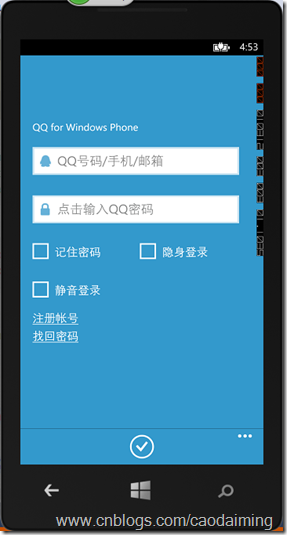
运行效果如下:
高仿Windows Phone QQ登录界面的更多相关文章
- WPF开发实例——仿QQ登录界面
原文:WPF开发实例--仿QQ登录界面 版权声明:本文为博主原创文章,如需转载请标明转载地址 http://blog.csdn.net/u013981858 https://blog.csdn.net ...
- 编写Java程序,使用Swing布局管理器和常用控件,实现仿QQ登录界面
返回本章节 返回作业目录 需求说明: 使用Swing布局管理器和常用控件,实现仿QQ登录界面 实现思路: 创建登录界面的类QQLogin,该类继承父类JFrame,在该类中创建无参数的构造方法,在构造 ...
- 零基础~仿qq登录界面
html代码: <!DOCTYPE html> <html> <head> <meta charset="utf-8"> <t ...
- JavaSwing仿QQ登录界面,注释完善,适合新手学习
使用说明: 这是一个java做的仿制QQ登录界面,界面仅使用一个类, JDK版本为jdk-11 素材包的名字为:素材(下载)请在项目中新建一个名字为“素材”的文件夹. 素材: https://pan. ...
- 仿知乎app登录界面(Material Design设计框架拿来就用的TexnInputLayout)
在我脑子里还没有Material Design这种概念,就我个人而言,PC端应用扁平化设计必须成为首选,手当其冲的两款即时通讯旺旺和QQ早就完成UI扁平化的更新,然而客户端扁平化的设计本身就存在天生的 ...
- 高仿腾讯QQ最终版
之前写过一篇关于高仿腾讯QQ的博客,不知道的看这:http://blog.csdn.net/htq__/article/details/51840273 ,主要是从界面上高仿了腾讯QQ,在UI上基本上 ...
- 界面编程模仿篇(QQ登录界面逼真篇)
写了好多天的爬虫,偷空前前后后用了两天的时间(排除吃饭睡觉)写完了这个QQ登录界面,看起来还凑和着吧,如果是的大神的,莫见笑,纯属业余作品,废话先不多说,截图如下,其中第二幅图片中的红色方框部份有待完 ...
- Android菜鸟的成长笔记(3)——给QQ登录界面说So Easy
原文:Android菜鸟的成长笔记(3)--给QQ登录界面说So Easy 上一篇:Android菜鸟的成长笔记(2)--第一个Android应用 我们前面已经做了第一个Android应用程序,虽然有 ...
- QQ登录界面布局
简单的qq登录界面布局 <?xml version="1.0" encoding="utf-8"?> <RelativeLayout xmln ...
随机推荐
- 说一下output子句
Output子句日常灰常有用,而且用的地方也挺多,但是确好多时候被我们忽视,今天我就也简单扫盲一下这个语句的用法. Output子句 返回受 INSERT.UPDATE.DELETE 或 MERGE ...
- [原]openstack-kilo--issue(七):虚拟机怎么通外网,外网怎么ping通虚拟机
=====问题======= 虚拟机可以ping通外网,外网能ping通虚拟机但是收不到reply 这个问题本人遇到有两种情况: 1.安装完整openstack-kilo后,在route中和虚拟机中抓 ...
- 获取下拉框的value和值
jsp: <td class="formItem_content"> <select name="label" id = "labe ...
- MS SQLServer 操作XML语句的存储过程
-- ================================================ SET ANSI_NULLS ON GO SET QUOTED_IDENTIFIER ON GO ...
- AngularJS几个基础概念
作用域 应用的作用域是和应用的数据模型相关联的,同时作用域也是表达式执行的上下文.$scope对象是定义应用业务逻辑.控制器方法和视图属性的地方.作用域是视图和作用域之间的胶水.在应用将视图渲染并呈现 ...
- 中国版的 Office 365
与Windows Azure一样,中国版的Office 365也是由世纪互联运营的——与国际版完全隔离的定制版.而言,从功能方面来看,中国版的Office 365并没有损失太多功能,并且其更新速度也基 ...
- Windows系统小知识
前言 本文写作于Window10发布后的2015-08-01,新系统发布后我做了新系统的小白鼠,所以写此文以作记录. WIN10各版本下载地址:http://www.ithome.com/html/w ...
- Markdown(MD)写作
简洁的写作 目前正逐步使用Makedown来写博客或其它的文档,本文记录一下Markdown的相关知识 Markdown语法 标题 # 内容 (一级标题) ## 内容 (二级标题) ### 内容 (三 ...
- webform:分页组合查询
一个简单的分页组合查询页面 /// <summary> /// 查询方法 /// </summary> /// <param name="tsql"& ...
- oracle基本用法
作为企业版的后台数据支撑,就首先要掌握oracle的使用方法!!! 注册用户之前,需要使用system管理员来进行注册功能!!! 1.首先创建新用户 2.这样就能使创建的新用户能够登陆吗?不,还需要分 ...