
Fragment嵌套Fragment实现的Tab导航
要实现的效果就是底部导航,具体到每一个Fragment又在上部设置一个导航条,分成两个Fragment实现。效果图是:
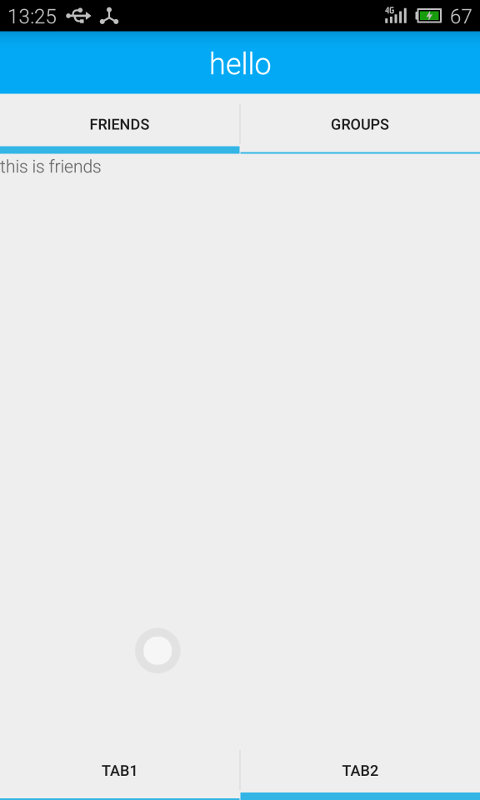
首先给出activity的layout:
<android.support.v4.app.FragmentTabHost xmlns:android="http://schemas.android.com/apk/res/android"

    xmlns:tools="http://schemas.android.com/tools"

    android:id="@android:id/tabhost"

    android:layout_width="match_parent"

    android:layout_height="match_parent"

    tools:context=".MainActivity">

    <LinearLayout

        android:layout_width="match_parent"

        android:layout_height="match_parent"

        android:orientation="vertical">

        <FrameLayout

            android:id="@android:id/tabcontent"

            android:layout_width="fill_parent"

            android:layout_height="0dp"

            android:layout_weight="1" />

        <TabWidget

            android:id="@android:id/tabs"

            android:layout_width="fill_parent"

            android:layout_height="wrap_content"

            android:layout_gravity="bottom" />

    </LinearLayout>

</android.support.v4.app.FragmentTabHost>
然后是main activity的代码:
package com.example.xxx.myapplication;

import android.os.Bundle;

import android.support.v4.app.FragmentActivity;

import android.support.v4.app.FragmentTabHost;

import android.view.Menu;

import android.view.MenuItem;

public class MainActivity extends FragmentActivity {

    private FragmentTabHost mTabHost;

    @Override

    protected void onCreate(Bundle savedInstanceState) {

        super.onCreate(savedInstanceState);

        setContentView(R.layout.activity_main);

        mTabHost = (FragmentTabHost) findViewById(android.R.id.tabhost);

        mTabHost.setup(this, getSupportFragmentManager(), android.R.id.tabcontent);

        mTabHost.addTab(mTabHost.newTabSpec("Tab1").setIndicator("TAB1", null), Fragment1.class, null);

        mTabHost.addTab(mTabHost.newTabSpec("Tab2").setIndicator("TAB2", null), Fragment2.class,

                null);

    }

}
我在Fragment2中嵌套两个fragment,这个layout比较重要,容易出问题的地方就是这里。
<?xml version="1.0" encoding="utf-8"?>

<android.support.v4.app.FragmentTabHost

    android:id="@android:id/tabhost"

    xmlns:android="http://schemas.android.com/apk/res/android"

    xmlns:tools="http://schemas.android.com/tools"

    android:layout_width="match_parent"

    android:layout_height="match_parent"

    tools:context=".MainActivity">

    <LinearLayout

        android:layout_width="match_parent"

        android:layout_height="match_parent"

        android:orientation="vertical">

        <TextView

            android:layout_width="match_parent"

            android:layout_height="50dp"

            android:background="@color/bg_color"

            android:textColor="@android:color/white"

            android:textSize="24sp"

            android:gravity="center_horizontal|center_vertical"

            android:text="hello"/>

        <TabWidget

            android:id="@android:id/tabs"

            android:layout_width="fill_parent"

            android:layout_height="wrap_content"

            android:layout_gravity="bottom"/>

        <FrameLayout

            android:id="@android:id/tabcontent"

            android:layout_width="fill_parent"

            android:layout_height="0dp"

            android:layout_weight="1"/>

    </LinearLayout>

</android.support.v4.app.FragmentTabHost>
fragment2的代码实现
public class Fragment2 extends Fragment {

    private FragmentTabHost tabHost;

    @Nullable

    @Override

    public View onCreateView(LayoutInflater inflater, ViewGroup container, Bundle savedInstanceState) {

        View view  = inflater.inflate(R.layout.fragment_test, null);

        tabHost = (FragmentTabHost) view.findViewById(android.R.id.tabhost);

        tabHost.setup(getActivity(),getChildFragmentManager(), android.R.id.tabcontent);

        tabHost.addTab(tabHost.newTabSpec("friends").setIndicator("friends", null), FriendsFragment

                .class, null);

        tabHost.addTab(tabHost.newTabSpec("groups").setIndicator("groups", null), GroupFragment

                        .class,

                null);

        tabHost.setCurrentTab(0);

        return view;

    }

}
Fragment嵌套Fragment实现的Tab导航的更多相关文章
- android fragment嵌套fragment出现的问题:no activity
package com.example.fragmentNavigation2.fragment; import android.content.Context; import android.os. ...
- Android 中关于Fragment嵌套Fragment的问题
转载请注明出处:http://www.cnblogs.com/Joanna-Yan/p/5802146.html 问题描述: 在项目中Activity A中嵌套Fragment B,Fragment ...
- Fragment 嵌套Fragment注意事项
最近项目新功能需要在垂直方方向可以循环滚动,并且水平方向也可以水平循环滚动,并且可以定位到指定item上.很自然的想到了ViewPager和 VerticalViewPager来解决项目需求,UI的大 ...
- Fragment嵌套Fragment时候。子类fragment调用父容器Fragment方法
业务场景:有的时候我们的页面可能是Activity 嵌套多个Fragment ..其中某个Fragment 又嵌套多个Fragment. 其中某个子Fragment 定义为 NewsFragmen ...
- Fragment嵌套Fragment时遇到的那些坑
由于项目要改成MVP模式,自然会用到了Fragment,有时候可能会需要一个Fragment里面嵌套多个Fragment,并且add完成后需要立即刷新子Fragment的View,那么这个时候就会抛出 ...
- 关于Fragment里面嵌套fragment
今天看到一篇好文章 https://www.2cto.com/kf/201609/545979.html 转载过来记录一下,往后需要的时候可以随时查看: 接下来进入正题: 动态fragment的使用 ...
- 浅谈Android Fragment嵌套使用存在的一些BUG以及解决方法
时间 2014-03-18 18:00:55 eoe博客 原文 http://my.eoe.cn/916054/archive/24053.html 主题 安卓开发 自从Android3.0引入了F ...
- Fragment嵌套
当我们从一个Activity启动了一个Fragment,然后在这个Fragment中又去实例化了一些子Fragment,在子Fragment中去有返回的启动了另外一个Activity,即通过start ...
- Fragment(一)--Fragment用法常见问题
fragment notes fragment相关内容包括 基本定义与使用 回退栈内部实现 fragment通信(与activity 与fragment) DialogFragment VP + Fr ...
随机推荐
- 使用Vue-cli创建project遇到的坑
环境: win10 / node( v10.2.1) /npm( v5.6.0) 准备: 1.安装node:上node官网下载node版本进行安装 2.安装vue-cli:npm install -- ...
- 【翻译】自定义 UIViewController Transitions
原文地址:http://www.shinobicontrols.com/blog/posts/2013/10/03/ios7-day-by-day-day-10-custom-uiviewcontro ...
- 【java】字符串的反转
@org.junit.Test public void test(){ String a = "I IOVE CHINA"; if(a.indexOf(" ") ...
- LLBLGen Pro ORM 生成器
LLBLGen Pro ORM 生成器: http://www.llblgen.com/default.aspx 支持多种 框架,多种数据库.
- 关于constraint 的disable和enable
建立主外键的constraint create table emp1(emp_no number(2) constraint emp_emp_no_pk primary key,ename varch ...
- Jenkins任务优先分配到原来的执行节点上
Jenkins一般部署采用master-salve架构,这样可以同时构建多个任务. jenkins任务构建时默认使用第一次随机分配的机器,这样可以增量拉取代码,减少gitlab或者github的负担. ...
- 【Sofa】Sofa比赛成绩记录
最高得到过第4名,然后后面跌倒了第7名,现在追到了第6名.虽然名次还不是最高,但是很开心,今天能在一道一直困扰的题目上有突破,就是那个自行车预测的题目,开始过拟合了.后面进行了一些处理,效果很明显.继 ...
- docker_usb开发软件部署
1.docker镜像包 (备注:61提供,带桌面版本) rayosx2.0.2.tar 2.paho-mqtt dnf install git -y git clone https://github ...
- C#属性和字段区别、get与set用法
属性和字段的区别 在C#中,我们可以非常自由的.毫无限制的访问公有字段,但在一些场合中,我们可能希望限制只能给字段赋于某个范围的值.或是要求字段只能读或只能写,或是在改变字段时能改变对象的其他一些状态 ...
- 蒙皮 skin
http://help.autodesk.com/view/MAYAUL/2016/CHS/?guid=GUID-EFE68C08-9ADA-4355-8203-5D1D109DCC82 skin:顶 ...