
scrapy + selenium 的动态爬虫
动态爬虫
在通过scrapy框架进行某些网站数据爬取的时候,往往会碰到页面动态数据加载的情况发生,如果直接使用scrapy对其url发请求,是绝对获取不到那部分动态加载出来的数据值。但是通过观察我们会发现,通过浏览器进行url请求发送则会加载出对应的动态加载出的数据。那么如果我们想要在scrapy也获取动态加载出的数据,则必须使用selenium创建浏览器对象,然后通过该浏览器对象进行请求发送,获取动态加载的数据值。
selenium在scrapy中使用的原理分析
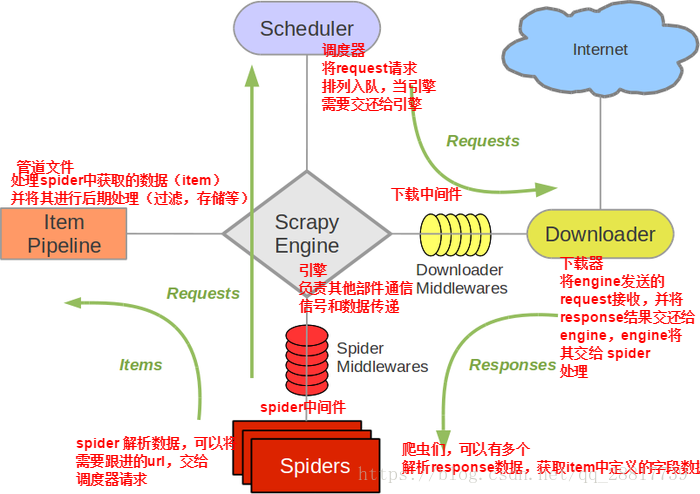
当引擎将国内板块url对应的请求提交给下载器后,下载器进行网页数据的下载,然后将下载到的页面数据,封装到response中,提交给引擎,引擎将response在转交给Spiders。Spiders接受到的response对象中存储的页面数据里是没有动态加载的新闻数据的。要想获取动态加载的新闻数据,则需要在下载中间件中对下载器提交给引擎的response响应对象进行拦截,切对其内部存储的页面数据进行篡改,修改成携带了动态加载出的新闻数据,然后将被篡改的response对象最终交给Spiders进行解析操作。
    使用流程:

        .在爬虫文件中实例化一个浏览器对象

        .重写爬虫类父类一方法closed,在刚方法中关闭浏览器对象

        .在下载中间件中process_response中:

            a:获取爬虫文件中实例化好的浏览器对象

            b:执行浏览器自动化的行为动作

            c:实例化了一个新的响应对象,并且将浏览器获取的页面源码数据加载到了该对象中

            d:返回这个新的响应对象
实操和代码
创建爬虫应用
cmd中

scrapy startproject wangyinewPro

cd wangyinewPro

scrapy genspider news ww.x.com
爬虫文件news.py
# -*- coding: utf- -*-

import scrapy

from wangyinewPro.items import WangyinewproItem

from selenium import webdriver

from aip import AipNlp

class NewsSpider(scrapy.Spider):

    # 百度AI

    APP_ID = ''

    API_KEY = '9KgKVwSwyEyqsENo9aSfbyW8'

    SECRET_KEY = 'cKOt09e3EGpMq8uNy65x2hXru26H9p5G '

    client = AipNlp(APP_ID, API_KEY, SECRET_KEY)

    name = 'news'

    # allowed_domains = ['ww.x.com']

    start_urls = ['https://news.163.com/']

    news_url = []  # 四大板块的url

    def __init__(self):

        # 实例化selenium的谷歌浏览器对象

        self.bro = webdriver.Chrome(executable_path=r'F:\爬虫\chromedriver.exe')

    def close(self, response):

        self.bro.quit()

    def parse(self, response):

        # 获取指定板块的连接(国内,国际,军事,航空)

        li_list = response.xpath('//div[@class="ns_area list"]/ul/li')  # 新闻版块的标签

        indexs = [, , , ]

        new_li_list = []  # 获取四大板块

        for index in indexs:

            new_li_list.append(li_list[index])

        # 将四大板块对应的li标签进行解析(详情页的超链)

        for li in new_li_list:

            new_url = li.xpath('./a/@href').extract_first()  # 超链获得

            self.news_url.append(new_url)  # 添加4大板块的url

            print(self.news_url)

            yield scrapy.Request(url=new_url, callback=self.pares_news)

    def pares_news(self, response):

        div_list = response.xpath('//div[@class="ndi_main"]/div')  # 获得所有新闻的div标签列表

        for div in div_list:

            item = WangyinewproItem()

            item['title'] = div.xpath('./a/img/@alt').extract_first()  # 获取标题

            item['img_url'] = div.xpath('./a.img/@src').extract_first()  # 获取图片url

            detail_url = div.xpath('./a/@href').extract_first()  # 获取详情页的url

            yield scrapy.Request(url=detail_url, callback=self.pares_detail, meta={'item': item})

    def pares_detail(self, response):

        item = response.meta['item']

        content = response.xpath('//div[@id="endText"]//text()').extract()

        item['content'] = ''.join(content).strip(' \n\t')

        # 调用百度AI的接口,提取文章的类型和关键字

        # 关键字

        keys = self.client.keyword(item['title'].replace(u'\xa0', u''),

                                   item['content'].replace(u'\xa0', u''))  # 由于gbk格式报错,所以替换下

        key_list = []

        for dic in keys['items']:  # 百度AI返回的是{items:{'score':0.89, 'tag':'手机'}} 这种类型

            key_list.append(dic['tag'])  # 添加分类

        item['keys'] = ''.join(key_list)  # 返回来的所有类型以字符串形式添加到item的keys属性中

        # 类型(分类)

        kinds = self.client.topic(item['title'].replace(u'\xa0', u''), item['content'].replace(u'\xa0', u''))

        item['kind'] = kinds['item']['lv1_tag_list'][]['tag']  # 获得一级分页的分类

        # print(item['keys'], item['kind'])

        yield item
items.py文件中
import scrapy

class WangyinewproItem(scrapy.Item):

    # define the fields for your item here like:

    title = scrapy.Field()

    content = scrapy.Field()

    img_url = scrapy.Field()

    kind = scrapy.Field()

    keys = scrapy.Field()
下载中间件 middlewares.py中
# -*- coding: utf- -*-

# Define here the models for your spider middleware

#

# See documentation in:

# https://doc.scrapy.org/en/latest/topics/spider-middleware.html

from scrapy import signals

from time import sleep

from scrapy.http import HtmlResponse  # 新的响应对象

class WangyinewproDownloaderMiddleware(object):

    # Not all methods need to be defined. If a method is not defined,

    # scrapy acts as if the downloader middleware does not modify the

    # passed objects.

    def process_request(self, request, spider):

        return None

    def process_response(self, request, response, spider):

        # Called with the response returned from the downloader.

        # Must either;

        # - return a Response object

        # - return a Request object

        # - or raise IgnoreRequest

        # 其实url收到请求后,拦截后使用创建好的浏览器对象进行动态获取数据

        if request.url in spider.news_url:  # 如果当前其请求的url再四大板块中的url

            bro = spider.bro  # 获取spider程序对象中的bro(浏览器实例化对象)

            bro.get(url=request.url)  # 发送请求

            sleep()

            js = 'window.scroll(0,document.body.scrollHeight)'  # 滑动,整个body的高度 的js代码

            bro.execute_script(js)  # 执行滑动到底部的js

            sleep()  # 等待一秒

            bro.execute_script(js)  # 执行滑动到底部的js

            sleep()  # 等待一秒

            bro.execute_script(js)  # 执行滑动到底部的js

            sleep()  # 等待一秒

            # 我们需求中需要的数据源(携带了动态加载出来新闻数据的页面源码数据)

            page_text = bro.page_source

            # 创建一个新的响应对象,并且将上述获取的数据内容加载到该相应对象中

            r = HtmlResponse(

                url=spider.bro.current_url,  # 当前浏览器打开的url对应的url

                body=page_text,  # 新的相应对象的内容是page_text

                encoding='utf-8',  # 编码

                request=request  # 当前响应对应的request

            )

            return r

        return response  # 如果是其他的请求 不做拦截

    def process_exception(self, request, exception, spider):

        pass
注意 先创建sql库和表
sql中

create database spider;

use spider;

create table news(title varchar(),content text,img_url varchar(),kind varchar(),new_keys varchar())
管道pipelines.py文件中
# -*- coding: utf- -*-

# Define your item pipelines here

#

# Don't forget to add your pipeline to the ITEM_PIPELINES setting

# See: https://doc.scrapy.org/en/latest/topics/item-pipeline.html

import pymysql

class WangyinewproPipeline(object):

    conn = None

    cursor = None

    def open_spider(self, spider):

        self.conn = pymysql.Connect(host='127.0.0.1', port=, user='root', password='', db='spider')

        print(self.conn)

    def process_item(self, item, spider):

        print(item)

        self.cursor = self.conn.cursor()

        sql = 'insert into news values("%s","%s","%s","%s","%s")' % (

            item['title'], item['content'], item['img_url'], item['keys'], item['kind'])

        print(sql)

        try:

            self.cursor.execute(sql)

            self.conn.commit()

        except Exception as e:

            print(e)

            self.conn.rollback()

        return item

    def close_spider(self, spider):

        self.cursor.close()

        self.conn.close()
配置settings.py文件中
USER_AGENT = 'Mozilla/5.0 (Macintosh; Intel Mac OS X 10_12_0) AppleWebKit/537.36 (KHTML, like Gecko) Chrome/68.0.3440.106 Safari/537.36'

ROBOTSTXT_OBEY = False

DOWNLOADER_MIDDLEWARES = {

   'wangyinewPro.middlewares.WangyinewproDownloaderMiddleware': ,

}

ITEM_PIPELINES = {

   'wangyinewPro.pipelines.WangyinewproPipeline': ,

}

COOKIES_ENABLED = False

LOG_LEVEL = 'ERROR'

RETRY_ENABLED = False
scrapy + selenium 的动态爬虫的更多相关文章
- 使用scrapy爬虫,爬取今日头条搜索吉林疫苗新闻(scrapy+selenium+PhantomJS)
这一阵子吉林疫苗案,备受大家关注,索性使用爬虫来爬取今日头条搜索吉林疫苗的新闻 依然使用三件套(scrapy+selenium+PhantomJS)来爬取新闻 以下是搜索页面,得到吉林疫苗的搜索信息, ...
- 使用scrapy爬虫,爬取今日头条首页推荐新闻(scrapy+selenium+PhantomJS)
爬取今日头条https://www.toutiao.com/首页推荐的新闻,打开网址得到如下界面 查看源代码你会发现 全是js代码,说明今日头条的内容是通过js动态生成的. 用火狐浏览器F12查看得知 ...
- [Python爬虫] 之一 : Selenium+Phantomjs动态获取网站数据信息
本人刚才开始学习爬虫,从网上查询资料,写了一个利用Selenium+Phantomjs动态获取网站数据信息的例子,当然首先要安装Selenium+Phantomjs,具体的看 http://www.c ...
- scrapy爬取动态分页内容
1.任务定义: 爬取某动态分页页面中所有子话题的内容. 所谓"动态分页":是指通过javascript(简称"js")点击实现翻页,很多时候翻页后的页面地址ur ...
- 使用Python + Selenium打造浏览器爬虫
Selenium 是一款强大的基于浏览器的开源自动化测试工具,最初由 Jason Huggins 于 2004 年在 ThoughtWorks 发起,它提供了一套简单易用的 API,模拟浏览器的各种操 ...
- Scrapy笔记10- 动态配置爬虫
Scrapy笔记10- 动态配置爬虫 有很多时候我们需要从多个网站爬取所需要的数据,比如我们想爬取多个网站的新闻,将其存储到数据库同一个表中.我们是不是要对每个网站都得去定义一个Spider类呢? 其 ...
- Scrapy+selenium爬取简书全站
Scrapy+selenium爬取简书全站 环境 Ubuntu 18.04 Python 3.8 Scrapy 2.1 爬取内容 文字标题 作者 作者头像 发布日期 内容 文章连接 文章ID 思路 分 ...
- QQ空间动态爬虫
作者:虚静 链接:https://zhuanlan.zhihu.com/p/24656161 来源:知乎 著作权归作者所有.商业转载请联系作者获得授权,非商业转载请注明出处. 先说明几件事: 题目的意 ...
- 使用scrapy制作的小说爬虫
使用scrapy制作的小说爬虫 爬虫配套的django网站 https://www.zybuluo.com/xuemy268/note/63660 首先是安装scrapy,在Windows下的安装比 ...
随机推荐
- Makefile模板(C++)
Makefile的C++的一个模板,可用于根据不同源文件,生成多个可执行文件 . CC = g++ DIR_INC = ./include DIR_SRC = ./src DIR_OBJ = ./ob ...
- luogu P5320 [BJOI2019]勘破神机
传送门 首先我们要知道要求什么.显然每次放方块要放一大段不能从中间分开的部分.设\(m=2\)方案为\(f\),\(m=3\)方案为\(g\),\(m=2\)可以放一个竖的,或者两个横的,所以\(f_ ...
- python复习2
在操作字符串时,我们经常遇到str和bytes的互相转换.为了避免乱码问题,应当始终坚持使用UTF-8编码对str和bytes进行转换.
- 《模式分类(原书第二版)》pdf格式下载电子书免费下载
<模式分类(原书第二版)>pdf格式下载电子书免费下载: https://u253469.ctfile.com/fs/253469-302448505 内容简介 <模式分类>( ...
- Jquery验证码倒计时
html代码: <input type="button" value="获取验证码" id="getCode" style=" ...
- SpringJUnit4ClassRunner (单元测试)
1.在Maven的pom.xml中加入 <dependency> <groupId>junit</groupId> <artifactId>junit& ...
- spring-mvc访问本地html文件
项目中要用到在线预览word文档,刚开始考虑是要将word转成pdf文件,然后再直接在浏览器打开pdf文档即可, 但是项目部署在Linux下,在网上搜了一下没有找到合适的方法, 后来项目组讨论用POI ...
- anacoda报错No module named 'sklearn.cross_validation'
在目前的snacoda里集成的sklearn已经不存在cross_validation模块了 使用以下模块 from sklearn.model_selection import train_te ...
- Maven Install报错:Perhaps you are running on a JRE rather than a JDK?
我用的是idea,解决办法是:安装jdk,配置环境变量
- OpenStack--Rabbitmq组件消息队列
概念 队列 MQ 全称为Message Queue,消息队列( MQ ) 是一种应用程序的通信方法.应用程序通过读写入列队的消息(针对应用程序的数据)来通信,而无需专用连接来链接它们. 消息传递指的是 ...