
【Spring-Security】Re01 入门上手
一、所需的组件
SpringBoot项目需要的POM依赖:
<dependency>

     <groupId>org.springframework.boot</groupId>

     <artifactId>spring-boot-starter-security</artifactId>

 </dependency>

<dependency>

    <groupId>org.springframework.security</groupId>

    <artifactId>spring-security-test</artifactId>

</dependency>
具体的版本号是跟随你的Boot版本走的:
<parent>

    <groupId>org.springframework.boot</groupId>

    <artifactId>spring-boot-starter-parent</artifactId>

    <version>2.3.4.RELEASE</version>

    <relativePath/> <!-- lookup parent from repository -->

</parent>
其他常规依赖:
<dependency>

    <groupId>org.springframework.boot</groupId>

    <artifactId>spring-boot-starter-thymeleaf</artifactId>

</dependency>


<dependency>

    <groupId>org.springframework.boot</groupId>

    <artifactId>spring-boot-starter-web</artifactId>

</dependency>


<dependency>

    <groupId>org.springframework.boot</groupId>

    <artifactId>spring-boot-devtools</artifactId>

    <scope>runtime</scope>

    <optional>true</optional>

</dependency>


<dependency>

    <groupId>org.springframework.boot</groupId>

    <artifactId>spring-boot-configuration-processor</artifactId>

    <optional>true</optional>

</dependency>


<dependency>

    <groupId>org.projectlombok</groupId>

    <artifactId>lombok</artifactId>

    <optional>true</optional>

</dependency>


<dependency>

    <groupId>org.springframework.boot</groupId>

    <artifactId>spring-boot-starter-test</artifactId>

    <scope>test</scope>

    <exclusions>

        <exclusion>

            <groupId>org.junit.vintage</groupId>

            <artifactId>junit-vintage-engine</artifactId>

        </exclusion>

    </exclusions>

</dependency>
二、上手入门
在static目录下编写一个首页:
<!DOCTYPE html>

<html lang="en">

<head>

    <meta charset="UTF-8">

    <title>Project-Index</title>

</head>

<body>

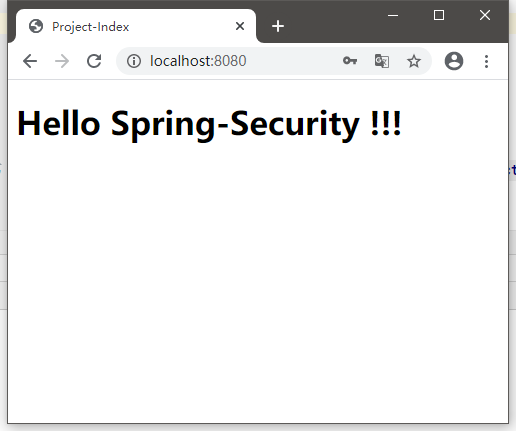
    <h1>Hello Spring-Security !!!</h1>

</body>

</html>
启动项目访问项目地址:
http://locahost:8080
会发现被重定向到这个地址,并且要求登陆账号
http://localhost:8080/login
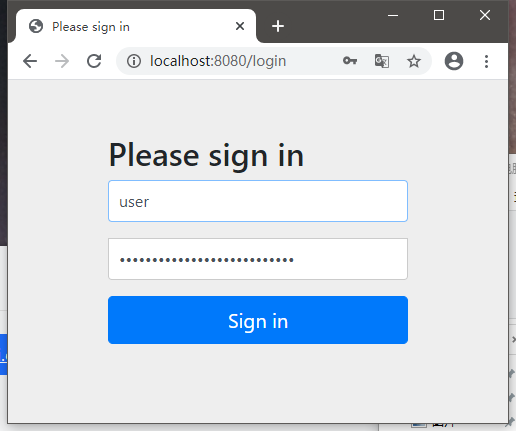
Spring-Security默认的用户是user,但是密码是由组件Spring-Security-Test随机生成的
在控制台输出可以找到:
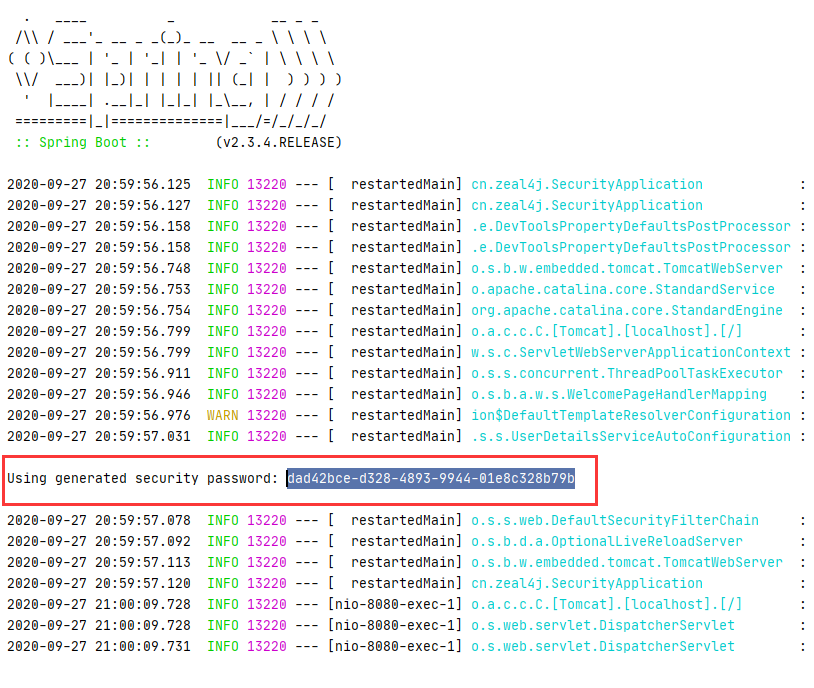
登陆成功之后,才会跳转到页面中来:
参考地址:
https://www.bilibili.com/video/BV12D4y1U7D8?p=3
三、UserDetailService接口分析
package org.springframework.security.core.userdetails;

public interface UserDetailsService {

    UserDetails loadUserByUsername(String var1) throws UsernameNotFoundException;

}
只有一个接口方法,通过用户名加载账号信息
注意,返回的是一个UserDetails类型对象,账号细节实例
再来看UserDetails接口:
package org.springframework.security.core.userdetails;

import java.io.Serializable;

import java.util.Collection;

import org.springframework.security.core.GrantedAuthority;

public interface UserDetails extends Serializable {

    Collection<? extends GrantedAuthority> getAuthorities();

    String getPassword();

    String getUsername();

    boolean isAccountNonExpired();

    boolean isAccountNonLocked();

    boolean isCredentialsNonExpired();

    boolean isEnabled();

}
该类型也是一个接口,不过多出了其他一些方法:
1、Collection<? extends GrantedAuthority> getAuthorities();

获取账户对应的所有权限的集合对象

2、String getPassword();

获取密码

3、String getUsername();

获取用户名

4、boolean isAccountNonExpired();

账户是否过期,过期的账户不可以被认证

5、boolean isAccountNonLocked();

账户状态是否为锁定,锁定的账户不可以被认证

6、boolean isCredentialsNonExpired();

凭证是否过期,凭证即密码

7、boolean isEnabled();

账户状态是否为可用
相比于Shiro来说,UserDetailsService更像Shiro的Realm
而这个UserDetails对象在ShIro中是需要我们自己来实现的,例如之前的项目中的ActivateUser。
注意上面权限集合类型,官方文档特别注释该方法返回不可以为NULL。
当然,Security也提供了对应的一些实现类:

四、密码加密 PasswordEncoder接口
package org.springframework.security.crypto.password;

public interface PasswordEncoder {

    String encode(CharSequence var1);

    boolean matches(CharSequence var1, String var2);

    default boolean upgradeEncoding(String encodedPassword) {

        return false;

    }

}
API说明:
1、String encode(CharSequence var1);

设置密码加密的方法,加密逻辑自行实现

2、matches(CharSequence var1, String var2);

匹配判断,var1 是原始密码,var2 是加密的密码

匹配逻辑自行实现

3、upgradeEncoding(String encodedPassword) {

判断是否能够二次加密密码,一般不使用,且默认false
该接口下的实现类:

官方推荐的实现类使用这个:
org.springframework.security.crypto.bcrypt.BCryptPasswordEncoder
API测试:
package cn.zeal4j;

import org.junit.jupiter.api.Test;

import org.springframework.boot.test.context.SpringBootTest;

import org.springframework.security.crypto.bcrypt.BCryptPasswordEncoder;

import org.springframework.security.crypto.password.PasswordEncoder;

@SpringBootTest

class SecurityApplicationTests {

    @Test

    void contextLoads() {

        cryptTest();

    }

    private static void cryptTest() {

        final String PASSWORD = "123456";

        PasswordEncoder passwordEncoder = new BCryptPasswordEncoder();

        String encode = passwordEncoder.encode(PASSWORD);

        System.out.println(encode);

        boolean matches = passwordEncoder.matches(PASSWORD, encode);

        System.out.println(matches);

    }

}
结果:
$2a$10$NNySuHkEHtzLHodCivAFN.FvakFpR6/tSpkgzDW4QPd8PMF5IBaza

true
【Spring-Security】Re01 入门上手的更多相关文章
- spring security 简单入门
spring security 简单入门示例 一.概述 Spring Security是一个能够为基于Spring的企业应用系统提供声明式的安全访问控制解决方案的安全框架 . 其中最主要的安全操作有两 ...
- Spring Security框架入门
1.Spring Security框架入门 1.1 Spring Security简介 Spring Security是一个能够为基于Spring的企业应用系统提供声明式的安全访问控制解决方案的安全框 ...
- springboot集成spring security安全框架入门篇
一. :spring security的简介 Spring Security是一个能够为基于Spring的企业应用系统提供声明式的安全访问控制解决方案的安全框架.它提供了一组可以在Spring应用上下 ...
- Spring Boot中使用 Spring Security 构建权限系统
Spring Security是一个能够为基于Spring的企业应用系统提供声明式的安全访问控制解决方案的安全框架.它提供了一组可以在Spring应用上下文中配置的Bean,为应用系统提供声明式的安全 ...
- Spring Security(一):官网向导翻译
原文出自 https://spring.io/guides/topicals/spring-security-architecture Spring Security Architecture ...
- SpringBoot安全篇Ⅵ --- 整合Spring Security
知识储备: 关于SpringSecurity的详细学习可以查看SpringSecurity的官方文档. Spring Security概览 应用程序的两个主要区域是"认证"和&qu ...
- [转]Spring Security架构
作者:before31原文:https://my.oschina.net/xuezi/blog/3126351 本指南是Spring Security的入门,它提供了对该框架的设计和基本构建的见解.我 ...
- Spring Security 入门(1-1)Spring Security是什么?
1.Spring Security是什么? Spring Security 是一个安全框架,前身是 Acegi Security , 能够为 Spring企业应用系统提供声明式的安全访问控制. Spr ...
- Spring Security 入门
一.Spring Security简介 Spring Security是一个能够为基于Spring的企业应用系统提供声明式的安全访问控制解决方案的安全框架.它提供了一组可以在Spring应用上下文中配 ...
随机推荐
- Tensorflow--------tf.nn库
1.tf.nn :提供神经网络相关操作,包括卷积神经(conv),池化操作(pooling),归一化,loss,分类操作,embedding,RNN,Evaluation. 2.tf.layers:高 ...
- Syn_Flood攻击&防御手段
Syn_Flood攻击原理 攻击者首先伪造地址对服务器发起SYN请求(我可以建立连接吗?),服务器就会回应一个ACK+SYN(可以+请确认).而真实的IP会认为,我没有发送请求,不作回应.服务器没有收 ...
- Java springboot支付宝小程序授权,获取用户信息,支付及回调
参考官方文档https://opendocs.alipay.com/mini/introduce/pay 支付宝小程序的支付和微信小程序的支付一样第一步都是要获取到用户的唯一标识,在微信中我们获取到的 ...
- LeetCode739 每日温度
根据每日 气温 列表,请重新生成一个列表,对应位置的输入是你需要再等待多久温度才会升高的天数.如果之后都不会升高,请输入 0 来代替. 例如,给定一个列表 temperatures = [73, 74 ...
- 安装weblogic 11g
参考 https://blog.csdn.net/z69183787/article/details/38401013 https://blog.csdn.net/wjf8882300/article ...
- 安装蓝鲸paas社区版
安装蓝鲸paas社区版http://docs.bk.tencent.com/bkce_install_guide/setup/get_ready.html#hostssystemctl stop fi ...
- 【Linux】rsync中sending incremental file list时间优化
每次使用rsync的时候,前面出现sending incremental file list 这句之后要等待很长时间 查了很多帖子和官方文档后,发现是-c这个选项的问题, -v, --verbose ...
- kubernets之pod的标签
一 如何查看pod 的日志 1 通过执行命令查看日志信息 kubectl logs pod_name 二 创建带有标签的pod,一个范例的pod创建yaml文件如下所示 2.1 创建带有 ...
- npm i 报错 'match' of undefined 错误以及删除node_modules失败
简单粗暴的解决办法就是一个字'删', 1.先把node_modules给删了 手动删除的话,window系统经常会有部分删不了,说需要个权限什么的,直接用rimraf 就能解决 先安装npm inst ...
- Android事件分发机制三:事件分发工作流程
前言 很高兴遇见你~ 本文是事件分发系列的第三篇. 在前两篇文章中,Android事件分发机制一:事件是如何到达activity的? 分析了事件分发的真正起点:viewRootImpl,Activit ...