
Java 连接操作 Redis 出现错误
Exception in thread "main" redis.clients.jedis.exceptions.JedisConnectionException: java.net.ConnectException: Connection refused: connect

    at redis.clients.jedis.Connection.connect(Connection.java:207)

    at redis.clients.jedis.BinaryClient.connect(BinaryClient.java:93)

    at redis.clients.jedis.Connection.sendCommand(Connection.java:126)

    at redis.clients.jedis.Connection.sendCommand(Connection.java:121)

    at redis.clients.jedis.BinaryClient.ping(BinaryClient.java:106)

    at redis.clients.jedis.BinaryJedis.ping(BinaryJedis.java:195)

    at practice.RedisJava.main(RedisJava.java:13)

Caused by: java.net.ConnectException: Connection refused: connect

    at java.net.DualStackPlainSocketImpl.waitForConnect(Native Method)

    at java.net.DualStackPlainSocketImpl.socketConnect(DualStackPlainSocketImpl.java:85)

    at java.net.AbstractPlainSocketImpl.doConnect(AbstractPlainSocketImpl.java:350)

    at java.net.AbstractPlainSocketImpl.connectToAddress(AbstractPlainSocketImpl.java:206)

    at java.net.AbstractPlainSocketImpl.connect(AbstractPlainSocketImpl.java:188)

    at java.net.PlainSocketImpl.connect(PlainSocketImpl.java:172)

    at java.net.SocksSocketImpl.connect(SocksSocketImpl.java:392)

    at java.net.Socket.connect(Socket.java:589)

    at redis.clients.jedis.Connection.connect(Connection.java:184)

    ... 6 more
这可能是两个原因造成的,首先可能是redis的6379端口无法访问,请先在cmd中输入命令
telnet 127.0.0.1 6379
看看可不可以访问redis-server 机器的6379端口,如果不能访问,需要在远程机器关掉防火墙或者添加允许通过
1)使用root用户登录,vi /etc/sysconfig/iptables,添加如图所以一行
# Generated by iptables-save v1.4.21 on Tue Nov 21 12:32:27 2017

*filter

:INPUT ACCEPT [0:0]

:FORWARD ACCEPT [0:0]

:OUTPUT ACCEPT [1:156]-A INPUT -m state --state NEW -m tcp -p tcp --dport 6379 -j ACCEPT

COMMIT

# Completed on Tue Nov 21 12:32:27 2017
2)输入命令service iptables restart重启防火墙
或者可以直接root用户使用命令service iptables stop关闭防火墙。
防火墙检查完后,如果还是出现上述问题,说明redis还有地方需要配置,redis默认是只有本机可以访问的,想要远程访问需要修改redis.conf配置文件。
进入redis.conf目录,并使用vi命令打开,找到bind那行修改后,wq保存退出,重启redis-server。

bind 后加的是允许访问的ip
bind 127.0.0.1代表只有本机可以访问,可以将允许访问的ip加入,也可以直接注释掉这一行,这样所有机器都可以访问
解决上述问题后出现的新问题:DENIED Redis is running in protected mode
报错信息如下:
Exception in thread "main" redis.clients.jedis.exceptions.JedisDataException: DENIED Redis is running in protected mode because protected mode is enabled,
 no bind address was specified, no authentication password is requested to clients. In this mode connections are only accepted from the loopback interface.
If you want to connect from external computers to Redis you may adopt one of the following solutions:

1) Just disable protected mode sending the command 'CONFIG SET protected-mode no' from the loopback interface by connecting to Redis from the same host the
server is running, however MAKE SURE Redis is not publicly accessible from internet if you do so. Use CONFIG REWRITE to make this change permanent.

2) Alternatively you can just disable the protected mode by editing the Redis configuration file, and setting the protected mode option to 'no', and then restarting the server.

3) If you started the server manually just for testing, restart it with the '--protected-mode no' option.

4) Setup a bind address or an authentication password. NOTE: You only need to do one of the above things in order for the server to start accepting connections from the outside.

    at redis.clients.jedis.Protocol.processError(Protocol.java:127)

    at redis.clients.jedis.Protocol.process(Protocol.java:161)

    at redis.clients.jedis.Protocol.read(Protocol.java:215)

    at redis.clients.jedis.Connection.readProtocolWithCheckingBroken(Connection.java:340)

    at redis.clients.jedis.Connection.getStatusCodeReply(Connection.java:239)

    at redis.clients.jedis.Jedis.set(Jedis.java:121)

    at roy.redis.test.Test.init(Test.java:13)

    at roy.redis.test.Test.main(Test.java:8)
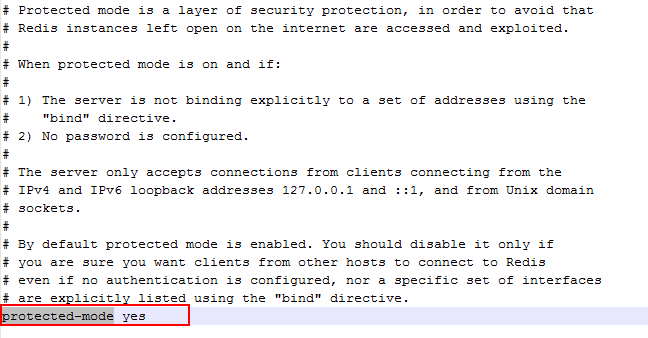
主要是这里的原因:redis开启了保护模式,我们可以将它设置为no;
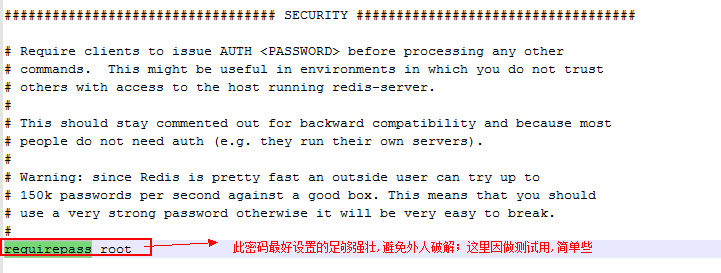
当然,另一种安全的做法是
Java 连接操作 Redis 出现错误的更多相关文章
- Java 连接使用 Redis
1. 开始在 Java 中使用 Redis 前, 我们需要确保已经安装了 redis 服务及 Java redis 驱动,且你的机器上能正常使用 Java. 首先你需要下载驱动包,下载 jedis.j ...
- Redis入门教程(三)— Java中操作Redis
在Redis的官网上,我们可以看到Redis的Java客户端众多 其中,Jedis是Redis官方推荐,也是使用用户最多的Java客户端. 开始前的准备 使用jedis使用到的jedis-2.1.0. ...
- java代码操作Redis
1.导入需要的pom依赖 <properties> <project.build.sourceEncoding>UTF-8</project.build.sourceEn ...
- Redis Java连接操作
安装 要在Java程序中使用使用操作Redis,需要确保有Redis的Java驱动程序和Java设置在机器上.可以检查看Java教程-学习如何在机器上安装Java.现在,让我们来看看如何设置Redis ...
- Java连接远程Redis
redis-server & //后台启动redis redis-cli //使用redis 打开redis.conf文件在NETWORK部分有说明 /usr/local/src ...
- Java代码操作Redis的sentinel和Redis的集群Cluster操作
总共四台机器,crxy99,crxy98分别是主节点和从节点. crxy97和crxy96是两个监控此主从架构的sentinel节点. 看代码: import org.junit.Test; im ...
- 使用java代码操作Redis
1导入pom.xml依赖 <dependency> <groupId>redis.clients</groupId> <artifactId>jedis ...
- Python进阶学习_连接操作Redis数据库
安装导入第三方模块Redis pip3 install redis import redis 操作String类型 """ redis 基本命令 String set(n ...
- 20190928-02使用Redis客户端Jedis连接Redis,以及用Java代码操作Redis 000 030
启动redis package com.yujie.jedis; import java.util.HashMap; import java.util.Map; import java.util.Se ...
随机推荐
- 【转帖】C++经典书籍汇总
TCPL和D&E 1:Bjarne Stroustrup, The C++ Programming Language (Special 3rd Edition) <C++ 程序设计语言( ...
- linux rm指定的文件
如何删除一个目录下的除了想要的文件之外的所有文件 rm `ls | grep -v "aa"` Linux下 报错“命令参数列表过长”,在用mv命令一次移动3万多个文件时失败了,原 ...
- isEnable() 和 isDisplayed() 和 isSelected()
isEnable().isDisplayed()和isSelected() 1.以上三个为布尔类型的函数 2.isEnable用于存储input.select等元素的可编辑状态,可以编辑返回true, ...
- javaScript动画2 scroll家族
offsetWidth和offsetHight (检测盒子自身宽高+padding+border) 这两个属性,他们绑定在了所有的节点元素上.获取之后,只要调用这两个属性,我们就能够获取元素节点的宽和 ...
- Maven的plugins、pluginManagement和dependencies、dependencyManagement
plugins和dependencies下边配的都是真实使用的. pluginManagement和dependencyManagement下边配的都只是做声明的,一般配置在顶级pom中. 参考链接: ...
- 企业级项目把.app文件转成.ipa文件的自动化实现
将MakeIPA.sh添加到项目的根目录下 此脚本针对企业级项目打包,不会编译项目,在打包前确认项目已经编译完成生成了"XXX.app"文件 使用前需要配置该脚本部分路径才能正确打 ...
- WPF和Sliverlight不同之UIElement-事件
WPF: http://msdn.microsoft.com/en-us/library/System.Windows.UIElement.aspx DragEnter DragLeave DragO ...
- Spring七大框架
Spring Core:最基础部分,提供IOC和依赖注入.基础概念是BeanFactory,提供对Factory模式的经典实现,这样来消除对程序性单例模式的需要,并真正地允许你从程序逻辑中分离出依赖关 ...
- Ansible VMware模块使用示例
vmware_vm_facts模块使用示例 执行条件: 安装Pyvmimo: pip install pyvmomi 方法一,直接编写单个yaml文件: - hosts: localhost # 注 ...
- [BZOJ1996] chorus合唱队
Description Input Output Sample Input 4 1701 1702 1703 1704 Sample Output 8 HINT 区间$dp$,首先每个点被放入队伍时队 ...