
Consul 简介、安装、常用命令的使用
1 Consul简介
Consul 是 HashiCorp 公司推出的开源工具,用于实现分布式系统的服务发现与配置。与其他分布式服务注册与发现的方案,Consul的方案更“一站式”,内置了服务注册与发现框 架、分布一致性协议实现、健康检查、Key/Value存储、多数据中心方案,不再需要依赖其他工具(比如ZooKeeper等)。使用起来也较 为简单。Consul使用Go语言编写,因此具有天然可移植性(支持Linux、windows和Mac OS X);安装包仅包含一个可执行文件,方便部署,与Docker等轻量级容器可无缝配合 。
2 Consul安装
安装环境:
mac:64bit(查看mac位数:打开终端–>”uname -a”)
consul_0.6.4_darwin_amd64.zip和consul_0.6.4_web_ui.zip,从consul官网https://www.consul.io/downloads.html进行下载就好(选择好OS和位数)
1、解压consul_0.6.4_darwin_amd64.zip
2、将解压后的二进制文件consul(上边画红框的部分拷贝到/usr/local/bin下)
sudo scp consul /usr/local/bin/
说明:使用sudo是因为权限问题。
3、查看是否安装成功,
直接在家目录下执行consul命令即可。出现如下结果,表示安装成功。
lidongdeMacBook-Pro:bin lidong$ consul

usage: consul [--version] [--help] <command> [<args>]

Available commands are:

    agent          Runs a Consul agent

    configtest     Validate config file

    event          Fire a new event

    exec           Executes a command on Consul nodes

    force-leave    Forces a member of the cluster to enter the "left" state

    info           Provides debugging information for operators

    join           Tell Consul agent to join cluster

    keygen         Generates a new encryption key

    keyring        Manages gossip layer encryption keys

    kv             Interact with the key-value store

    leave          Gracefully leaves the Consul cluster and shuts down

    lock           Execute a command holding a lock

    maint          Controls node or service maintenance mode

    members        Lists the members of a Consul cluster

    monitor        Stream logs from a Consul agent

    operator       Provides cluster-level tools for Consul operators

    reload         Triggers the agent to reload configuration files

    rtt            Estimates network round trip time between nodes

    snapshot       Saves, restores and inspects snapshots of Consul server state

    version        Prints the Consul version

    watch          Watch for changes in Consul
3 Consul 启动
1、执行命令
./consul agent -dev # -dev表示开发模式运行,另外还有-server表示服务模式运行查看显示结果:
lidongdeMacBook-Pro:bin lidong$ consul agent -dev

==> Starting Consul agent...

==> Starting Consul agent RPC...

==> Consul agent running!

           Version: 'v0.7.5'

           Node ID: 'c67a8d03-deac-35b8-8f68-06ff7b687215'

         Node name: 'lidongdeMacBook-Pro.local'

        Datacenter: 'dc1'

            Server: true (bootstrap: false)

       Client Addr: 127.0.0.1 (HTTP: 8500, HTTPS: -1, DNS: 8600, RPC: 8400)

      Cluster Addr: 127.0.0.1 (LAN: 8301, WAN: 8302)

    Gossip encrypt: false, RPC-TLS: false, TLS-Incoming: false

             Atlas: <disabled>

==> Log data will now stream in as it occurs:

    2017/03/13 12:44:31 [DEBUG] Using unique ID "c67a8d03-deac-35b8-8f68-06ff7b687215" from host as node ID

    2017/03/13 12:44:31 [INFO] raft: Initial configuration (index=1): [{Suffrage:Voter ID:127.0.0.1:8300 Address:127.0.0.1:8300}]

    2017/03/13 12:44:31 [INFO] raft: Node at 127.0.0.1:8300 [Follower] entering Follower state (Leader: "")

    2017/03/13 12:44:31 [INFO] serf: EventMemberJoin: lidongdeMacBook-Pro.local 127.0.0.1

    2017/03/13 12:44:31 [INFO] consul: Adding LAN server lidongdeMacBook-Pro.local (Addr: tcp/127.0.0.1:8300) (DC: dc1)

    2017/03/13 12:44:31 [INFO] serf: EventMemberJoin: lidongdeMacBook-Pro.local.dc1 127.0.0.1

    2017/03/13 12:44:31 [INFO] consul: Adding WAN server lidongdeMacBook-Pro.local.dc1 (Addr: tcp/127.0.0.1:8300) (DC: dc1)

    2017/03/13 12:44:36 [WARN] raft: Heartbeat timeout from "" reached, starting election

    2017/03/13 12:44:36 [INFO] raft: Node at 127.0.0.1:8300 [Candidate] entering Candidate state in term 2

    2017/03/13 12:44:36 [DEBUG] raft: Votes needed: 1

    2017/03/13 12:44:36 [DEBUG] raft: Vote granted from 127.0.0.1:8300 in term 2. Tally: 1

    2017/03/13 12:44:36 [INFO] raft: Election won. Tally: 1

    2017/03/13 12:44:36 [INFO] raft: Node at 127.0.0.1:8300 [Leader] entering Leader state

    2017/03/13 12:44:36 [INFO] consul: cluster leadership acquired

    2017/03/13 12:44:36 [INFO] consul: New leader elected: lidongdeMacBook-Pro.local

    2017/03/13 12:44:36 [DEBUG] consul: reset tombstone GC to index 3

    2017/03/13 12:44:36 [INFO] consul: member 'lidongdeMacBook-Pro.local' joined, marking health alive

    2017/03/13 12:44:37 [INFO] agent: Synced service 'consul'

    2017/03/13 12:44:37 [DEBUG] agent: Node info in sync

    2017/03/13 12:44:39 [INFO] agent.rpc: Accepted client: 127.0.0.1:54095

    2017/03/13 12:44:50 [DEBUG] http: Request GET /v1/catalog/datacenters (580.862µs) from=127.0.0.1:54114

    2017/03/13 12:44:50 [DEBUG] http: Request GET /v1/catalog/datacenters (34.955µs) from=127.0.0.1:54114

    2017/03/13 12:44:50 [DEBUG] http: Request GET /v1/internal/ui/nodes?dc=dc1&token=<hidden> (1.024476ms) from=127.0.0.1:54112

    2017/03/13 12:44:50 [DEBUG] http: Request GET /v1/coordinate/nodes?dc=dc1&token=<hidden> (361.25µs) from=127.0.0.1:54111

    2017/03/13 12:44:50 [DEBUG] http: Request GET /v1/internal/ui/services?dc=dc1&token=<hidden> (315.405µs) from=127.0.0.1:54111

    2017/03/13 12:44:53 [DEBUG] http: Request GET /v1/internal/ui/nodes?dc=dc1&token=<hidden> (140.095µs) from=127.0.0.1:54111

    2017/03/13 12:44:54 [DEBUG] http: Request GET /v1/kv/?keys&seperator=/&dc=dc1&token=<hidden> (1.368486ms) from=127.0.0.1:54111

    2017/03/13 12:44:55 [DEBUG] http: Request GET /v1/acl/list?dc=dc1&token=<hidden> (9.253µs) from=127.0.0.1:54111

    2017/03/13 12:44:57 [DEBUG] http: Request GET /v1/internal/ui/services?dc=dc1&token=<hidden> (109.196µs) from=127.0.0.1:54111

    2017/03/13 12:44:59 [DEBUG] http: Request GET /v1/internal/ui/services?dc=dc1&token=<hidden> (98.48µs) from=127.0.0.1:54111

    2017/03/13 12:45:58 [DEBUG] agent: Service 'consul' in sync

    2017/03/13 12:45:58 [DEBUG] agent: Node info in sync

    2017/03/13 12:47:55 [DEBUG] agent: Service 'consul' in sync

    2017/03/13 12:47:55 [DEBUG] agent: Node info in sync
说明:
-dev(该节点的启动不能用于生产环境,因为该模式下不会持久化任何状态),该启动模式仅仅是为了快速便捷的启动单节点consul
该节点处于server模式
该节点是leader
该节点是一个健康节点
2、查看consul cluster中的每一个consul节点的信息
lidongdeMacBook-Pro:~ lidong$ consul members

Node                       Address         Status  Type    Build  Protocol  DC

lidongdeMacBook-Pro.local  127.0.0.1:8301  alive   server  0.7.5  2         dc1
说明:
- Address:节点地址
- Status:alive表示节点健康
- Type:server运行状态是server状态
- DC:dc1表示该节点属于DataCenter1
注意:
members命令的输出是基于gossip协议的,并且是最终一致的(也就是说,某一个时刻你去运用该命令查到的consul节点的状态信息可能是有误的)
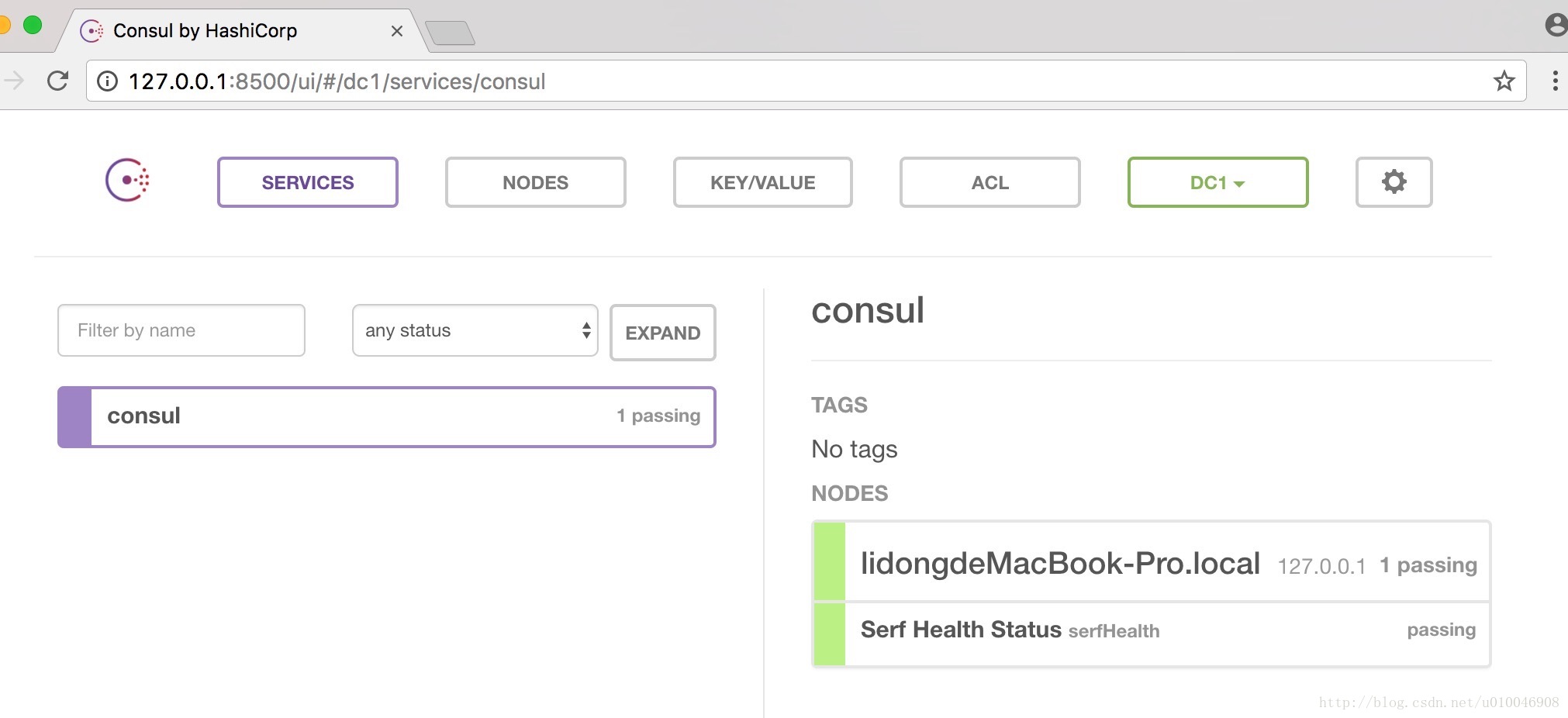
输入http://127.0.0.1:8500/ui/ 访问Consul,可查看到如下界面:
4 停止服务(优雅退出)
命令:CTRL+C
^C==> Caught signal: interrupt

    2017/03/13 12:50:42 [DEBUG] http: Shutting down http server (127.0.0.1:8500)

    2017/03/13 12:50:42 [INFO] agent: requesting shutdown

    2017/03/13 12:50:42 [INFO] consul: shutting down server

    2017/03/13 12:50:42 [WARN] serf: Shutdown without a Leave

    2017/03/13 12:50:42 [WARN] serf: Shutdown without a Leave

    2017/03/13 12:50:42 [ERR] dns: error starting tcp server: accept tcp 127.0.0.1:8600: use of closed network connection

    2017/03/13 12:50:42 [INFO] agent: shutdown complete
说明:
- 该节点离开后,会通知cluster中的其他节点
注意:
- 安装部分参考自:https://www.consul.io/intro/getting-started/install.html
- 启动和停止服务部分参考自:https://www.consul.io/intro/getting-started/agent.html
5 Consul常用命令
| 命令 | 解释 | 示例 |
|---|---|---|
| agent | 运行一个consul agent | consul agent -dev |
| join | 将agent加入到consul集群 | consul join IP |
| members | 列出consul cluster集群中的members | consul members |
| leave | 将节点移除所在集群 | consul leave |
consul agent 命令详解
输入consul agent --help ,可以看到consul agent 的选项,如下:
  -advertise=addr          Sets the advertise address to use

  -advertise-wan=addr      Sets address to advertise on wan instead of advertise addr

  -atlas=org/name          Sets the Atlas infrastructure name, enables SCADA.

  -atlas-join              Enables auto-joining the Atlas cluster

  -atlas-token=token       Provides the Atlas API token

  -atlas-endpoint=1.2.3.4  The address of the endpoint for Atlas integration.

  -bootstrap               Sets server to bootstrap mode

  -bind=0.0.0.0            Sets the bind address for cluster communication

  -http-port=8500          Sets the HTTP API port to listen on

  -bootstrap-expect=0      Sets server to expect bootstrap mode.

  -client=127.0.0.1        Sets the address to bind for client access.

                           This includes RPC, DNS, HTTP and HTTPS (if configured)

  -config-file=foo         Path to a JSON file to read configuration from.

                           This can be specified multiple times.

  -config-dir=foo          Path to a directory to read configuration files

                           from. This will read every file ending in ".json"

                           as configuration in this directory in alphabetical

                           order. This can be specified multiple times.

  -data-dir=path           Path to a data directory to store agent state

  -dev                     Starts the agent in development mode.

  -recursor=1.2.3.4        Address of an upstream DNS server.

                           Can be specified multiple times.

  -dc=east-aws             Datacenter of the agent (deprecated: use 'datacenter' instead).

  -datacenter=east-aws     Datacenter of the agent.

  -encrypt=key             Provides the gossip encryption key

  -join=1.2.3.4            Address of an agent to join at start time.

                           Can be specified multiple times.

  -join-wan=1.2.3.4        Address of an agent to join -wan at start time.

                           Can be specified multiple times.

  -retry-join=1.2.3.4      Address of an agent to join at start time with

                           retries enabled. Can be specified multiple times.

  -retry-interval=30s      Time to wait between join attempts.

  -retry-max=0             Maximum number of join attempts. Defaults to 0, which

                           will retry indefinitely.

  -retry-join-wan=1.2.3.4  Address of an agent to join -wan at start time with

                           retries enabled. Can be specified multiple times.

  -retry-interval-wan=30s  Time to wait between join -wan attempts.

  -retry-max-wan=0         Maximum number of join -wan attempts. Defaults to 0, which

                           will retry indefinitely.

  -log-level=info          Log level of the agent.

  -node=hostname           Name of this node. Must be unique in the cluster

  -protocol=N              Sets the protocol version. Defaults to latest.

  -rejoin                  Ignores a previous leave and attempts to rejoin the cluster.

  -server                  Switches agent to server mode.

  -syslog                  Enables logging to syslog

  -ui                      Enables the built-in static web UI server

  -ui-dir=path             Path to directory containing the Web UI resources

  -pid-file=path           Path to file to store agent PID
consul agent 命令的常用选项,如下:
- -data-dir
- 作用:指定agent储存状态的数据目录
- 这是所有agent都必须的
- 对于server尤其重要,因为他们必须持久化集群的状态
- -config-dir
- 作用:指定service的配置文件和检查定义所在的位置
- 通常会指定为”某一个路径/consul.d”(通常情况下,.d表示一系列配置文件存放的目录)
- -config-file
- 作用:指定一个要装载的配置文件
- 该选项可以配置多次,进而配置多个配置文件(后边的会合并前边的,相同的值覆盖)
- -dev
- 作用:创建一个开发环境下的server节点
- 该参数配置下,不会有任何持久化操作,即不会有任何数据写入到磁盘
- 这种模式不能用于生产环境(因为第二条)
- -bootstrap-expect
- 作用:该命令通知consul server我们现在准备加入的server节点个数,该参数是为了延迟日志复制的启动直到我们指定数量的server节点成功的加入后启动。
- -node
- 作用:指定节点在集群中的名称
- 该名称在集群中必须是唯一的(默认采用机器的host)
- 推荐:直接采用机器的IP
- -bind
- 作用:指明节点的IP地址
- 有时候不指定绑定IP,会报
Failed to get advertise address: Multiple private IPs found. Please configure one.的异常
- -server
- 作用:指定节点为server
- 每个数据中心(DC)的server数推荐至少为1,至多为5
- 所有的server都采用raft一致性算法来确保事务的一致性和线性化,事务修改了集群的状态,且集群的状态保存在每一台server上保证可用性
- server也是与其他DC交互的门面(gateway)
- -client
- 作用:指定节点为client,指定客户端接口的绑定地址,包括:HTTP、DNS、RPC
- 默认是127.0.0.1,只允许回环接口访问
- 若不指定为-server,其实就是-client
- -join
- 作用:将节点加入到集群
- -datacenter(老版本叫-dc,-dc已经失效)
- 作用:指定机器加入到哪一个数据中心中
使用-client 参数可指定允许客户端使用什么ip去访问,例如-client 192.168.11.143 表示可以使用http://192.168.11.143:8500/ui 去访问。
我们尝试一下:
consul agent -dev -client 192.168.11.143- 1
发现果然可以使用http://192.168.11.143:8500/ui 访问了。
6 Consul 的高可用
Consul Cluster集群架构图如下: 
这边准备了三台CentOS 7的虚拟机,主机规划如下,供参考:
| 主机名称 | IP | 作用 | 是否允许远程访问 |
|---|---|---|---|
| node0 | 192.168.11.143 | consul server | 是 |
| node1 | 192.168.11.144 | consul client | 否 |
| node2 | 192.168.11.145 | consul client | 是 |
6.1 搭建步骤:
- 启动node0机器上的Consul(node0机器上执行):
consul agent -data-dir /tmp/node0 -node=node0 -bind=192.168.11.143 -datacenter=dc1 -ui -client=192.168.11.143 -server -bootstrap-expect 1- 启动node1机器上的Consul(node1机器上执行):
consul agent -data-dir /tmp/node1 -node=node1 -bind=192.168.11.144 -datacenter=dc1 -ui- 启动node2机器上的Consul(node2机器上执行):
consul agent -data-dir /tmp/node2 -node=node2 -bind=192.168.11.145 -datacenter=dc1 -ui -client=192.168.11.145- 将node1节点加入到node0上(node1机器上执行):
consul join 192.168.11.143- 将node2节点加入到node0上(node2机器上执行):
consul join -rpc-addr=192.168.11.145:8400 192.168.11.143- 这样一个简单的Consul集群就搭建完成了,在node1上查看当前集群节点:
consul members -rpc-addr=192.168.11.143:8400结果如下:
Node   Address              Status  Type    Build  Protocol  DC

node0  192.168.11.143:8301  alive   server  0.7.0  2         dc1

node1  192.168.11.144:8301  alive   client  0.7.0  2         dc1

node2  192.168.11.145:8301  alive   client  0.7.0  2         dc1
说明集群已经搭建成功了。
我们分析一下,为什么第5步和第6步需要加-rpc-addr 选项,而第4步不需要加任何选项呢?原因是-client 指定了客户端接口的绑定地址,包括:HTTP、DNS、RPC,而consul join 、consul members 都是通过RPC与Consul交互的。
6.2 访问集群

如上,我们三个节点都加了-ui 参数启动了内建的界面。我们可以通过:http://192.168.11.143:8500/ui/ 或者http://192.168.11.145:8500/ui/进行访问,也可以在node1机器上通过http://127.0.0.1:8500/ui/ 进行访问,原因是node1没有开启远程访问 ,三种访问方式结果是一致的,如下:

7 参考文档:
Consul官方文档:https://www.consul.io/intro/getting-started/install.html
Consul 系列博文:http://www.cnblogs.com/java-zhao/archive/2016/04/13/5387105.html
使用consul实现分布式服务注册和发现:http://www.tuicool.com/articles/M3QFven
Consul 简介、安装、常用命令的使用的更多相关文章
- webpack 介绍 & 安装 & 常用命令
webpack 介绍 & 安装 & 常用命令 webpack系列目录 webpack 系列 一:模块系统的演进 webpack 系列 二:webpack 介绍&安装 webpa ...
- Docker-Compose简介及常用命令
1.Docker-Compose简介 Docker-Compose项目是Docker官方的开源项目,负责实现对Docker容器集群的快速编排.Docker-Compose将所管理的容器分为三层,分别是 ...
- Nginx学习——简介及常用命令
Nginx简介 Nginx是什么 同Apache一样,都是一种WEB服务器 基于REST架构风格,以统一资源描述符(URI)或者统一资源定位符(URL)作为沟通依据,通过HTTP协议提供各种网络服务 ...
- adb 简介与常用命令
1. abd 简介 2. adb 常用命令 1. abd 简介 adb 的全称为 Android Debug Bridge,就是起到调试桥的作用. 借助 adb 工具,我们可以管理设备或手机模拟器的状 ...
- webpack学习(一):webpack 介绍&安装&常用命令
一.简单介绍 什么是Webpack Webpack是一款用户打包前端模块的工具,它将根据模块的依赖关系进行静态分析,然后将这些模块按照指定的规则生成对应的静态资源. 主要是用来打包在浏览器端使用的ja ...
- webpack介绍 安装 常用命令
Webpack是一款用户打包前端模块的工具,它将根据模块的依赖关系进行静态分析,然后将这些模块按照指定的规则生成对应的静态资源.主要是用来打包在浏览器端使用的javascript的.同时也能转换.捆绑 ...
- linux常用软件安装,常用命令
jdk [root@localhost]# tar -zxvf jdk-8u144-linux-x64.tar.gz [root@localhost]# vi /etc/profile 在profil ...
- Git的原理简介和常用命令
Git和SVN是我们最常用的版本控制系(Version Control System, VCS),当然,除了这二者之外还有许多其他的VCS,例如早期的CVS等.顾名思义,版本控制系统主要就是控制.协调 ...
- Phoneix(一)简介及常用命令
一.简介 Apache Phoneix是运行在HBase之上的高性能关系型数据库,通过Phoneix可以像使用jdbc访问关系型数据库一样访问HBase. Phoneix操作的表以及数据存储在HBas ...
- [Python] 安装 & 常用命令
安装 http://www.xue51.com/soft/2301.html 常用命令 #查看pip版本$ pip --version#安装pip$ sudo apt install python3- ...
随机推荐
- BZOJ1304 CQOI2009 叶子的染色 【树形DP】
BZOJ1304 CQOI2009 叶子的染色 Description 给一棵m个结点的无根树,你可以选择一个度数大于1的结点作为根,然后给一些结点(根.内部结点和叶子均可)着以黑色或白色.你的着色方 ...
- 基于 task 为 VSCode 添加自定义的外部命令
我们有很多全局的工具能在各处使用命令行调用,针对某个仓库特定的命令可以放到仓库中.不过,如果能够直接为顺手的文本编辑器添加自定义的外部命令,那么执行命令只需要简单的快捷键即可,不需要再手工敲了. ...
- Oracle中Inner join和Where的区别
1 .Where子句中使用的连接语句,在数据库语言中,被称为隐性连接.Inner join--on子句产生的连接称为显性连接.(其他Join参数也是显性连接)Where 和Inner join产生的连 ...
- POJ3045 Cow Acrobats
题意 Farmer John's N (1 <= N <= 50,000) cows (numbered 1..N) are planning to run away and join t ...
- 微信web端生成支付二维码
授权获取二维码类: <?php /** * Trade类 * @author xyyphp * @date 2016/10/10 */ abstract class TradeControlle ...
- erlang的websocket例子
创建工程 rebar-creator create-app websocket_demo 文件列表 route_helper.erl -module(route_helper). -export([g ...
- 解决win下无法ping通VM虚拟机CentOS系统的方法
事情描述:公司迁新址,电脑带过去之后,用xshell连接vm的centos系统老是连接失败,然后考虑到公司迁新址这个情况,我首先怀疑是ip的问题,然后在vm中执行ifconfig找到centos的ip ...
- STM32=LWIP
https://blog.csdn.net/zouw96/article/details/8443141
- 杂项-数学软件:Mathematica
ylbtech-杂项-数学软件:Mathematica Mathematica是一款科学计算软件,很好地结合了数值和符号计算引擎.图形系统.编程语言.文本系统.和与其他应用程序的高级连接.很多功能在相 ...
- Nginx启停
启动nginx /usr/local/nginx/nginx #不指定配置文件地址/usr/local/nginx/sbin/nginx -c /usr/local/nginx/conf/nginx. ...