
吴裕雄--天生自然 R语言开发学习:高级数据管理


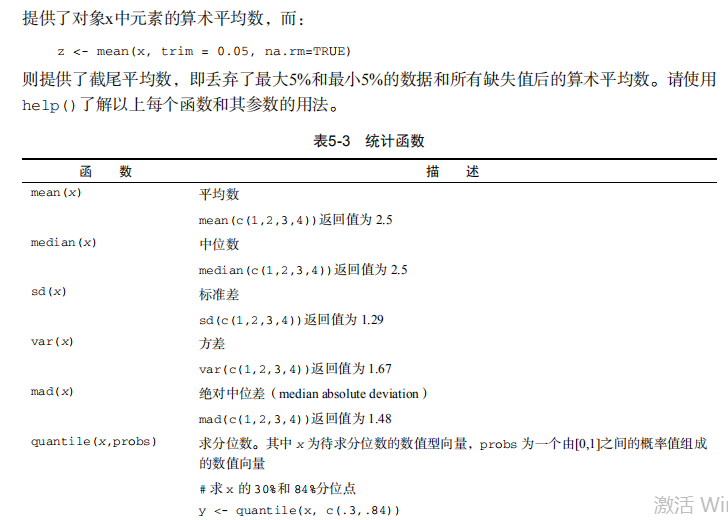
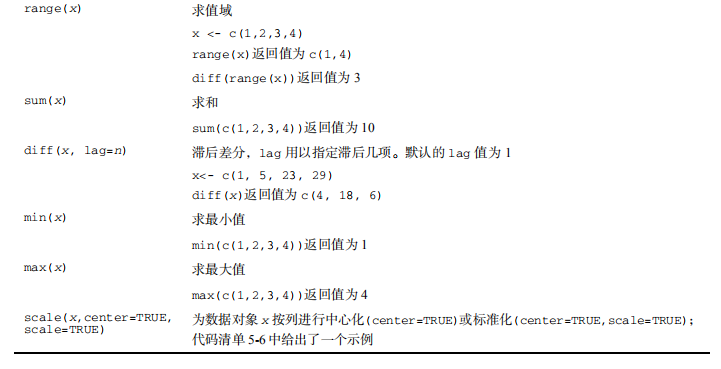
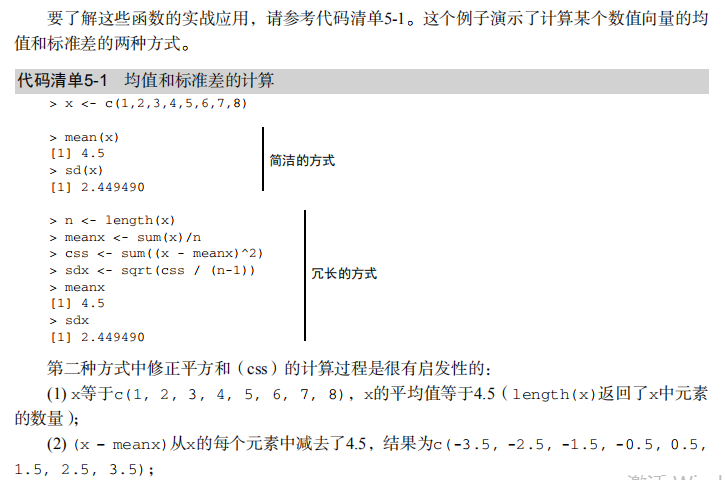
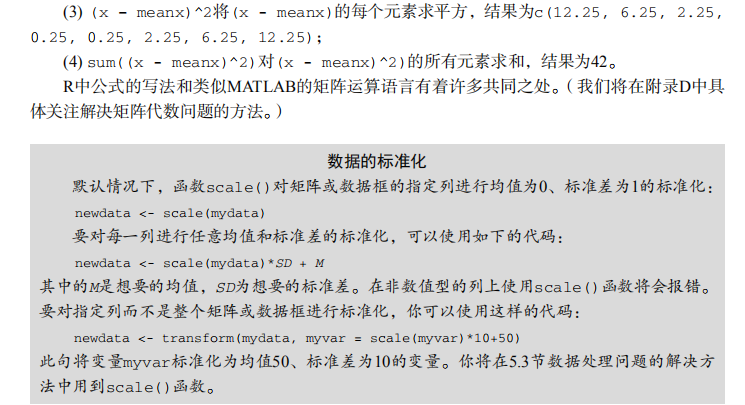
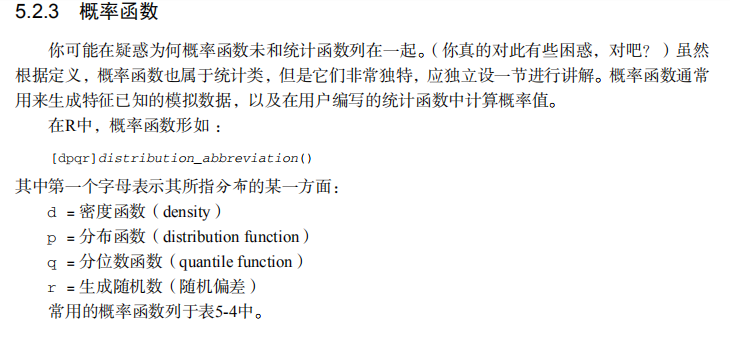

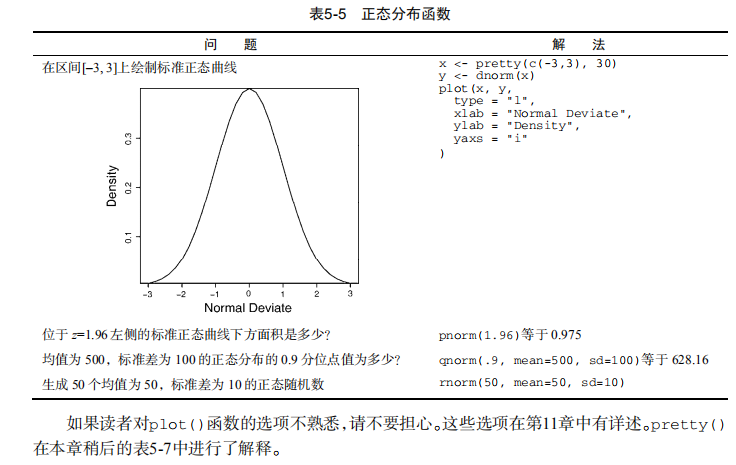


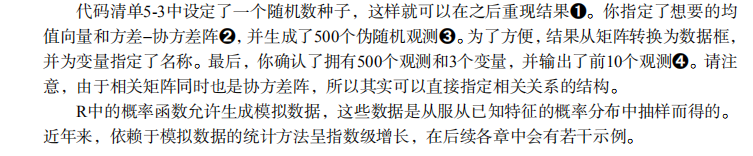
#-----------------------------------#

# R in Action (2nd ed): Chapter 5   #

# Advanced data management          #

# requires that the reshape2        #

# package has been installed        #

# install.packages("reshape2")      #

#-----------------------------------#

# Class Roster Dataset

Student <- c("John Davis","Angela Williams","Bullwinkle Moose",

             "David Jones","Janice Markhammer",

             "Cheryl Cushing","Reuven Ytzrhak",

             "Greg Knox","Joel England","Mary Rayburn")

math <- c(502, 600, 412, 358, 495, 512, 410, 625, 573, 522)

science <- c(95, 99, 80, 82, 75, 85, 80, 95, 89, 86)

english <- c(25, 22, 18, 15, 20, 28, 15, 30, 27, 18)

roster <- data.frame(Student, math, science, english,

                     stringsAsFactors=FALSE)

# Listing 5.1 - Calculating the mean and standard deviation

x <- c(1, 2, 3, 4, 5, 6, 7, 8)

mean(x)

sd(x)

n <- length(x)

meanx <- sum(x)/n

css <- sum((x - meanx)**2)

sdx <- sqrt(css / (n-1))

meanx

sdx

# Listing 5.2 - Generating pseudo-random numbers from

# a uniform distribution

runif(5)

runif(5)

set.seed(1234)

runif(5)

set.seed(1234)

runif(5)

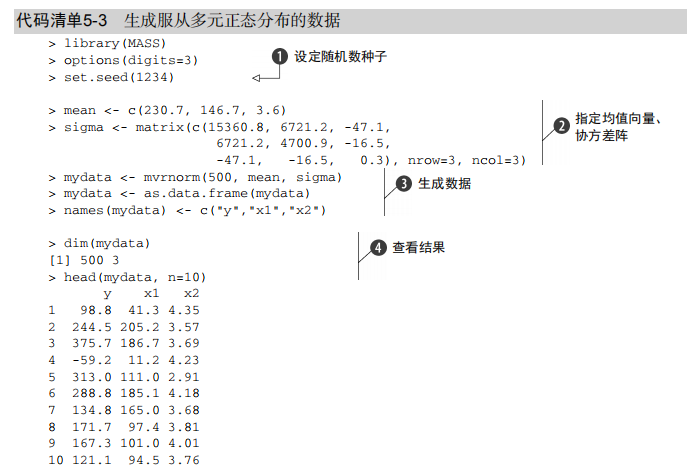
# Listing 5.3 - Generating data from a multivariate

# normal distribution

library(MASS)

mean <- c(230.7, 146.7, 3.6)

sigma <- matrix( c(15360.8, 6721.2, -47.1,

                   6721.2, 4700.9, -16.5,

                   -47.1,  -16.5,   0.3), nrow=3, ncol=3)

set.seed(1234)

mydata <- mvrnorm(500, mean, sigma)

mydata <- as.data.frame(mydata)

names(mydata) <- c("y", "x1", "x2")

dim(mydata)

head(mydata, n=10)

# Listing 5.4 - Applying functions to data objects

a <- 5

sqrt(a)

b <- c(1.243, 5.654, 2.99)

round(b)

c <- matrix(runif(12), nrow=3)

c

log(c)

mean(c)

#  Listing 5.5 - Applying a function to the rows (columns) of a matrix

mydata <- matrix(rnorm(30), nrow=6)

mydata

apply(mydata, 1, mean)

apply(mydata, 2, mean)

apply(mydata, 2, mean, trim=.4)

# Listing 5.6 - A solution to the learning example

options(digits=2)

Student <- c("John Davis", "Angela Williams", "Bullwinkle Moose",

             "David Jones", "Janice Markhammer", "Cheryl Cushing",

             "Reuven Ytzrhak", "Greg Knox", "Joel England",

             "Mary Rayburn")

Math <- c(502, 600, 412, 358, 495, 512, 410, 625, 573, 522)

Science <- c(95, 99, 80, 82, 75, 85, 80, 95, 89, 86)

English <- c(25, 22, 18, 15, 20, 28, 15, 30, 27, 18)

roster <- data.frame(Student, Math, Science, English,

                     stringsAsFactors=FALSE)

z <- scale(roster[,2:4])

score <- apply(z, 1, mean)

roster <- cbind(roster, score)

y <- quantile(score, c(.8,.6,.4,.2))

roster$grade[score >= y[1]] <- "A"

roster$grade[score < y[1] & score >= y[2]] <- "B"

roster$grade[score < y[2] & score >= y[3]] <- "C"

roster$grade[score < y[3] & score >= y[4]] <- "D"

roster$grade[score < y[4]] <- "F"

name <- strsplit((roster$Student), " ")

Lastname <- sapply(name, "[", 2)

Firstname <- sapply(name, "[", 1)

roster <- cbind(Firstname,Lastname, roster[,-1])

roster <- roster[order(Lastname,Firstname),]

roster

# Listing 5.4 - A switch example

feelings <- c("sad", "afraid")

for (i in feelings)

  print(

    switch(i,

           happy  = "I am glad you are happy",

           afraid = "There is nothing to fear",

           sad    = "Cheer up",

           angry  = "Calm down now"

    )

  )

# Listing 5.5 - mystats(): a user-written function for

# summary statistics

mystats <- function(x, parametric=TRUE, print=FALSE) {

  if (parametric) {

    center <- mean(x); spread <- sd(x)

  } else {

    center <- median(x); spread <- mad(x)

  }

  if (print & parametric) {

    cat("Mean=", center, "\n", "SD=", spread, "\n")

  } else if (print & !parametric) {

    cat("Median=", center, "\n", "MAD=", spread, "\n")

  }

  result <- list(center=center, spread=spread)

  return(result)

}

# trying it out

set.seed(1234)

x <- rnorm(500)

y <- mystats(x)

y <- mystats(x, parametric=FALSE, print=TRUE)

# mydate: a user-written function using switch

mydate <- function(type="long") {

  switch(type,

         long =  format(Sys.time(), "%A %B %d %Y"),

         short = format(Sys.time(), "%m-%d-%y"),

         cat(type, "is not a recognized type\n"))

}

mydate("long")

mydate("short")

mydate()

mydate("medium")

# Listing 5.9 - Transposing a dataset

cars <- mtcars[1:5, 1:4]

cars

t(cars)

# Listing 5.10 - Aggregating data

options(digits=3)

attach(mtcars)

aggdata <-aggregate(mtcars, by=list(cyl,gear),

                    FUN=mean, na.rm=TRUE)

aggdata

# Using the reshape2 package

library(reshape2)

# input data

mydata <- read.table(header=TRUE, sep=" ", text="

ID Time X1 X2

1 1 5 6

1 2 3 5

2 1 6 1

2 2 2 4

")

# melt data

md <- melt(mydata, id=c("ID", "Time"))

# reshaping with aggregation

dcast(md, ID~variable, mean)

dcast(md, Time~variable, mean)

dcast(md, ID~Time, mean)

# reshaping without aggregation

dcast(md, ID+Time~variable)

dcast(md, ID+variable~Time)

dcast(md, ID~variable+Time)
吴裕雄--天生自然 R语言开发学习:高级数据管理的更多相关文章
- 吴裕雄--天生自然 R语言开发学习:R语言的安装与配置
下载R语言和开发工具RStudio安装包 先安装R
- 吴裕雄--天生自然 R语言开发学习:数据集和数据结构
数据集的概念 数据集通常是由数据构成的一个矩形数组,行表示观测,列表示变量.表2-1提供了一个假想的病例数据集. 不同的行业对于数据集的行和列叫法不同.统计学家称它们为观测(observation)和 ...
- 吴裕雄--天生自然 R语言开发学习:导入数据
2.3.6 导入 SPSS 数据 IBM SPSS数据集可以通过foreign包中的函数read.spss()导入到R中,也可以使用Hmisc 包中的spss.get()函数.函数spss.get() ...
- 吴裕雄--天生自然 R语言开发学习:使用键盘、带分隔符的文本文件输入数据
R可从键盘.文本文件.Microsoft Excel和Access.流行的统计软件.特殊格 式的文件.多种关系型数据库管理系统.专业数据库.网站和在线服务中导入数据. 使用键盘了.有两种常见的方式:用 ...
- 吴裕雄--天生自然 R语言开发学习:R语言的简单介绍和使用
假设我们正在研究生理发育问 题,并收集了10名婴儿在出生后一年内的月龄和体重数据(见表1-).我们感兴趣的是体重的分 布及体重和月龄的关系. 可以使用函数c()以向量的形式输入月龄和体重数据,此函 数 ...
- 吴裕雄--天生自然 R语言开发学习:基础知识
1.基础数据结构 1.1 向量 # 创建向量a a <- c(1,2,3) print(a) 1.2 矩阵 #创建矩阵 mymat <- matrix(c(1:10), nrow=2, n ...
- 吴裕雄--天生自然 R语言开发学习:图形初阶(续二)
# ----------------------------------------------------# # R in Action (2nd ed): Chapter 3 # # Gettin ...
- 吴裕雄--天生自然 R语言开发学习:图形初阶(续一)
# ----------------------------------------------------# # R in Action (2nd ed): Chapter 3 # # Gettin ...
- 吴裕雄--天生自然 R语言开发学习:图形初阶
# ----------------------------------------------------# # R in Action (2nd ed): Chapter 3 # # Gettin ...
- 吴裕雄--天生自然 R语言开发学习:基本图形(续二)
#---------------------------------------------------------------# # R in Action (2nd ed): Chapter 6 ...
随机推荐
- LeetCode——48. 旋转图像
给定一个 n × n 的二维矩阵表示一个图像. 将图像顺时针旋转 90 度. 说明: 你必须在原地旋转图像,这意味着你需要直接修改输入的二维矩阵.请不要使用另一个矩阵来旋转图像. 示例 1: 给定 m ...
- WebAPI异常捕捉处理,结合log4net日志(webapi框架)
一:异常捕捉处理 首先,在我们需要区分controller的类型.是全部基层controller,还是Apicontroller.(当然一般API框架,用的都是Apicontroller).两者异常处 ...
- 吴裕雄--天生自然MySQL学习笔记:MySQL 管理
启动及关闭 MySQL 服务器 Windows 系统下 在 Windows 系统下,打开命令窗口(cmd),进入 MySQL 安装目录的 bin 目录. 启动: cd c:/mysql/bin mys ...
- Web 全栈大会:万维网之父的数据主权革命
大家好,今天我和大家分享一下由万维网之父发起的一场数据主权革命.什么叫数据主权?很容易理解,现在我们的数据是把持在巨头手里的,你的微信通讯录和聊天记录都无法导出,不管是从人权角度还是从法理角度,这些数 ...
- 给c盘瘦身
火狐浏览器缓存 C:\Users\lenovo\AppData\Local\Mozilla\Firefox\Profiles\5nk022sw.default\cache2\entries C:\U ...
- reactor-core
<dependency> <groupId>io.projectreactor</groupId> <artifactId>reactor-core&l ...
- TPO6-1Powering the Industrial Revolution
The source had long been known but not exploited. Early in the eighteenth century, a pump had come i ...
- 再来看看Java的新特性——其他新特性
关于剩余Java8新特性知识点总结,包含:默认方法.Optional.CompletableFuture.时间相关. 默认方法 默认方法皆在帮助Java新功能可以兼容低版本JDK已开发的程序. 比如说 ...
- AtCoder Beginner Contest 126
因为本人rating太低,这场比赛还要记rating就来划水了,果然垫底了. 6题都很水,于是头一次在网赛中AK,不过由于网卡+手速太慢还是成功垫底. ABE 签到.不贴代码了,因为A考察字符串读入和 ...
- android打飞机游戏、MVP句子迷App、悬浮窗、RxJava+Retrofit、加载动画、定制计划App等源码
Android精选源码 微信打飞机 android进度设置加载效果源码 Android新手引导库EasyGuide MVP-好看又好用的句子迷客户端 XFloatView 一个简易的悬浮窗实现方案 a ...