
SpringMvc返回JSON的工作原理。
一:导入jar包。然后在springmvc.xml中配置上这么一句话
 <!-- 能支持springmvc更高级的一些功能,JSR303校验,快捷的ajax,处理JSON数据。映射动态请求 -->

     <mvc:annotation-driven/>
<mvc:annotation-driven /> 会自动注册DefaultAnnotationHandlerMapping与AnnotationMethodHandlerAdapter 两个bean,是spring MVC为@Controllers分发请求所必须的。
并提供了:数据绑定支持,@NumberFormatannotation支持,@DateTimeFormat支持,@Valid支持,读写XML的支持(JAXB),读写JSON的支持(Jackson)。
二:在方法中前面加上这么一个注解:
@ResponseBody
return返回的就是一个JSON的对象。而不是去跳转到页面上。
原理:使用HtppMessageConverter这个类。
      这个类负责将请求信息转换成一个对象。将对象输出为响应信息。
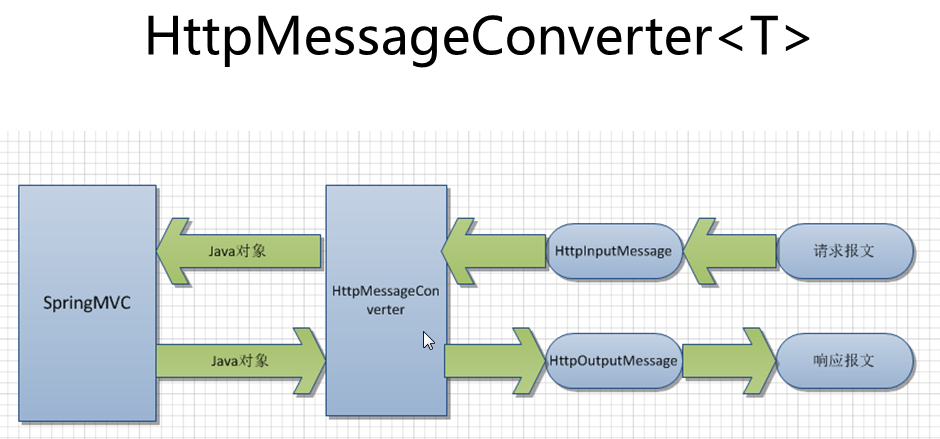
简介:
@RequestBody
作用:
i) 该注解用于读取Request请求的body部分数据,使用系统默认配置的HttpMessageConverter进行解析,然后把相应的数据绑定到要返回的对象上;
ii) 再把HttpMessageConverter返回的对象数据绑定到 controller中方法的参数上。
使用时机:
A) GET、POST方式提时, 根据request header Content-Type的值来判断:
- application/x-www-form-urlencoded, 可选(即非必须,因为这种情况的数据@RequestParam, @ModelAttribute也可以处理,当然@RequestBody也能处理);
- multipart/form-data, 不能处理(即使用@RequestBody不能处理这种格式的数据);
- 其他格式, 必须(其他格式包括application/json, application/xml等。这些格式的数据,必须使用@RequestBody来处理);
B) PUT方式提交时, 根据request header Content-Type的值来判断:
- application/x-www-form-urlencoded, 必须;
- multipart/form-data, 不能处理;
- 其他格式, 必须;
说明:request的body部分的数据编码格式由header部分的Content-Type指定;
@ResponseBody
作用:
该注解用于将Controller的方法返回的对象,通过适当的HttpMessageConverter转换为指定格式后,写入到Response对象的body数据区。
使用时机:
返回的数据不是html标签的页面,而是其他某种格式的数据时(如json、xml等)使用;
 <span style="font-family:Microsoft YaHei;">/**

  * Strategy interface that specifies a converter that can convert from and to HTTP requests and responses.

  *

  * @author Arjen Poutsma

  * @author Juergen Hoeller

  * @since 3.0

  */

 public interface HttpMessageConverter<T> {

     /**

      * Indicates whether the given class can be read by this converter.

      * @param clazz the class to test for readability

      * @param mediaType the media type to read, can be {@code null} if not specified.

      * Typically the value of a {@code Content-Type} header.

      * @return {@code true} if readable; {@code false} otherwise

      */

     boolean canRead(Class<?> clazz, MediaType mediaType);

     /**

      * Indicates whether the given class can be written by this converter.

      * @param clazz the class to test for writability

      * @param mediaType the media type to write, can be {@code null} if not specified.

      * Typically the value of an {@code Accept} header.

      * @return {@code true} if writable; {@code false} otherwise

      */

     boolean canWrite(Class<?> clazz, MediaType mediaType);

     /**

      * Return the list of {@link MediaType} objects supported by this converter.

      * @return the list of supported media types

      */

     List<MediaType> getSupportedMediaTypes();

     /**

      * Read an object of the given type form the given input message, and returns it.

      * @param clazz the type of object to return. This type must have previously been passed to the

      * {@link #canRead canRead} method of this interface, which must have returned {@code true}.

      * @param inputMessage the HTTP input message to read from

      * @return the converted object

      * @throws IOException in case of I/O errors

      * @throws HttpMessageNotReadableException in case of conversion errors

      */

     T read(Class<? extends T> clazz, HttpInputMessage inputMessage)

             throws IOException, HttpMessageNotReadableException;

     /**

      * Write an given object to the given output message.

      * @param t the object to write to the output message. The type of this object must have previously been

      * passed to the {@link #canWrite canWrite} method of this interface, which must have returned {@code true}.

      * @param contentType the content type to use when writing. May be {@code null} to indicate that the

      * default content type of the converter must be used. If not {@code null}, this media type must have

      * previously been passed to the {@link #canWrite canWrite} method of this interface, which must have

      * returned {@code true}.

      * @param outputMessage the message to write to

      * @throws IOException in case of I/O errors

      * @throws HttpMessageNotWritableException in case of conversion errors

      */

     void write(T t, MediaType contentType, HttpOutputMessage outputMessage)

             throws IOException, HttpMessageNotWritableException;

 }

 </span>
该接口定义了四个方法,分别是读取数据时的 canRead(), read() 和 写入数据时的canWrite(), write()方法。
在使用 <mvc:annotation-driven />标签配置时,默认配置了RequestMappingHandlerAdapter(注意是RequestMappingHandlerAdapter不是AnnotationMethodHandlerAdapter,详情查看Spring 3.1 document “16.14 Configuring Spring MVC”章节),并为他配置了一下默认的HttpMessageConverter:
ByteArrayHttpMessageConverter converts byte arrays.

    StringHttpMessageConverter converts strings.

    ResourceHttpMessageConverter converts to/from org.springframework.core.io.Resource for all media types.

    SourceHttpMessageConverter converts to/from a javax.xml.transform.Source.

    FormHttpMessageConverter converts form data to/from a MultiValueMap<String, String>.

    Jaxb2RootElementHttpMessageConverter converts Java objects to/from XML — added if JAXB2 is present on the classpath.

    MappingJacksonHttpMessageConverter converts to/from JSON — added if Jackson is present on the classpath.

    AtomFeedHttpMessageConverter converts Atom feeds — added if Rome is present on the classpath.

    RssChannelHttpMessageConverter converts RSS feeds — added if Rome is present on the classpath.
ByteArrayHttpMessageConverter: 负责读取二进制格式的数据和写出二进制格式的数据;
StringHttpMessageConverter: 负责读取字符串格式的数据和写出二进制格式的数据;
ResourceHttpMessageConverter:负责读取资源文件和写出资源文件数据;
FormHttpMessageConverter: 负责读取form提交的数据(能读取的数据格式为 application/x-www-form-urlencoded,不能读取multipart/form-data格式数据);负责写入application/x-www-from-urlencoded和multipart/form-data格式的数据;
MappingJacksonHttpMessageConverter: 负责读取和写入json格式的数据;
SouceHttpMessageConverter: 负责读取和写入 xml 中javax.xml.transform.Source定义的数据;
Jaxb2RootElementHttpMessageConverter: 负责读取和写入xml 标签格式的数据;
AtomFeedHttpMessageConverter: 负责读取和写入Atom格式的数据;
RssChannelHttpMessageConverter: 负责读取和写入RSS格式的数据;
当使用@RequestBody和@ResponseBody注解时,RequestMappingHandlerAdapter就使用它们来进行读取或者写入相应格式的数据。
HttpMessageConverter匹配过程:
@RequestBody注解时: 根据Request对象header部分的Content-Type类型,逐一匹配合适的HttpMessageConverter来读取数据;
spring 3.1源代码如下:
 private Object readWithMessageConverters(MethodParameter methodParam, HttpInputMessage inputMessage, Class paramType)

             throws Exception {

         MediaType contentType = inputMessage.getHeaders().getContentType();

         if (contentType == null) {

             StringBuilder builder = new StringBuilder(ClassUtils.getShortName(methodParam.getParameterType()));

             String paramName = methodParam.getParameterName();

             if (paramName != null) {

                 builder.append(' ');

                 builder.append(paramName);

             }

             throw new HttpMediaTypeNotSupportedException(

                     "Cannot extract parameter (" + builder.toString() + "): no Content-Type found");

         }

         List<MediaType> allSupportedMediaTypes = new ArrayList<MediaType>();

         if (this.messageConverters != null) {

             for (HttpMessageConverter<?> messageConverter : this.messageConverters) {

                 allSupportedMediaTypes.addAll(messageConverter.getSupportedMediaTypes());

                 if (messageConverter.canRead(paramType, contentType)) {

                     if (logger.isDebugEnabled()) {

                         logger.debug("Reading [" + paramType.getName() + "] as \"" + contentType

                                 +"\" using [" + messageConverter + "]");

                     }

                     return messageConverter.read(paramType, inputMessage);

                 }

             }

         }

         throw new HttpMediaTypeNotSupportedException(contentType, allSupportedMediaTypes);

     }
@ResponseBody注解时: 根据Request对象header部分的Accept属性(逗号分隔),逐一按accept中的类型,去遍历找到能处理的HttpMessageConverter;
源代码如下:
private void writeWithMessageConverters(Object returnValue,

                HttpInputMessage inputMessage, HttpOutputMessage outputMessage)

                throws IOException, HttpMediaTypeNotAcceptableException {

            List<MediaType> acceptedMediaTypes = inputMessage.getHeaders().getAccept();

            if (acceptedMediaTypes.isEmpty()) {

                acceptedMediaTypes = Collections.singletonList(MediaType.ALL);

            }

            MediaType.sortByQualityValue(acceptedMediaTypes);

            Class<?> returnValueType = returnValue.getClass();

            List<MediaType> allSupportedMediaTypes = new ArrayList<MediaType>();

            if (getMessageConverters() != null) {

                for (MediaType acceptedMediaType : acceptedMediaTypes) {

                    for (HttpMessageConverter messageConverter : getMessageConverters()) {

                        if (messageConverter.canWrite(returnValueType, acceptedMediaType)) {

                            messageConverter.write(returnValue, acceptedMediaType, outputMessage);

                            if (logger.isDebugEnabled()) {

                                MediaType contentType = outputMessage.getHeaders().getContentType();

                                if (contentType == null) {

                                    contentType = acceptedMediaType;

                                }

                                logger.debug("Written [" + returnValue + "] as \"" + contentType +

                                        "\" using [" + messageConverter + "]");

                            }

                            this.responseArgumentUsed = true;

                            return;

                        }

                    }

                }

                for (HttpMessageConverter messageConverter : messageConverters) {

                    allSupportedMediaTypes.addAll(messageConverter.getSupportedMediaTypes());

                }

            }

            throw new HttpMediaTypeNotAcceptableException(allSupportedMediaTypes);

        }
SpringMvc返回JSON的工作原理。的更多相关文章
- 【Spring学习笔记-MVC-3.1】SpringMVC返回Json数据-方式1-扩展
<Spring学习笔记-MVC>系列文章,讲解返回json数据的文章共有3篇,分别为: [Spring学习笔记-MVC-3]SpringMVC返回Json数据-方式1:http://www ...
- 【Spring学习笔记-MVC-4】SpringMVC返回Json数据-方式2
<Spring学习笔记-MVC>系列文章,讲解返回json数据的文章共有3篇,分别为: [Spring学习笔记-MVC-3]SpringMVC返回Json数据-方式1:http://www ...
- 【Spring学习笔记-MVC-3】SpringMVC返回Json数据-方式1
<Spring学习笔记-MVC>系列文章,讲解返回json数据的文章共有3篇,分别为: [Spring学习笔记-MVC-3]SpringMVC返回Json数据-方式1:http://www ...
- SpringMVC返回Json,自定义Json中Date类型格式
http://www.cnblogs.com/jsczljh/p/3654636.html —————————————————————————————————————————————————————— ...
- 配置SpringMVC返回JSON遇到的坑
坑一:官方网站下载地址不明朗,最后找了几个下载地址:http://wiki.fasterxml.com/JacksonDownload Jackson2.5下载地址:jackson2.5.0.jar ...
- SpringMVC返回JSON数据时日期格式化问题
https://dannywei.iteye.com/blog/2022929 SpringMVC返回JSON数据时日期格式化问题 博客分类: Spring 在运用SpringMVC框架开发时,可 ...
- 深入了解Struts2返回JSON数据的原理
首先来看一下JSON官方对于"JSON"的解释: JSON(JavaScript Object Notation) 是一种轻量级的数据交换格式.易于人阅读和编写.同时也易于机器解析 ...
- 020 SpringMVC返回Json
一:处理Json 1.添加jar包 添加json需要的包 2.后端返回json对用的对象或者集合 使用ResponseBody标签 package com.spring.it.json; import ...
- spring入门(七)【springMVC返回json串】
现在多数的应用为了提高交互性多使用异步刷新,即在不刷新整个页面的情况下,只刷新局部,局部刷新用得最多就是ajax,ajax和后台进行交互的数据格式使用的最多的是JSON,这里简单描述,在springm ...
随机推荐
- IHttpHandler
https://docs.microsoft.com/en-us/dotnet/api/system.web.ihttphandler?view=netframework-4.8 Defines th ...
- 表单修饰符 number、trim、lazy
number修饰符 <input type="number" v-model.number="age"> 结论:age 类型则为number,非字符 ...
- day18—Flex弹性布局详解(二)
转行学开发,代码100天——2018-04-03 2.6 align-content属性 align-content 属性定义了在交叉轴方向对齐方式和额外空间分配,类似于justify-content ...
- Linux_自制系统服务启动脚本
目录 目录 前言 Case语句 Apache 启动脚本 Postfix service 启停脚本 前言 在Linux的某些系统服务中,需要自己定制启动服务的脚本.通常会使用Cash语句来实现. Cas ...
- jmeter之集合点的使用
通过jmeter并不能1秒立即达到某一并发,这时候,可以通过集合点来实现,达到某一并发时,然后再一起执行某一动作,仅作用于第一次动作的时候 目录 1.集合点元件 2.简单的概念介绍 1.集合点元件 集 ...
- 爬虫中GET方法应用基本模型
根据get方法,更改界面url从而获取信息 GET请求URL附带查询参数 POST请求保存在form表单中 分析百度贴吧url特点: 分析url https://tieba.baidu.com/f是贴 ...
- PAT甲级【2019年9月考题】——A1164 DijkstraSequence【30】
7-4 Dijkstra Sequence (30 分) Dijkstra's algorithm is one of the very famous greedy algorithms. It is ...
- selenium向IE的输入框中输入字符时特别慢
selenium向IE的输入框中输入字符时特别慢,需要去selenium官网下载32位的iedriver,替换掉64位的,即可解决.
- tornado后台小框架
import tornado.ioloop import tornado.web """使用get方法提交过来数据就是用get方法,使用post执行post方法这个框架的 ...
- WEB应用安全解决方案测试验证
WEB应用安全解决方案测试报告 --- By jiang.jx at 2017-08-11 WEB应用安全解决方案.docx 链接:https://share.weiyun.com/068b05467 ...